What's a good bootable CF card?

ScarsUnseen

Weaksauce
Joined
Jul 9, 2007
Messages
121
Hi people,

My sister bought a new laptop and decided to keep the hdd from her old laptop to use externally. Thus, she gave to me her old Dell Inspiron 600m without a hdd.

I'd like to replace the hdd for this. It doesn't have to have a HUGE amount of space, but I definitely prefer speed. It's going to be used mostly for school, so boot time and program-loading times are important for me. I'm considering getting a CF-IDE Adapter (http://www.addonics.com/products/flash_memory_reader/ad44midecf.asp) and booting Ubuntu off of a CF card.

What would be a good CF card to use? I think 16gb would probably be best for me in the long run. What would be a proper speed to look for in CF cards? From what I've read, 40x is probably too slow and running an OS.

Also, what would be an advantage of using an Ultra DMA CF card. I don't quite understand since it's solid-state. I'm kind of new to this area honestly.

Let me know what you guys think. :D

Thanks,
Scars
 
Come to think of it, I think 8gb would be fine. I have a 4gb thumb drive for extra storage anyway if necessary. Any thoughts on this subject yet?
 
Prices in the UK are almost the same for a decent 4GB CF card and a 40GB 2.5inch HD. The HD will be a lot faster and can hold 10x the storage. For me i wouldnt even consider the CF card.
 
So you're saying that a 2.5" IDE hdd would be faster than a SSD? Can you please explain?
 
The speeds on CF and other flash memory devices is no where near the speeds of MTRON drives etc.

At the ultra high end of the CF market, the 4GB cards can do approx 30MB/s read and write, but these cards cost approx 140$ each. (Sandisk Extreme IV). For much much cheaper you could pick up a small 20/40GB 2.5" HD for a lot less which will out perform in in almost all cases (except latency).

If you were just thinking of getting a cheap CF card, dont even bother, there speeds can range between 5-15MB/s, which will give a horribly slow experience.
 
Here's a website that gives performance ratings of the various cards... they are testing them with cameras, so the numbers will be a lot lower than what you'd get using it as a hard drive, but it does a good job of comparing relative performance. It's also a little out of date.

http://www.robgalbraith.com/bins/multi_page.asp?cid=6007-7699

Provided you get a reasonably fast one, like a sandisk extreme III, I'd actually go with the flash drive, unless you need storage space, especially if this isn't a long-term solution. They're more durable, less energy hungry, and work well for other things later one. And yes, unless you get a pretty fast one, there will be a noticeable difference between it and a regular hard drive.
 
I have a 2GB (!) Extreme III card I'm booting from. It's quite fast; most of the time the box is CPU bottlenecked. I get ~15 MB/s reads and writes, and about 800 random accesses per second. I'm using a debian-live image, so it's used for reads only, which means durability is not an issue. Boot times take a while (squashfs is pretty slow to mount, especially on this slow box) but once it's up I can suspend-to-ram very quickly, so I just use that.

Addonics makes a dual-card CF adapter; I'd get that so there's room for expansion if you want another card later - put your home directory or whatnot on it.
 
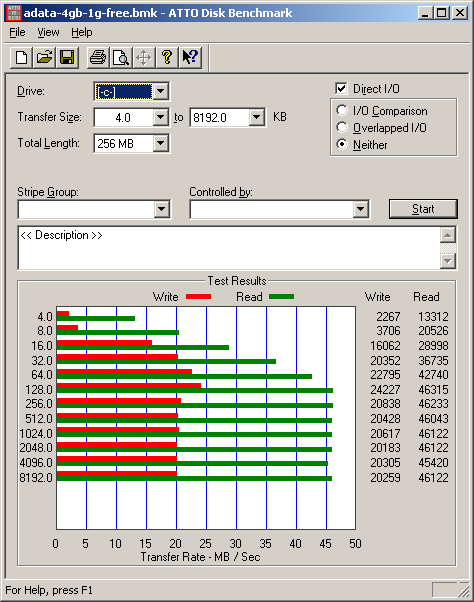
A-DATA makes some relatively inexpensive UDMA-capable CF cards. Here are some benches from a "266x" 4 GB CF in a DMA-capable dual CF to IDE adapter I picked up on eBay for ~$10. IIRC it's running UDMA mode 4.

UDMA allows faster transfer rates and much lower CPU utilization.

It feels pretty zippy in use. I also tried this with a UDMA-capable microdrive which does around 7 MB/s read/write with ~21ms access time (IIRC), and the difference is not subtle.

atto-cf-adata-4g.png


hdtune-cf-adata-4g-64k.png


I presume the dip above is from an OS access during the test. I haven't re-tested this yet. The card is being used for the OS, swap, temp, etc..
 
Back
Top