
What would you upgrade on this rig?

thearrow

n00b
Joined
Jun 21, 2009
Messages
8
Built a midrange PC two years ago from parts ordered on Newegg.

It's still an acceptable performer, but I feel like it's time to upgrade.
Problem is, there's so much better stuff out on the market now, for so much cheaper, I don't know where to start!
I'd like to stay with the core 2 duo lineup, I think there's still acceptable performance upgrades to be found there without upgrading everything to a core i7 platform.

Major Components:

CASE:
11-144-151-12.jpg

APEVIA X-CRUISER-BK Black Steel ATX Mid Tower
(Modded with 120mm intake fan to blow over hard drives, 80mm intake fan on side window where the grill is to blow on GPU)
Yes, I know, the blue LEDs are a little gaudy, but I wasn't thinking about that two years ago. At least the new airflow should be decent.

RAM:
20-220-144-10.jpg

Patriot Extreme Performance 2GB (2 x 1GB) 240-Pin DDR2 SDRAM DDR2 800
(I run a stripped down 32-bit version of XP Pro SP3, but wouldn't mind upgrading to a 64-bit OS if it would mean a great gain in performance)

MOBO:
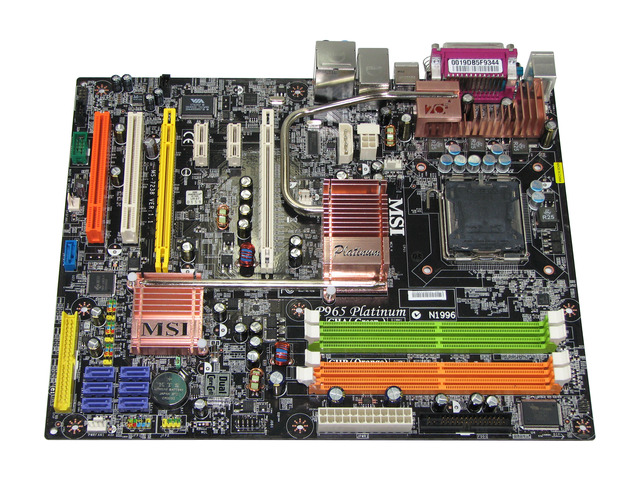
13-130-055-12.jpg

MSI P965 Platinum LGA 775 Intel P965 Express ATX Intel Motherboard
Board's fine........nothing special here, it works. Only thing I can think of is that the PCI-E slot is only PCI-E x16, not PCI-E 2.0 x16 .........

CPU:
19-115-003-01.jpg

Intel Core 2 Duo E6600 Conroe 2.4GHz 4M shared L2 Cache LGA 775 65W
Good old C2D. Would there be great performance benefits from moving up to a newer C2D manufactured using the 45nm process with SSE4 capabilities and higher clock speeds?

GPU:
14-130-071-03.jpg

EVGA 640-P2-N821-AR GeForce 8800 GTS 640MB 320-bit GDDR3 PCI Express x16
Trusty old 8800GTS 640. Showing a bit of its age, but I only game a little on a 19" LCD, so it's been fine. Only issue here is that the old G80 core isn't supported for newer CUDA features like ambient occlusion in games and hardware H264 decoding.


Other stuff:
19" Viewsonic LCD, which is fine for now since I'll be going off to college and want to keep desk space available.
500W power supply, might need to be upgraded if I go for a new GPU?
Zalman 9500 CPU cooler, I can move this to a new C2D if I upgrade...
Plenty of hard drive space for me, 2x250GB and 1x640GB.


So what do you guys think? For an all-around experimental workstation, some modern gaming, some music production, some video production, some 3D and 2D graphics work what upgrade would give me the most bang for the buck?

<$300 would be preferable.

Thanks!
:)
 
Looking on the msi website its unclear whether it supports 45nm cpu's, maybe with a bios update it will.

In that case i would be looking at a E8400 3ghz cpu, you can clock these up to 4ghz quite easily. If you're doing alot of video editing etc then you could go for a quad.

Gpu, well if you're running a 19" max res 1280 x 1024?(unless its widescreen) then i would go for a 4850 or 4770.

As for memory either:
1) Get another 2gb patriot mem
2) Sell your patriot and get 2 x 2gb DDR2 1066, corsair,g-skill,ocz, etc. (if you do decide to go 64bit then you can always chuck in another 4gb)

These upgrades should net you a decent increase in performance, more so if you overclock the cpu.

Now have you included selling the cpu/vid car/mem in the $300, if not then you could do something alot better.

This is all assuming the board supports 45nm, if not prob go for a q6600 g0 and overclock it.

Edit: A few questions.
Are you thinking of upgrading monitor anytime soon?
How long does this build have to last ?
Are you going to overclock?

Could have a big impact on what you choose.
 
Last edited:
Thanks for the reply!

About the ram, I'll probably find another 2x1GB cheap somewhere, not try to bother selling my old stuff.

What do you think about a card like this?
Nvidia 9800 GTX+
Same price, seems to perform slightly better than the 4850 in most benchmarks and run cooler.

Since either of these cards is PCIe 2.0 x16, will they work with my mobo at PCIe x16? What's the 2.0 difference? Just more bandwidth? Would it be worth upgrading my mobo to a board with a PCIe 2.0 x16 and guaranteed compatibility for a new 45nm CPU?

Edit:
My current monitor is fine for at least another 4 years, it's got great picture quality (for me) and is quick enough (2ms, supposedly) for my games.
A 19" screen isn't much these days, but I wouldn't want to fill up desk space in my dorm with a huge monitor.
(Also, a buddy of mine is bringing a 40+" 1080p HDTV, and we were thinking of hooking up my PC to it. Would I want to upgrade the GPU to pump out games at such huge resolutions?)

I'd like to have the machine last until....i run it into the ground. :D
As I'm going to be a college student in the fall, the money doesn't exactly flow freely........

I'd be willing to overclock, a little. My e6600 is running at 2.55 Ghz now, which isn't much of an OC, but i wouldn't want to jeopardize the longevity of my hardware. (No AC in the dorm, so it'll be a little warm, i would guess.....)
 
Last edited:
Thanks for the reply!

About the ram, I'll probably find another 2x1GB cheap somewhere, not try to bother selling my old stuff.

What do you think about a card like this?
Nvidia 9800 GTX+
Same price, seems to perform slightly better than the 4850 in most benchmarks and run cooler.

Since either of these cards is PCIe 2.0 x16, will they work with my mobo at PCIe x16? What's the 2.0 difference? Just more bandwidth? Would it be worth upgrading my mobo to a board with a PCIe 2.0 x16 and guaranteed compatibility for a new 45nm CPU?

Yeah a 9800gtx+ would be just as good if you want to go nvidia - good prices as well.

Heres a link explaining about pcie 2.0:
http://www.pcisig.com/news_room/faqs/pcie2.0_faq/

Basically more bandwidth and more power if you wanted to simplify it.

If you can, go for a newer motherboard with 45nm support.
 
As my last board was the same msi p965, it doesn't support 45nm core 2 and board is horrible overclocker.

Your best bet is to go with Phenom 2 build but if you are dead set on Core 2 cpu, E6300 and Gigabyte P43 board is your best sub $200 upgrade.
 
Thanks for the link, e-geek.
Any suggestions on a new board?

Something like this?

If i did end up upgrading my board and gpu, what should I do with my old stuff, just throw it up on ebay, try and get a few bucks for it?

And yea, shiro, the p965 is a terrible overclocker, but I only heard that after I bought it........ :(
So you're recommending this?
 
Edit: Alot of E6600's can hit 3ghz+ on stock volts or a little bump. You should run realtemp or core temp and see how hot your cpu is getting under load.

If you're wanting to power a 1080p res with eye candy turned up then you would want something a bit more powerful like a 4870 1gb/gtx260, but then your budget goes up as well.

It might be worth selling your 8800gts, even if you got a better cpu hsf and overclocked your E6600 to around 3.4ghz that would be enough for most of the latest games, then you would have more $ for a better video card.
 
Thanks for the link.

Any suggestions on a new board?

Something like this?

If i did end up upgrading my board and gpu, what should I do with my old stuff, just throw it up on ebay, try and get a few bucks for it?

P45 chipsets are solid, my old e8500 on a p35 could hit 4.4ghz.

Yeah i would chuck it all on ebay to recover some of the cost.

A 4870 1gb/gtx 260 + an E6600 at 3.4ghz would be enough for most games at 1080p, add another 2gb ram and i think you would be happy with that.

Edit: A E6300 is a downgrade from his cpu. I would definately go for the p45 chipset over that p43 any day.
 
I see. I'm running the Realtemp Rivatuner plugin, and my e6600 idles at ~45C and loads at ~60C. The ambient temp in the room is ~24C/75F, which may be a little warm because I like to have my windows open :cool:

Also, the p965 is a terrible overclocking board, like shiro mentioned, so i might have trouble pushing it to 3ghz........


Edit:
So yeah, looks like this for $105 after MIR would be a good start. (How are the folks at Gigabyte with rebates, decent, hopefully?)
Then, I can more easily overclock my current CPU and I'll have compatibility with newer 45nm C2Ds in the future, and I'll have a PCIe 2.0 x16 slot for a GPU upgrade.

+ 2GB more RAM.

Thanks, guys!


EDIT 2:
Bought more patriot (2 x 1GB) RAM - $20
 
Last edited:
P45 chipsets are solid, my old e8500 on a p35 could hit 4.4ghz.

Yeah i would chuck it all on ebay to recover some of the cost.

A 4870 1gb/gtx 260 + an E6600 at 3.4ghz would be enough for most games at 1080p, add another 2gb ram and i think you would be happy with that.

Edit: A E6300 is a downgrade from his cpu. I would definately go for the p45 chipset over that p43 any day.

His current cpu is E6600 is Conroe clock at 2.4 Ghz, how is E6300 wolfdale clock at 2.8 GHz is downgrade?

P45 isn't give night and day overclock over P43 board. Is it worth the extra $40???
 
Hmmmm.......I'm gonna do more research before i make a mobo decision.

I'll probably stick with my same CPU though, just OC it a bit more.


Edit:
Gigabyte P43 at newegg is $87 shipped.

Buy.com has it for $76 shipped. What's their RMA process like? Any experiences with them?
 
Last edited:
The Core 2 series have reached EOL status this year. Unless you get the processor used, what you see is what you get -- and it may not be around later.

A good CPU cooler may also help. One good, relatively inexpensive choice is the Xigmatek Dark Knight S1283V.

That said, go with the EP43-UD3L unless you must have RAID support. As an FYI, having all four RAM slots filled may add additional stress to the board's MCH, which may limit how far you can push your overclock.
 
How about the Zalman 9500 that I already have installed?

Hmmm.... too late now on the RAM. I'm not counting on a big OC anyways since the p965 isn't the greatest board to begin with..........
 
His current cpu is E6600 is Conroe clock at 2.4 Ghz, how is E6300 wolfdale clock at 2.8 GHz is downgrade?

P45 isn't give night and day overclock over P43 board. Is it worth the extra $40???

This is a Pentium. Doesn't that mean that is just two procs jammed on the same die? Therefore the Core 2 would be infinitely faster in real world performance.
 
I said similar and the extra cache is prob worth 200mhz anyway, there just wouldnt really be any noticeable difference.
 
e6600 conroe
Stock - 2.4 GHz ( 266*9) - air
Good overclock - 3 GHz (333*9) - air
Great overlcock - 3.6 GHz (400*9) - might need water with plus .05v to .1v to be stable
Hardocp overclock - 3.8 GHz (420*9) - will need water with 1.5v to be stable

e6300 wolfdale
Stock - 2.8 GHz ( 266*10.5) - air
Good overclock - 3.5 GHz (333*10.5) - air
Great overlcock - 4.2 GHz (400*10.5) - air with 1.3v to be stable
Hardocp overclock - 4.8 GHz (450*10.5) - will need water with 1.5v to be stable
Truely Hardcore overlclock - 5.2 GHz (520*10) water with 1.7v

Games care about about the clock speed and not the amount of L2 cache. Conroe (65nm) is generation behind wolfdale (45nm).
 
........relax, guys. I didn't mean to start an e6600 vs e6300 debate........

I've read some places that games 'care about' both clock speed and L2 cache........

Thank you for the enthusiasm, but I probably won't end up touching my CPU anyways, unless I upgrade my mobo.
 
Under $300 upgrade, I would do this with your setup

VIDEO CARD/RAM - EVGA Geforce GTS 250 512MB + OCZ 4GB DDR2 1066 both for $166 ($10 MIR on video card)
http://www.newegg.com/Product/ComboDealDetails.aspx?ItemList=Combo.197596

MOBO - GIGABYTE GA-EP43-UD3L for $80
http://www.newegg.com/Product/Product.aspx?Item=N82E16813128380

HEATSINK - Xigmatek Dark Knight-S1283V for $40
http://www.newegg.com/Product/Product.aspx?Item=N82E16835233029

Total: $286 before shipping

With this:

1. Video card upgraded which is faster and has CUDA/PHYS support
2. 4GB of RAM over your 2GB ram. Although you have XP 32bit o/s, you still get more RAM anyway. Plus, you can upgrade to Win 7 64bit later
3. Mobo upgraded with ability to O/C your cpu and support of 45nm wofdale dual core and 45nm yorkfield quad core cpus.
4. Xigmatek DarkNight heatsink is better in cooling vs the Zalman 9500 that you have. Therefore, you should have a good O/C on your E6600 cpu dual core. Also, you can reuse this HSF on a future Core i7 build.
 
Back
Top