Weird problem with X-25m G2 drive

bunta

Limp Gawd
Joined
Jan 11, 2003
Messages
203
Does anyone know why my 4k read/write is so much slower than other people with the same drive??? Its a brand new X-25m G2 drive.

I even used HHDErase 3.3 to secure erase the drive when i first benchmarked it. I thought something was wrong with it. But even after a second secure erase, i am still having the same problem.

Its seems as tho my 4K scores are cut in half than what they are supposed to be. AHCI is enabled.


Untitled.png
 
Last edited:
What OS are you using?

If you are on WinXP it sounds like partition misalignment forcing the SSD to do double work for every read/write.
 
If you are on WinXP it sounds like partition misalignment forcing the SSD to do double work for every read/write.

This is also my guess, but I think everyone is using the wrong terminology and we should be saying sector or page alignment. (The confusion is, that if you set the partition to start at a certain boundary, then the sectors (pages?) will end up lining up with the underlying physical pages.)
 
How much free space do you have?

Check the resource monitor during a run. Does the queue length go significantly above 1? (Ideally, it should stay at 1 because crystaldiskmark does not do concurrent IO).

If so, the drive is trying to defragment itself. I have the same problem. This won't get completely fixed until TRIM is released.
 
How much free space do you have?

Check the resource monitor during a run. Does the queue length go significantly above 1? (Ideally, it should stay at 1 because crystaldiskmark does not do concurrent IO).

If so, the drive is trying to defragment itself. I have the same problem. This won't get completely fixed until TRIM is released.

The drive is brand new with barely anything on it.. Im using 13gb from 80gb(x-25m g2). I dont think TRIM has anything to do with what im experiencing because if that is the case, everyone else would be having the same 4K read write problem.
 
Check the resource monitor during a run. Does the queue length go significantly above 1? (Ideally, it should stay at 1 because crystaldiskmark does not do concurrent IO).

What do you mean "resource monitor?" Is that part of CrystalDiskMark?
 
To get the resource monitor

CTRL+SHIFT+ESC for the task manager
Goto performance
Goto Resource monitor (bottom button)
Goto Disk
Look at the disk queue length for your drive when you run CDM.
 
To get the resource monitor

CTRL+SHIFT+ESC for the task manager
Goto performance
Goto Resource monitor (bottom button)
Goto Disk
Look at the disk queue length for your drive when you run CDM.

Thank you. RESMON.EXE will also launch this. (For those of us running Sysinternal replacement for Task Manger.)
 
How much free space do you have?

Check the resource monitor during a run. Does the queue length go significantly above 1? (Ideally, it should stay at 1 because crystaldiskmark does not do concurrent IO).

If so, the drive is trying to defragment itself. I have the same problem. This won't get completely fixed until TRIM is released.

OK, i just did a benchmark and watched the Resource Monitor. Queue Lenght was at 5 for most of the time. :(

WTH?? So like i said, how come we are experiencing this problem?? There are a bunch of X-25m G2 benchmarks out there that are normal... what gives?
 
In some other thread, the G2 sacrifices fragmentation for higher write IOPS, with the knowledge that a TRIM fix will come soon. Yes, you could say that Intel launched a pre-release product here, but video card companies do that a lot also.
 
In some other thread, the G2 sacrifices fragmentation for higher write IOPS, with the knowledge that a TRIM fix will come soon. Yes, you could say that Intel launched a pre-release product here, but video card companies do that a lot also.

So why am i the only one with this problem? If you are having the same problem, then why isnt anybody, else having this exact same problem??

This is getting frustrating:mad:
 
Im using Win7 RC 7260. Now im wondering if a Windows 7 RTM version with TRIM would help with this problem.. :eek:
 
The RC has TRIM enabled. The Gen2 x-25m's firmware doesn't support TRIM at present.
 
1. A lot of people report results for drives they just got, not after doing 80GB of writes to it. I got super fast random writes when the drive was new, also.
2. The drive is still plenty fast, just not THAT fast according to benchmark programs. So no one is complaining.
3. A lot of people don't even know what to look for.
 
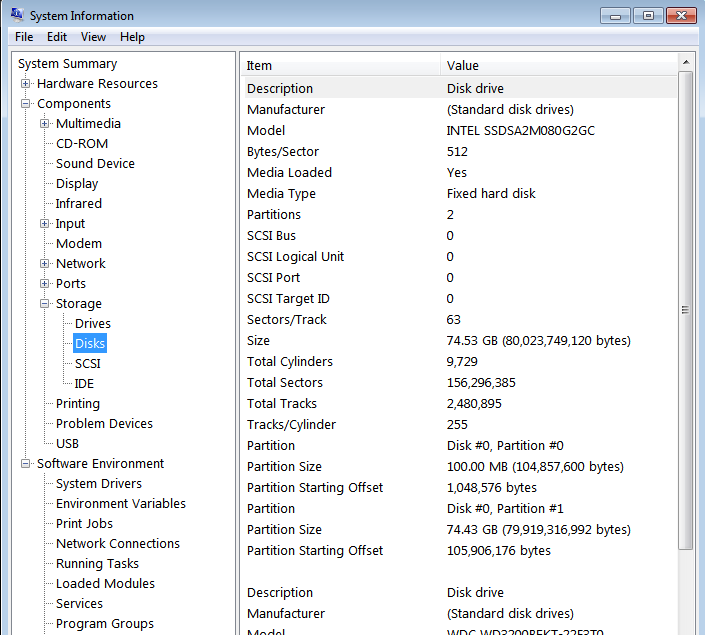
does mine look right. I used HDDERASE 3.3 to erase the drive, and then loaded Windows 7 on it and that was it. I didnt create any partition or anything else..

sysinf.png
 
I am having issues with HDDERASE 3.3
seeing an X25-M Gen 2. 160GB on a SONY Z series notebook.
The drive is perfectlyfine and healthy, the interface is SATA-1
speed, but the reads are like lightening.

The HDDERASE 3.3 boot CD boots, and loads but never
gets to the screen where it sees the X25-M's partitions.

Any other utility or work-around for this known?
 
Bunta, how are you verifying that you are in AHCI mode. I'm not sure you can just switch over to IDE mode if you have installed in AHCI mode, but maybe try the drive in IDE mode. On a related note, maybe Win7 was installed in one mode and now you are operating in a different mode?

Under Device Manger > IDE/ATAPI controllers > ATA Channel X <right click> Advanced Settings, I presume you are in UDMA 5?
 
Bunta, how are you verifying that you are in AHCI mode. I'm not sure you can just switch over to IDE mode if you have installed in AHCI mode, but maybe try the drive in IDE mode. On a related note, maybe Win7 was installed in one mode and now you are operating in a different mode?

Under Device Manger > IDE/ATAPI controllers > ATA Channel X <right click> Advanced Settings, I presume you are in UDMA 5?


Phiz... yes, i know im running AHCI cuz BIOS said so. Intel Storage Matrix Manager says so too.

Im not on my home comp, so i cant verify if im in UDMA 5.

I dont have IDE mode. I have ATA, AHCI and RAID. I installed in AHCI mode, and if i tried to switch to ATA, it wouldnt get past the Window screen. It would just BSOD.

Help with my partition! :(
 
If you allowed Win7 to create your partition, then it is aligned by default.

ATA = IDE

Grab my alignment tool from the link below if you wish to check your numbers.
http://www.ocztechnologyforum.com/forum/showthread.php?t=57599

When you plug numbers into the sheet, I believe Intel drives are 128k (131072 bytes) blocks and 4k (4096 bytes) pages.

Jason

edit: Bunta, just realized you linked your msinfo32 specs in an earlier post. Your alignment is correct.
 
Last edited:
If you allowed Win7 to create your partition, then it is aligned by default.

ATA = IDE

Grab my alignment tool from the link below if you wish to check your numbers.
http://www.ocztechnologyforum.com/forum/showthread.php?t=57599

When you plug numbers into the sheet, I believe Intel drives are 128k (131072 bytes) blocks and 4k (4096 bytes) pages.

Jason

edit: Bunta, just realized you linked your msinfo32 specs in an earlier post. Your alignment is correct.

I have no idea why i said, i didnt have IDE when i knew ATA was the same thing:rolleyes:. This problem has really been screwing with my brains for the past 24 hrs.

But i do thank you for that tool. It'll prolly come in handy some day.

So whats left???::confused:

Intel is offering to send me a new drive but i seriously doubt that the drive i have is defective.
 
Back
Top