• Some users have recently had their accounts hijacked. It seems that the now defunct EVGA forums might have compromised your password there and seems many are using the same PW here. We would suggest you UPDATE YOUR PASSWORD and TURN ON 2FA for your account here to further secure it. None of the compromised accounts had 2FA turned on.
    Once you have enabled 2FA, your account will be updated soon to show a badge, letting other members know that you use 2FA to protect your account. This should be beneficial for everyone that uses FSFT.

Weird Event, Kingston SSD

  • Thread starter Deleted member 88301
  • Start date
D

Deleted member 88301

Guest
Hi, all.

I have a Kingston SV300S37A120G SSD drive that is randomly giving me this error:


"Device security state has changed to SEC1 (security disabled, not locked, not frozen..."

The Event Code in Kingston SSD Toolbox is 360


Everything seems to be running just fine. What's the deal here?


The SSD is drive C:, Windows boots from it.


System info:
Dell Precision T3500
Xeon X5672
eVGA GTX 750Ti SC 2GB
8 GB DDR3 ECC (2X4)
Kingston 120GB SSD
WD 1TB Blue 7200
WD 3TB External 5400
Windows 10 Home, anniversary


If it wasn't for the error popping up randomly I wouldn't have any reason to think anything was wrong.


Thanks!
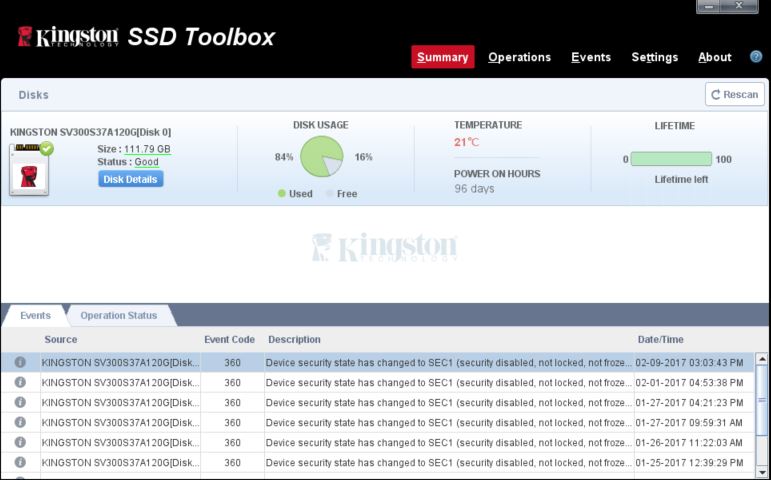
 

Attachments

  • SSDErrorSnip.JPG
    SSDErrorSnip.JPG
    63.5 KB · Views: 105
Have I done something to anger you guys? I get zero replies to my posts, and I don't post that often. If I have done something that has caused me to be ostracized I'd like to know, so I can at least have a chance to defend myself.

I really like the [H], and I have nothing but respect for the people on it.

I'm confused, did I do something wrong? If it's because I'm opinionated, well, that's the way I am. But I have never, and never will, try to discount others opinions.
 
Last edited by a moderator:
I don't think anyone that might know has seen the post just yet. Since there's an event code in Kingston's toolbox, it may be worth giving Kingston's phone support a call and seeing what they know and can do about it.
 
Don't worry about lack of replies. I post some pretty obscure things and sometimes it takes a couple of days before someone sends a reply.

This seems like a pretty obscure thing and like John721 said, it could be just no one that has anything meaningful to say has seen this your post.
 
Less than 24 hours and you expect it to be solved? Or would you rather get a bunch of replies that don't help at all? Contact Kingston.
 
mnewxcv,

I don't "expect" anything. It just seemed odd that I didn't get any help.

I don't like having to go to the manufacturer for help, as that's usually an extremely an hour-long ordeal.
But, yes, I will call Kingston.

Thanks for having my back.

Wyo.
Less than 24 hours and you expect it to be solved? Or would you rather get a bunch of replies that don't help at all? Contact Kingston.
 
mnewxcv,

I don't "expect" anything. It just seemed odd that I didn't get any help.

I don't like having to go to the manufacturer for help, as that's usually an extremely an hour-long ordeal.
But, yes, I will call Kingston.

Thanks for having my back.

Wyo.
let us know if they figure it out.
 
Yep, calling Kingston was useless. 55 minutes on hold before I gave up.

Screw it. I don't understand why I'm getting the "fails." I've searched and searched for any kind of info, to no avail.

Everything is working fine.

Fuck it.


I'll soon be doing a clean install, anyway.
 
A clean install probably won't help. I used to use PATA SSDs to boost older laptops back to "usable" status, and since no real reputable manufacturers ever messed with PATA I ended up using off-brand drives. They worked, don't get me wrong, and they made old single-core laptops run pretty well, but the drives would often end up with ATA security messages like you are describing. Several of the drives locked up permanently with these security issues. Read up on ATA security policies, they are hardwired into the firmware and you likely will not be able to bypass/fix the drives if they decide to crap out down the line.

TL;DR - the drive might be on its way out, beware.

And don't worry about no replies, this isn't a very heavily frequented subforum - plus it's a little cliquey (not saying that's good or bad, just an observation).
 
Back
Top