• Some users have recently had their accounts hijacked. It seems that the now defunct EVGA forums might have compromised your password there and seems many are using the same PW here. We would suggest you UPDATE YOUR PASSWORD and TURN ON 2FA for your account here to further secure it. None of the compromised accounts had 2FA turned on.
    Once you have enabled 2FA, your account will be updated soon to show a badge, letting other members know that you use 2FA to protect your account. This should be beneficial for everyone that uses FSFT.

WD6400AAKS poopin out

Hazaro

Gawd
2FA
Joined
Sep 8, 2007
Messages
629
I knew I should of asked earlier, but now I'm paying the price. The drive is only 5 months old.
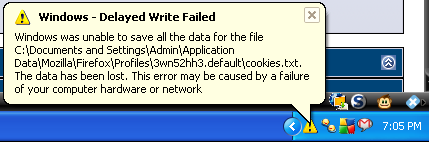
DelayedWriteFailed9-9-08.png


I got 7 of these in 7 minutes, I saved 3 other screens, but they all got corrupted and this is the sole survivor.

Not just Firefox, but writing to .png as well.

Leading up to this my computer would freeze up every few minutes for a few seconds.

Since maybe 3 months ago I started having 90% of the desktop icons go white/blank occasionally.

It's picked up in the last week, the stuttering and etc, but now I'm having write errors. Everything I do on the computer takes a few seconds to go though, even simple things as writing text it will stop for a few seconds.

So I am asking...

1) What diagnosis tools can I run, or attempt to fix this?
2) How would I back-up my data?

I am thinking of buying a new drive because you have to send your old one in for RMA correct?

*I've already been recommended to use WD's Data LifeGuard tool, but should I get the DOS or Windows version?

**RAM was my second guess, but my music was still playing while compy froze up, so it was reading from that fine, plus I ran memtest for 8 hours 2 weeks ago and it was fine.
 
Run the WD Diagnostic Utility off of Windows, which means yes, use the bootable DOS version.

If possible, try to extract as much of your data as possible when you can still access it, depending on what the WD Diagnostic Utility says (which I suspect will report back a failing drive), you may simply just be unlucky with a defective/early dying disk. It happens. :(
 
If you game at all, the bad RAM woulda reared its head then. HD death is more insidious. Count yourself lucky that Windows is screaming bloody murder - and immediately pull off data while you can.
 
I'll scavenge what data I can fit on my 180GB available.

Should I try to transfer my data before running the diagnostic tool? It seems to me that it would put stress on the drive, which would reduce the chance of getting the data off afterward.

I am currently on my laptop and the desktop is off, although I am wondering if turning it off was a good idea or not.
 
Just move the data. You don't need the diagnostic tool to tell you something's wrong.
 
So apparently WD has an Advanced RMA program, pretty nifty.

What program should I use to transfer over the data to the new WD6400AAKS?

I remember reading something about not using the WD utility and maybe Acronis was it?
 
So apparently WD has an Advanced RMA program, pretty nifty.

What program should I use to transfer over the data to the new WD6400AAKS?

I remember reading something about not using the WD utility and maybe Acronis was it?

I would manually back up your important documents and files as soon as possible before doing such a disk intensive task like disk cloning, which would entail a byte-for-byte transfer of one hard disk to another, just to be safe. If it works out with no errors or data corruption, then it'd be safe to say that you got away from data loss this time around. I would recommend you do the Advanced RMA process like you mentioned for the most convenience for you, but until then, I would try to keep the time you use the disk at a minimum until you're ready to back up your entire disk to your RMA disk.

Too bad you got a faulty drive, I would swear by those WD6400AAKSs and its reliability if working properly. Just one of those things, I guess. :(
 
Documents, music, pictures are all going on 4GB sticks

Rest of it hopefully will copy over ok.

I still need a program to copy the image from one to the other.
 
Agreed. Did you try a different SATA cable or different port on the motherboard?
 
I think if he was able to transfer data over to his USB drives (4GB?), then that rules out his mobo (southbridge) as a whole. OTOH, I think testing the specific SATA port is valid, but something to do AFTER (if he can) moves his most critical data off.

E.g. different SATA port. Still fails? Use different cable. Still fails? Rules out both bad cable and bad port (and QED on bad HD).
 
Negative.

My P5B went death with everything working (hmm, that's sounds stupid).

Anyway, it froze, and froze, and froze. And then more often, more often. It took the darned board three months to finally die and to boot in less then 5% of the times I tried.

And now my videocard (7900GTX) is slowly dying. I guess it will only take 20 months or so :rolleyes:. Oh, and in between I had a death RAM module two months after the death motherboard.

And just shipped my DOA WD6400AACS back to WD.
 
I had delayed write failed errors on two of my WD drives. I changed out the cheap sata cables for some good ones and its was fixed. The WD utility showed that all was good.
 
Hmm. I was hoping bad cable nonsense was gone since the switch from PATA to SATA. I remember helping a girl install Windows. Tried 3 times in a row, kept stopping b/c it couldn't load a driver.

First thought it was the CD - got another copy from campus store. Nope.
Memtested the RAM in my comp - nope. Finally, got a dusty, unused PATA cable from my closet. Put it in, and Windows install finally goes through. :(
 
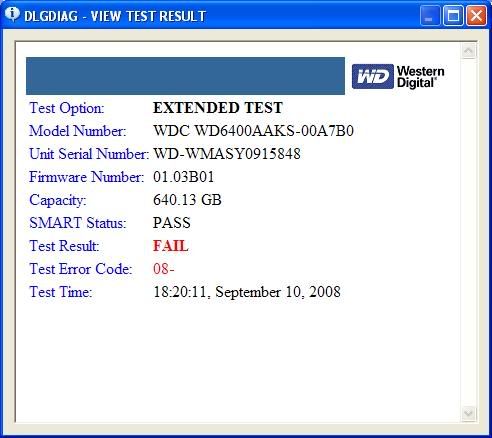
I swapped SATA port and got another cable, ran the diagnostic and came up with this.

Thing is... it doesn't tell me HOW many bad sectors I have...

WDHDDResult.jpg


Replacement is already on it's way, but would it be possible to fix the damaged sectors then copy over an image of the drive?
 
23msn7s.png


That's what started acting up before the pauses, before the error messages.

Anyway, I got my important stuff off and I wanted to try to image it anyway.

So again I'm gonna ask for suggestions to TRY and copy my drive over to a new WD6400AAKS, thanks.
 
Back
Top