• Some users have recently had their accounts hijacked. It seems that the now defunct EVGA forums might have compromised your password there and seems many are using the same PW here. We would suggest you UPDATE YOUR PASSWORD and TURN ON 2FA for your account here to further secure it. None of the compromised accounts had 2FA turned on.
    Once you have enabled 2FA, your account will be updated soon to show a badge, letting other members know that you use 2FA to protect your account. This should be beneficial for everyone that uses FSFT.

Water pump problems

leSLIe

Fully [H]
Joined
Oct 18, 2004
Messages
17,390
I recently noticed that my water pump malfunctions while gaming.

I have an RTX 4090 and dont game very often. But these couple of times i noticed that after 5min of gaming, the pump started to struggle to move the water. Almost to a stand still. The tubing was hot so I decided to turned off the PC, both of the times. After an hour started the PC and the pump was back to normal.

I have a 10-year old VPP655 pump so I thought it was dying and decided to replace it. But first I tested it with a DC power supply, for about an hour, and it run fine with no wierd noises.

I didnt install new hardware. The RTX is using 4 rails of 12V

So now I think it could be the PSU.
I've just cleaned it, it wasnt that dirty, now I have to test it

IMG-20240922-WA0309.jpg


Its the same age as the RTX 4090

20240922_113852.jpg


what do you guys think? PSU or a dying water pump?
 
Do you have your pump setup to run at constant speed or some sort of PWM?

If constant speed, should be easy to measure voltage under load, if the voltage sags and the pump gives up, sounds like a PSU issue (but... Pump working hard could pull more load and cause the voltage sag).
 
Do you have your pump setup to run at constant speed or some sort of PWM?

If constant speed, should be easy to measure voltage under load, if the voltage sags and the pump gives up, sounds like a PSU issue (but... Pump working hard could pull more load and cause the voltage sag).
Constant speed. Its an old VPP655, it doesnt have PWM. It's hooked to the PSU using a molex

IMG-20240922-WA0322.jpg

Good idea, I'm gonna test the voltages and post them
 
Well, after some testing. The waterpump stays at 12,06 to 12,08V.
Still, I will have to do some stress testing to check if the setup is 100% stable.

But, for now no more waterpump problems. Looks like the PSU was dirty and thus it wasn't working 100%... 🤷‍♀️
 
Alright
I put a new pump, then all was going well in 2D environment. Then in gaming the new pump started to throttle down apparently, same as with the old pump. Didnt check the voltages though.
BTw the pump was set to be at 100%.

So the pump is not the problem, then its the PSU? In gaming there was no resets or BDODs. If its the PSU wouldnt the vid card be having problems too?
 
Are you sure the pump is slowing down? It's on a molex and no other PWM capability. So, given constant voltage I have to assume it's running at a constant speed unless something mechanically reduces the pump impeller speed or the power to the pump is reduced. So, logical to assume the PSU.

You say the pump "throttled down apparently"? What specific symptoms are you seeing?

Add a flow indicator/meter to the loop to verify flow rate during operation.

I have a 3090/5950x loop with only 360mm of total radiator capacity. It has a Corsair pump in it and I thought the pump would run stock at ~2500rpm. It doesn't. At the desktop and running basic tasks it's fine. Once I hit it with a 3d or sustained compute load the temps climbed and began throttling down to the gpu's rated base/boost speed. that was my symptom, along with rising temps. Nothing mechanically would change, but the flow was too low to manage the heat buildup. I had to install the corsair garbage software to adjust the pump speed. Couldn't get it to work through the mb. It was running at ~1400 stock and was not changing as the heat increased. I set it higher and watched to make sure it held the setting after rebooting. The heat dissipation is still too low for this amount of hardware running flat out, but, it's enough to keep the system cool enough to run within its specs. And the pump works as expected.
 
Yeah, if voltage was the problem your system would be having problems, if the voltage problem was PSU-side. It's a single rail PSU and all the 12v power comes from a single source.

I think of two things causing this since the behavior is the same with a new pump- something in your loop is expanding and causing constriction as it warms up, or your connector is bad and causing too much resistance as things warm up.
 
I'll add, my 4090's have 1120mm and 720mm of radiator fan area. They do fine.
 
Are you sure the pump is slowing down? It's on a molex and no other PWM capability. So, given constant voltage I have to assume it's running at a constant speed unless something mechanically reduces the pump impeller speed or the power to the pump is reduced. So, logical to assume the PSU.

You say the pump "throttled down apparently"? What specific symptoms are you seeing?

Add a flow indicator/meter to the loop to verify flow rate during operation.

I have a 3090/5950x loop with only 360mm of total radiator capacity. It has a Corsair pump in it and I thought the pump would run stock at ~2500rpm. It doesn't. At the desktop and running basic tasks it's fine. Once I hit it with a 3d or sustained compute load the temps climbed and began throttling down to the gpu's rated base/boost speed. that was my symptom, along with rising temps. Nothing mechanically would change, but the flow was too low to manage the heat buildup. I had to install the corsair garbage software to adjust the pump speed. Couldn't get it to work through the mb. It was running at ~1400 stock and was not changing as the heat increased. I set it higher and watched to make sure it held the setting after rebooting. The heat dissipation is still too low for this amount of hardware running flat out, but, it's enough to keep the system cool enough to run within its specs. And the pump works as expected.
The PWM (type 4 pin fan) connector is hooked to the mobo, the 12V is connected directly to a PSU molex
PWM is disabled in BIOS

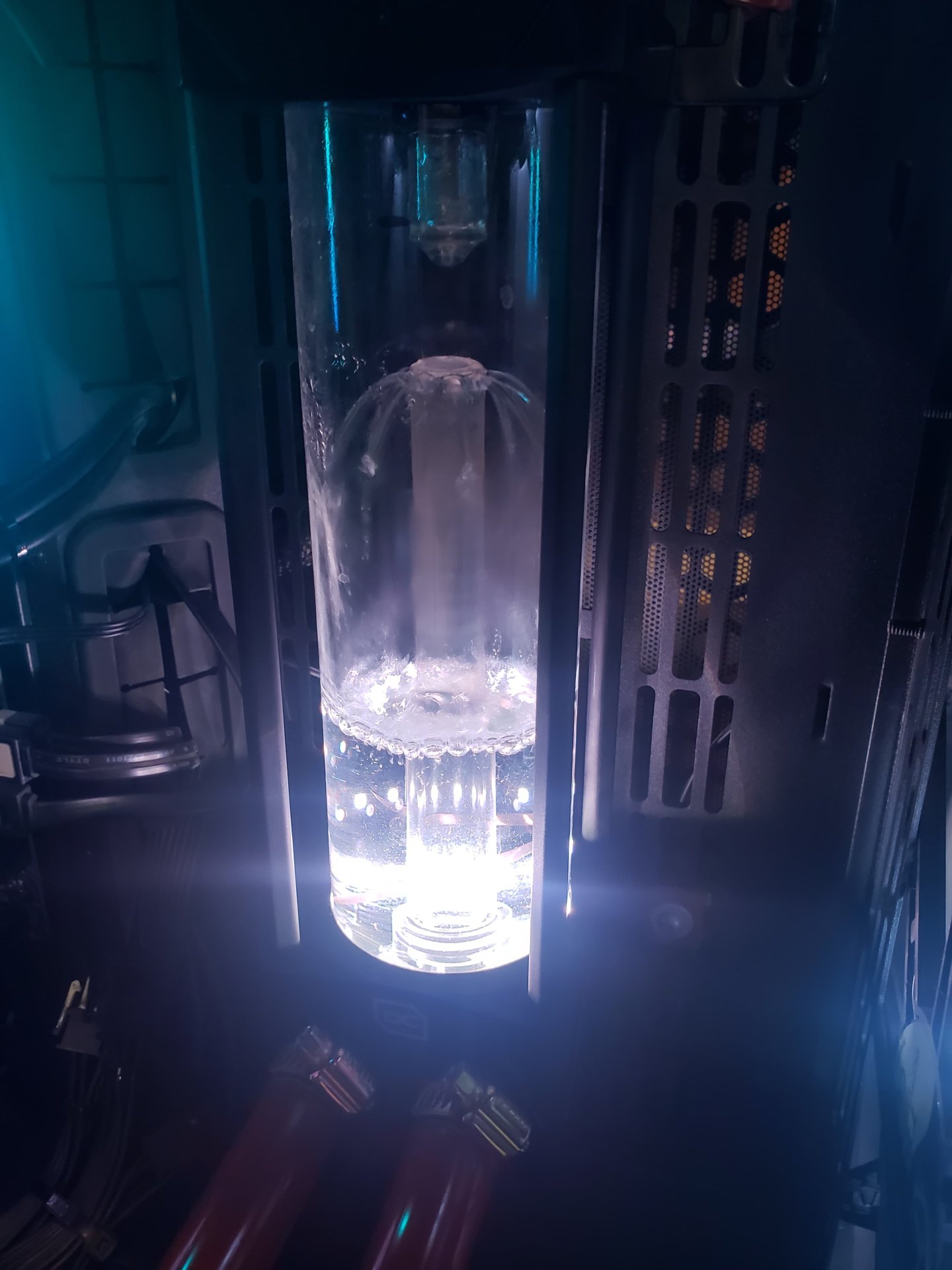
Normal flow in the fountain
1normal.jpeg


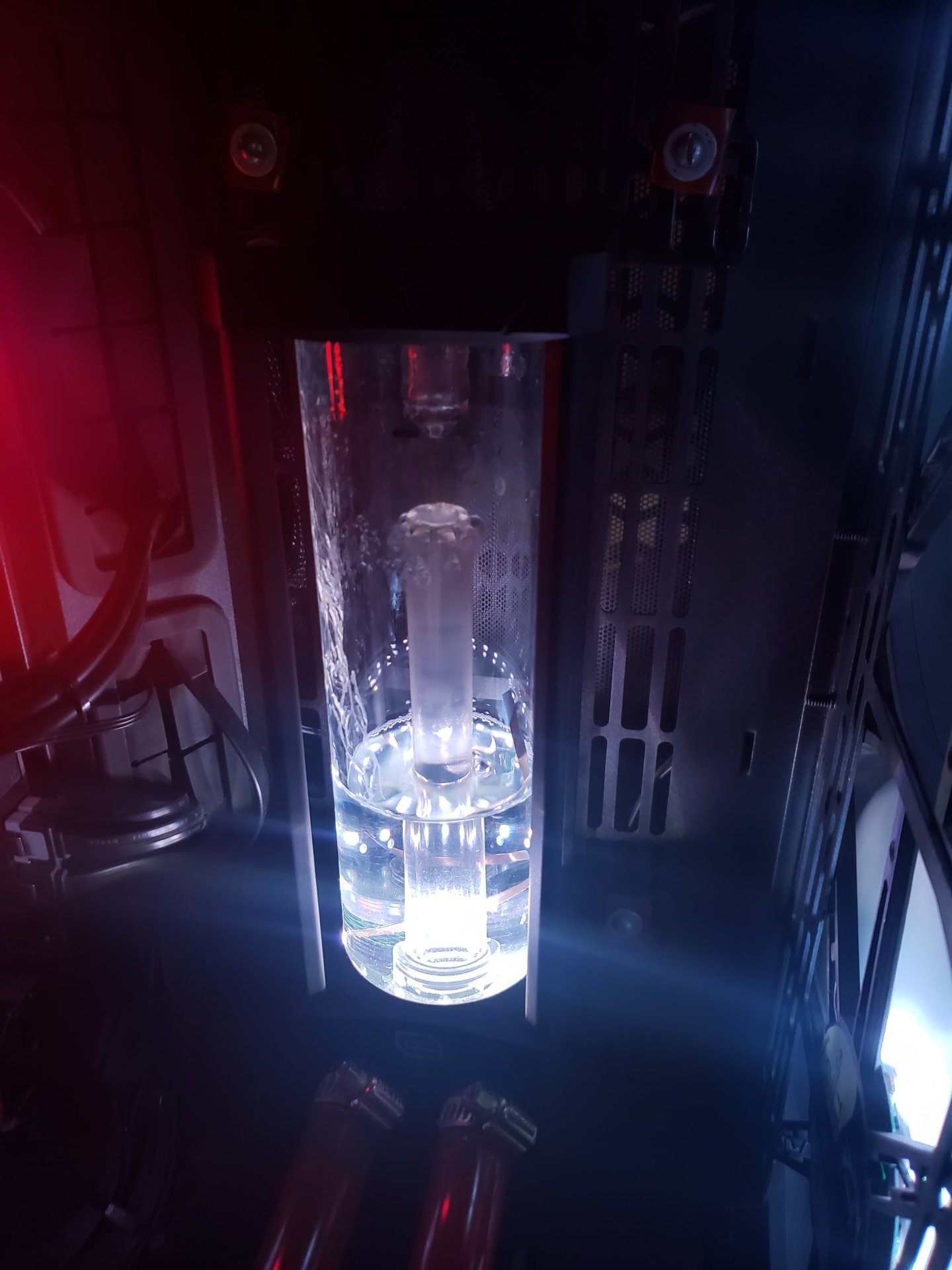
After 10min in gaming, the temperature rises, I get low flow, as you can see below in the "fountain" . (I don't have a flowmeter.)
There is flow, but it's minimal, like 20% or so
2problem.jpeg


Indeed, if it was a PSU problem, I would have vid card problems too, but the system is solid.
I will recreate the problem and this time I'm gonna check voltages and frecuency, to see if the PWM is acting out on its own...

Something mechanical that obstruct the way? It's a remote possibility, but I'm also gonna look into it.
 
If you unplug the PWM, it should function at 100% so you can rule that out.

Unplugging the pump to check voltage at the connector won't help, you'll need to measure voltage at the connector with the pump connected. Maybe use a splitter of some sort so you can measure voltage on the second connector.
 
If you unplug the PWM, it should function at 100% so you can rule that out.

Unplugging the pump to check voltage at the connector won't help, you'll need to measure voltage at the connector with the pump connected. Maybe use a splitter of some sort so you can measure voltage on the second connector.
Gonna try removing the pwm connector
Im gonna use paper clips plugged to the molex to check for voltages. Will update later 😀
 
You mentioned your pump is 10-year old VPP655 pump. From what I recall one of the VPP versions uses a bushing/washer to keep the impeller from bottoming out. Maybe checking that?
 
So are you still using the same 10 year old pump or did you replace it?

I would start with the pump assuming you don't have blockage in the CPU or GPU micro fins but judging by the pics of the water you posted seems like it has the flow then miraculously decreases.

Use a different slot on the PSU with a different molex connection?
 
So are you still using the same 10 year old pump or did you replace it?

I would start with the pump assuming you don't have blockage in the CPU or GPU micro fins but judging by the pics of the water you posted seems like it has the flow then miraculously decreases.

Use a different slot on the PSU with a different molex connection?

I hope he did replace it. A good D5 can be had for a real good price nowadays.

Alright
I put a new pump, then all was going well in 2D environment. Then in gaming the new pump started to throttle down apparently, same as with the old pump. Didnt check the voltages though.
BTw the pump was set to be at 100%.

So the pump is not the problem, then its the PSU? In gaming there was no resets or BDODs. If its the PSU wouldnt the vid card be having problems too?
He got a new pump but it did the same thing.
 
Crap! Looks like the OP has blockage somewhere. Time to take it all apart and flush it all out.
 
  • Like
Reactions: Tsumi
like this
Crap! Looks like the OP has blockage somewhere. Time to take it all apart and flush it all out.
How can we explain the photo of the water bubbling up from the high flow like when you max out a strong pump and you physically see the water gushing around in the reservoir?
 
How can we explain the photo of the water bubbling up from the high flow like when you max out a strong pump and you physically see the water gushing around in the reservoir?
Hmm, yeah I can't explain that. I figure when in doubt, go back to the basics and play the elimination game. It's what I would do.
 
Back
Top