![[H]ard|Forum](/styles/hardforum/xenforo/logo_dark.png)

- Joined
- May 9, 2008
- Messages
- 1,469
A complaint and warning. Been dealing with this since I got a 12700 CPU for my work PC. I would not buy a BIG.little CPU if you use Virtualbox in Windows.
Virtualbox loads E cores up, very little load on P cores, and the computer is terribly slow. I use multiple VMs for testing OS and software updates. Ideally I just start them all up, let them received the updates I've pushed, then test them out afterwards. If I start two VMs with 4 cores assigned to each, only the E cores get loaded. Same if I assign them 6 cores each. Virtualbox being shitty or Windows not scheduling things properly, I chalk it up to bad design.
I don't understand why my whole computer is so slow when I'm at 20-40% CPU use with 8 P cores and hyperthreading sitting nearly idle. Chrome locks up, file explorer hangs, it's almost unusable. 10 GB+ free memory, very little disk use on the OS drive.
Seems to me like some critical Windows processes must be assigned to E cores and never leave even when other cores are unused. It's silly that all this performance is sitting there unused while the VMs can take hours to install an update that should take 5-10 minutes.
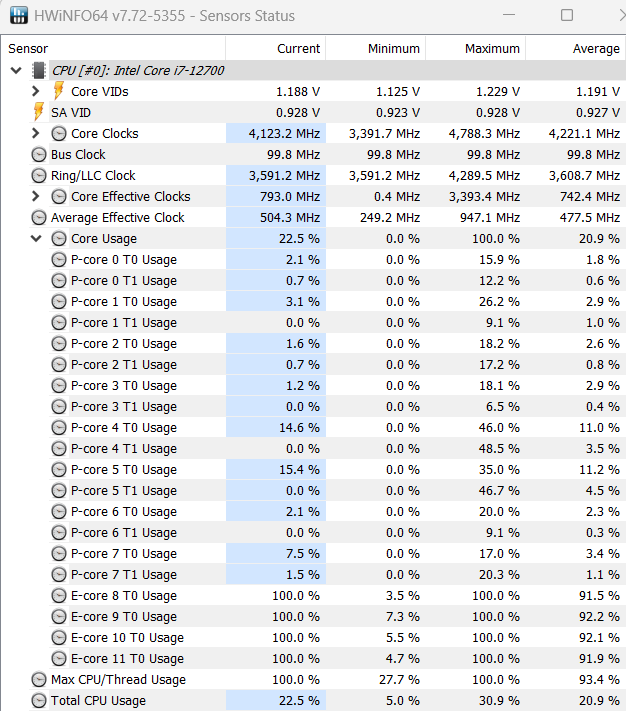
The below screenshot is shown when I have two VMs, 6 cores assigned to each, installing the July cumulative windows updates on each at the same time. Only the 4 e cores get loaded even though 6 cores within each VM show as 100% use. So 12 virtual cores results in 4 E cores overloaded. If I work with one VM at a time there is no issue. Maybe Process Lasso or disabling E cores would help sort this out but I'll probably just replace it.

Virtualbox loads E cores up, very little load on P cores, and the computer is terribly slow. I use multiple VMs for testing OS and software updates. Ideally I just start them all up, let them received the updates I've pushed, then test them out afterwards. If I start two VMs with 4 cores assigned to each, only the E cores get loaded. Same if I assign them 6 cores each. Virtualbox being shitty or Windows not scheduling things properly, I chalk it up to bad design.
I don't understand why my whole computer is so slow when I'm at 20-40% CPU use with 8 P cores and hyperthreading sitting nearly idle. Chrome locks up, file explorer hangs, it's almost unusable. 10 GB+ free memory, very little disk use on the OS drive.
Seems to me like some critical Windows processes must be assigned to E cores and never leave even when other cores are unused. It's silly that all this performance is sitting there unused while the VMs can take hours to install an update that should take 5-10 minutes.
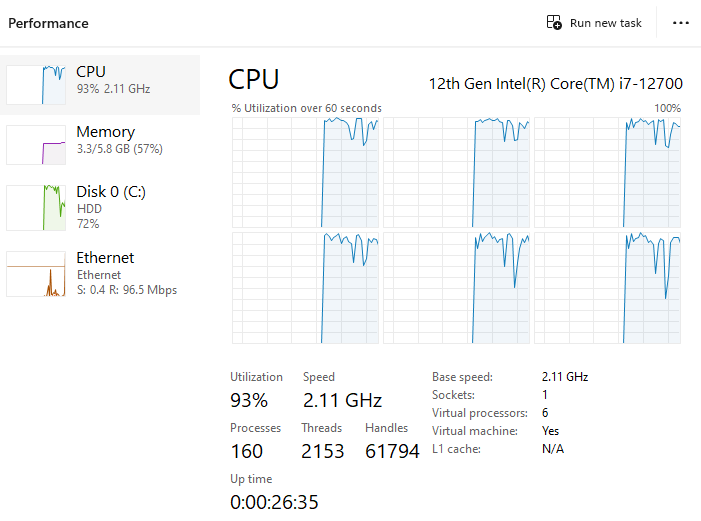
The below screenshot is shown when I have two VMs, 6 cores assigned to each, installing the July cumulative windows updates on each at the same time. Only the 4 e cores get loaded even though 6 cores within each VM show as 100% use. So 12 virtual cores results in 4 E cores overloaded. If I work with one VM at a time there is no issue. Maybe Process Lasso or disabling E cores would help sort this out but I'll probably just replace it.