• Some users have recently had their accounts hijacked. It seems that the now defunct EVGA forums might have compromised your password there and seems many are using the same PW here. We would suggest you UPDATE YOUR PASSWORD and TURN ON 2FA for your account here to further secure it. None of the compromised accounts had 2FA turned on.
    Once you have enabled 2FA, your account will be updated soon to show a badge, letting other members know that you use 2FA to protect your account. This should be beneficial for everyone that uses FSFT.

Video HELP!!!!

Joined
Jul 22, 2008
Messages
29
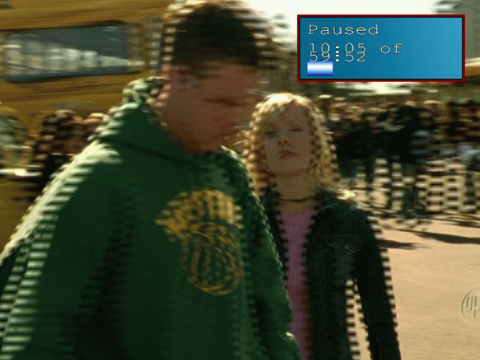
I have a question about watching movies. Every movie I watch is fine but I get these clear lines that come and go at every camera movement and every scene change. I have a Sapphire 100311SR Video Card HD 6970 2GB DDR5 PCI Express Dual DVI/Sin. with an AMD phenom II six core. Could it be the graphics card settings? if so, what are the correct settings?. Thanks.
 
Frame tearing, maybe? See if your video player has a vsync setting (forcing it from the control panel won't work).
 
He's describing combing artifacts, which look similar to this:
8524f1.inline.png


You need to enable deinterlacing in your media player. If your media player doesn't have a deinterlacing option, get rid of it and use something better.
 
Last edited:
Back
Top