![[H]ard|Forum](/styles/hardforum/xenforo/logo_dark.png)
I thought I had done this in the past, but I could be mistaken. I want to be able to use VLANs in the nested environment. On my physical ESXi box, I created a standard vSwitch with several port groups. All of them have promiscuous mode enabled and different VLANs. Both the physical and nested ESXi hosts are running version 5.5. See screen shot below.
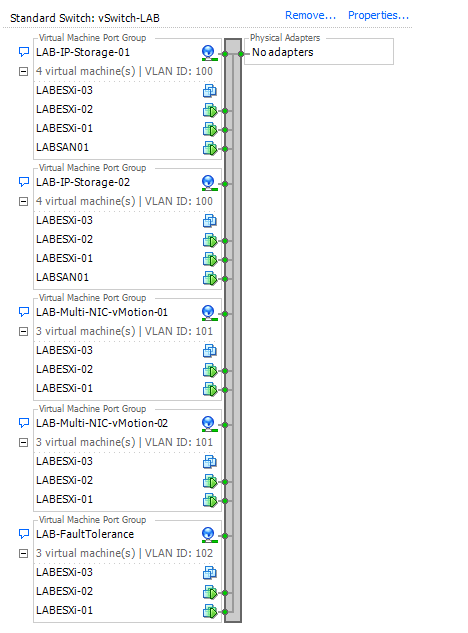
The nested environment is using a separate vCenter with three nested ESXi hosts and I am using several vDS's.

Whether promiscuous mode is enabled or not, none of the networks work if I have a VLAN configured. If I set them all to VLAN - None, then they work fine. Is there a different way to configure it so VLAN's work?
I am also wondering about using VMXNET3 on the nested ESXi hosts. I see only E1000 and E1000E are available, but I was reading virtuallyGhetto's article about VMXNET3 in a nested 5.1 environment. Although the article doesn't mention if the OS is set to "Other 64-bit" or not. Plus some other people said they were getting PSOD's when using VMXNET3. So if anyone know if this works, it would be good to know before changing everything. Mainly I just want to connect to my virtual SAN using 10 Gb. At the moment I am using QuantaStor. If anyone has a different recommendation for a SAN running as a VM for a lab, please let me know. It would need to be free of course.

The nested environment is using a separate vCenter with three nested ESXi hosts and I am using several vDS's.

Whether promiscuous mode is enabled or not, none of the networks work if I have a VLAN configured. If I set them all to VLAN - None, then they work fine. Is there a different way to configure it so VLAN's work?
I am also wondering about using VMXNET3 on the nested ESXi hosts. I see only E1000 and E1000E are available, but I was reading virtuallyGhetto's article about VMXNET3 in a nested 5.1 environment. Although the article doesn't mention if the OS is set to "Other 64-bit" or not. Plus some other people said they were getting PSOD's when using VMXNET3. So if anyone know if this works, it would be good to know before changing everything. Mainly I just want to connect to my virtual SAN using 10 Gb.
At the moment I am using QuantaStor. If anyone has a different recommendation for a SAN running as a VM for a lab, please let me know. It would need to be free of course.