Trying to save a dying hard drive

gx240

n00b
Joined
Jul 21, 2014
Messages
4
I have a Western Digital internal hard drive (WD2002FAEX) on a Windows 8.1 64-bit system that seems to be dying, and I want to see if there's anything I can do to fix it before I just throw it away. It's out of warranty, so I can't return it to the manufacturer.

The problem is that files on the drive randomly become damaged and inaccessible. The files that become corrupted are completely random. I just found a corrupted file that I hadn't read or written from in months, while one I just downloaded from a website yesterday has already become corrupted. This is what it looks like when I try to access one of these corrupted files:

f6AsbZI.png


When I run Western Digital's diagnostic tool it passes both the SMART and extended tests, but it fails a quick test with the following error message:

jpKLcmx.png


I don't really understand how it can pass an extended test but fail a quick one. I've also run chkdsk, but it just says it hasn't detected any problems and doesn't fix anything. Is there anything else I can do before I just throw this drive away? I have backups of everything on the drive already, so data loss isn't a concern.
 
Last edited:
Random intermittent problems are the hardest and most irritating of all with respect to hard drives - I can't even begin to tell you (well, I suppose I'm doing that now, actually) how many drives have crossed my workbenches over the years that would work great one minute, pass all the necessary diagnostics, then 5 minutes later start tossing out error after error so I'd disconnect it, let it cool down, reconnect and retest, all clear. 20 mins later, or some other random amount of time, boom, error after error after error.

There's just no way to know for sure if the drive is functional or not. If it will not pass every test the manufacturer's diagnostic offers without errors then the drive cannot be trusted, that's about as simple and definitive an answer as you're going to get.

Back up the data you can while you can, then it's up to you to use it if you want but I would not consider that drive trustworthy IF if doesn't fully pass all the manufacturer's diagnostic tests then I won't recommend it being used any longer. And when I test a drive I do all of them that the software offers, one right after the other - if I get a failure at any point I'll typically stop, back up what data I can, then tell the client what the situation is and my recommendation always is getting a new drive to replace it and why.

The "read test element" means something going on with the actual read/write heads in my experience aka a physical damage/failure type of situation and not just some software error like a weak sector (a sector where the magnetic fields/flux are not strong enough to maintain whatever charge has been applied to them for data storage purposes).

It failed a part of the manufacturer's diagnostic so that's enough for me to say "Back it up, then chuck it..." and now the rest is up to you. ;)
 
  • Like
Reactions: N4CR
like this
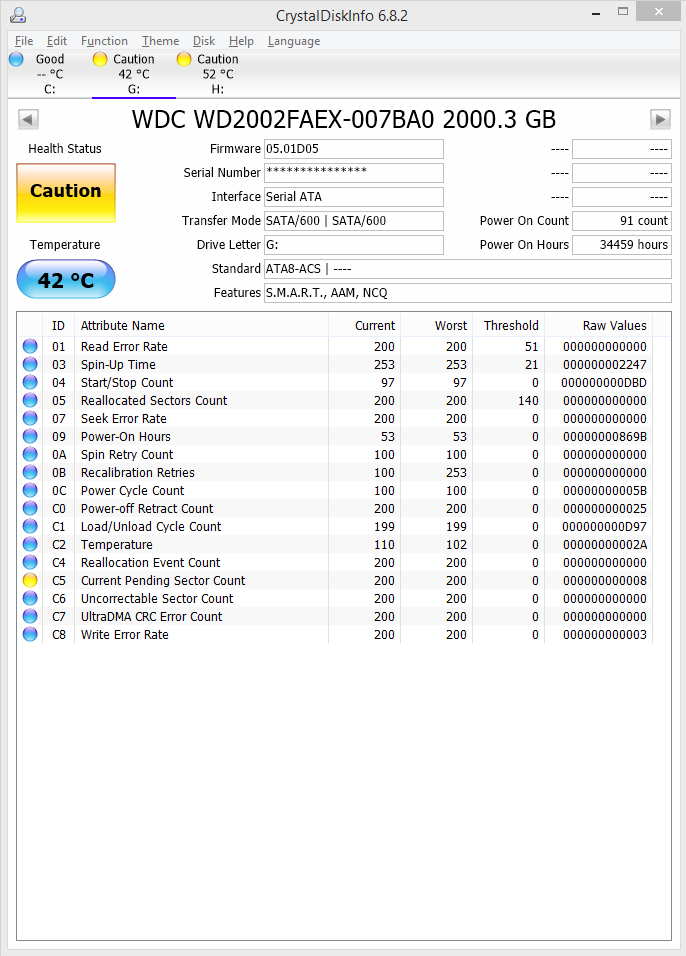
Could you post the SMART data? Like, a screenshot of Crystaldiskinfo? if you have the UDMA CRC parameter going upwards from 0 it might be a wiring problem causing random corruption during IO operations.
 
In Crystaldiskinfo "Current Pending Sector Count" shows up as a problem. Doesn't that just mean there are bad sectors that need to be remapped? Isn't chkdsk supposed to do that?

LOlzfyt.png
 

Attachments

  • upload_2016-6-8_4-49-3.png
    upload_2016-6-8_4-49-3.png
    103.7 KB · Views: 24
In Crystaldiskinfo "Current Pending Sector Count" shows up as a problem. Doesn't that just mean there are bad sectors that need to be remapped? Isn't chkdsk supposed to do that?

Not necessarily "bad" bad. Sometimes it's a 'soft' error due to a power issue during writing or another manageable condition.
As for the chkdsk question, it's not uniform across all drives. With WD, in my experience, you need to run a utility that will do a read/write of that area and afterwards cycle the power.
If during said read/write the drive doesn't error-out, it will simply decrease the "pending" counter back to 0 and might operate normally for years to come.
I use badblocks (non-destructive read-write test) from a Linux live CD or MHDD from Hiren's.
If the media is indeed damaged, nothing will change and it will still show Pending sectors or may perform a Reallocation. Thing is, with WDs you sometimes have to turn the power off and back on for the SMART data to become updated.
 
Back
Top