• Some users have recently had their accounts hijacked. It seems that the now defunct EVGA forums might have compromised your password there and seems many are using the same PW here. We would suggest you UPDATE YOUR PASSWORD and TURN ON 2FA for your account here to further secure it. None of the compromised accounts had 2FA turned on.
    Once you have enabled 2FA, your account will be updated soon to show a badge, letting other members know that you use 2FA to protect your account. This should be beneficial for everyone that uses FSFT.

The Truth about RAID

One last thing to say then..

If we are talking real world performance, of RAID 0 for enthusiast use.. and that is what we are talking about yes?

then this article is the one to read:
http://www.anandtech.com/storage/showdoc.aspx?i=2101

and on this page http://www.anandtech.com/storage/showdoc.aspx?i=2101&p=10

We see that in LOADING GAMES one raptor is faster than TWO IDENTICAL RAPTORS IN RAID 0 most of the time.

Why? Don't ask me. But it is true. RAID 0 is not worth it for 99% of the world.

==>Lazn
 
Maybe the sector length was too long. Or too short. While it probably won't make a difference in games, I think it could impact something like encoding DvD's, where your hard drive can't keep up with the CPU.
 
Vertigo Acid said:
... and guess how much you can get one for? If you answered $75 + ship for a 73gb 10K drive, you'd be right on the mark. Price/performance ratio is much better than a raptor, wouldn't you say?

Where did you get one for $75 shipped? I am building a new file server and would certainly be interested in prices like that.
 
mikeblas said:
How do those "differences between hard drives" manifest themselves, other than in seek time and data throughput rates?

Why would a drive with poor on-paper performance outperform a drive with better statistics? That the manufacturer-provided specifications are a lie? If they're true, what would cause the perf difference?

Funny thing is, for a while, a 5% improvement in the TPC benchmark score of a database product would result in a substantial change in sales. The market has cooled down since then ... mainly because the market is now pushing TPC-per-dollar instead of TPC alone.

Again, I understand the idea that real-world performance is what matters to users. But I'm not a user.

Plus, the advice that comes out doesn't exactly match what's happening. For example, there are posters who will say that RAID 0 is only good for "larger file transfers". How is a large file transfer different than a small one? It turns out that the COPY command in Widows only writes (or reads) 64 kilobytes at a time. Is a 128 kilobyte file "large", then?

.B ekiM

I don't think it's quite as "cut and dry'" or "bilateral" as you may be making it out to be. There is no real line between "big" and "small".

You may (probalby) understand some of these ideas but I will try to explain them anyway for those who may not and who may be interested in the reasoning for why some applications are not affected by RAID while others have huge increases in performance.

Probably the best way to explain it is, the larger the file, the more likely it will be for the RAID array to reach it's maximum level of throughput. In practical terms that is essentially correct -- a file of infinite size would always allow for the array's maximum level of throughput.

Why?

When accessing a large file sequentially, the drive first has to locate the start of the file, then simply read all of the data in a straight line. Of course this assumes the file is not fragmented. Once the file is located, the transfer is simply a stream of data as fast as the hard drive can read it. The transfer rate should scale nicely with the number of drives in the array.

It works differently with heavily fragmented files or large numbers of small files. The drive must locate the start of the first file. Copy that file, then check with the file system for the location of the second file. Then it locates the second file, copies, goes to the third, and so on. Each time it must consult with the file system, or go to the start of a new file, it must seek. Therefore the limiting factor is not necessarily the transfer rate, but the seek time of the drive. No data is being transferred while the drive seeks a new file.

As a proof of concept, you can try finding a large number of small files. Your c:\windows\system32 directory is probably a good example. Mine has about 2300 files totalling about 500 MB. Add them all into a ZIP file with no compression. Then try transferring them somewhere, a separate drive or machine over the network is probably best, especially one that is significantly faster to rule out bottlenecks due to the target drive's write performance. More likely than not the large number of small files will take a good bit longer than the large ZIP file.

Another example of this would be a drive with 5 millisecond seek time and 50 MB/s throughput (those numbers are chosen for simplicity of calculation.) If you transfer 1,000,000 - 1K files on a single drive, it will probalby take about 17 minutes.Transferring the same data (1GB) as one big file would take about 20 seconds. Each 1K file takes a tiny fraction of a millisecond to transfer, but several milliseconds to locate (5ms to access the file table, 5ms to find the file, for 10ms per file).

The same thing is evident with RAID 0. The theoretical maximum is 100 MB /s (again just used for simplicity). The huge file would take half as long, 10 seconds. However, due to the large number of file system consultations, the transfer would still take 15 minutes and 10 seconds. The throughput is incrased by the RAID, but the latency stays the same.

2 things would speed this up and one can be done easily. The first is defragmenting your hard drive. Making all large files in one big chunk NEVER hurts. The other would be making the Master File Table accessible in RAM. I don't think this is implemented anywhere, probably because the master file table can be large (for example, the MFT on a 600GB storage array filled with a mix of large and small files was about 1GB). You would have to have a significant amount of RAM to keep the entire table loaded into memory. However doing so would cut would eliminate much of the latency involved in finding many small files, especially on drives where the files are actually located sequentially, or on drives that have command queueing capability and can read them in sequential order whether or not the OS requests it.

If i'm wrong on any of my details please do let me know!
 
Pyromaneyakk said:
I don't think it's quite as "cut and dry'" or "bilateral" as you may be making it out to be. There is no real line between "big" and "small".

You may (probalby) understand some of these ideas but I will try to explain them anyway for those who may not and who may be interested in the reasoning for why some applications are not affected by RAID while others have huge increases in performance.

Probably the best way to explain it is, the larger the file, the more likely it will be for the RAID array to reach it's maximum level of throughput. In practical terms that is essentially correct -- a file of infinite size would always allow for the array's maximum level of throughput.

Why?

When accessing a large file sequentially, the drive first has to locate the start of the file, then simply read all of the data in a straight line. Of course this assumes the file is not fragmented. Once the file is located, the transfer is simply a stream of data as fast as the hard drive can read it. The transfer rate should scale nicely with the number of drives in the array.

It works differently with heavily fragmented files or large numbers of small files. The drive must locate the start of the first file. Copy that file, then check with the file system for the location of the second file. Then it locates the second file, copies, goes to the third, and so on. Each time it must consult with the file system, or go to the start of a new file, it must seek. Therefore the limiting factor is not necessarily the transfer rate, but the seek time of the drive. No data is being transferred while the drive seeks a new file.

As a proof of concept, you can try finding a large number of small files. Your c:\windows\system32 directory is probably a good example. Mine has about 2300 files totalling about 500 MB. Add them all into a ZIP file with no compression. Then try transferring them somewhere, a separate drive or machine over the network is probably best, especially one that is significantly faster to rule out bottlenecks due to the target drive's write performance. More likely than not the large number of small files will take a good bit longer than the large ZIP file.

Another example of this would be a drive with 5 millisecond seek time and 50 MB/s throughput (those numbers are chosen for simplicity of calculation.) If you transfer 1,000,000 - 1K files on a single drive, it will probalby take about 17 minutes.Transferring the same data (1GB) as one big file would take about 20 seconds. Each 1K file takes a tiny fraction of a millisecond to transfer, but several milliseconds to locate (5ms to access the file table, 5ms to find the file, for 10ms per file).

The same thing is evident with RAID 0. The theoretical maximum is 100 MB /s (again just used for simplicity). The huge file would take half as long, 10 seconds. However, due to the large number of file system consultations, the transfer would still take 15 minutes and 10 seconds. The throughput is incrased by the RAID, but the latency stays the same.

2 things would speed this up and one can be done easily. The first is defragmenting your hard drive. Making all large files in one big chunk NEVER hurts. The other would be making the Master File Table accessible in RAM. I don't think this is implemented anywhere, probably because the master file table can be large (for example, the MFT on a 600GB storage array filled with a mix of large and small files was about 1GB). You would have to have a significant amount of RAM to keep the entire table loaded into memory. However doing so would cut would eliminate much of the latency involved in finding many small files, especially on drives where the files are actually located sequentially, or on drives that have command queueing capability and can read them in sequential order whether or not the OS requests it.

If i'm wrong on any of my details please do let me know!

Awesome explanation.

==>Lazn
 
aug1516 said:
Where did you get one for $75 shipped? I am building a new file server and would certainly be interested in prices like that.
$75 + shipping, that's the low side of the price range that they go on e-bay right now for
 
Pyromaneyakk said:
There is no real line between "big" and "small".

Well, there must be. Otherwise, the explanation you give (and the limits DougLite suggests back in Post #1 here) aren't specifc and therefore aren't extremely useful.

You've said there's better performance on RAID 0 for large, and worse for small. So we must be able to tell what's large and small, otherwise we can't know when we'll have good performance!

You've actually come pretty close to directly stating a definition for the limit yourself when you wrote this:

Pyromaneyakk said:
Probably the best way to explain it is, the larger the file, the more likely it will be for the RAID array to reach it's maximum level of throughput.

First, you don't need to worry about file size. What you're concerned with is transfer size -- the number of bytes the application asks the OS to go and get from the volume in a single request. I can read a 100 gigabyte file by making requests 512 bytes at a time, and that's really poor. I can read a pretty small file in one shot and get pretty decent performance, since I'm trying to minimize overhead.

The line, then, is the lowest transfer size where the subsystem does reach its maximum level of throughput.

Finding this limit is why I suggsted the benchmark that I did. By stepping through different request sizes, we can rapidly find that point for a given system.

Succintly, that limit is what I've been asking about all this time. What is that point for a RAID-0 system? How does it compare to a SLED system? I suspect the result will depend on the stripe-size for the RAID array. I want to know if the numbers are different; and if they are, I want to come to understand exactly why they're different.

Pyromaneyakk said:
Each time it must consult with the file system, or go to the start of a new file, it must seek.

Maybe, or maybe not. If the size of two (or more) adjacent files is smaller than the size of the cylinder they live on, then the drive doesn't need to seek. If the file allocation table is cached -- which it very likely is, at least the part you're making hot be reading all these files for -- you won't have to seek when looking for the file tables.

Convesely, note that reading a long file also involves seeking. The OS has to find the next block, which might require access to an uncached part of the MFT. The next block might not be on the same cylinder, and so that might require a seek -- even though the read is sequential.

Modern drives have very low adjacent track seek times; less than 1.0ms, usually, so a seek in a sequential read is less expensive than the "average" seek time that is so frequently quoted.

Pyromaneyakk said:
especially on drives where the files are actually located sequentially, or on drives that have command queueing capability and can read them in sequential order whether or not the OS requests it.

Assuming the driver and the OS themselves aren't doing their own elevator seeking algorithm in memory. NCQ is only useful when there's more than one thread requesting I/O, or a single thread doing overlapped I/O. In your copy example, I doubt that's happening.

Even a partial cache of MFT is going to realize a bigger win than fooling around with NCQ. Why do you speculate about NCQ but assume there's zero caching?

.B ekiM
 
Lazn_Work said:
We see that in LOADING GAMES one raptor is faster than TWO IDENTICAL RAPTORS IN RAID 0 most of the time.

Why? Don't ask me.

This is the Far Cry level loading test, right? How is that timed, by the way?

What access pattern does FarCry make of the drive when loading a level? Has anyone run a disk montior program and measured it?

"Most of the time" seems like a very generous summary. Wasn't the level loading test the only test in that benchmark article where the single drive was faster than the RAID 0 set?

.B ekiM
 
This is a great debate guys, keep it going, I am learning alot.

I just wanted to say, that I just got my Raid 0 up and running. I used two WD 74 Gig 10k RPM drives. I was having problems setting it up, and until I figured out that I needed a CMOS reset, I set up windows, sound and vid drivers and updates, and some games on a single drive. I defragmented after installing all of this and honestly, there wasn't much of a difference between the single 10k SATA drive and my old Seagate 7200 8mb cache IDE drive in load times in Battlefield Vietnam. I didn't do any benchmarks, but it only felt slightly faster. I got into each map in multiplayer on average of about 5 or so seconds before I used to (I know this because I frequently play on the same server and this is where I did my seat-of-the-pants testing).

When I finally did get my Raid 0 array up, loaded all windows updates, drivers and updates, etc. and the game, I went to the same server. Now on a side note, my computer also booted up much faster than before, and loaded windows very quickly. When I got into the same server, and played a few games, I was in on average 20 seconds faster than with a single 10k drive.

I should also mention the rest of my system specs, especially the RAM which was brought up earlier (very good post by the way Lazn) since maybe a larger amount make some kind of difference. I have a 3.0c P4 (stock), 2 Gigs of Crucial PC3200 (cas 3), An ATi X800XT-PE and Soundblaster Audigy 2ZS Platinum.

I just feel that my system is faster now in Raid 0. Like I said, I don't do benchmarks, and am not versed in any of this except that I am an enthusiast, but I believe it was well worth the money. Even my wife after booting up the computer the other day commented on how fast it is now.

Maybe there are big differences in whether you use the native southbridge of a motherboard for RAID or whether you use a PCI solution RAID card? I dunno.

Just wanted to share my experiences so far. I would also like to add I keep my computer well defragmented, I usually clean out all of the temp files and defragment every 2-3 days using the speed disk program that came with Norton '05. Again, I defragment every time I add or remove a program, updates etc. also

Great thread.

--Engine
 
EngineChauffer said:
This is a great debate guys, keep it going, I am learning alot.
-Snip-
Engine, your post is almost exactly my point; in the end, no amount of benchmarking can change your subjective opinion on what feels faster to you. So experiment and find out what you like!
 
Folks, I was gone all day Saturday taking someone to the airport and working on building a new box (new 3D performance record for all the boxes I've built :D ) for a friend. It would appear that we have reached a stalemate of sorts. However, I hope that we (not just I) now have some information out there that puts an end to posts like "I don't know much about RAID, but I know RAID-0 is fast" That was my main goal. Everybody will be able to find data that supports their side of the argument, but I really do not want to see enthusiasts popping for two hard drives looking for RAID scalability that may not necessarily be there for what they want their system to do. I still recommend RAID for many applications, but gaming systems is not one of them. There may be situations for gamers where striping delivers a performance boost, but it is not across the board, and for many enthusiasts it is not worth the cost in dollars and reliability.
I will say no more about SCSI, as I do not want to continue to alienate users that put SCSI drives to good use, other than to restate my points about SCSI all along - it is long on performance and scalability but short on capacity for the dollar and simplicity. And I remind you that a SCSI drive is still listed for 'absolute fastest' in my HD buyer's guide. Thanks for the feedback, comments, concerns, and corrections!
 
I was mainly trying to provide a baseline understanding for those who might not realize why large files always seem to transfer much faster than large numbers of small files, even with the presence of RAID. However i will try to address a few of the issues brought up.

mikeblas said:
Well, there must be. Otherwise, the explanation you give (and the limits DougLite suggests back in Post #1 here) aren't specifc and therefore aren't extremely useful.

You've said there's better performance on RAID 0 for large, and worse for small. So we must be able to tell what's large and small, otherwise we can't know when we'll have good performance!

Perhaps I didn't make my original point clear enough. It's not so much about "big and small" as it is about "bigger and smaller". What would be big or small depends on a large number of factors. Things such as system bus / port speed (PCI / PCI-E), CPU speed, memory speed, storage bus / port speed (SCSI / SATA), drive rotational speed, drive seek time, drive cache amount and technique, OS cache amount and technique, stripe size, file system (allocation unit size, fragmentation, etc.), RAID level, RAID acceleration (host or on-board CPU?) The point is, unless you have specific hardware on which you are developing your application, it's all relative. There is no single universal answer that affects all machines operating under all conditions.

If you need absolute numbers, your best bet IMO is either to develop specifically on one standardized platform and sell your application as a black-box appliance, therefore giving you guaranteed consistent high performance (at the cost of flexibility), or reverse engineer every single RAID controller, hard drive, operating system, motherboard etc. on the market, which would probably me prohibitively expensive and time-consuming for anything but the largest of corporations and/or governments.

Most likely the best solution is to identify the key factors that affect performance and, as you said, create a benchmark to try to identify and optimize for them. Some things may not be possible with a benchmark but may be possible to find by other means, such as identifying the drive's model # and looking up it's specifications in the database. Of course this does not do much to help in RAID arrays since they typically do not expose the drive's numbers to the OS (though knowing what RAID controller it is may help)

Another idea would be to develop on an open source platform (Linux etc.) where if you really wanted to get down and dirty you could hack through the source code and see exactly how the caching mechanisms and such work and optimize for them. AFAIK Windows caching is essentially a "black box" and I'm not entirely familiar with how it works (then again i'm not a 100% dedicated storage expert -- maybe ask someone at a company like Adaptec or LSI)

On a side note, i don't think this is so much a "debate" about whether or not RAID is good, etc. It's more about identifying WHERE RAID is useful, and how to best reap the rewards of what it can offer while also overcoming any possible disadvantages and shortcomings. There are situations where RAID is useful -- and there are some situations where 2 discreet drives would be better. (Reading some data, doing some process to it, and writing it would be better on 2 individual drives instead of a RAID 0, or 2 RAID 1's instead of a RAID 10)
 
Hit on some good points- the sole reason I am running SCSI for my Swap drives (2 x 18GB Seagate 15000rpm's in RAID0) and C: Drive (1 U320 73GB 15000rpm Seagate) is to be able to take advantage of the faster seek times and lower latency. And SCSI on C: for peace of mind- my logic is a ~$700 (when I bought it..) enterprise level hard-drive better be more reliable than a $50 Best Buy special..15k prm is icing on the cake with that drive.

15k Seagates

For mass storage I use less expensive (and supposedly less reiable if going by the above logic) SATA drive in RAID 10. Why RAID 10? I'm paranoid and want only one logical drive. Sure, there are ways to fanangle a single drive from multiple via software- but I don't like to use stuff where you have to rely on software for primary hardware management. I have all of my documents and worldly files on this array.

And yes, every quarter I do a new full backup to DVD's.. Occasionally do incrementals if there is something I really don't want to loose between quarters.
 
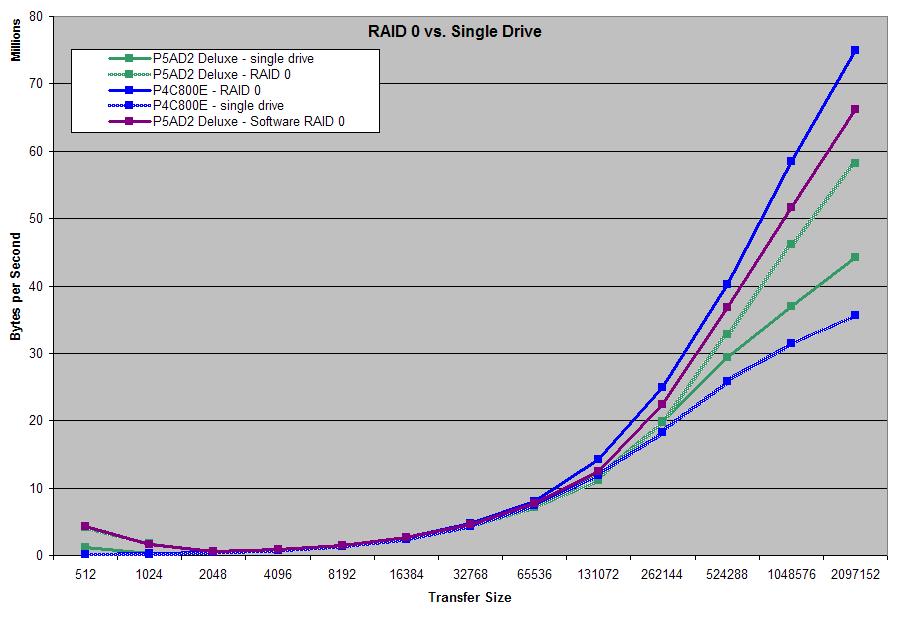
I had the time today to implement my benchmark program. It creates a single file 65,572 megabytes in size. Then, without caching, it reads blocks of varying size from the file. It will read 10,000 blocks of each size, and reads the blocks from a random location in the file. All of the I/O requests issued were blocking.

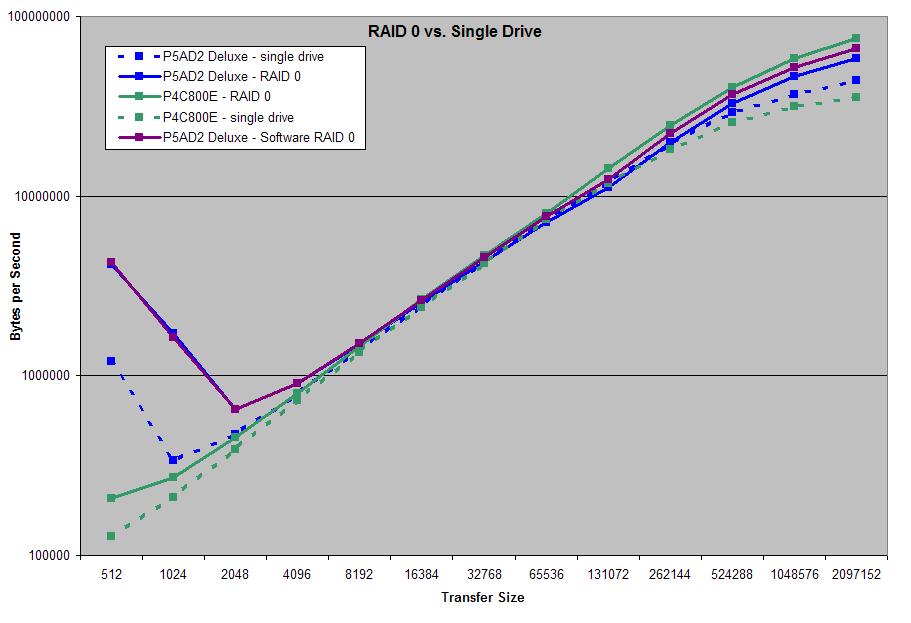
It times all its accesses, and prints the resuts. After pulling the results into Excel and doing some math to make them sensible, I've charted the results here:

blocks.jpg

blocks_log.jpg


The P5AD2 RAID 0 array is two Maxtor 6B300S0 drives off the motherboard SATA RAID port on my Asus P5AD2 Deluxe motherboard. The array has a 128 kilobyte stripe size.

The single drive on the P5AD2 is a third Maxtor 6B300S0 drive. It's on the motherboard SATA port, as well. I formatted it as a dynamic disk in one volume.

On the P4C800E, the comparison is not quite as ideal. The RAID 0 array is a pai of 250 gig Hitachi drives, while the single drive is a 120 gigabyte HDS722512VLSA80 from Hitachi. Obviously, this isn't nearly as clean a comparison as the drives on the P5AD2.

Both machines are running Windows XP SP2.

The program timed the total of all the accesses, eliminating loop overhead. The time for the accesses was measured by the Pentium Performance Counter using the Win32 QueryPerformanceCounter() API. The block size, multiplied by 10,000, then divided by the time totalled with the perf counter, gives the throughput in bytes.

Using DiskMon from sysinternals.com, I verified that the drive really performing the physical I/O requests that that the program would expect to cause.

I don't disagree that RAID 0 isn't for everybody. But I'm very wary of some of the conclusions about how RAID works given other benchmark numbers, particularly results from completely opaque "real world" scenarios. The numbers that I've observed with this software on this system seem to indicate that there isn't a penalty compared to a single drive for smaller accesses on RAID 0, nor is there a penalty for random accesses.

RAID 0 might not be "worth it" for some specific application, and it may not be incredibly faster for many users, but it doesn't appear to be slower than a single drive.

.B ekiM
 
mikeblas said:
I don't disagree that RAID 0 isn't for everybody. But I'm very wary of some of the conclusions about how RAID works given other benchmark numbers, particularly results from completely opaque "real world" scenarios. The numbers that I've observed with this software on this system seem to indicate that there isn't a penalty compared to a single drive for smaller accesses on RAID 0, nor is there a penalty for random accesses.

RAID 0 might not be "worth it" for some specific application, and it may not be incredibly faster for many users, but it doesn't appear to be slower than a single drive.

.B ekiM

I don't know anyone that claims it is significantly slower, only barely measurably slower in a few instances.. 99% of the time RAID 0 is faster.. The issue here is the increased chanse of losing the data..

I know it is not "valid" data but EVERY person I know who has used RAID 0 has eventually lost the data/array. It lasted as long as 2 years for one person, for everyone else, it was more like 6 months, but eventually the increased chanse of data loss caught up with everyone I know who has used it.

So the issue here is not if RAID 0 increases performance, but rather if the performance increase is worth the risk.

==>Lazn
 
Lazn_Work said:
I don't know anyone that claims it is significantly slower, only barely measurably slower in a few instances..

As I've pointed out at least once before, my worry is really the conclusions made from opaque "real world" benchmarks about the implementation of, and low-level performance characteristics of, RAID arrays.

We still don't know what "many" or "smaller" means, but you can't deny that my benchmark is doing "smaller" transfers because it performs transfers of a wide variety of sizes. The only definition of "smaller" that escapes me are sub-sector transfers. Only an idiot would write software to read less than a sector from a drive at a time.

The smallest transfers are actually almost three times faster in a two-drive RAID 0 array on my machine than they are for a standalone unit of the same drive. Maybe this is because rotational latency is reduced in RAID 0; maybe there's some other explanation. I would dearly enjoy coming to understand why this is so.

I'm not questioning the game loading benchmark, by the way; if Storage Review has found that game level loading is slower on RAID 0, then it's slower. I can't find any definition of "game level loading" as a benchmark, though, so I don't know how I would reproduce or analyse that test.

What I do question is the conclusion that RAID 0 must be slow for "many small transfers" because a RAID 0 array has scored a certain way on a benchmark. I think that's a weak conclusion not only because I have an instance to refute it, but because I think very little is understood about the benchmark itself: does anyone truly know what the game is doing when loading a level? Is it really doing many small transfers?

I can't find details or a specification for the "SR Gaming DriveMark 2002" over at the storage review site.

Suppose that the game really is directly performing many small transfers.

Why would the game authors write it that way, if the game must be doing a ton of I/O during the load? Everyone, after all, knows that even on a single drive loading an individual large file with larger transfer requests is faster than loading many smaller files, or even many smaller requests into the single file. (If nothing else, this is what my benchmark confirms. In fact, the higher scores at the left side of the chart are extremely surprising.)

During setup, installing a single large file will also reduce fragmentation and cause better performance for setup itself.

Then why does this bug exist in the game? It seems a very odd mistake to have made, if the time spent moving from one level to another is important for gamers.

Lazn_Work said:
The issue here is the increased chanse of losing the data..

Maybe for you. For me, the issue is coming to completely and very deeply understand how RAID influences performance in a wide range of scenarios and applications.

I think the chance of losing the data is very situational. None of your "known cases" would have lost their data had they backed it up. Any drive can fail, so the only reason they lost data was because they were slovenly about managing their computers.

It's hard to argue against having two co-dependent drives halves the MTTF statistic for the involved drives, since it makes sense on the surface. But the MTTF stastistic doesn't appear to be very meaningful -- it's so large to begin with, it's absurd. For the 6B300S0 drives I'm using here, the MTTF number is 1 million hours.

Half a million hours is more than 57 years!

Maybe a better way to investigate the issue, for users who are concerned with it, is to think about the distribution of drive failures. Problem is, I doubt that level of detail would be forthcoming from the drive vendors.

.B ekiM
 
jen4950 said:
nice work mikeblas -

Thanks. The program was very simple to write; it only took about an hour. It's not even 200 lines long! It takes about half an hour to run over each drive, though.

Also, I've updated the charts to be prettier (I guess), and include results from another one of my machines. There's now a logarithmic-scale graph to make the information a little easier to see.

I think the hard part is interpreting the results. I'm not sure I can guess why there's a trough in the transfer speed around 2048 bytes. This observation goes against the notion that RAID 0 drives are slow for small random transfers, though.

Isn't it a bit surprising to not see any bumpiness around the stripe-size I have for the drives? It is 128k on both machines. Maybe I'm underestimating the increase in performance that starts to show around there, though.

.B ekiM
 
Well part of the answer is that games are shipped with bugs, and fixing bugs usually involves replacing files with updated ones, and it is easier to do that if your files are not all in one big file.

I don't think access patterns of hard drives is very high on the list of priorities of a game develper, instead they are making sure the game works, not how it loads from the drive.

I found this article on RAID performance while tooling around today: http://sunsite.uakom.sk/sunworldonline/swol-07-1997/swol-07-diskconfig.html
This article is focused on Sun systems, and it is not real in depth, but still interesting.

==>Lazn
 
Vertigo Acid said:
I'd be willing to bet that 99% of the SCSI drives in desktop systems on this entire board are used.

Actually I'd be willing to go the extra mile and say that probably half of all SCSI users here buy new, if they truly intend on using it for their desktop. The enthusiast built servers I see threads about almost always have something about IDE RAID setups, just because they are so cheap.

If I were to ever buy a used drive, you can bet it would be SCSI and not IDE.
 
mikeblas said:
It's hard to argue against having two co-dependent drives halves the MTTF statistic for the involved drives, since it makes sense on the surface. But the MTTF stastistic doesn't appear to be very meaningful -- it's so large to begin with, it's absurd. For the 6B300S0 drives I'm using here, the MTTF number is 1 million hours.

Half a million hours is more than 57 years!
The MTBF is not how long they expect an average drive will last.
techtarget.net
ssdirect.com
The second one is more on-topic. I would post more examples, but nobody is willing to talk about this, so google doesn't give many results. Anyways, if you have an 8 disk system with MTBF 100k hours, this means you can expect a disk crash about once every 12,500 hours. This might not sound too bad, you've got a year and change before the first disk dies, and that's on 8 disks! The problem is the way these figures are determined. The manufacturer will take a batch of say 1000 disks and run them for a period of time. Suppose the disks run for 100 hours (4 days) and only one dies. The manufacturer will rate these drives as 100,000 hour MTBF, since 1000*100 = 100,000. Looking at the stats on a new seagate 120GB sata disk, the MTBF is 600,000. This means that their set of disks ran for 600 hours until one died.

What all this means is that they only test the drives for a few hundred hours. After this, you're pretty much on your own. My suggestion for array drives is get ones (like that seagate) with long warranties. When they die, you can get an RMA fairly easily and cheaply. I just RMAed 2 of the pata brothers of that drive, cost was $7 for shipping and I got my drives back in about a week. You must expect drive failures if you're planning to run an array of any sort over the long term.

On a related note, I can't wait for the higher density tapes to kick in. Disk-to-disk backups are nice and fast, but they're so expensive, and there are no alternatives right now. I have 800GB or so to back up, I am not repeat not switching 160 DVDs to back it all up. I'd rather lose my data than do all that mess. :eek:
 
Lazn_Work said:
Well part of the answer is that games are shipped with bugs, and fixing bugs usually involves replacing files with updated ones, and it is easier to do that if your files are not all in one big file.

Why is it impossible to apply bite-wise patches to the single larger file?

Lazn_Work said:
I don't think access patterns of hard drives is very high on the list of priorities of a game develper, instead they are making sure the game works, not how it loads from the drive.

No wonder gamers are so concerned with the time it takes levels to load!

.B ekiM
 
unhappy_mage said:
The MTBF is not how long they expect an average drive will last.

That's why I said that it isn't such a useful statistic. It would be far more interesting to know the distirbution of failures. The median time to failure would be interesting, too.

.B ekiM
 
I've updated the graphs comparing RAID 0 and single drives to include software RAID. The purple line shows two Hitachi 300GB drives in a software RAID setup using Disk Manager's "striped drives" feature in Windows XP SP 2. I did this on the Asus motherboard.

.B ekiM
 
mikeblas said:
That's why I said that it isn't such a useful statistic. It would be far more interesting to know the distirbution of failures. The median time to failure would be interesting, too.

.B ekiM
storagereview.com said:
How to Read Percentiles
A percentile score of 70 means according to filtered and analyzed results from readers, the given drive is more reliable than 70% of the other drives reviewed by StorageReview.com.
Code:
   Family    	           Released    	             Number Of Comments    Percentile  
   Barracuda ATA IV    	   Third quarter 2001    	   550    	   87  
   Barracuda ATA V    	   Third quarter 2002    	   151    	   93  
   Raptor WD360GD    	   Second quarter 2003    	   104    	   67  
   Raptor WD740GD   	   Fourth quarter 2003   	   83   	   61  
   MaXLine III    	   Third quarter 2004    	   8    	   *  
   SpinPoint P80    	   Second quarter 2003    	   154    	   46
These are excerpts taken from the SR reliability database. Registration is required to view them, so I posted what I feel are the most relevant drives of today. I do not mean to violate their copyright, but this material is gathered from the public and so should belong to the public.

My analysis: Buy a seagate if you care about it. Their 15k.3 cheetahs are beaten (in reliability) only by Quantam Atlas 10k II and their Fireball Plus LM. The first is a 36GB scsi disk, the second a 30GB ide. I feel that if you need absolutely reliable storage, you're welcome to buy the quantam drives, but the storage capacity of the seagate drives make it an allover win for them.
 
jen4950 said:
Okay- here's an answer noone wants to hear-

You need to spend some real money to get the real juicy rewards of RAID- i.e. high end equipment gets high-end results.

If you're a cheap-ass, be prepared to either be lucky or dissapointed. And decent RAID equipment can't be bought at Best Buy.


Is that better?

QFT. Cheap RAID is worse than no RAID at all.
 
RAID 0 Hype or Blessing

Femme Taken employs IPEAK SPT traces just like SR does

Because of the striping setup's overhead, the single Raptor WD740GD is faster than the RAID-0 machine, with a queue length of one and a transfer size of up to 32K. When the transfer size increases to 64K however, the two striped Raptors take the lead from the single drive. Increasing the number of operations in the I/O-queue to eight means the striped setup leaves the single Raptor in a cloud of dust.

on the desktop of the power user p2p-sharing, image- and video editing and backing up all kinds of digital media are frequent activities, too. AnandTech, Storage Review and Tweakers.net all share the same audience: power users and tweakers who want to maximize power, speed and usability of their rig. Unlike the average secretary, our target audience is continuously multi-tasking, which can include downloading everything that can be found on the internet, while taking pictures at the highest possible settings. In short: they demand the highest performance from their desktop.

Performance scaling in the office and content creation benchmarks performed by Storage Review contrast severely with Tweakers.net's tests, where the Raptor array, as mentioned earlier, showed a 36,1 percent improvement in Business Winstone 2004 and a nice gain of 50 percent in the Multimedia Content Creation Winstone 2004. The fact that Storage Review had the FastTrak S150 TX4 crawling on a 32-bits 33MHz PCI-bus can't be a fair explanation for the disappointing results, since our FastTrak S150 TX2plus was also installed on a legacy PCI-slot. Bandwidth is of greater importance for RAID 0 performance, since the improvements in Storage Review's tests had to be obtained with faster sequential transfer rates. Differences between the Promise FastTrak S150 TX4 and the TX2plus can in no possible way cause such a big difference in results, since both adapters are very similar to each other.

The fact that there is a significant improvement in the Windows XP boot benchmark clearly shows that Storage Review's system could have some obvious advantages with RAID 0 when using correct workloads. Therefore, we suggest that Storage Review's benchmarks are not typical for the demanding use patterns in current office and content creation applications.

Our observations clearly show that the testing methods of AnandTech and Storage Review are too limited to jump to conclusions about the use of striping in desktop environments - let alone that they could be used to sign RAID 0's death sentence. Both AnandTech's and Storage Review's results of the IPEAK largely contradict Tweakers.net's benchmarks, where RAID 0 does show significant improvements in the I/O performance.

In the case of Storage Review, this can be explained by their use of traces based on older software, which isn't representative of present-day 'power user' workloads. Using system benchmarks to assess storage performance is at the very least questionable anyway, because they mainly depend on CPU performance. The same thing goes for the loading times of games - not to mention the fact that a test limited to two games will never give a realistic view of performance in general.

Most striking is the fact that neither AnandTech nor Storage Review even bothered to test RAID in situations where the performance of the storage system really matters - for example when a backup application, anti-virus tool or compression program is active in the background while demanding content creation applications are running in the foreground. These are conditions that quickly give rise to noticeable latencies and in which single drive setups don't suffice anymore.

he also has considerably more RAID benchmarking experience than SR ;)

if your going to investigate tweakers.net
breakout world lingo and set it to Dutch ;)
 
unhappy_mage said:
I do not mean to violate their copyright, but this material is gathered from the public and so should belong to the public.
Just like credit reports, huh?

unhappy_mage said:
My analysis: Buy a seagate if you care about it.

I don't think there's enough information up there to make any real conclusion. The samples just aren't big enough, and the information is completely unaudited.

.B ekiM
 
I am planning on a RAID system. This system will be primarily used for GAMING. And I will also install Media Center Xp on this machine for video storage. I will be using an Asus A8n-SLI board. I am curious to know how I can set up my C: drive by itself and have the media center xp portion of it in RAID configuration with lets say 4 drives?
 
RAID0 is going to be an improvement in some situations. most gaming and single user use of RAID0 is not going to benefit much if not at all. There are some really good NEW FAQs about consumer level RAID and it's pros and cons.

Before consumer level raid was popular I ran RAID0 myself. I thought that it was a nice boost, but again only in some cases. I don't feel people should be put down if they want to run a RAID0 setup. it can be good, and for computers being a hobby to some, it can be fun.

I dont run RAID0 on my system anymore mose so for cost factor alone, but I do have a file server that I run a software RAID5 and I find that to be doing very well in my case...
 
After reading this really useful article i gotta say it enlightened me on some things :) :

1) raid isnt some sort of miracle operation that will speed up overall performance, only some and especially not alot of the stuff we average joes use.

2)Its better to have 2 independent drives for some purposes such as backups / games / data sorting than a raid cuz its not very friendly on peoples pockets if u have to shelf out $$$ to buy a raid controller (esp mine :x) and halfs the thereotecal life of BOTH hard discs. Plus

3)raid is limited to system bus speed so it might be a bottleneck on some systems and not on some others.

my conclusion is that i'll wait for SATA2 to come out and get a controller plug on pci-e for my primary windows hard disk and use my old one as archiving and backup ^^ or a cheap scsi hdd for the OS only :x Whatever people do, i guess tweaking the virtual memory and frequent defragging coupled with some tweaks on the OS will help in access times.

ps. wouldnt a controller on a pci-e eat into a pci-e graphic card's bandwidth??

personal comment:
no matter how slow a computer might be, i guess the bottleneck element in the mix is us humans(esp the guys at micro$oft. Otherwise who wouldnt tweak and tweak our own rigs?wouldnt you be defragging your com right now? wouldnt you be using linux?
 
Here's an interesting thing to think about regarding failure rates and MTBF:

If a single drive is rated with an MTBF of 10,000 hours, it can be assumed that running 2 of them in RAID0 would halve the MTBF to 5,000 hours as mentioned earlier in the thread, because if one drive files, all data is lost.

However, if you think about it, running drives in RAID0 means that on average, all reads and writes occur half on one drive and half on the other. Therefore, technically, each drive is only being written to or read from half as many times as it would be if all the data was stored on a single drive. This is assuming that most files on the system are much larger than the stripe size, so that each file is split relatively evenly over the two drives.

That said, even though the MTBF is technically cut in half because of the fact that if one drive fails it takes the other one down with it, the amount of time each drive is actually being used is also cut in half because all reads and writes occur half on one drive and half on the other. Therefore, using 2 drives in RAID0 for 10,000 hours would mean that each drive is effectively only being written/read for 5,000 hours or half their individual MTBF.

If you've followed my line of logic, then, that means that a RAID0 array being used for 10,000 hours has the same MTBF as a single drive being run for 10,000 hours due to the fact that the RAIDed drives will actually be read/written half as often as the single drive would be, despite the fact that the failure of one drive will kill the data on both.

All this is assuming, of course, that MTBF is based on the amount of time a drive can be written/read persistantly until it dies as opposed to just spinning up and not being accessed at all. What do you guys think? :)
 
However, frequent activity is only one potential cause of failure. You may have a power fluctuation that cooks a drive, a metadata/RAID BIOS bug that trashes the array, one of the drives in the array may be a 'weak link' from the factory, both drives still power cycle on bootup, etc. Suffice it to say, the expected 'normal' service life of the drive(s) (as measured by MTTF) is not the only factor that affects RAID-0 reliability, and that the other factors conspire to make RAID-0 considerably worse than SLED or fault tolerant RAID levels in reliability.
 
...which makes me wonder what exactly is tested during MTBF testing. Sustained reading/writing, or just letting the drives spin til they die.
 
http://www.pcguide.com/ref/hdd/perf/qual/specMTBF-c.html

excerpt
Mean Time Between Failures (MTBF)

The most common specification related to drive reliability is mean time between failures or MTBF. This value, usually measured in hours, is meant to represent the average amount of time that will pass between random failures on a drive of a given type. It is usually in the range of 300,000 to 1,200,000 hours for modern drives today (with the range increasing every few years) and is specified for almost every drive.

This number is very often misinterpreted and misused. Usually, the "analysis" goes like this: "Gee, a year contains 8,766 hours. That means my 500,000 MTBF drive should last 57 years." (I have even seen this on the web site of a major hard disk manufacturer that shall remain nameless to spare them the embarrassment!) After concluding that the MTBF means the drive will last for decades, amusingly, one of two opposite things usually happens: either the person actually thinks the drive will last half a century or longer, or the opposite: they realize this is crazy and so they write off the entire MTBF figure as "obvious exaggeration and therefore useless". The real answer of course is neither. (It is obviously impossible for any individual hard disk to be tested to anywhere near the amount of time required to provide a MTBF factor near even 100,000, never mind 500,000.)

To be interpreted properly, the MTBF figure is intended to be used in conjunction with the useful service life of the drive, the typical amount of time before the drive enters the period where failures due to component wear-out increase. MTBF only applies to the aggregate analysis of large numbers of drives; it says nothing about a particular unit. If the MTBF of a model is 500,000 hours and the service life is five years, this means that a drive of that type is supposed to last for five years, and that of a large group of drives operating within this timeframe, on average they will accumulate 500,000 of total run time (amongst all the drives) before the first failure of any drive. Or, you can think of it this way: if you used one of these drives and replaced it every five years with another identical one, in theory it should last 57 years before failing, on average (though I somehow doubt we'll be using 10 to 100 GB spinning-platter hard disk drives in the year 2057. :^) )

There are in fact two different types of MTBF figures.....

in a RAID 0 array its the potential for data loss that exponentially increases with the number of drives
in fact the most popular way to bork the data doesnt involve any hardware failure except inbetween the ears :p
 
mikeblas said:
One of the frustrating things I've found about RAID is that nobody really knows how to answer the hard questions. It's a pattern:

  • Someone says: "Hey! I'm going to set up RAID 0! How fast will it be?" or makes some similar, naieve and hopeful answer.
  • A poster who thinks they're hard and wise tells them not to do it, and gives some "common sense" reason for it.
  • Some good questions come up.
  • The hard and wise poster says: "Just read the FAQ", or "feel free to Google it", or "everybody already knows this". Whatever: they're all responses, not answers.
  • Some more of the hard questions come up. How, specificially? Why, practically? Measurements, algorithms, and best practices?
  • The going gets tough, so the poster who was so hard and wise ends up leaving.

I've never said anything about it being easy: I've just said it should be possible to make a meaningful measurement -- even for one drive.

Hopefully, I'll be able to find the time to do some emprical analysis. The opportunity is ripe, as I have some drives and some equipment lying around. The missing ingredient is time.

Thing is, that analysis results in a set of observations, not necessarily any certain conclusion about how things really work.

.B ekiM

Not to bring up an old post... But it seems this "pattern" shows up in a lot more places than in this post. :)
 
Blitzrommel said:
Not to bring up an old post... But it seems this "pattern" shows up in a lot more places than in this post. :)

Another pattern I've noticed emerging is that any critical questioning is interpreted as "arguing". It's hard to get soild information if asking good questions is portrayed in such a negative light.

Anyway, I might have gotten to the bottom of my questions in this thread.
 
Yeah, afraid you're right. I think a large component is that some people are defensive about their knowledge, and if anything arises that'd challenge their credibility, or may even SOUND like it might, even if it doesn't... Self defense kicks in to defend their manhood or something. Relax, everyone. :) Constructive criticism is how a lot of people end up learning things!
 
I dont know crap about raid...except for what I read on the intarnets...

But the truth about raid is that

RAID PWNES!!!

raid.png


4x 300GB + Raid 0 = 1.08TB

Promise SX4000lite and 5 Maxtor DiamondMax 10's, the 5th one is the boot drive.
 
Back
Top