![[H]ard|Forum](/styles/hardforum/xenforo/logo_dark.png)
Krazypoloc
Gawd
- Joined
- Jul 23, 2010
- Messages
- 759
So several months back I decided that I was tired of having multiple remotes sitting around and wanted to centralize my control scheme. I started researching many, many different solutions. I have done extensive research on the offerings from URC, Crestron, Logipoop, and many others. But these solutions are very costly and I just wasn't willing to spend $1k+ and still not have 2 way controls for any of my stuff. I also HATE IR, so I wanted to get away from this whenever possible. I'm ok with IR as long as it has either a direct input into the device (1/8th" input) or an IR emitter that sticks onto the IR receiver of the device.
So I started looking around at other options and they are few and far between.....and it dawned on me that I must create my own Frankenstein.
Being very familiar with Android and fairly active in the Android modding community over the last 2 years I found that it would be the perfect platform for such a venture. I plan on making a simple front end (or adding buttons to XBMC remote) that just has source selection similar to what Log!tech offers with their "watch" buttons. My plan is to keep it as simple and clean as possible, I can always break out the OEM remotes if I need to configure something more complex.
The Hardware
I will be able to control everything with either my wife's or my Android phone. However this is not idea if others want to use the system, so the primary control will be either an Android Tablet or a Nook Color, I'm heavily favoring the Nook Color right now for cost and functionality purposes. The Nook Color will be running Cyanogen's Cyanogenmod rom and will be rooted so I have access to do whatever I want with the system.
Nook Color $250.
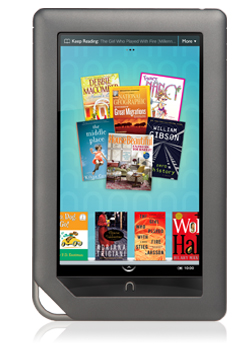
http://www.barnesandnoble.com/nookc...arch-_-Q000000630-_-Test NOOK-_-9781400532650
This is what the XBMC remote front end looks like on the Nook Color.

But how will you control an IR device from a phone or tablet you ask? One of these little beauties. I plan on getting two of these, one for the bedroom and one for the living room. They are around $100 each and should serve my purposes perfectly as it will plug into the backbone of my internal network which is tied to my WIFI which is tied to my phones/Nook Color. They also have a POE model if you are in a tricky placement scenario which I am not.

http://www.globalcache.com/products/itach/ip2irspecs/
2 Custom built HTPC's. Yes I decided to move from my beloved Pocorn Hour devices back once again to HTPC's for my main source. The biggest reason is that HD Audio support is finally maturing and they ironed out some of the niggling thinks like DX support and flash stuff. The HTPC's are nothing too crazy, one is an overclocked C2D E6320@3Ghz with 2 9600GT's for the video (soon to be replaced by a single ATI HD5850) and 4GB of memory. I do some gaming on this machine so I do need a pretty capable video card. The bedroom system will consist of a dual core AMD machine with an HD4550 video card.
The Software
Windows 7 Ultimate x64 for the OS
XBMC for the media center front end.
**EDIT**
XBMC Remote for Android for the remote control application. This application has 2 way control functionality and fully supports cover art and rich content on the phone. You can browse the library on the phone and start/queue content or browse to it on the on screen GUI with the remote app.
http://xbmc.org/freezy3k/2010/07/13/official-xbmc-remote-for-android/
**EDIT**
I have switched from the above mentioned remote app to the official one. There are a few differences that made me switch. I would also like to note that I had to edit the "Socket Read Timeout" to eliminate nagging false positive errors of the session timing out.
-Pro's
Much more stable
WoL built in (This is awesome and will save me a lot of headache)
Option to cache cover art and thumbnails (This speeds up browsing media on the phone a LOT)
Better filtering and navigation with sliding tabs
**EDIT**
WoL - I plan on making a little script that uses the WoL feature of the PC's to turn them on as I want to completely eliminate any IR usage from my system whenever possible.
**EDIT**
So my "to buy" list consists of a Nook Color, and 2 IP to IR modules. For under $500 total investment I should have amazing controls that will trounce anything from Crestron, URC, Logipoop, and any other solution that I have seen. Obviously doesn't have the complexity that some of the a fore mentioned companies can wield but the end user usability and overall look (sexiness) is what I'm going for.
I hope to get this project going in full swing in the next few weeks and have major progress within the next few months.
So I started looking around at other options and they are few and far between.....and it dawned on me that I must create my own Frankenstein.
Being very familiar with Android and fairly active in the Android modding community over the last 2 years I found that it would be the perfect platform for such a venture. I plan on making a simple front end (or adding buttons to XBMC remote) that just has source selection similar to what Log!tech offers with their "watch" buttons. My plan is to keep it as simple and clean as possible, I can always break out the OEM remotes if I need to configure something more complex.
The Hardware
I will be able to control everything with either my wife's or my Android phone. However this is not idea if others want to use the system, so the primary control will be either an Android Tablet or a Nook Color, I'm heavily favoring the Nook Color right now for cost and functionality purposes. The Nook Color will be running Cyanogen's Cyanogenmod rom and will be rooted so I have access to do whatever I want with the system.
Nook Color $250.
http://www.barnesandnoble.com/nookc...arch-_-Q000000630-_-Test NOOK-_-9781400532650
This is what the XBMC remote front end looks like on the Nook Color.
But how will you control an IR device from a phone or tablet you ask? One of these little beauties. I plan on getting two of these, one for the bedroom and one for the living room. They are around $100 each and should serve my purposes perfectly as it will plug into the backbone of my internal network which is tied to my WIFI which is tied to my phones/Nook Color. They also have a POE model if you are in a tricky placement scenario which I am not.
http://www.globalcache.com/products/itach/ip2irspecs/
2 Custom built HTPC's. Yes I decided to move from my beloved Pocorn Hour devices back once again to HTPC's for my main source. The biggest reason is that HD Audio support is finally maturing and they ironed out some of the niggling thinks like DX support and flash stuff. The HTPC's are nothing too crazy, one is an overclocked C2D E6320@3Ghz with 2 9600GT's for the video (soon to be replaced by a single ATI HD5850) and 4GB of memory. I do some gaming on this machine so I do need a pretty capable video card. The bedroom system will consist of a dual core AMD machine with an HD4550 video card.
The Software
Windows 7 Ultimate x64 for the OS
XBMC for the media center front end.
**EDIT**
XBMC Remote for Android for the remote control application. This application has 2 way control functionality and fully supports cover art and rich content on the phone. You can browse the library on the phone and start/queue content or browse to it on the on screen GUI with the remote app.
http://xbmc.org/freezy3k/2010/07/13/official-xbmc-remote-for-android/
**EDIT**
I have switched from the above mentioned remote app to the official one. There are a few differences that made me switch. I would also like to note that I had to edit the "Socket Read Timeout" to eliminate nagging false positive errors of the session timing out.
-Pro's
Much more stable
WoL built in (This is awesome and will save me a lot of headache)
Option to cache cover art and thumbnails (This speeds up browsing media on the phone a LOT)
Better filtering and navigation with sliding tabs
**EDIT**
WoL - I plan on making a little script that uses the WoL feature of the PC's to turn them on as I want to completely eliminate any IR usage from my system whenever possible.
**EDIT**
So my "to buy" list consists of a Nook Color, and 2 IP to IR modules. For under $500 total investment I should have amazing controls that will trounce anything from Crestron, URC, Logipoop, and any other solution that I have seen. Obviously doesn't have the complexity that some of the a fore mentioned companies can wield but the end user usability and overall look (sexiness) is what I'm going for.
I hope to get this project going in full swing in the next few weeks and have major progress within the next few months.
Last edited:
