![[H]ard|Forum](/styles/hardforum/xenforo/logo_dark.png)
Navigation
Install the app
How to install the app on iOS
Follow along with the video below to see how to install our site as a web app on your home screen.
Note: This feature may not be available in some browsers.
More options
You are using an out of date browser. It may not display this or other websites correctly.
You should upgrade or use an alternative browser.
You should upgrade or use an alternative browser.
Testing Input Lag (Correctly)
- Thread starter Nielo TM
- Start date
- Status
- Not open for further replies.
Though no real proof of it it has been reported that at least nVidia might not clone two monitors without introducing lag on one of them (don't know what cards that would be if so).
Also the resolution should be taken into account since the scaler might add lag.
There are tons of reports not using 1/1000 and I wouldn't say they are inaccurate. In some cases it can be hard but you can still get good results out of it.
Also the resolution should be taken into account since the scaler might add lag.
PS: If you're unable to increase the shutter speed to 1/1000, please don't try and compensate. There is absolutely no point in providing inaccurate values.
There are tons of reports not using 1/1000 and I wouldn't say they are inaccurate. In some cases it can be hard but you can still get good results out of it.
rhiridflaidd
Weaksauce
- Joined
- Aug 30, 2006
- Messages
- 72
Good points here.
One thing that puzzles me - why is it caused "input lag." Surely a monitor has output lag unless it's a touchscreen?!
Also the point about resolutions is critical - I think that it should be measured multiple times with various resolutions.
One thing that puzzles me - why is it caused "input lag." Surely a monitor has output lag unless it's a touchscreen?!
Also the point about resolutions is critical - I think that it should be measured multiple times with various resolutions.
Though no real proof of it it has been reported that at least nVidia might not clone two monitors without introducing lag on one of them (don't know what cards that would be if so).
Also the resolution should be taken into account since the scaler might add lag.
That's an accurate assessment.
It's not always possible to accurately clone without the aid of a CRT. If you clone two displays with different native resolutions, scaling latency will ultimately becomes a factor.
I try to round that as an error when I review HDTVs, because that aspect is out my hands.
There are tons of reports not using 1/1000 and I wouldn't say they are inaccurate. In some cases it can be hard but you can still get good results out of it.
There are 1000ms in a second
So anything above or below 1/1000 should not be taken into account.
Good points here.
One thing that puzzles me - why is it caused "input lag." Surely a monitor has output lag unless it's a touchscreen?!
Unlike CRT, the image has to be processed and mapped digitally on a FPD, which can take n number of ms. There are also other factors such as overdrive calculations, dithering, LUT, pixel states etc...
That's an accurate assessment.
It's not always possible to accurately clone without the aid of a CRT. If you clone two displays with different native resolutions, scaling latency will ultimately becomes a factor.
I try to round that as an error when I review HDTVs, because that aspect is out my hands.
With ATi cards you can clone two displays running different resolutions. Granted the scaling is handled by the graphic card and as far as I know it's unknown what that might add but it seems to be believed that it's negligible in the circumstances.
There are 1000ms in a second
So anything above or below 1/1000 should not be taken into account.
There are 1 000 000 us in a second.
So anything above or below 1/1000000 should not be taken into account.
Logic?
Theoretically you could even have a shuttertime of one second and add a litle white box at certain intervals on the screen and thus see the difference in terms of lag. Certainly not ideal no but why would a fixed shutter speed of exactly 1/1000 be of such importance?
You just need a fast enough shutter speed to stop the frames from running together. 1/200 is sufficient, but generally faster is better. I have seen people try to do this with 1/2 shutter speed and obviously it runs several frames together. I would say once you are down to half the frame length, you will get a high number of keepers. So even 1/120 is probably fine.

vick1000
2[H]4U
- Joined
- Sep 15, 2007
- Messages
- 2,443
Don't forget the splitter, you can't get acurate results with the video card cloning the image.
There are 1000ms in a second
So anything above or below 1/1000 should not be taken into account.
Why 1000ms? Why not 867 or 1241? There's not some natural boundary of 1000ms that LCDs fall on. A better way is to report the input lag as VALUE +/- PRECISION (but even this doesn't include the aforementioned lags from clone mode or rescaling).
None of that really matters. A shutter speed that high makes no difference because each part of the screen only updates once every 16-17 ms at 60 Hz. The biggest cause of inaccurate values is inaccurate timers like the flatpanels.dk timer, which only updates once every 10-20 ms.Nielo TM said:1. Dim the test environment to an absolute minimum
2. Set the camera's shutter speed to 1/1000
3. Set the aperture to the lowest possible value (<f/4.0)
4. Increase the ISO sensitivity if needed
5. Record 10 images
6. State the lowest and the highest values including the average
PS: If you're unable to increase the shutter speed to 1/1000, please don't try and compensate. There is absolutely no point in providing inaccurate values.
The timers commonly used aren't synchronized with the refresh rate and aren't guaranteed to update at any particular interval. There can also be tearing if the timer updates while that part of the screen is refreshing. If the timers were perfect, there would always be a 16-17 ms difference between frames at 60 Hz. There are no "lowest" and "highest" values. Lag doesn't vary. Any test that relies on averages is already flawed.
Another problem is people only test on one part of the screen, so there's no way to know where the monitors are refreshing. All monitors draw from top to bottom, and one monitor might only be slightly behind the other monitor in drawing the current frame, especially due to response times. Here is a program that uses bars instead of a timer to determine where the monitors are refreshing: http://www.hardforum.com/showthread.php?t=1423433
Also, clone mode is not guaranteed to update both monitors at the same time. A splitter guarantees both monitors get the same signal at the same time.
When I use a splitter and a timer that updates between refreshes in multiple parts of the screen, I always get 100% consistent results.
Last edited:
Logic?
Theoretically you could even have a shuttertime of one second and add a litle white box at certain intervals on the screen and thus see the difference in terms of lag. Certainly not ideal no but why would a fixed shutter speed of exactly 1/1000 be of such importance?
It's always best to reduce the possibility of errors
1/1000 is a nice round number that doesn't require any interpolation. For example, if monitor B is 23ms behind monitor A, how would you know if the shutter is fixed at1/200?
It's always best to reduce the possibility of errors
1/1000 is a nice round number that doesn't require any interpolation. For example, if monitor B is 23ms behind monitor A, how would you know if the shutter is fixed at1/200?
How would you know if your shutter is at 1/1000? You are really only going to be able to tell to the nearest frame (16.6ms for most LCDs).
Thanks for the link to the program Toasty.
Don't forget the splitter, you can't get acurate results with the video card cloning the image.
Unfortunately, that's not possible in most cases because there always be some sort of scaling (unless both displays have the same native res).
In the field of HDTV, splitter is definitely not possible when a monitor is involved.
Last edited:
This is based on my own testing, which has shown that the amount of lag is always consistent.Nielo TM said:Could you enplane the theory behind that post? I mean, why do you believe there can't be any possible variance between the values
My own testing has shown otherwise. All monitors draw from top to bottom because that's the way the video signal is encoded. I guess it's possible to buffer the image and display it all at once, but I haven't seen any monitor do that.Nielo TM said:AM based LCD do not draw frames. The entire matrix is updated at certain intervals. What may appear to be drawn is in fact caused by the backlight flicker/strobing.
Example (CRT vs. DoubleSight DS-263N):
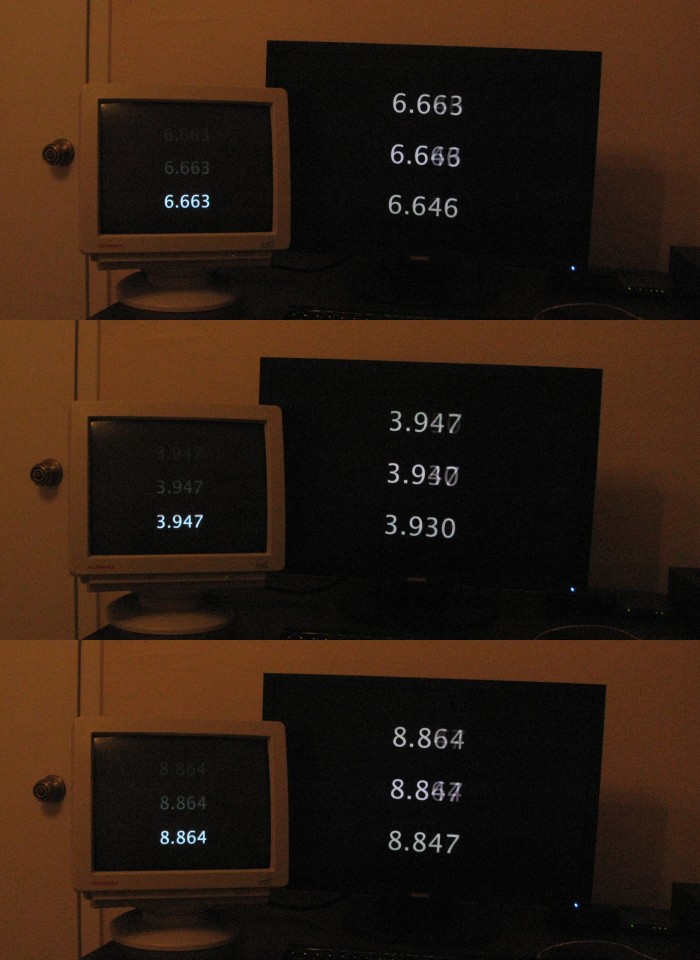
It's definitely possible to use a splitter to test an HDTV against a monitor. DVI, HDMI, and VGA can all be split, and DVI and HDMI are interchangeable.Nielo TM said:Unfortunately, that's not possible in most cases because there always be some sort of scaling (unless both displays have the same native res).
In the field of HDTV, splitter is definitely not possible when a monitor is involved.
Also, I've found that most monitors don't have more lag when scaling non-native resolutions, although that might not be the case with HDTVs.
Most modern monitors lack dedicated scalers (thanks to the GPU scaling), but its mandatory for HDTVs
I was under the impression that it was only some 30" lacking a scaler, and other specialized monitors such as SGI 1600SW.
I quick check confirms that all monitor in my house at least reports resolution in the OSD - this would be kind of unnecessary without a scaler because if it wasn't native you wouldn't get a picture.

- Joined
- Jul 5, 2005
- Messages
- 1,590
Im at around 28ms lag (Avg.) between my Kuro plasma vs. FW900 CRT
lowest recorded differance:

lowest recorded differance:
burningrave101
[H]F Junkie
- Joined
- Sep 9, 2003
- Messages
- 11,825
Is there ever much of a variable difference between input lag on different CRT's? I know with CRT's the input lag should typically be negligible but what about between an older crappy CRT and a high-end CRT?
I don't really understand why the input lag would vary on LCDs. I would think that the nematic twisting or in-plane switching would be a constant-time physical process (isn't it just some sort of little flipping diode)?? Unless the lag is introduced by the graphics card..
Is there ever much of a variable difference between input lag on different CRT's? I know with CRT's the input lag should typically be negligible but what about between an older crappy CRT and a high-end CRT?
It depends on the processing
A full analogue CRT will have virtually no lag compared to a CRT with digital processing. But far as I'm aware, all CRT monitors are fully analogue with digital control (not processing).
I have never seen anyone show that with proper testing. Response times can vary depending on what's changing on the screen, and overdrive can affect that, but lag itself doesn't vary.Nielo TM said:I respect your finding, but other elements such as overdrive and decoding have know to cause slight variance in lag.
The camera can't predict the future. If one screen is showing something that has not yet appeared on another screen, the camera will show the difference regardless of the shutter speed. You only need a fast enough shutter speed to prevent the frames from running into each other. If the shutter speed is too fast, there will be nothing but a small sliver on the CRT, and the image will be too dark to see the LCD accurately.Nielo TM said:The camera's shutter speed can also be a contributing factor
What you're saying doesn't make any sense. How can backlight flicker consistently cause the top of the screen to be updated before the bottom?Nielo TM said:A lot of people mistake the backlight flicker and flicker induced trailing as drawing.
I don't know how you can say that when even your own video and pictures show that monitors update from top to bottom.Nielo TM said:All LCD monitor above 10" are based on active matrix and therefore, updated at ones (each cycle).
The very first picture shows what I'm talking about:
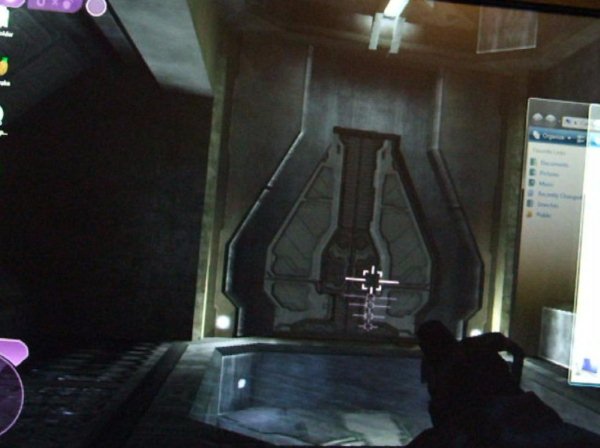
The window is clearly moving to the left because the left side of the window is fading in from top to bottom. If the window were moving to the right, the left side of the window would be fading out from top to bottom, and the right side would be fading in from top to bottom.
Here is a frame from your video that shows exactly what I'm talking about:
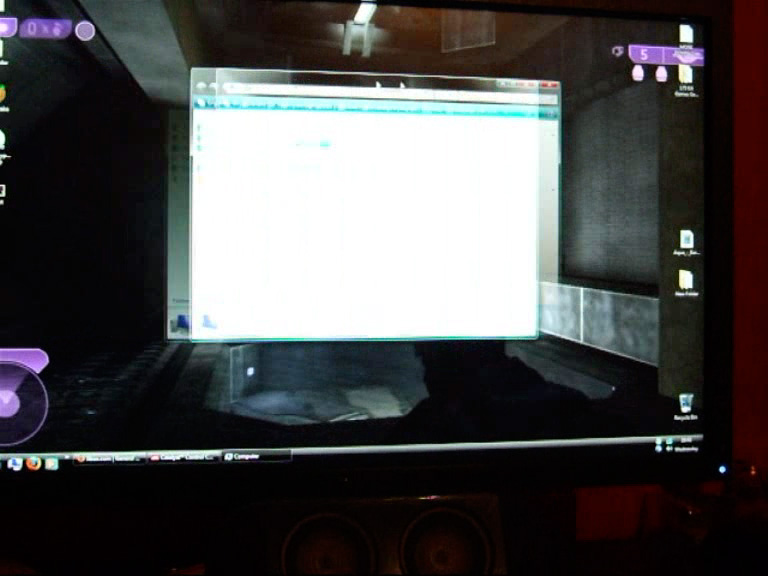
How can backlight flicker cause that? The monitor is clearly updating from top to bottom.
Here is a picture where both monitors are in the middle of refreshing:
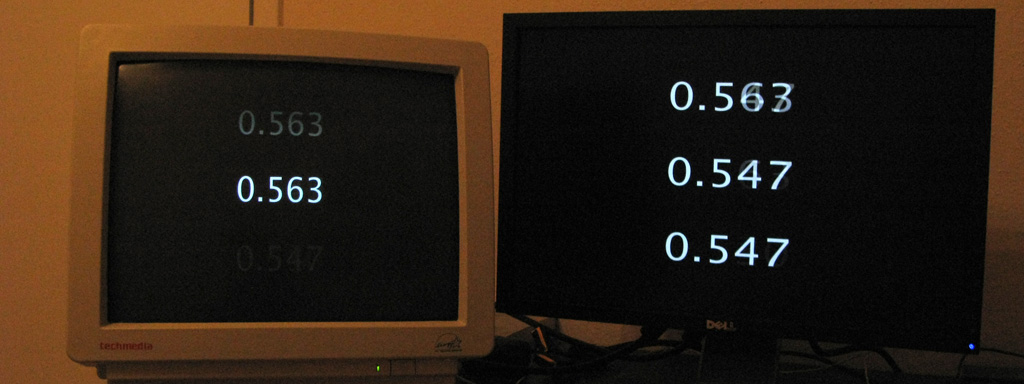
If LCD monitors update all at once, then how has the top of the LCD already updated when the CRT hasn't even received the full frame yet? The monitor is clearly updating from top to bottom.
Those aren't video formats. There's only one video format. You're talking about timing standards, of which there are several: GTF, CVT, CVT-RB, CEANielo TM said:Actually it's more complicated
There are two types of video formats VESA and CEA.
When an HDTV detects VESA format (if supported), it switches to PC mode. So it's not possible to carry out a fair comparison without specialized equipments.
Most monitors can handle the same timings that HDTVs can. The point of timing standards is to make sure monitors can handle certain timings so there aren't any compatibility issues between devices. Most monitors can also handle non-standard timings.
I don't really understand why the input lag would vary on LCDs. I would think that the nematic twisting or in-plane switching would be a constant-time physical process (isn't it just some sort of little flipping diode)?? Unless the lag is introduced by the graphics card..
There more to LCDs than twisting the crystal
You have to take in the buffer, overdrive, LUT, dithering etc...
Also when comparing to a CRT, you have to take in the location of the scanning beam (see post 19)
I already explained why you're getting inconsistent results. Why do you start a thread on testing lag correctly, then continue to test lag incorrectly even after I explained what you're doing wrong? You need to take into account where the LCD is refreshing, and you need to output something that updates between refreshes.I took a few comparison images (couple of days ago) and it clearly illustrates the difference between 1/500 and 1/1000.
The test models were iiyama HM903 (via VGA) and Sony KDL-26P2530 (HDMI). Both were connected to the ATI HD4650 in clone mode @ 1280 x 720 60Hz.
http://cid-9c09d09ec80b78d1.skydrive.live.com/browse.aspx/Public/Data Storage/Input Lag
PS: Camera configuration including the make and the model can be found in image properties
PPS: There's no set standard where the scanning beam should be for an accurate comparison. For example, scanning beam covering the top half will yield different values compared to the bottom half.
http://cid-9c09d09ec80b78d1.skydriv...lic/Data Storage/Input Lag/Scanning Beam?uc=2
As you can see from the images above, the values range from ~15ms to ~31ms. So it's best to average it out.
Your pictures are useless because first, you can't tell where the LCD is refreshing, and second, you're using a web page timer, which has no guarantee of accuracy. Use the bars program and you will get much more consistent results.
If you can tell where both the CRT and the LCD are refreshing, you can see that the lag is always consistent.
I know what you're trying to say, but that still doesn't explain what's being shown. For that effect to be caused by backlight strobing, only the part that appears to be updating must be lit, which would cause noticeable flicker at 60 Hz, and you'd have that problem where you can only see a small part of the screen like on a CRT. That's not how backlight strobing works.Nielo TM said:We call it backlight strobing. Backlight is strobed from top to bottom which causes image artifacts similar phosphor trailing on plasmas as well as tilted horizontal motion. It also causes the illusion of differential update speeds .We don't know if it's intentional or an inherent flaw in the design. But it does seems to help with motion.
It's the effect of backlight strobing. And it's identical to the image I've posted on my account.
Backlight strobing does the opposite and only turns off the part that's being updated. The rest of the screen would still be lit. That still doesn't explain what's being shown because if the entire screen were updated at once, you'd still see the update unless the shutter speed was very fast, in which case you'd still see the update on the parts of the screen that are still lit.
Most monitors don't have backlight strobing anyway. All LCD monitors flicker, but they flicker at much higher rates, depending on the brightness. That sort of flicker has no effect on lag tests.
I've seen monitors with backlight strobing. It eliminates motion blur, but it causes this annoying effect where I'm always seeing 2-3 clear frames at once. I can also see flicker on those monitors when I move my eyes in a dark room. On monitors without backlight strobing, I see a small blurry trail instead and no obvious flicker.
Let's go back to this image:
The video signal is sent from top to bottom. The CRT is showing the signal as it's being received. How has the top of the LCD already updated when it hasn't received the whole frame yet? Backlight strobing can't explain that.
If you used the bars program, you can see for yourself that LCDs refresh from top to bottom just like a CRT, and that it's always behind by a consistent amount.Nielo TM said:How can you correct me when you believe LCDs refresh from top to bottom when they are clearly incapable (unless configured into PM mode).
You wouldn't need a high speed camera if the strobing were significant enough to affect lag tests.Nielo TM said:With a high-speed video camera, I would've been able to actually record the strobing pattern.
I think this previous image from Toasty make it even more clear that it is an update pattern and not a backlight strobe. In these the top is finished updating, and you can barely see the old number. In the center it has just updated so you see new and old. On the bottom the update hasn't reached there yet. Classic update pattern.
Toasty what timer program are you using for this one?
http://toastyx.net/ds-nolag.jpg
One more reason this isn't a backlight sweep, is because the vast majority of LCDs simply do not do this. Backlights may flash with some form of PWM as you turn them down.
But there are few that actually have a the backlight arranged in rows to sweep. That is a specific feature. The vast majority aren't set up in a sweep pattern.
Of course if you look at the bar program output and think about it, then it becomes obvious that there is no backlight sweep or flicker involved:
http://www.hardforum.com/showthread.php?t=1423433
If you look there is a white separators between each bar and since they don't change, they are not affected by the update, but if it was sweeping or flickering backlight, it would be affecting separators, not just the new bar moving along. Case closed. LCDs are updating top to bottom.
Toasty what timer program are you using for this one?
http://toastyx.net/ds-nolag.jpg
One more reason this isn't a backlight sweep, is because the vast majority of LCDs simply do not do this. Backlights may flash with some form of PWM as you turn them down.
But there are few that actually have a the backlight arranged in rows to sweep. That is a specific feature. The vast majority aren't set up in a sweep pattern.
Of course if you look at the bar program output and think about it, then it becomes obvious that there is no backlight sweep or flicker involved:
http://www.hardforum.com/showthread.php?t=1423433
If you look there is a white separators between each bar and since they don't change, they are not affected by the update, but if it was sweeping or flickering backlight, it would be affecting separators, not just the new bar moving along. Case closed. LCDs are updating top to bottom.
Last edited:
It's a Quartz composition that only works in Mac OS X and is only accurate at 60 Hz, so it's not perfect either. For accurate results, it must be run under Quartz Composer (included with Xcode tools): http://www.toastyx.net/Timer3.qtzSnowdog said:
Okay, theoretical question (just out of curiosity). Is the amount of time it takes one pixel to change "colors" constant? Meaning if you had the panel without a backlight or anything, would the individual pixels take the same amount time to change state?
After searching net for a while, it would seem you may be correct. However, there are a few contradicting information and it's not clear how the pixels are actually addressed.
Anyway, thanks for the input and I'll continue the research.
PS: I've requested this thread to be locked or deleted. When I find some concrete evidence, I'll sent it to you via PM. However, if you already in possession of such info, could you please send it to me via PM
Anyway, thanks for the input and I'll continue the research.
PS: I've requested this thread to be locked or deleted. When I find some concrete evidence, I'll sent it to you via PM. However, if you already in possession of such info, could you please send it to me via PM
Okay, theoretical question (just out of curiosity). Is the amount of time it takes one pixel to change "colors" constant?
No
The pixel response time varies according to their state, which is why on/off and GTG are useless.
- Status
- Not open for further replies.