• A Great friend to the HardForum with a great kid that he is trying to get a scholorship to continue his schooling. Please give hime a vote! Only 24 hours left! Thanks.
    If you have an VOTE FOR KEENAN!

Temp issue with H50 and 2600k

djgizmo

[H]ard|Gawd
Joined
Dec 24, 2006
Messages
1,429
Ok, the usual.
CPU: 2600k
Mobo: Asus Max Gene-Z
Cooler: Corsair H50 (Dec 2010 version)
PSU: Corsair 650tx v2 (bottom mounted, not venting into the case)
Case: Fractal Designs Define R3
Video Card: MSI 560 (non-overclocked)

When I first put the system together (and testing), I had temps idling around 29-32c. After putting everything in my case and properly hiding the wires. My temps rose to the upper 30s. I decided to remove the cooler and re-apply the TIM with MX-2. My temps at STOCK (no overclock) are at mid to upper 30s. IDLE. Load is about 60-61c

If I overclock (to even 4.2), temps seem to hit upper 60s Beyond 4.2, temps climb in the 70s.

I've reseated the cooler 3 times. (each time cleaning off the cpu / cooler with the Artic Cleaning kit and reapplying TIM). I've tried the rice dot method, the X method, combination of both.

I'm open to suggestions.
 
How much vcore are you feeding the chip? Are using just the stock fan with the H50? What are you running to stress the chip to hit those temps? If its Intel burn test then those temps are probably about right.
 
with my H80, my idle is avg 30c across the 4 cores.. with speedstep enabled..idle drops to 1.024 vcore

IBT at about 60-65c, same 4.2 oc, vcore goes to 1.36 or 1.35

my H80 is blowing heat out, with push / pull fans

One thing I wondering about.. is what HW Monitor reports as "System".. I dont see that value or report in Core temp.. but its a hotter spot. Was wondering if that is the VRM heatsinks? or what it is? and should I be concerned? See image..

systemtemp.jpg
 
How much vcore are you feeding the chip? Are using just the stock fan with the H50? What are you running to stress the chip to hit those temps? If its Intel burn test then those temps are probably about right.

I agree, those temps sound about right, depending on the voltage. The H50 isn't any better than air coolers, so you aren't going to see amazing numbers.
 
Hey guys, just a quick update.

To answer some of your questions...

How much vcore are you feeding the chip?
(1.280v shows in CPU-Z under load). I'm using negative offset.

Are using just the stock fan with the H50?
No, I"m using 2 Gentle Typhoons (1400rpm) in push pull exhausting outside of the case. In general, my case has good air flow.

What are you running to stress the chip to hit those temps?
I'm using Prime95 blend. IBT is about 5 degrees worse.

I've re-seated the H50 a fourth time, and it seems a bit better (yes, I cleaned and re-applied TIM). Dropped about 5 degrees under load. At the moment I'm back to OC'ing at 4.2Ghz.

I've contacted Corsair and reported to them that my copper plate on my H50 seems a bit worn/pitted and they instantly gave me an RMA to replace the entire H50. Which is cool , as I would have been willing to just replace the plate since it looks serviceable.

Looks like I won't be setting any OC records anytime soon, but maybe I'll be able to inch up to 4.8.
 
Yeah, that sounds off. Good call on the rma. The H50 is a great cooler, let us know how the replacement goes for you.
 
Will do. Hopefully the replacement will be here within 3 days or so.
 
I just got my i7 2600K yesterday and with the CPU loaded to 100%, I am hitting 75*c @ 4.44Ghz with the H60 with 2 fans blowing out of the case.
idles at 34-38. room is 77*F.
 
Will do. Hopefully the replacement will be here within 3 days or so.


Well received my replacement today (H60). Going to install it tonight. Will leav the stock shin etsu tim on and just clean my CPU.

I'll report back with pics and temps.
 
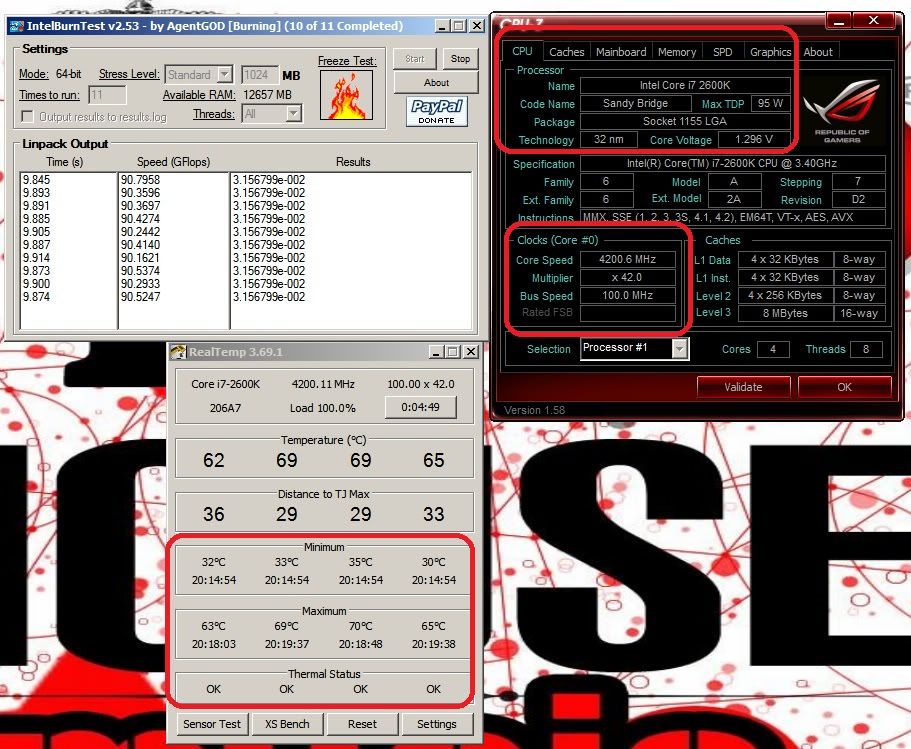
Ok, here is my BEFORE temps with the H50 and MX-2 (push pull exhaust out the back). Overclocked to 4.2Ghz

H50-BEFORE.jpg


next post will be with the temps with the H60 installed.
 
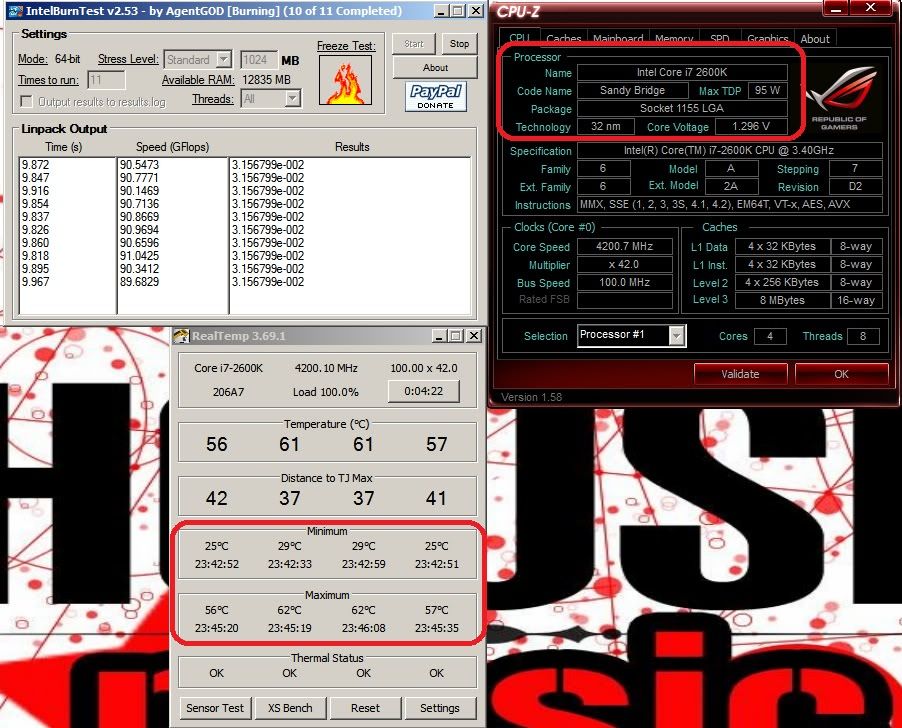
Ok, here is my AFTER temps with the H60 and stock TIM (push pull INTAKE). Overclocked to 4.2Ghz

H60-AFTER.jpg


Looks like its definitely an improvement over the H50.

There were a couple things I did not like during the install of the H60.

A) Backplate. It can only be installed one way with the Intel cpu, but the simplified instructions don't really tell you that.
B) Compared to the H50, the H60 radiator screw holes are flush an additional 1mm. This means the screw/fan/shroud combo I was using before didn't quite work this time. This turned a 15 min install into over an hour install.
C) The power cord of the H60 is really flimsy. While this may just subjective, it makes routing it even more a PITA for me.
 
Last edited:
I'll ship back the old H50 to Corsair and hope that the H60 lasts me a a while.
 
Did you ever inspect what your contact patch looked like with the H50 it may not have been finished very level also maybe the pump was not functioning properly/at full speed.
 
I requested an advance rma. They asked for a credit card to hold funds in case I didn't send back the bad unit.
 
Did you ever inspect what your contact patch looked like with the H50 it may not have been finished very level also maybe the pump was not functioning properly/at full speed.

Yea, I examined it. Looks like the plate was applying more pressure in one area. Left a blimish on my new CPU. Nothing permanent as the h60 seems good.

The way the new h60 pump mounts is way easier than the old h50.
 
Back
Top