I got tired of playing BF 4 so I picked up TF2 for free and I'm looking to get some tips. When I play as Heavy I just put my mouse sensitivity button on the highest setting so it's faster to turn. Also, I have my other mouse button set to do a 180 degree turn. This comes in handy when I play as the Flame Thrower guy as I can ambush a bunch of enemies and keep hitting the 180 degree turn button and release the flamethrower in a 360 degree non stop lol. Any other tips?
![[H]ard|Forum](/styles/hardforum/xenforo/logo_dark.png)
Navigation
Install the app
How to install the app on iOS
Follow along with the video below to see how to install our site as a web app on your home screen.
Note: This feature may not be available in some browsers.
More options
-
Some users have recently had their accounts hijacked. It seems that the now defunct EVGA forums might have compromised your password there and seems many are using the same PW here. We would suggest you UPDATE YOUR PASSWORD and TURN ON 2FA for your account here to further secure it. None of the compromised accounts had 2FA turned on.
Once you have enabled 2FA, your account will be updated soon to show a badge, letting other members know that you use 2FA to protect your account. This should be beneficial for everyone that uses FSFT.
You are using an out of date browser. It may not display this or other websites correctly.
You should upgrade or use an alternative browser.
You should upgrade or use an alternative browser.
Team Fortress 2 Tips
- Thread starter Hulk
- Start date
I do the opposite and reduce my normal sensitivity (3.01 default in the menu) down to 1.51 when I play Heavy; I track and kill targets much better with lower sensitivity. That Pyro strategy is crude at best and will not help you get better at playing the class; you'd be better served focusing on your positioning prior to attacking and making use of your secondary weapons if your flamethrower isn't going to finish the job.
Also, google around and figure out how to set up your config (.cfg) files correctly for each class. TF2 has this strange default cl_interp ratio of .1 when it could be much lower. My demoman .cfg looks like this, for instance:
Here is a good discussion thread: http://teamfortress.tv/thread/14120/about-cl-interp-and-hit-registeration
Also, google around and figure out how to set up your config (.cfg) files correctly for each class. TF2 has this strange default cl_interp ratio of .1 when it could be much lower. My demoman .cfg looks like this, for instance:
cl_interp_ratio 1
cl_interp 0.0152
bind [ "sensitivity 1.51"
bind ] "sensitivity 3.01"
bind 1 "slot1"
bind 2 "slot2"
bind 3 "slot3"
bind Mouse2 +attack2
bind shift +attack2
Here is a good discussion thread: http://teamfortress.tv/thread/14120/about-cl-interp-and-hit-registeration
AMD T-type
Supreme [H]ardness
- Joined
- Aug 26, 2002
- Messages
- 4,590
I do the opposite and reduce my normal sensitivity (3.01 default in the menu) down to 1.51 when I play Heavy; I track and kill targets much better with lower sensitivity. That Pyro strategy is crude at best and will not help you get better at playing the class; you'd be better served focusing on your positioning prior to attacking and making use of your secondary weapons if your flamethrower isn't going to finish the job.
Also, google around and figure out how to set up your config (.cfg) files correctly for each class. TF2 has this strange default cl_interp ratio of .1 when it could be much lower. My demoman .cfg looks like this, for instance:
Here is a good discussion thread: http://teamfortress.tv/thread/14120/about-cl-interp-and-hit-registeration
wat
hundreds of hours into TF2, did not know this.
wat
hundreds of hours into TF2, did not know this.
It's most noticeable when firing projectiles. The stock cl_interp rate of .1 (or 100 ms) is the reason why you get that weird effect where it looks like the grenade or rocket is coming from somewhere to the right or behind the grenade/rocket launcher viewmodel, and it's also the reason why you end up needing to lead targets a lot more than you should.
As such, getting used to a new aiming scheme will likely take a bit of practice, depending on how much twitch muscle memory you've built up - but it is a far more intuitive way to shoot projectiles because 1) they appear to be leaving the correct spot on the viewmodel and 2) your reaction time will be better because the delay between the time you click your mouse and the effect in the game will be reduced, meaning you will have a more 'direct' shot and won't have to lead in an unnatural way.
You can find more info here https://developer.valvesoftware.com/wiki/TF2_Network_Graph. In-game you can type "net_graph 4" (without quotes) in the console to bring up:
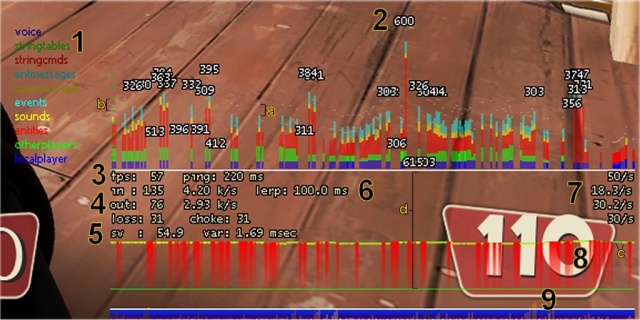
Area 6
The "lerp" indicator shows the number of msecs of interpolation being used by the client.
So in-game you can type cl_interp .xxx and watch as your "lerp" number on the graph increases or decreases. From that original forum thread I linked to, you probably saw that it was recommended to go lower for projectiles (cl_interp .0152), but (cl_interp .033) for hitscan classes like Scout or Heavy; this is where setting up individual class .cfg files comes in handy. You can find your cfg files in the "cfg" folder, which can be found by navigating to Steam > SteamApps > common > Team Fortress 2 > tf > cfg

- Joined
- Sep 24, 2008
- Messages
- 2,605
That Pyro strategy is crude at best and will not help you get better at playing the class; you'd be better served focusing on your positioning prior to attacking and making use of your secondary weapons if your flamethrower isn't going to finish the job.
Agree and also suggest Hulk learn to use Pyro compression blast ASAP. Not just bouncing rockets and pipes, but learning to separate medics from their uber/kritz partners. A wasted uber is far more valuable (kills momentum) than killing them.
And noob heavies spend more time shooting than moving. You have to keep moving, you're the slowest class on the map and an easy kill for almost everyone. (and using Fists of Steel is recommended since it knocks down ranged damage) And you have to learn to jump corners, stairs, whatever and simultaneously spin-up gun/shoot when you land.