• Some users have recently had their accounts hijacked. It seems that the now defunct EVGA forums might have compromised your password there and seems many are using the same PW here. We would suggest you UPDATE YOUR PASSWORD and TURN ON 2FA for your account here to further secure it. None of the compromised accounts had 2FA turned on.
    Once you have enabled 2FA, your account will be updated soon to show a badge, letting other members know that you use 2FA to protect your account. This should be beneficial for everyone that uses FSFT.

system file error keeps on coming back?

lzqtiancai

Limp Gawd
Joined
Jan 21, 2011
Messages
169
Hi , I just upgraded my computer a week ago from c2q. now detailed spec is in my sig. BUT I ran into a problem. My brand new ssd - ocz vertex plus 2.5 sata2 120gb(my windows 7 64bit primary drive) keeps on getting corrupted?

symptoms.
1. C drive needed a consistency check during bootup(happened a couple times), errors were found and recovered.
2. In event viewer: "the file system on the disk is corrupt and unusable, please run chkdsk utility on the volume\device\harddiskVolume2." ( happened maybe 3-4 times)
3. In event viewer: "the file system on the disk is corrupt and unusable, please run chkdsk utility on the volume C:"(happened maybe 3-4 times)
4. restart, I ran Chkdsk utililty a couple times, both times fixed errors. bootup to windows the rerun disk eror check, everything s good, until maybe a day later. same errors pop up in event viewer.
5.side note: first I thought it was my ram, so I ran memtest86+, 1st pass, failed with quater million errors. pulled out test stick by stick on 1st slot, OK. pairs by pairs OK. slot pairs OK. put everything back: memtest overnight 6 passes: OK again.... Idk. its inconsistent...
6. side note: had random bsod 0x0124 and 0x01A, but havent seen it since the bios update


anyway, Do I have a bad ssd??? Thanks in advance
 
Last edited:
Looks like it. Try to secure erase it, maybe (that will destroy everything on it).
 
Looks like it. Try to secure erase it, maybe (that will destroy everything on it).

yeah. maybe i will try that, but here's an update on the situation. which makes me lean toward ram problem a little. SO is problem the ram or ssd? or both:eek:

1. bumped up my dram voltage from 1.59 to 1.62
2. memtest overnight 6 passes. no errors
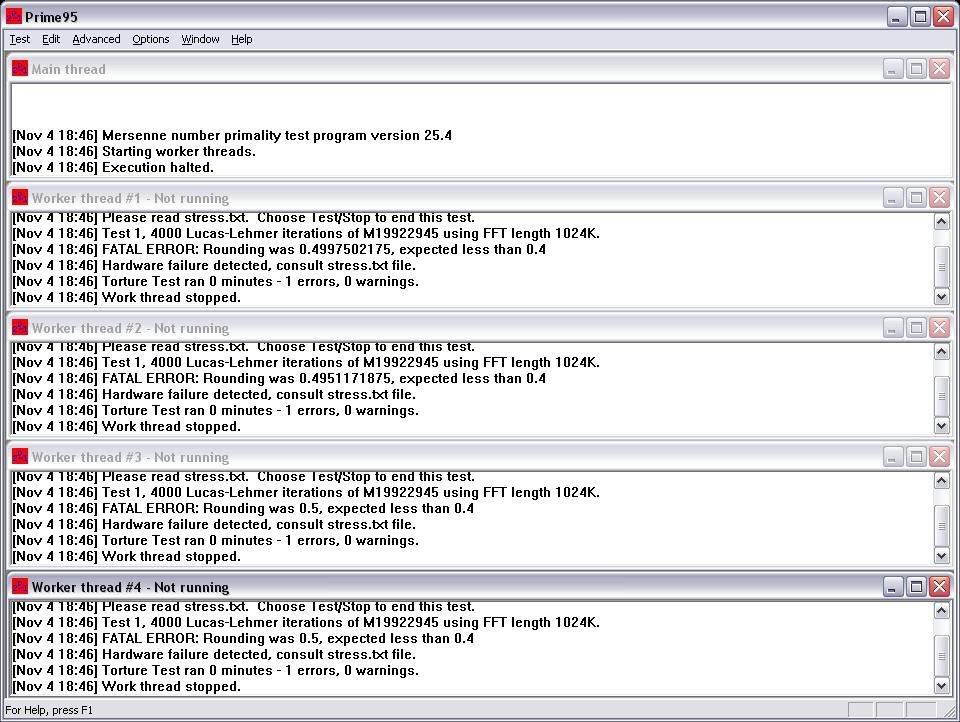
3. Prim95. Blend test.(memory). 1 error found within 10 min

GRRAGAIN.jpg
 
Last edited:
If you were having memory problems (which it sounds like you were initially at least), that will cause filesystem corruption.

Before you return the SSD, try it in another system. Secure Erase and reformat, copy some random data to it until it's maybe 1/2 full and then run a CHKDSK.

A memtest pass and a prime fail could indicate a problem that only manifests itself when the system is under heavy load, power issues maybe? Or heat. It could easily be something other than a bad DIMM.

Dustin
 
So you are saying bad ram can cause ssd to be corrupted??
That might make sense, b/c my ram is not exactly compatible with my advanced new board. at least its not listed on asrock website. system specs in my sig. also when the dram voltage is default auto by the mobo, its 1.59. where my ram on ocz website is listed as 1.65. thats y I bumped it to 1.62. to make it at least a little closer:D

If you were having memory problems (which it sounds like you were initially at least), that will cause filesystem corruption.

Before you return the SSD, try it in another system. Secure Erase and reformat, copy some random data to it until it's maybe 1/2 full and then run a CHKDSK.

A memtest pass and a prime fail could indicate a problem that only manifests itself when the system is under heavy load, power issues maybe? Or heat. It could easily be something other than a bad DIMM.

Dustin
 
So you are saying bad ram can cause ssd to be corrupted??
That might make sense, b/c my ram is not exactly compatible with my advanced new board. at least its not listed on asrock website. system specs in my sig. also when the dram voltage is default auto by the mobo, its 1.59. where my ram on ocz website is listed as 1.65. thats y I bumped it to 1.62. to make it at least a little closer:D

I do not believe in mobo manufacturer RAM compatibility list.
For example:
If mobo is DDR2 PC6400 compatible, it is DDR2 PC6400 compatible and it does not matter when and who the hell manufactured that DDR2 PC6400 DIMM.

This is my opinion. I may be wrong.

Please consider damaged mobo also. Damaged northbridge possibility, etc ...

My friend have very strange problems with the mobo.

- random BSOD
- random memtest failures
- random CPU stress test failures

He tested all the hardware in other mobo without any issue.

Please try to use default recommended memory voltage during tests. Even in my overclocked c2d 1.8@2.8, I am using default voltage for my DIMMs.

Kiwwiaq
 
Please try to use default recommended memory voltage during tests. Even in my overclocked c2d 1.8@2.8, I am using default voltage for my DIMMs.

Kiwwiaq

ok
By default voltage, you mean manufacture ratings(which is 1.65) or mobo bios auto default(which is 1.59)?
 
I really really dont want the problem to be on the mobo.... since i bought it used from here. while ram and ssd i bought new from tiger and directron.

But I agree with you that my problems seems to be a little random. too.. I read at bunch places talking about how 8 gb ram is touchy. so i might just run on 4 gb for now see if system stablizes.

If anybody have any more suggestions before I do that would be appreciated
 
Yeah I overlooked the part when you talked about your memory. It can definitely screw up an HDD/SSD contents, that's why some (including me) do their overclocking validation with a dedicated hard drive.

First, if your memory needs 1.65V, give it that.

Doing some OC recently on my rig (MSI X58 Big Bang, i7 920, 6*2GB Corsair DDR3) I tested XMP for the first time, my previous memory didn't have that. It didn't work very well (BSOD during boot), until I realized it tried to put the memory at 1600MHz with only 1.5V. Worked much better at 1.65V.
 
When I was solving such issues with my friend, we used following method:
- we dismantled the whole rig
- cleaned all parts from dust
- we build minimum HW configuration - mobo, cpu, 1 mem stick, psu, keyboard and monitor
- we started the rig on total factory default
- boot from usb stick or cd/dvd
- no HDD drives, no GPU (only onboard GPU if possible)

We executed this kind of test:
- 5 cycles of latest memtest
- 1st stick, 1st slot
- 1st stick, 2nd slot
- 1st stick, 3rd slot
- ...

After that we added second stick and executed the same kind of the test.

When memory was OK, we started heavy burn tests of CPU, then GPU, every HDD complete surface test can be done also. If you have spare PC, you can run several HDD tests during the mem tests. I hope, that you can see my point.

After tests use the rig as usual for some time, 2 weeks etc.

If this test will be negative, wrong oveclock settings are the reason and something have not enough power or something is running unstable after your overclock settings, if you are already overclocking.

I know, that it is very time consuming, but patience will give you the result.

Kiwwiaq
 
Thank you for the advice! but that is wayy too much downtime for me, this is the only desktop I have. well, the other one is intel celeron, pretty useless when it comes to gaming... What I might go ahead and do now is start using 4gb 2x2gb to see if the system stablizes, then go from there. if not, new ram time?
Thanks again for the detailed desciption

When I was solving such issues with my friend, we used following method:
- we dismantled the whole rig
- cleaned all parts from dust
- we build minimum HW configuration - mobo, cpu, 1 mem stick, psu, keyboard and monitor
- we started the rig on total factory default
- boot from usb stick or cd/dvd
- no HDD drives, no GPU (only onboard GPU if possible)

We executed this kind of test:
- 5 cycles of latest memtest
- 1st stick, 1st slot
- 1st stick, 2nd slot
- 1st stick, 3rd slot
- ...

After that we added second stick and executed the same kind of the test.

When memory was OK, we started heavy burn tests of CPU, then GPU, every HDD complete surface test can be done also. If you have spare PC, you can run several HDD tests during the mem tests. I hope, that you can see my point.

After tests use the rig as usual for some time, 2 weeks etc.

If this test will be negative, wrong oveclock settings are the reason and something have not enough power or something is running unstable after your overclock settings, if you are already overclocking.

I know, that it is very time consuming, but patience will give you the result.

Kiwwiaq
 
ok, update. I put my ram to 1.65. ran prime(blend test) and left. when i got back, the computer already restarted... I checked the event viewer, it ran for 2hours before it restarted. So I dont know what bsod it game me, probably 0x000000050..... since this one is the most common right now.

Yeah I overlooked the part when you talked about your memory. It can definitely screw up an HDD/SSD contents, that's why some (including me) do their overclocking validation with a dedicated hard drive.

First, if your memory needs 1.65V, give it that.

Doing some OC recently on my rig (MSI X58 Big Bang, i7 920, 6*2GB Corsair DDR3) I tested XMP for the first time, my previous memory didn't have that. It didn't work very well (BSOD during boot), until I realized it tried to put the memory at 1600MHz with only 1.5V. Worked much better at 1.65V.
 
if youve the money just buy compatible ram, save you the headache of trying to find working settings (which might not happen).
 
if youve the money just buy compatible ram, save you the headache of trying to find working settings (which might not happen).

rams are cheap these days. I just dont want my new ram not to work either... anyone using a asrock z68 pro gen3 fatality mobo have a good ram recommendation?
 
update: I decided to run 8gb (4x2gb) for one last day. found corrupted games/programs in C(ssd) and D drives. did the disk check, nothing found. then i ran memtest86+
1. V dram at 1.65(factory rating), error immediately
2. V dram set at 1.59(bio auto default). error immediately
3. V dram set at 1.605(in between...). eroor immediately
4. shut down computer, unplugged power for 10 seconds. start up computer, memtest have been running. no errors at 3 passes so far.


Can someone tell me if this points to any faulty device? ram?, mobo?(please not mobo).. etc
 
update: I decided to run 8gb (4x2gb) for one last day. found corrupted games/programs in C(ssd) and D drives. did the disk check, nothing found. then i ran memtest86+
1. V dram at 1.65(factory rating), error immediately
2. V dram set at 1.59(bio auto default). error immediately
3. V dram set at 1.605(in between...). eroor immediately
4. shut down computer, unplugged power for 10 seconds. start up computer, memtest have been running. no errors at 3 passes so far.


Can someone tell me if this points to any faulty device? ram?, mobo?(please not mobo).. etc

Hi,

unfortunately we can`t. Any part can be damaged here. You need to run the tests. This can point to damaged RAM module, slot, memory bus, CPU, your SSD, bios settings. Something is producing the data corruption in the memory.

This issue is random ... :( Something is slowly dying probably or who knows :(

k.
 
one more question. since bad ram can corrupt hard drives. can bad harddrive give ram errors?
 
one more question. since bad ram can corrupt hard drives. can bad harddrive give ram errors?

Well, to keep it simple, when you are doing any operation, it is going through RAM. If you read good data from HDD and you have bad RAM, data are bad, if you are reading bad data from HDD, data in RAM will be bad.
 
Well, to keep it simple, when you are doing any operation, it is going through RAM. If you read good data from HDD and you have bad RAM, data are bad, if you are reading bad data from HDD, data in RAM will be bad.

Thanks!.
Update on my situation: pulled out 2 sticks of ram. now runing on 4gb (2x2gb). ran memtest86+ all night, 11 passes no error. but after restart. C got corrupted again.. restart to do disk check. after restarting, windows aero is gone. like the files and options just disappeared, now only can run classic mode. lol. this is sad.

I might switch out the 2 ram inside with the pulled out ones.
 
Back
Top