• Some users have recently had their accounts hijacked. It seems that the now defunct EVGA forums might have compromised your password there and seems many are using the same PW here. We would suggest you UPDATE YOUR PASSWORD and TURN ON 2FA for your account here to further secure it. None of the compromised accounts had 2FA turned on.
    Once you have enabled 2FA, your account will be updated soon to show a badge, letting other members know that you use 2FA to protect your account. This should be beneficial for everyone that uses FSFT.

Summer FileServer/MediaServer Build Log

zankza

n00b
Joined
Mar 7, 2013
Messages
44
So the summer has come and its been long over due that I've always wanted to build an file/media server where it would store all of my movies/tv shows and have it accessible to every applicable device in my network via wired and wifi.

I need some bit of help with opinions, basically mostly about hardware and fileserver configuration.

I'm looking to start my fileserver with 4x4TB array, and most likely will use FreeNAS for OS/ZFS. Due to nature of calculations done by ZFS it is most likely I will go for xeon and ECC ram path, I would like rock solid reliable, but I accept any possibilities of failure. As seeing most of the data are actually from the DVD/Blu-ray, I'll also need some help and find the best software to properly rip the discs into digital format without losing any quality yet saving if any. But that's another topic.

To kickstart this discussion, If anyone has experience with FreeNAS, I have some couple of questions. While the array will start with 4x4TB but I most definitely would expect to expand the array, and there's real good chance the next hard drives won't be 4TB(higher capacity) how difficult and ease is it to add more disks to existing array without requiring to format or recreate the array completely. I know the more RAM the better the array performance will be, but is there such thing SSD-cached in FreeNAS? Because I have some spares or even would consider buying an SSD for cache purpose.

For those who are hardware fanatic, I would like to start looking for appropriate case first, before deciding the rest of parts. I am having hard time to find this desktop I saw year ago, this desktop had full hard drive cages all the way from top to bottom at the front of the tower. This desktop could accompany around dozen(less or more) hard drives and it was very minimal without costing too much. But I can't find the build log nor the case, so with your help I would like to find this case or better one.

I'll bring up about networking part later, some discussing about SFP (10g). But for now I need help with hardware and a bit information about FreeNAS.
 
Hi zankza,

first the easy part : the bluray ripping :D
Use makemkv. it's free while in beta (has been in beta since forever), rips blurays to mkv and doesnt touch video or audio data (native video and audio streams, i can testify that DolbyTrueHD and DTS-MA get passed fine to the receiver). Remuxed my own bluray collection that way.

Now for the more complicated part :

It all depends on how big you want to go. For 20tera-ish i was quite happy with my HP N40L microserver. with a 5.25-3.5 adapter it fits 5x4 tera, and runs Nas4Free like a champ.

Seeing as you're talking about 10gbit and ZFS though, you're inclined to build something similar to my new fileserver. One thing about ZFS first though : you cannot expand arrays.

But frankly, if we are talking Xeon and SFP budgets, HD costs should be negligeable.

What you can do is the following :
- make a zpool
- add a vdev as first array (probably 5disk raidz1 or 6 disk raidz2)
- for more disk space, add another vdev to the zpool later.

That would increase your total zpool space, but it comes with 2 caveats :
- 2 vdevs in a zpool act like RAID0. this gets you performance increase if both vdevs are written to (have empty space). However if one vdev fails, the whole pool fails. Careful with that.
- if your first vdev is full, then you will only write to the new vdev. performance is the one of your new vdev. Data does not get rebalanced.

I am doing the following :
- Starting out with a zpool of 2 raidz2 vdevs of 6 disks each. makes for a nice 30tera-ish with 4 disks failure protection.
- i will either add more 6disks vdevs to the zpool, or create a 2nd zpool. not sure yet.

SSD cache ... i don't know if this will make much sense. Professionals are using SLC or faster ZEUS disks as ZIL for accelerating ZFS, but imho it doesn't make much sense for a home media server. MLC or TLC drives are definitely not recommended. I don't plan on using one in my build.

As cases, it really depends on how many disks you want. If you want to go big, there's the usual rackmounts : Norco 4224 for US people and the XCase.co.uk ones for Europeans.

Hope that gets you started :D
 
As far as the cases go, you can go with desktop cases like Fractal design R4. Even better is the old Fractal Design Define XL with 10x HDD + 4x5.25", where you put Norco SS-500 and get extra 5 drives... But finding the case might be tough, since it discontinued...

If you wan't to go for more drives, take a look at Norco cases (4220, 4224). For around 400$, you get a 24 HDD case with hotswap bays and rack format. If you are from USA, take a look at craigslist if anyone is selling Supermicro cases (SC846, SC847, SC848). Sometimes you can get killler deals for cases that costs $1000+.

As for hardware, this is currently my pick for the new NAS:
SuperMicro X10SL7-F
Kingston 16GB ECC
Intel Core i3-4330
Sea Sonic M12II-750
X-case RM 424
Kingston SSDNow S200 30Gb

X10SL7 has 14 SATA ports. You can add additional HBA to the remaining x8 port and get 8 more drives... The problem I see is, if you want to add a 10gbit network card, then you are out of pci-e ports...

Another option is to coming Asrock E3C224D4M-16RE board with 16xSATA ports and 2x PCI-e x8 slots + mezzanine slot for 10GBps network card... I'm not sure if it's out yet and how the SATA drives behave when plugged to expander...

Matej
 
Don't get 8GB Kingston modules with a Supermicro X10 board. There are compatibility issues and kingston recently removed the X10 boards from their compatibility list for 8GB modules.

X10SL7 has 14 SATA ports. You can add additional HBA to the remaining x8 port and get 8 more drives... The problem I see is, if you want to add a 10gbit network card, then you are out of pci-e ports...

Why can't you put it in the second PCIe slot. It's PCIe 2.0 4x in an 8x slot. That's capable of 16Gbit/s in bandwidth. Unless you mean add 2 more HBAs. Well I guess either add a 16-port HBA, or add a SAS expander and expand the onboard SAS controller so you can get enough for 24 ports still leaving 1 PCIe open.
 
Last edited:
As far as the cases go, you can go with desktop cases like Fractal design R4. Even better is the old Fractal Design Define XL with 10x HDD + 4x5.25", where you put Norco SS-500 and get extra 5 drives... But finding the case might be tough, since it discontinued...

If you wan't to go for more drives, take a look at Norco cases (4220, 4224). For around 400$, you get a 24 HDD case with hotswap bays and rack format. If you are from USA, take a look at craigslist if anyone is selling Supermicro cases (SC846, SC847, SC848). Sometimes you can get killler deals for cases that costs $1000+.

As for hardware, this is currently my pick for the new NAS:
SuperMicro X10SL7-F
Kingston 16GB ECC
Intel Core i3-4330
Sea Sonic M12II-750
X-case RM 424
Kingston SSDNow S200 30Gb

X10SL7 has 14 SATA ports. You can add additional HBA to the remaining x8 port and get 8 more drives... The problem I see is, if you want to add a 10gbit network card, then you are out of pci-e ports...

Another option is to coming Asrock E3C224D4M-16RE board with 16xSATA ports and 2x PCI-e x8 slots + mezzanine slot for 10GBps network card... I'm not sure if it's out yet and how the SATA drives behave when plugged to expander...

Matej

I completed my build in February, in this exact case Fractal XL. I was able to fit in all my custom water cooling without taking up a single drive bay. Great quiet case, the loudest thing is the hard drives. Of course I have neglected to install software because I have been too busy for the migration from my old WHS server :(...

For OS I'm trying to install Windows Server Essentials with Drive Bender or Stable bits DrivePool, this way I can get free automated incremental Backups for all my windows PC's, have an easily expandable storage pool, and run my security camera software + any other servers I may want to put up.

For what it's worth SSD will be nice for reliability reasons and faster boot times should you need to restart the server for any reason. Hardware isn't too important so far, I'm have been using a C2D dual core with 4GB ram for years, and it's still chugging along fine. I'm upgrading it to a quadcore only because I intend to add more POE security cameras and those do eat some of the CPU for decoding, but probably not enough to justify the faster CPU alone (Ok real reason is I updated my gaming rid so the old one is a free upgrade). I was maxed out on sata ports and had to add a couple SATA PCIe cards, the new board gives me 2 more ports (because it is not micro ATX). However I'll be using 4TB drives instead of 1TB drives this time around so the number of sata ports is now much less important. The only issue I have when streaming media is when the media is across multiple disks and I have get a pause while the next disk powers up. This is probably more an issue of having way more drives than the old WHS was ever meant to support, and that all the drive are full. It might be an issue with a drive or two itself, or the fact I don't have a designated disk for the security cameras. I think they are all 7+ years old at this point ;).

With servers take into mind NOISE and Maintenance. You want something with easy to clean filters, and maybe something you can lift to bring it outside once a year to air-compressor it out. Now mine will be a bit on the heavy side with the water cooling and I won't be able to fit the Norco SS-500 because that's where I have my pump mounted, but it's still an overkill system for it's intended purpose (I won't need 40TB+ for a while).
 
Last edited:
SirMaster said:
Why can't you put it in the second PCIe slot. It's PCIe 2.0 4x in an 8x slot. That's capable of 16Gbit/s in bandwidth. Unless you mean add 2 more HBAs. Well I guess either add a 16-port HBA, or add a SAS expander and expand the onboard SAS controller so you can get enough for 24 ports still leaving 1 PCIe open.

As far as I looked, all 10GBps cards need x8 pci-e slot...

Matej
 
As far as I looked, all 10GBps cards need x8 pci-e slot...

Matej

It's not 10GBps network, it's 10Gbps.

I would believe an 8x PCIe 1.0 slot, but I don't see why a 4x PCIe 2.0 slot would not be the same.

PCIe 2.0 is twice the bandwidth per lane as PCIe 1.0

Speed
Per lane (each direction):
v1.x: 250 MB/s (2.5 GT/s)
v2.x: 500 MB/s (5 GT/s)
v3.0: 985 MB/s (8 GT/s)
v4.0: 1969 MB/s (16 GT/s)

So a 4x PCIe 2.0 slot is 2000MB/s = 16Gbit/s.

So this is assuming you get a 10Gbps card that is PCIe 2.0 or greater.
 
Well the slot on the supermicro board is physically an 8x slot so those cards will physically fit fine. And as long as you don't get one that's PCIe v1.x then I don't see why it wouldn't have enough bandwidth for 10Gbps since the available bandwidth in the slot exceeds the bandwidth capabilities of the card.

But it's possible it's more complicated than that I suppose.
 
Last edited:
I know the slot is x8, but I think it needs to be electrically x8 as well for system to boot/recognize the card...

I once tried to put IBM M1015 SAS HBA to a x8 physical/x4 electrical slot and the system didn't find the card...

Matej
 
Hmm, weird. I have put various sized PCIe cards in various slots and they always worked fine since PCIe is modular.

I once even cut the end open on a 1x PCIe slot and stuck a 16x card in it and it ran fine, just slower.
 
Hum... Now that I read a little on a pcie standard, it seems like it should work, just speeds are a little slower...

It might be my MB fault for my HBA not to work...
 
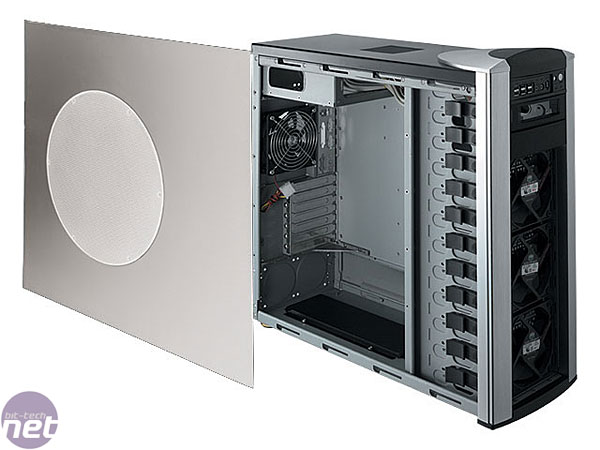
I am having hard time to find this desktop I saw year ago, this desktop had full hard drive cages all the way from top to bottom at the front of the tower. This desktop could accompany around dozen(less or more) hard drives and it was very minimal without costing too much. But I can't find the build log nor the case, so with your help I would like to find this case or better one.
I'm not sure if this is the case you are referring to, but the case that pioneered the concept of drive bays from top to bottom was the CoolerMaster Stacker, and its succesor the Stacker 830. You could fit 4, 4x3 or 5x3 HDD hot swap modules in them *IF* you removed the USB front port/power button drive bay and didn't use an optical drive. This necessitated the use of an external optical drive and to install a power button elsewhere. These cases are long since discontinued, but there are other cases similar to them now.

Original Stacker:
page1-2.jpg


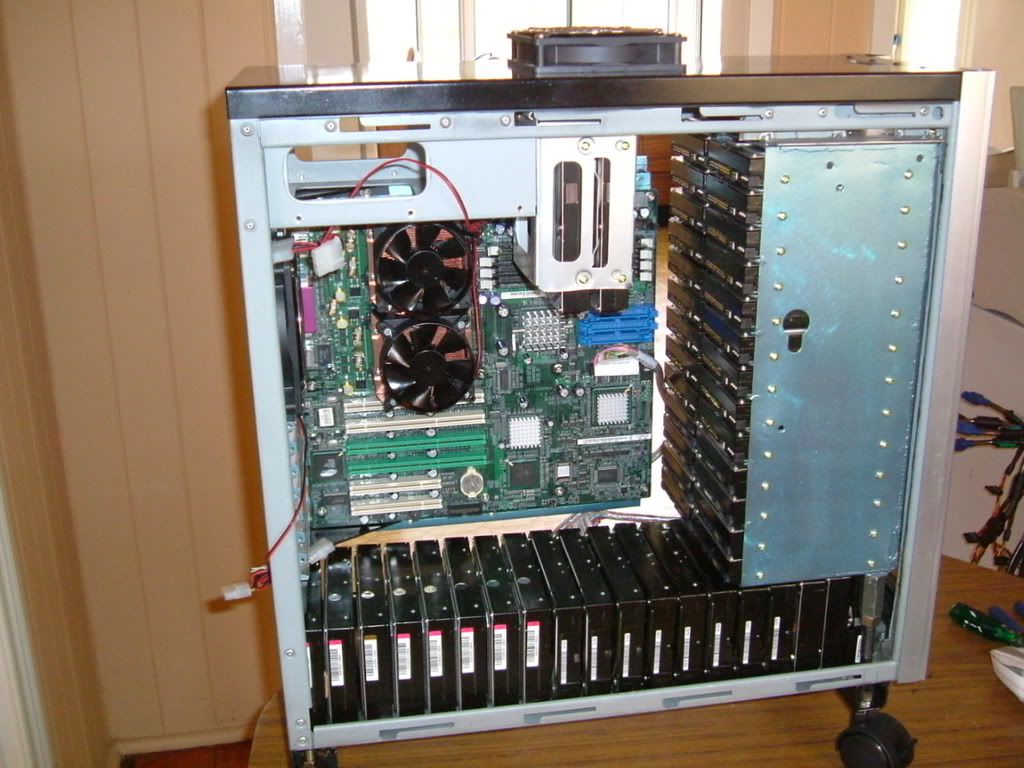
Here was a case mod to fit 47 hard drives in it...
http://forums.overclockers.com.au/showthread.php?t=602130
In case you are wondering about the cooling setup on this one, look carefully through the pics, you will see all the HDD's actually do have fans cooling them.
42.jpg
 
Last edited:
I love my Fractal R4. I bought an additional 12(or was it 14cm) fan for the back and I'm running them on 5V. All disks stay around 22-24°C.

As I said, the old XL is even better, but they are hard to come by. Maybe you can get a used one on ebay or something. You get more HD space and there is never enough of them:)

I bought a R4 thinking 8HDDs will be enough. Well, 4 months later it's full and I have to buy a new case. I could have just add 300$ and go with Norco in the first place and save myself some troubles:)

Matej
 
As an eBay Associate, HardForum may earn from qualifying purchases.
As an Amazon Associate, HardForum may earn from qualifying purchases.
Mobo: http://www.newegg.com/Product/Product.aspx?Item=N82E16813157414
Ram: http://m.ebay.com/itm?itemId=380522579381
Net: http://m.ebay.com/itm?itemId=360935583830
CAse: http://www.amazon.com/gp/aw/d/B0066...bile?psc=1&redirect=true&ref_=wms_ohs_product

Psu not yet determined.
The reason why i went with this mobo is becuz it has 8 sata plus two pcie, will use one for network and another one for 8port sata card (98$) so strong future growth. And mobo can support shitnton memory.

Board takes un-buffered RAM, but you have registered RAM listed on the ebay link, this wont work.

The motherboard can support 32GB of memory, this is the standard amount that pretty much any motherboard can support these days.
 
As an eBay Associate, HardForum may earn from qualifying purchases.
As an Amazon Associate, HardForum may earn from qualifying purchases.
I've wrote a lenghty reply the last time but I guess I forgot to post it. Damn!

Ok, so lets see:
- Mobo:
I would not go with this motherboard. Poor ethernet controllers (Realtek is a no-go if you want performance, go Intel), questionable SATA3 ASMedia 1061 support in FreeNAS (better check that), no KVMoIP. I would rather go with SuperMicro X10SL7-F. Server class MB, good/top components for the money (Intel NICs, LSI SATA HBA,...) and KVMoIP. I know you many think you don't need it, but get it and you'll see how handy that is. No more running to the basement pluging your monitor to your server because something happened, boot iso from your workstation PC and install FreeNAS over network,...

- Memory:
As the one before me said, you need Unregistered ECC. As far as I know, there is no 16GB Unreg ECC, 8GB is max.

- 4x GBps nic:
Do you really need it? What kind of transfers do you expect? Single large one or many smaller? This NIC won't help with single transfers, only multiple. If it's the 2nd case, I would first try the two on motherboard and if they get saturated, order another card.

- Case:
I would reather choose Fractal Design. It's really quality build and has more space. Think twice about the case. I ordered myself a Fractal Design Desire R4 saying, 8HDD will be enough. Same with motherboard. 2 months later, I'm buying a new case and a new board+cpu+ram and it's gonna cost me more than buying everything in the beginning.

As for CPU, go with the i3 I'm using. Enough to have compression running have good performance.

As for PSU, don't save money. People had arrays failing because of poor PSUs and sometimes, array are hard to fix when you are using FreeNAS oz ZFS. Get a proper Seasonic or another good brand, better to have a few W extra...

Matej
 
Back
Top