• Some users have recently had their accounts hijacked. It seems that the now defunct EVGA forums might have compromised your password there and seems many are using the same PW here. We would suggest you UPDATE YOUR PASSWORD and TURN ON 2FA for your account here to further secure it. None of the compromised accounts had 2FA turned on.
    Once you have enabled 2FA, your account will be updated soon to show a badge, letting other members know that you use 2FA to protect your account. This should be beneficial for everyone that uses FSFT.

Storage Spaces - missing capacity?

TeeJayHoward

Limpness Supreme
2FA
Joined
Feb 8, 2005
Messages
13,321
I've been trying out what I consider to be Windows 8's version of ZFS, and I've encountered a bit of an issue. The math just doesn't seem to add up for me. Take a look.

First off, the data I have on my storage space is duplicated on my ZFS server:
Code:
tim@solaris:~$ zpool list pool
NAME   SIZE  ALLOC   FREE  CAP  DEDUP  HEALTH  ALTROOT
pool  16.2T  9.35T  6.90T  57%  1.00x  ONLINE  -

But under Windows, it shows up differently, depending on which window you're looking at. Windows explorer shows the "drive" as having 5.4TB free. The Storage Space properties show it as having 4.07TB free. And if I were to subtract the used space from the pool capacity, I'd only have 1.3TB free! On top of this, Storage Spaces is warning me to add drives, since I'm using 75.1% of my free space. I have 6x3TB drives in this pool. I'm have 9.35TB of data. That's only a little over half the raw capacity! Even if I looked at post-format capacity (2.72TB) and "lost" a full drive to parity, I should have 13.6TB of space to play with. That would put me at 68-69% utilization. Where the heck is all my "extra" space going?
StorageSpaces3_zps15270b23.png

StorageSpaces2_zps9bf8f40e.png

StorageSpaces1_zps411d2489.png
 
Seems odd to reply to my own post, but this is the only way I could figure any of their math out.

If they base the fullness of the space on a formula like the following:
(used space on drives including parity)/(total formatted capacity of drives including parity drive)
12.2TB / 16.3TB
75%

vs the way I'd expect it to be explained to the user:
(used space on storage space)/(total space on storage space)
8.1TB / 13.5TB
60%

It still doesn't explain the whole "20.2TB including resiliency" or "4.07TB free" in the last pic, though! Even if I added the parity space to the 8.1TB used, I'd end up with about 9.45TB used. As far as I can see, that's how Solaris comes up with it's number. Where the hell did the 12.2TB come from? The only thing I could see is if Storage Spaces is using 3 disks for parity. 3 whole freakin' drives. A 50% reduction in space. (No, it's not set up as a mirror)
 
Last edited:
It has been a while since I looked at Storage Spaces, but I distinctly remember there being an issue with Storage Spaces reporting low space well before the pool should be full. I remember that with mismatched drives specifically, but maybe you can look into that. It might be a Windows problem.
 
you'll be hard pressed to find any expert Storage Spaces help outside microsoft related forums (and even then I dunno). Many people are avoiding it like the plague until SP1 and only then re-evaluating it. I'd use it for test purposes only and not rely on it as primary storage, for many reasons already discussed in previous threads.
 
I've been trying out what I consider to be Windows 8's version of ZFS, and I've encountered a bit of an issue. The math just doesn't seem to add up for me. Take a look.

First off, the data I have on my storage space is duplicated on my ZFS server:
Code:
tim@solaris:~$ zpool list pool
NAME   SIZE  ALLOC   FREE  CAP  DEDUP  HEALTH  ALTROOT
pool  16.2T  9.35T  6.90T  57%  1.00x  ONLINE  -

But under Windows, it shows up differently, depending on which window you're looking at. Windows explorer shows the "drive" as having 5.4TB free. The Storage Space properties show it as having 4.07TB free. And if I were to subtract the used space from the pool capacity, I'd only have 1.3TB free! On top of this, Storage Spaces is warning me to add drives, since I'm using 75.1% of my free space. I have 6x3TB drives in this pool. I'm have 9.35TB of data. That's only a little over half the raw capacity! Even if I looked at post-format capacity (2.72TB) and "lost" a full drive to parity, I should have 13.6TB of space to play with. That would put me at 68-69% utilization. Where the heck is all my "extra" space going?
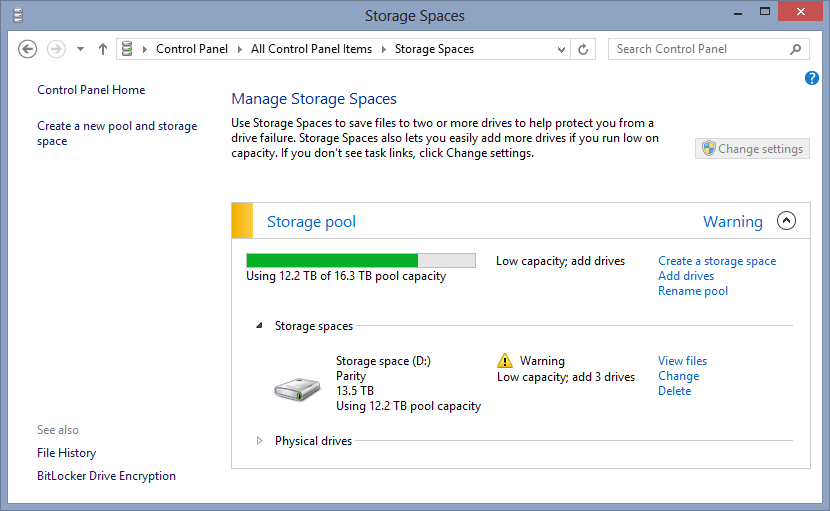
StorageSpaces3_zps15270b23.png

StorageSpaces2_zps9bf8f40e.png

StorageSpaces1_zps411d2489.png

Up your storage space (Drive D) to 16.3TB You are not using the complete capacity of the pool. The Pool is 16.3TB but your storage space is only 13.5TB
 
Somewhat of a necro.

Is there a way to adjust the warning so it prompts at like 95% rather than 75%? Looked through Powershell cmdlets and don't see anything.
 
Back
Top