• Some users have recently had their accounts hijacked. It seems that the now defunct EVGA forums might have compromised your password there and seems many are using the same PW here. We would suggest you UPDATE YOUR PASSWORD and TURN ON 2FA for your account here to further secure it. None of the compromised accounts had 2FA turned on.
    Once you have enabled 2FA, your account will be updated soon to show a badge, letting other members know that you use 2FA to protect your account. This should be beneficial for everyone that uses FSFT.

SSD RAID 0 Operating at Single SSD Speeds

Sanjiyan

n00b
Joined
Jun 25, 2013
Messages
3
I have set up two 250GB Samsung 850 Evo SSDs in a hardware RAID 0 configuration in the BIOS on my Asus G751JL-BSI7T28 laptop (Intel HM87 Expess Chipset with the most up to date BIOS/Intel RST firmware from Asus, released in 2015), after which I performed a clean installation of Windows 10 Pro x64 and installed all drivers including the most recent Intel chipset and RST software/driver. Both SSDs are identical with the latest firmware from Samsung. Everything functions normally, however I am only getting the same read/write performance I get from a single one of these drives, approximately 520-530 MB/s sequential read (similar results for all read/write performance when benchmarking), where I was anticipating it to be just a bit less than double that with this configuration. The array even shows up properly as an SSD in Windows. I have reached out to Asus support to which they replied saying that they do not provide support with storage or RAID configurations for their products. I'm aware that RAID 0 with SSDs isn't a significant benefit in all cases and doubles the risk of data loss, however that is not a concern in this case and the improved read an write performance would be a benefit for my needs. I have included a screen capture with the hope that it will provide enough information to evaluate the configuration.

Any insight or help is greatly appreciated. Thanks!
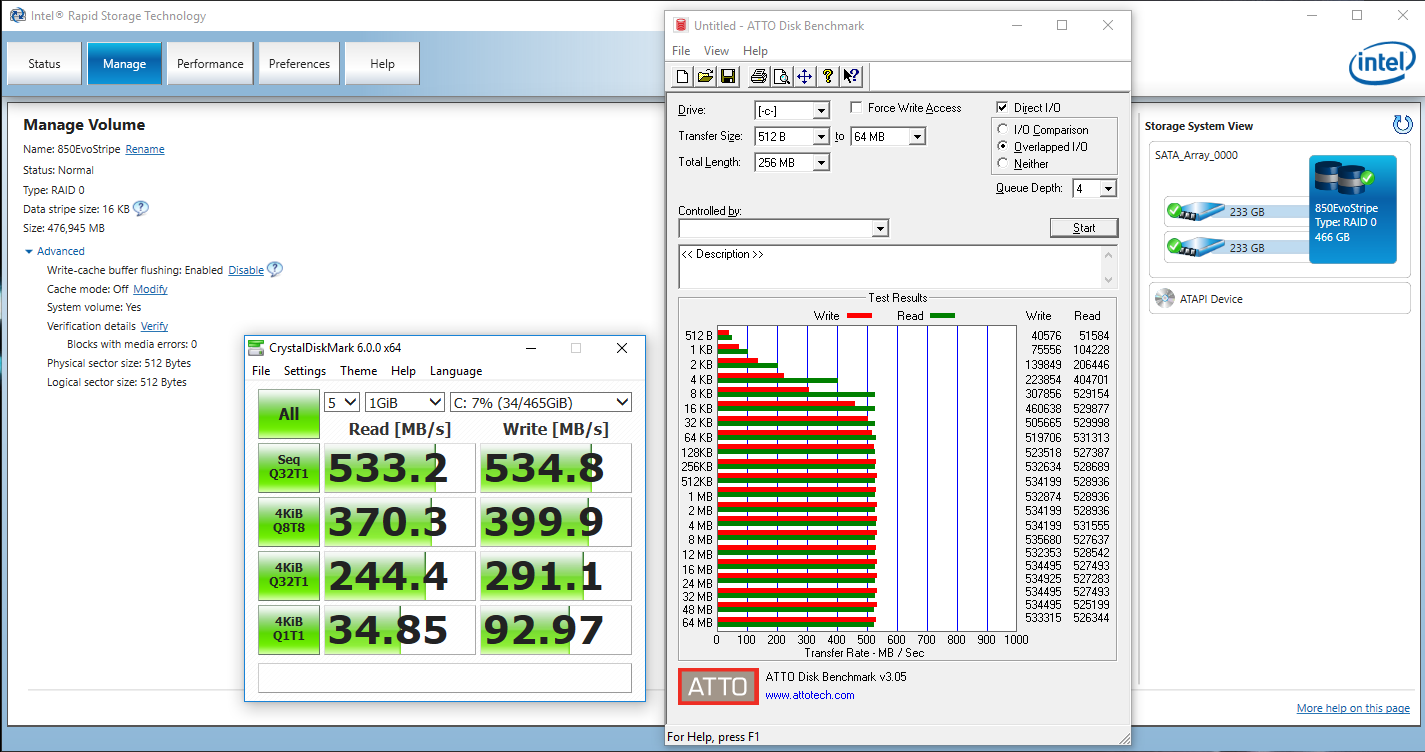
Capture.PNG
 
Just a question - if you *don't* have RAID 0 and you just benchmark a single one of your drives on its own, does it run this fast?

I'm asking because the HM87 chipset supports both SATA3 (6gb) and SATA2 (3gb) and it's possible the laptop has the drives connected to SATA2 ports.
 
Prior to setting it up as a RAID 0 I had run benchmarks on a single drive with similar performance results. This laptop has two 2.5" standard drive bays that should be operating at SATA 3 speeds (at least it was when in AHCI mode rather than RAID). According to AIDA64, both drives are currently operating in SATA 3 mode.
 
Have you tried changing the cache mode? It looks like it is currently off.
 
Not on a laptop, but I run two EVOs in RAID 0 and get approximately double your numbers, so your expectations are in the right place. Of course, I'm on a Z170 desktop, and I do not have Intel's RST desktop stuff installed, just the basic driver so I can't pop into the utility and see what mine looks like.
 
I found the issue. Apparently while the SSD in the second drive bay was being reported as operating in SATA 3 mode, it was actually operating in SATA 2 mode. It seems that it is a hardware limitation I was not previously aware of. Thanks for the assistance. :)
 
Back
Top