• Some users have recently had their accounts hijacked. It seems that the now defunct EVGA forums might have compromised your password there and seems many are using the same PW here. We would suggest you UPDATE YOUR PASSWORD and TURN ON 2FA for your account here to further secure it. None of the compromised accounts had 2FA turned on.
    Once you have enabled 2FA, your account will be updated soon to show a badge, letting other members know that you use 2FA to protect your account. This should be beneficial for everyone that uses FSFT.

SSD RAID 0, anyone?

clarkkent57

Limp Gawd
Joined
Nov 20, 2007
Messages
467
Has anyone out there actually ran a RAID 0 from two (preferably more, like 5) SSDs? If so, how did your overall system performance do? (I'm not talking about boot time, but your actual experience in games, video processing, etc. Something requiring steady storage accessing.)

My contention is that, though SSDs are relatively expensive, a computer user will experience a better "fair and balanced" upgrade to their computer if they upgrade their storage. I believe that [H]ard's PCI-E tests (which showed no real gain from 16x/16x and 16x/8x over 8x/8x) are indicative that we've pretty much hit the wall with improvement in CPUs, RAM, motherboards, and videocards...especially if they're all constantly awaiting data from the hard drive.

(I mean "best bang for buck" upgrades, not actual measurable performance inccreases. Of course we'd see an improvement in a better and faster videocard...but would we see an equally or greater performance increase if we radically improved the storage sus-sytem instead?)

[H]ard-like benchmarks before and after would definitely help.

Considering small SSDs can be had on special for 50 to 60 bucks these days, on sale, and that RAID 0 TRIM support is available for RAID 0, then I think I'd rather put $300 down on these drives to get a decent size OS and app drive, rather than 400+ on a videocard, if I was going to get a better experience with the former rather than the latter.

Any takers?
 
I suppose it really depends on the controller at that point. You'd almost want to get a very high end controller with true hardware raid.

As always, have good backups too.
 
....and that RAID 0 TRIM support is available for RAID 0....

Be carefull that your not confused with "Can pass trim to a single SSD, when *other* drives are being used in RAID". Intel MATRIX drivers will currently TRIM a single SSD when the motherboard is set to "RAID" mode and other drives are in RAID array.

For example, when looking at ports on mobo

SATA1 - SSD
SATA2 - RAID 0 Array (1 of 2)
SATA3 - RAID 0 Array (2 of 2)
SATA4 - DVD Drive

You can TRIM the SSD on port 1, even though the mobo is in RAID mode, but you still can't trim ports 2 & 3.

As far as I know there is no consumer grade RAID controller that can pass TRIM to drives in an array.
 
I run two X25-E drives in RAID 0 as a boot and it runs wonderfully. Very fast, and I'm not worried about trim with SLC drives.
 
SSDs will do you just fine in RAID0 for quite awhile without TRIM provided you take the following steps:

1. Leave 10 to 15 percent of the total space of the drives combined as 'dead space' when you set up the array. For instance with my two 80GB SSDs my ICH10R RAID BIOS reported 149.1GB total space available when I setup the array. I told it to make the array 130GB so that approximately 20GB would be left completely unused on the array (10GB dead space on each SSD). This action alone will DRASTICALLY reduce the purported 'performance degradation' that occurs over time on a RAID array with SSDs.

2. Once you've installed Windows 7 (or the OS of choice) do EVERYTHING you can to minimize writes to the drive. Common sense immediately says disable defragging (Win7 does this on it's own when it detects a volume with SSD speeds), search indexing (why index when you're using a drive with neat instant random access times, right?), system restore, and hibernate file.

2b. Also not commonly considered, but to lessen those SSD writes even further you can set applications that use temporary (or scratch) files to use a folder located on a mechanical platter based drive instead. For instance I have Photoshop, Sony Vegas, Grabit (usenet binaries client), and any other such application to use a folder on my WD 640GB hard drive for their scratch files and temporary files.

By doing steps 1 and 2 above you're RAID0 array will last a looooong time before performance even begins to degrade to a point where it's even measurable, let alone noticable in everyday use.
 
...so you've done it, but what are your measurable results compared to HDDs?

I'm not sure what you mean... measuring even a single SSD against even multiple traditional mechanical drives in RAID0 is pretty much moot since the SSD will blow them away. Essentially there is no comparison. But referring to your original post, the more SSDs you put in RAID0 the higher your numbers will be and let me tell you, SSDs scale beautifully in RAID0. Two, five, ten... it can get pretty impressive pretty fast.
 
In my sig system 1, I run 2 intel ssd's in raid0.
They do 245mb p/s read on there own and 470mb p/s togetter.
( I used Atto disk benchmark for the results )

That's using the onboard nvidia raid controller of my mobo.
 
Last edited:
Thanks, there are many online sites referencing benchmarking of SSD arrays, with the expected results.

The question I am trying to get answered is one of benchmarks a la [H]ard's, where I would expect to see greater numbers from an SSD array upgrade as opposed to a videocard upgrade.

The only way to see that is to test like [H], but though I've put in multiple requests fo them to re-run their 16x/16x, 16x/8x, and 8x/8x PCI-E tests with SSD RAID arrays, so far I haven't heard a thing. (TRIM and GC isn't even really a factor for the purposes of these tests.)

It's not about theory, but of real results. I am of the mind that it doesn't make sense to spend big $$$ on an expensive new card if the data throughput from the drive just isn't there. Data compression and bus bandwidth will only get you just so far.

So far, looking at CPU, PCI-E, RAM, and video card utilization numbers, I'm not seeing that they're used to anywhere close to their maximum potential, especially when compared to their predecessors. I think there's a lot of life left in LGA775, DDR2, PCI-E 1.0, and older cards...because of HDD's comparatively ultra-slow abilities.
 
Thanks, there are many online sites referencing benchmarking of SSD arrays, with the expected results.

The question I am trying to get answered is one of benchmarks a la [H]ard's, where I would expect to see greater numbers from an SSD array upgrade as opposed to a videocard upgrade.

The only way to see that is to test like [H], but though I've put in multiple requests fo them to re-run their 16x/16x, 16x/8x, and 8x/8x PCI-E tests with SSD RAID arrays, so far I haven't heard a thing. (TRIM and GC isn't even really a factor for the purposes of these tests.)

It's not about theory, but of real results. I am of the mind that it doesn't make sense to spend big $$$ on an expensive new card if the data throughput from the drive just isn't there. Data compression and bus bandwidth will only get you just so far.

So far, looking at CPU, PCI-E, RAM, and video card utilization numbers, I'm not seeing that they're used to anywhere close to their maximum potential, especially when compared to their predecessors. I think there's a lot of life left in LGA775, DDR2, PCI-E 1.0, and older cards...because of HDD's comparatively ultra-slow abilities.

i am confused here

you want kyle to rerun all his gpu test to see if having ssd raid will speed up the gpus? you think the old fashion hdds are slowing down gpus in gaming?
 
Yes, because if the data isn't there, the CPU/GPU can't process it. Their clocks will run, for sure, but they'll be waiting for the data they need.

Often, when people test new video cards and don't get the expected improvement, then they blame the CPU. I believe that to be wrong. I think they're just waiting for data that is slow to arrive, even with HDD RAID arrays.

The only way to test this is to run the same type of real-world tests Hard runs. Benchmarks, especially drive benchmarks, won't tell you anything, and, since they're comparative, the tests must be run on exactly the same hardware/software setup, with the only difference being the drives.
 
I don't understand.
There is no ingame boost. Just for arma II there is.
raptors or samsung f1 disks in raid0 are well up for anything you throw at them.

Only load times are decreased.
Loading crysis is a yoke now.

The only game I realy saw a benfit in was Arma II which utilizes an insane amount of hard drive resources, ram resources and Video memory resources.
It took away most of the stutter but again no FPS boost.

Otherwise there is NO ingame benefit.

My ssd's read @ 470mb p/s
My games are:

Arma II
Battlefield BC2
Crysis
Metro 2033
Alien vs. predator
Flight simulator X
Hawx

I have tried them all on my ssd's but apart from load time there is no benefit
so I installed 2 spinpoint f1's raid0 next to my ssd array for games. ( except arma II which is still on the ssd raid array )

Games get loaded into the ram.
1 to 3 GB buffer which is faster than the ssd's
 
Last edited:
Yes, because if the data isn't there, the CPU/GPU can't process it. Their clocks will run, for sure, but they'll be waiting for the data they need.

Often, when people test new video cards and don't get the expected improvement, then they blame the CPU. I believe that to be wrong. I think they're just waiting for data that is slow to arrive, even with HDD RAID arrays.

The only way to test this is to run the same type of real-world tests Hard runs. Benchmarks, especially drive benchmarks, won't tell you anything, and, since they're comparative, the tests must be run on exactly the same hardware/software setup, with the only difference being the drives.

i may be wrong but i think everything gets loaded into memory, either local or video memory. this all happens during the loading screen. after that you arent running from HDD at all.
 
I have 5 512GB SSD drives in RAID0 on a 9260-8i LSI raid controller 1504read/1706write.

zomg.
 
2 36GB Super Talent SSD's in raid0 for over a year now. Performance blows away any non SSD drive even in RAID. Its very noticeable for most daily tasks as well as games loading (mostly just maps loading for online games).

I plan on getting 2 more soon and put them all in the same RAID0 stripe.

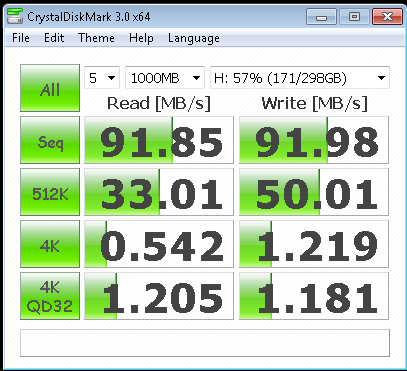
This image is on my old workstation. P45 (ICH10R).
Capture.png
 
Could you test with CrystalDiskMark Krazy? The sequential read is not really that important for SSD.
 
I've been wanting to do SSD RAID0 for a long time... but the lack of TRIM support in any RAID array is my show stopper
 
Could you test with CrystalDiskMark Krazy? The sequential read is not really that important for SSD.

Sure..

Just grabbed it and it doesn't detect my array, just my HDD that I have in the system...

scratch that got it working....
 
Last edited:
As you can see particarly your random speeds are very good; but writing is somewhat low for an SSD. Especially random writes should be a tad higher. For comparison:

Indilinx: 10MB/s
Intel X25-V: 40MB/s
Intel: 75MB/s
Micron: 100MB/s+

But this might be due to filling the SSD so much. Still it should be excellent as OS/App disk as random reads are your key performance target here, and that looks very good! Basically comparable to X25-M which is superb in random reads. The Intel gets a little lower 4K score (20MB/s) but higher 4K-32 score like 180MB/s.
 
As you can see particarly your random speeds are very good; but writing is somewhat low for an SSD. Especially random writes should be a tad higher. For comparison:

Indilinx: 10MB/s
Intel X25-V: 40MB/s
Intel: 75MB/s
Micron: 100MB/s+

But this might be due to filling the SSD so much. Still it should be excellent as OS/App disk as random reads are your key performance target here, and that looks very good! Basically comparable to X25-M which is superb in random reads. The Intel gets a little lower 4K score (20MB/s) but higher 4K-32 score like 180MB/s.

Yes I think the space used is a major factor here. Keep in mind these drives are a year and a half old as well.....I'm sure speed will improve when I add 2 more drives and there is more space.
 
Thanks, there are many online sites referencing benchmarking of SSD arrays, with the expected results.

The question I am trying to get answered is one of benchmarks a la [H]ard's, where I would expect to see greater numbers from an SSD array upgrade as opposed to a videocard upgrade.

The only way to see that is to test like [H], but though I've put in multiple requests fo them to re-run their 16x/16x, 16x/8x, and 8x/8x PCI-E tests with SSD RAID arrays, so far I haven't heard a thing. (TRIM and GC isn't even really a factor for the purposes of these tests.)

It's not about theory, but of real results. I am of the mind that it doesn't make sense to spend big $$$ on an expensive new card if the data throughput from the drive just isn't there. Data compression and bus bandwidth will only get you just so far.

So far, looking at CPU, PCI-E, RAM, and video card utilization numbers, I'm not seeing that they're used to anywhere close to their maximum potential, especially when compared to their predecessors. I think there's a lot of life left in LGA775, DDR2, PCI-E 1.0, and older cards...because of HDD's comparatively ultra-slow abilities.

Umm, no, not everything runs from the drive all the time.. it is loaded off the drive then run from RAM at that point the drive speed no longer matters until the next set of data needs to be loaded.. You could compare a 5400RPM IDE drive in an identically otherwise system with a SSD and they would get the same FPS in a game, the SSD would just load-start the game/levels quicker.
 
've been wanting to do SSD RAID0 for a long time... but the lack of TRIM support in any RAID array is my show stopper

agreed , but ssd is still so blazing we can offered to wait
 
3 x Intel x25-M on an ICH10R. Upgraded from a 640gb WD Caviar Blue and not looking back.

Now every time I use a computer that doesn't have an SSD, it's unsavory. Some games hardly benefit from it for some reason, while others will load instantaneously.

I do plenty of 3D rendering with compositing and post-production in after effects, and it's nice to be able to load thousands of rendered frames with a snap. When a project is finished, I'll just offload it to a HDD for storage.

30hn4ev.jpg
 
Back
Top