• Some users have recently had their accounts hijacked. It seems that the now defunct EVGA forums might have compromised your password there and seems many are using the same PW here. We would suggest you UPDATE YOUR PASSWORD and TURN ON 2FA for your account here to further secure it. None of the compromised accounts had 2FA turned on.
    Once you have enabled 2FA, your account will be updated soon to show a badge, letting other members know that you use 2FA to protect your account. This should be beneficial for everyone that uses FSFT.

SSD Life Question.

  • Thread starter Deleted member 88301
  • Start date
D

Deleted member 88301

Guest
Howdy all.

I've a Kensington SSD that, after like 2.5 years, just went from 100% health to 99%. That's just fine.

But I have an older Intel SSD that is at 77%. I got it from a friend recently, as he didn't need it.
My question is how long do you guys think it will last? Manufactured in 2013, 180GB.

I know that it's not an exact science. But just looking for a ballpark figure.


Thanks in advance,

Wyo.
 
depends on how you use it. it will last longer if you aren't constantly writing to it.
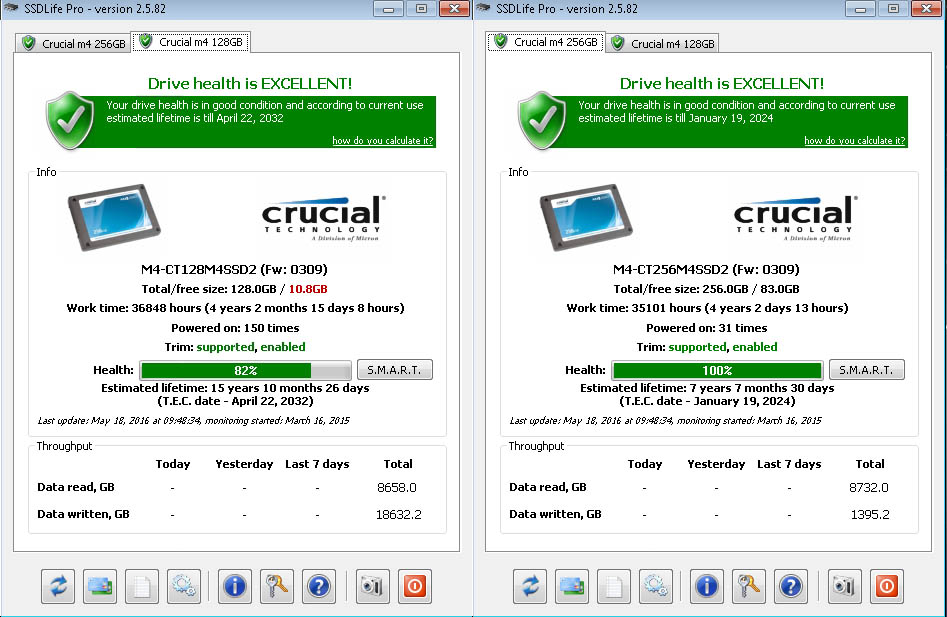
I had an M4 128GB for OS and M4 256GB for Games, they were about the same age and the 128 was at 80% when I pulled it from the machine and the 256 was at 100% after 5 years.
crucial-128-256-ssd-life-5-2016.jpg
 
Thanks. Just using it as boot/data for my 77 yo mom. She doesn't do anything that would be too taxing. I would just like to feel comfortable that the SSD, even though it shows 77%, will at least be reliable for 2 or three years.
 
just curious, how does one check the life of the drive? saw this post, started thinking, ive had my 250gb Samsung 850 evo for some time now, 2 years or so I think maybe more..... boot drive, primary programs, ect, keep most games... on my 1tb spinner....

that said started thinking cause befor this evo, I had a crucial m4 64gb that lasted about a year and gave up the ghost....

so I loaded up disk management looking for said option about life... nothing to be found.....

a quick google search turned up a bunch of sites that offered programs to download that supposedly do it, I'm always weary of installing random shit like that... malware/spyware/otherwise unneeded bullshit..... is there a way in windows without some bs programs off the web?
 
I have every single ssd I have ever owned. Honestly not a single one of them has died. That's everything from the Samsung slc pata (1.8 inch) this one is not in use, crucial m3, crucial m4, micron 550m (I think), corsair neutron 240, crucial mx200 500 GB, intel 750 1.2TB, pm 961's, and an intel p3700 (newest to me purchased used). All of them have been regulated to parents/family member pc's, except the last 4.
 
just curious, how does one check the life of the drive? saw this post, started thinking, ive had my 250gb Samsung 850 evo for some time now, 2 years or so I think maybe more..... boot drive, primary programs, ect, keep most games... on my 1tb spinner....

that said started thinking cause befor this evo, I had a crucial m4 64gb that lasted about a year and gave up the ghost....

so I loaded up disk management looking for said option about life... nothing to be found.....

a quick google search turned up a bunch of sites that offered programs to download that supposedly do it, I'm always weary of installing random shit like that... malware/spyware/otherwise unneeded bullshit..... is there a way in windows without some bs programs off the web?

since you have a Samsung drive, maybe you could download the Samsung magician software, that shows drive health and info.
http://www.samsung.com/semiconductor/minisite/ssd/download/tools/

the program I am using is SSD Life Pro and is a paid program.
https://ssd-life.com/
 
since you have a Samsung drive, maybe you could download the Samsung magician software, that shows drive health and info.

the program I am using is SSD Life Pro and is a paid program.

thanks, ran out of motivation the minute you mentioned id have to source additional software, I just don't care that much, woulda been curious had it been easier :p
 
thanks, ran out of motivation the minute you mentioned id have to source additional software, I just don't care that much, woulda been curious had it been easier :p
I gave you a link, so you can grab it and install it and see how your drive is doing.
 
I gave you a link, so you can grab it and install it and see how your drive is doing.

thanks, I'll have to revisit this in a few days, house sitting for a friend right now, and his internet is painfully slow, cant wait to get my computer hooked back up to my business connection Saturday/sunday
 
Sorry, a bit confused.

Could you please explain?
 
Actually, I think I'm good. But I would like to have some "pro" answer me about the dreaded 77%.

I'm going to use it as the only drive on my Mom's computer. Replacing her spinner with the SSD. I wish I could have her go on to Linux, but, no. Has to be Win 10.

Well, whatever, an SSD will boot faster than the 5 minutes she has to endure now.
 
I suck at wearing out SSD's. I feel like I'm not getting my money's worth.

Actually, I think I'm good. But I would like to have some "pro" answer me about the dreaded 77%.

I'm going to use it as the only drive on my Mom's computer. Replacing her spinner with the SSD. I wish I could have her go on to Linux, but, no. Has to be Win 10.

Well, whatever, an SSD will boot faster than the 5 minutes she has to endure now.

There is no way your mom is going to wear out an SSD that's at 77%. Don't worry about it.
 
Actually, I think I'm good. But I would like to have some "pro" answer me about the dreaded 77%.

I'm going to use it as the only drive on my Mom's computer. Replacing her spinner with the SSD. I wish I could have her go on to Linux, but, no. Has to be Win 10.

Well, whatever, an SSD will boot faster than the 5 minutes she has to endure now.

Dreaded 77%? That’s a huge amount of life, and those are very solid drives (if a bit lacking in speed compared to current models).
 
This all makes me wonder ...
Who can vouch for SSD Life Pro, and for what and how it does "its thing"?
Perhaps that software just another modern example of snake oil?
 
Intel is more conservative than most. 77% is a good deal of life, especially for light use like you describe.

Even when it hits 0% (in about 15-20 years based on your expected use profile), it just goes to read only, it doesn't explode.
 
This all makes me wonder ...
Who can vouch for SSD Life Pro, and for what and how it does "its thing"?
Perhaps that software just another modern example of snake oil?

More than likely, it's just the ratio of overprovised cells to the number of cells that have been flagged as exhausted. At least, that's what the vendor specific tools use.

All SSDs plan for some cell exhaustion. That's why the overprovision. On some drives, you can adjust the amount of overprovision if you really wanted to.

A drive will sit at 100% for a good while. The wear leveling algorithms are pretty good at their job. As cells start to flag bad (which is perfectly normal and to be expected for SSDs), they just get marked exhausted, and the wear count starts to tick down.

It takes a couple of years or more of typical use to go from 100% to 99%. And then several more years to go from 99% to 0%.
 
I have every single ssd I have ever owned. Honestly not a single one of them has died. That's everything from the Samsung slc pata (1.8 inch) this one is not in use, crucial m3, crucial m4, micron 550m (I think), corsair neutron 240, crucial mx200 500 GB, intel 750 1.2TB, pm 961's, and an intel p3700 (newest to me purchased used). All of them have been regulated to parents/family member pc's, except the last 4.
Same here, the name brands are doing well, the only one giving me trouble is a hectron x1 (company now known as drevo). A few reallocated sectors but an identical one in a friends laptop completely crapped out and the company won't replace it because I didn't get it from them.
 
I have a Kingston V300 128 GB installed as a Windows Media Center box, maybe about 1%-1.25% per year.

Intel drive, I prefer the older stuff like 520 or 330 series for endurance. Not sure about drives released after that. I had an Intel Pro 2500 (180 GB), that had about 40-50% left in a work laptop T440p, decided to croak at start of the month, with 10 days left in laptop warranty.

The life is an estimate, still need to do a backup.
 
I still have OG Intel 40 Gig drives from six years ago that check out to 98% life available. I was building radio automation PC's that use a local SQL database. 40 was big enough and I went for it. Still running flawless in the same Core i5 machines. I have, though converted the two redundant file servers to SSD for the audio volumes. That was about three years ago when 1 Terabyte drives became more reasonable. The only spinning drives on my network are in a Synology NAS. They are WD Red's.

SSD wise, early on, I only bought Intel. Later on, I moved to Samsung for obvious reasons.
 
Still have the Intel SSD with a Sandforce controller running 24/7.
 

Attachments

  • Screenshot 2018-03-17 17.06.44.png
    Screenshot 2018-03-17 17.06.44.png
    88.5 KB · Views: 0
Thanks. But I've recently acquired a five year old Intel 180GB SSD that shows 77%. I'm just not sure that I have the confidence needed to use it as my mom's only drive.
 
Back
Top