Bruno Giordano
n00b
- Joined
- Nov 20, 2026
- Messages
- 1
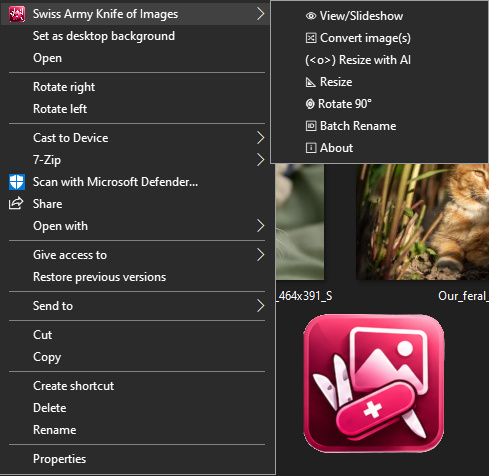
I created this software for batch-processing images directly from Windows Explorer; you can select multiple images and apply AI-based upscaling. Instead of resizing images one by one, you can select them all and have the application process everything at once, which saves a significant amount of time.
I programmed it in native C#. The source code is included within the installer, allowing anyone to audit or even modify it. Three files are compiled using a .BAT script located in the download folder, which contains the entire installer package. The application utilizes Real-ESRGAN ncnn Vulkan, created by Xinntao; therefore, you will need a graphics chip or card that supports Vulkan—a feature that is extremely common nowadays. The folder contains three essential files required to compile the application:
If you are a programmer, you can follow the script below to compile the software. Otherwise, simply download the program and run the SETUP file. The installation is local.
COMPILAR_WIN64 – A simple script for the automatic compilation of the program.
SAKI-PDF-0.4-NO-2x.cs – The raw source code (839 lines).
PdfiumViewer.cs – Integrates the `pdfium.dll` module for viewing PDF documents.
SakiRealEsrgan.cs – Integrates the `realesrgan-ncnn-vulkan` module for artificial intelligence.
<(o)> AI Resizing: Batch-resize images using artificial intelligence with a single mouse click.
 - Simple PDF viewer.
👁 Viewing/Slideshow: View images at lightning speed and start a slideshow by pressing the 'F' key; use the arrow keys on your keyboard to navigate between images.
 Image Conversion: Batch-convert images between PNG, JPG, BMP, GIF, and WEBP formats.
 Resizing: Batch-resize images to any dimensions while maintaining their aspect ratio.
 90° Rotation: Batch-rotate images by 90°.
 Batch Renaming: Simply enter a name—such as "wedding_photos"—and the program will automatically handle the numbering within the folder.
I created it with the firm intention that it be as useful to you as it is to me. It is open source and can be found on SourceForge.net.
https://sourceforge.net/projects/saki/

I programmed it in native C#. The source code is included within the installer, allowing anyone to audit or even modify it. Three files are compiled using a .BAT script located in the download folder, which contains the entire installer package. The application utilizes Real-ESRGAN ncnn Vulkan, created by Xinntao; therefore, you will need a graphics chip or card that supports Vulkan—a feature that is extremely common nowadays. The folder contains three essential files required to compile the application:
If you are a programmer, you can follow the script below to compile the software. Otherwise, simply download the program and run the SETUP file. The installation is local.
COMPILAR_WIN64 – A simple script for the automatic compilation of the program.
SAKI-PDF-0.4-NO-2x.cs – The raw source code (839 lines).
PdfiumViewer.cs – Integrates the `pdfium.dll` module for viewing PDF documents.
SakiRealEsrgan.cs – Integrates the `realesrgan-ncnn-vulkan` module for artificial intelligence.
<(o)> AI Resizing: Batch-resize images using artificial intelligence with a single mouse click.
- Simple PDF viewer.👁 Viewing/Slideshow: View images at lightning speed and start a slideshow by pressing the 'F' key; use the arrow keys on your keyboard to navigate between images.
Image Conversion: Batch-convert images between PNG, JPG, BMP, GIF, and WEBP formats. Resizing: Batch-resize images to any dimensions while maintaining their aspect ratio. 90° Rotation: Batch-rotate images by 90°. Batch Renaming: Simply enter a name—such as "wedding_photos"—and the program will automatically handle the numbering within the folder.I created it with the firm intention that it be as useful to you as it is to me. It is open source and can be found on SourceForge.net.
https://sourceforge.net/projects/saki/