• Some users have recently had their accounts hijacked. It seems that the now defunct EVGA forums might have compromised your password there and seems many are using the same PW here. We would suggest you UPDATE YOUR PASSWORD and TURN ON 2FA for your account here to further secure it. None of the compromised accounts had 2FA turned on.
    Once you have enabled 2FA, your account will be updated soon to show a badge, letting other members know that you use 2FA to protect your account. This should be beneficial for everyone that uses FSFT.

Socket 478 cooling solutions

sprale

n00b
Joined
Jun 1, 2008
Messages
37
I have a 478 P4 3.2GHz processor. The stock fan is running at around 5k RPMs, and is noisy! Is there any other fan that I could use with the heat sink I have to reduce noise without increasing temps? I am a cheap bastard, but would consider a new heat sink/fan combo if I could find one at a reasonable price.

My case is a Lian Li, with plenty of room to grow. I am thinking about adding side and top exhaust fans, maybe even a fan for one of my empty PCI slots. I was thinking about getting a manual controller for one of the 3.5" external bays as well to manage speeds. Would adding more fans and reducing the average speeds reduce the temps enough to make it worth the cost and work?
 
This cooler is a fantastic P4 heatsink fan combination (Push on diagonally opposed clips to properly install).

Case air flow in general should have an unobstructed path with balanced throughput. Observe your cables and other obstructions, then take steps to remedy any shortcomings.

Noise can be reduced by increasing fan diameter and lowering revolutions. Also cut away any turbulence inducing grills or other barriers to efficient air flow.

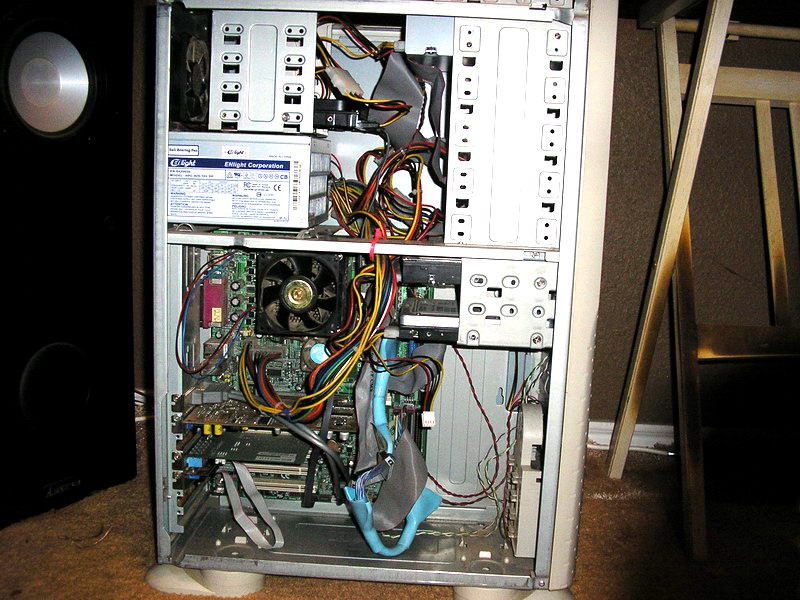
Post a picture or two of your case along with other important information about your system.
 
Thanks for the advice, I will try looking at a nice oversized heatsink that I can put a large fan on. That Scyth cooler looks like it could take two fans, one blowing vertically and one horizontally...

btw, I picked this complete system up on Craigslist for only $100. I only added my extra HD and DVD drives. :)

P6010099.jpg


P6010100.jpg


P6010101.jpg
 
Also, what is a safe temperature operating range for this processor/system? I am starting to monitor the temps more, since I think overheating killed my processor in my previous Dell system.
 
the rig in my sig is about the same as your proc and it idles in the low 30's and load in the mid 40s
 
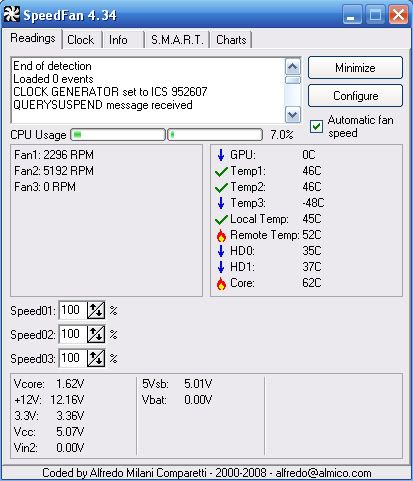
Here's a capture from SpeedFan. I think my system is running hot. :(

SFcapture.jpg


I'm more interested in reliability and noise reduction than performance. This is a DVD duping system mostly, very little gaming. A bit of internet usage, a file-/print-server as well..
 
My goof, I was told 6700, but its a 6800... Still sorting out hardware specs and versions... new toys :)
 
XP Pro eXPerience
Haha, I ran that on my laptop the past year. Drove me crazy, eventually formatted and put regular XP SP3 on there. Hope you have better luck than I did.
:p
 
I have had eXPerience on all my PCs for the last year or two, and loved every moment. My next distro will probably be BlackXP, still not a fan of Vista though...
 
There are a couple steps to improve temperatures.

The most important would be to upgrade the processor cooler to a good aftermarket model combined with some tested thermal paste. One push fan and one pull fan is more than sufficient on a Ninja.

I would also add a second exhaust fan to the rear of the case as there is ample room.

Cut the inner case grill from in front of the primary intake fan (not the finished aluminum) to improve air flow. While you are doing that, you should be able to bump the fan to a 120mm.

If you want to finish off the 'cooling and noise' aspect of your endeavor, move some the hard drives up to the five and quarter bays inside the EX-23NA . Other images.
 
I am thinking about something like this. A Scyth Samurai with a 92-120 adapter and a 120mm fan. If there is room, maybe a duct through the side panel for cooler air intake. Could the stock heatsink be good enough to simply adapt a quality 120mm fan? I can always use the Scythe fan elsewhere if I do swap out the heatsink.

SCSMZ-1000.jpg


I can't find the size on my OEM fan, do I measure the width of the actual fan or the housing?

I will probably add on more intake and exhaust cooling, but want to start with the processor. I know I need to toss the wide IDE cables for some round ones for better airflow. Its a real rats nest in there right now...

Down the road, probably going to add a few top panel exhaust fans, rear panel fan(s), left side panel fan(s) and front fans. Until now, I have always had functional PCs, never looked very nice. Finally going to try to make one that looks nice and works well.
 
Certainly the Samurai Z could be used. But with all the extra hassle you are subjecting yourself to regarding a hole in side panel, air duct and a fan adapter, you could forgo significant hassle while achieving superior cooling with a Ninja.

Ditch the stock heatsink.
 
This cooler is a fantastic P4 heatsink fan combination

I bought the Ninja Plus Rev B for a great price from Directron, $35. It came with a 120mm Scythe fan.

directron_2002_13026251


I also got a Thermaltake TT-1225 fan. It is a 130x25mm fan that fits a 120mm mount.

directron_2001_952467438


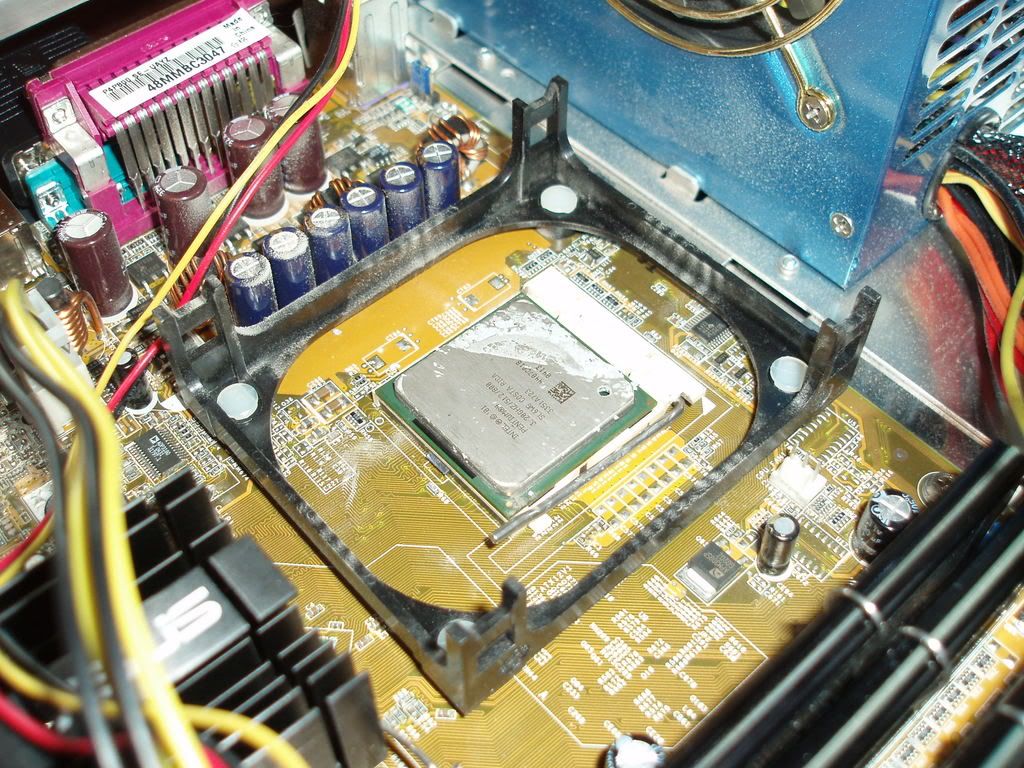
I forgot to get a set of wire brackets to mount the second fan, waiting on those... I want to get the unit completely assembled before I go and mount it (I only want to do it once). Before I do, how well do I need clean up the old thermal paste? Should I sand it down with something like this? Should I use thermal paste again to mount it, or maybe thermal pads? I think the current heat sink has been in there for a few years, but looks and feels solidly mounted.

Could I get a 3 pin splitter to wire both fans to the output on the board, or should I add a 4 pin Molex to 3 pin adapter? If I do the adapter, will I still be able to manage the speeds through a utility like SpeedFan? They are both 12V, but will probably be running lower speed when combined. I found a Zalman here that may work.

I know I need to mount a hanging bracket of some type to support the extra weight for this configuration.

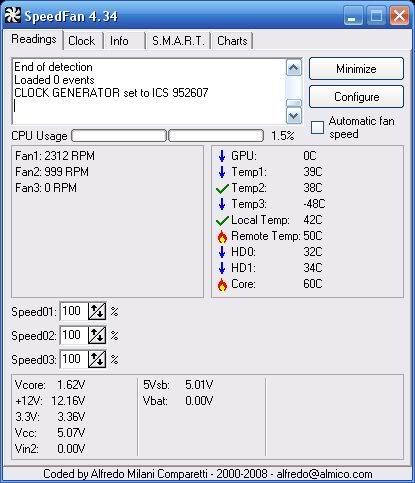
For reference later, here's the current SpeedFan readout:

SpeedFan001.jpg
 
Well, I got it installed today. It still seems a bit hot, though. I think I will add the 130mm fan to either the side or the top panel. There is not quite enough room under the existing rear fan for another... At lease I can hear myself think again! :D I'll upload the pics next...

thanks for the great advice everyone!
Levon

Before and after:
SpeedFan001.jpg
NewPicture002.jpg
 
im trying to remember what cooler i used for this setup, give me a few and i'll remember...

bestsandra1.jpg
 
funny my 2.4b outperforms an Opteron..... well in floating point calcs anyway.. gets beat in arith. raped the Extreme edition though
 
Before and after:
P6010101.jpg
P6090117.jpg


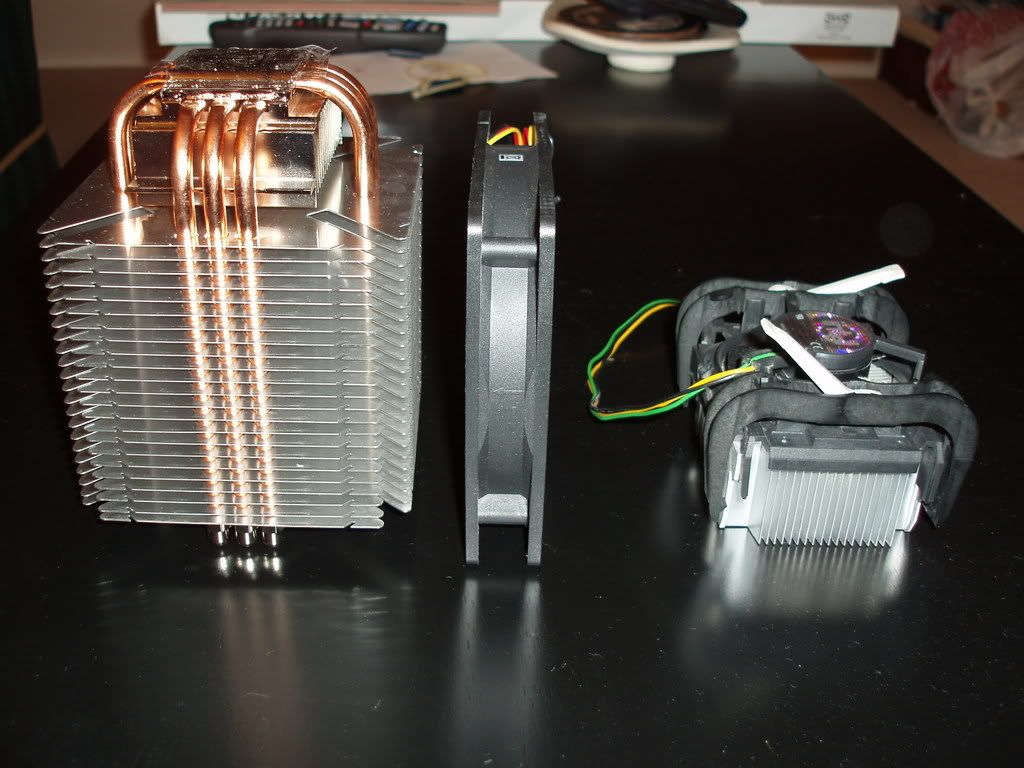
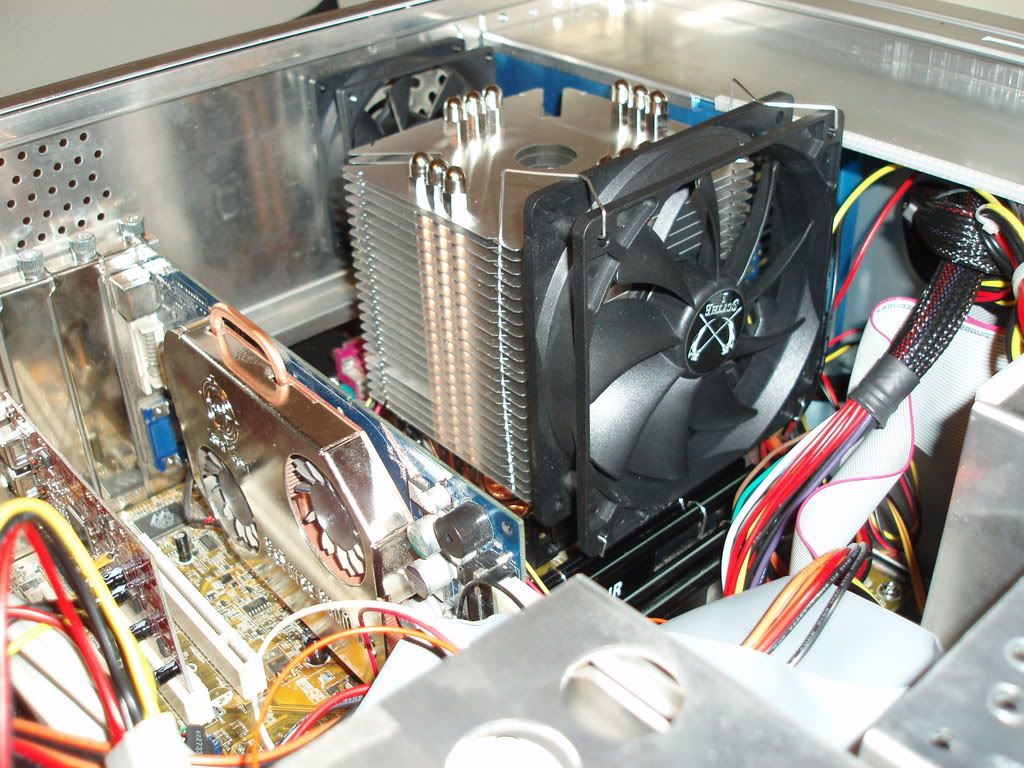
The heatsinks/fans size comparison:
P6090116.jpg


Cleaning the processor:
P6090111.jpg


Almost touches the side panel!
P6090118.jpg
 
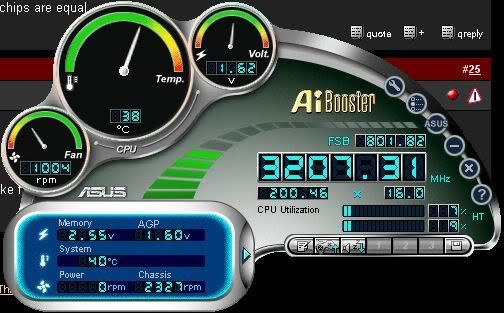
Wierd, the Asus app shows much cool temps... anyone else find similar experiences?

NewPicture004.jpg


37C vs. 60C... I am apt to believe the app from the mobo mfg... but SpeedFan has always served me well on other PCs...:confused:
 
Damn that new cooler is huge, lol. A little wire management for better air flow and your should a little drop in temp. Switch out those regular IDE cables for rounded cables or make it to where they do not interfere with air flow.
 
I plan on changing out the IDE cables soon, I know it will help.

If I wanted to upgrade my memory, I would have to remove the fan from the heatsink to get to two of the chips!

The inconsistency between the two software apps is my only concern right now...
 
http://www.thermalright.com/new_a_p...ler_xp90.htm?art=MTQyMywxLCxoZW50aHVzaWFzdA==

Thermalright XP-90 with panaflo 92*92* medium flow fan. Your temps are way to high

I idle at 27C, load to 42C. with this cooler setup on one of my pc's which is running a 3.4 Gallatin o/c to 3.625.

My other pc uses a CoolIt Freezone Elite with idle temps between 10C-21C, and peaks at 27C under full load. I'ts a ASUS P4C800-E deluxe with a Intel P4 3.4 EE Gallatin o/c to 3.91, 230FSB with stock vcore using 2 gb of Mushkin CP4000 Redline 1:1 running at 2/3/2/5
 
there is either something wrong with the temp monitor, or something wrong with the cool. The ninja can do a whole lot better than 60c.
 
I never had any trouble from either ASUS' or ABIT's hardware monitor utilities from my socket 478 rigs,
so I would go with that. My last 478 setup was almost identical to yours there, and I was using a
Titan Vanessa L-type with a single 1-inch diameter heatpipe and a 120mm fan - when I ran a good
overclock on my 3.2GHz Prescott P4 up to the 250FSB x 16 = 4.0GHz, idle was at 27-30C and ran
under load at around 37-40 depending on ambient room temperature - oh, and Arctic Silver 5, natch!
Another thing you might consider is lapping the integrated heat spreader on your P4 processor - on
the 3.2 Prescott I had, after 5-6 days, I kept getting slightly higher temps, creeping upward day by day.
Once I got fed up and removed the HSF, I noticed that the AS5 was all congealed into an ovoid form
in the very middle slightly smaller than the size of a nickel - the IHS was slightly concave, and a good
lapping job set everything to rights. That's when that Titan HSF really did shine with those nice temps!
If it were me, I would also cut out the 80mm space in the rear to fit a 120mm fan, better than 2x 80mm.

Congrats on that great deal from C-L, and best of luck on it all! ;)
 
Congratulations on the Ninja install.

You will probably see slightly reduced temperatures by removing the existing rear grill and adding a second fan/hole to improve the exhaust capability. The heatsink is only as good as airflow through the case.

I would defer to the ASUS temperature. To verify this, use a throttle watch program to see if temperature is exceeding the manufacturer's maximum.

Watch type of thermal interface did you use?

What method of application did you use?
 
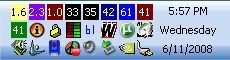
Here are my results with Everest:

Voltage - CPU Core: 1.6
Cooling Fan - Chassis: 2.3
Cooling Fan - CUP: 1.0
Drives: 33&35
GPU ambient: 42
GPU: 61
CPU: 38
mobo: 41

This app looks to be very in-depth for monitoring, but takes up some space in the taskbar before configuring.

NewPicture005.jpg
 
Back
Top