![[H]ard|Forum](/styles/hardforum/xenforo/logo_dark.png)
Navigation
Install the app
How to install the app on iOS
Follow along with the video below to see how to install our site as a web app on your home screen.
Note: This feature may not be available in some browsers.
More options
You are using an out of date browser. It may not display this or other websites correctly.
You should upgrade or use an alternative browser.
You should upgrade or use an alternative browser.
So what was the consensus for bf4?
- Thread starter ematsui
- Start date
Mainly CPU I would say. It loads all threads on a 4770k at 4.5ghz for me. Getting ~60FPS fully maxed on a 7950 with a moderate overclock. Still, your card is fairly old and could do with an upgrade too, but mainly it's the CPU holding you back I would think (at least in this game).
Mainly CPU I would say. It loads all threads on a 4770k at 4.5ghz for me. Getting ~60FPS fully maxed on a 7950 with a moderate overclock. Still, your card is fairly old and could do with an upgrade too, but mainly it's the CPU holding you back I would think (at least in this game).
yeah for bf4 I would argue a CPU upgrade would yield more results than a GPU upgrade since bf4 really benefits from multi-threads.
Also, have you looked into unlocking your 6950?
Of course, a gpu + cpu upgrade would be best, but I would spring for a cpu/mobo/ram upgrade now if you are on a budget and spring for a gpu upgrade later.
Down clock one and see how much difference it makes, then down clock the other and see which causes the biggest drop in fps
smart idea
Mainly CPU I would say. It loads all threads on a 4770k at 4.5ghz for me. Getting ~60FPS fully maxed on a 7950 with a moderate overclock. Still, your card is fairly old and could do with an upgrade too, but mainly it's the CPU holding you back I would think (at least in this game).
You must have some magical 7950 there pal. I have a 7970GE w/ 4.9ghz 2600k and I barely see 60 FPS average @ 1080P w/ ULTRA settings (no AA). You are far from fully maxed I can assure you.
With that said, Id try to upgrade CPU and GPU. 6950 just isnt enough for BF4 if you want eye candy. If you are happy with low settings, go with CPU only. A used 3570k would be a great upgrade and youd definitely see a boost in FPS.
Is your 7970 overclocked at all? I have a moderate overclock on my 7950 (1100/1400) going Do you have HT enabled on that 2600k? At 4.5ghz, I'm thinking my Haswell is slightly faster than your Sandy Bridge at 4.9 (assuming you have HT enabled, I do btw).You must have some magical 7950 there pal. I have a 7970GE w/ 4.9ghz 2600k and I barely see 60 FPS average @ 1080P w/ ULTRA settings (no AA). You are far from fully maxed I can assure you.
With that said, Id try to upgrade CPU and GPU. 6950 just isnt enough for BF4 if you want eye candy. If you are happy with low settings, go with CPU only. A used 3570k would be a great upgrade and youd definitely see a boost in FPS.
I'm not gonna say 60 average, but it maxes at 75 and mins at 45, a lot of the time it's around 60ish.
Is your 7970 overclocked at all? I have a moderate overclock on my 7950 (1100/1400) going Do you have HT enabled on that 2600k? At 4.5ghz, I'm thinking my Haswell is slightly faster than your Sandy Bridge at 4.9 (assuming you have HT enabled, I do btw).
I'm not gonna say 60 average, but it maxes at 75 and mins at 45, a lot of the time it's around 60ish.
You know there are ways to see your average instead of just guessing.
collegeboy69us
Supreme [H]ardness
- Joined
- Jul 27, 2003
- Messages
- 5,255
BF4 eats CPU for breakfast brunch lunch and dinner.
did some testing -- crossfire 7970s -- they each only stay about 50-70% in use in the game (2560x1440, 96Hz, all eye candy turned on) (with all 4 CPU cores maxed out)
Stock i5 2500k -- going to put it back to 4.2Ghz (been lazy to redo my CPU overclocks lately) will update thread with results tonight.
did some testing -- crossfire 7970s -- they each only stay about 50-70% in use in the game (2560x1440, 96Hz, all eye candy turned on) (with all 4 CPU cores maxed out)
Stock i5 2500k -- going to put it back to 4.2Ghz (been lazy to redo my CPU overclocks lately) will update thread with results tonight.
You know there are ways to see your average instead of just guessing.
I do and will do just that if you so desire.
Playing ~ 64 man conquest @ 1080p, Ultra + no AA. I got fps drops down to the 40's, but I mostly was in the 50-60 range-- with vsync.
The problem with getting an average fps in a MP game is the ramndomness. It does give us an idea when using FRAPS but it really is just ball park numbers.
Overall the game runs pretty well on my system (13.10b2 drivers). Unfortunatley I thin k I will stick with BF3 and get Titanfall instead until BF3.5 goes on sale with premium included.
The problem with getting an average fps in a MP game is the ramndomness. It does give us an idea when using FRAPS but it really is just ball park numbers.
Overall the game runs pretty well on my system (13.10b2 drivers). Unfortunatley I thin k I will stick with BF3 and get Titanfall instead until BF3.5 goes on sale with premium included.
My game stutters a lot. I seen 70s and as low as 20 fps. But the random choppiness occurs very frequently. Makes it unplayable. Turning down the settings and the choppyness is still there. Many online reports claim its the windows 7 that's causing the bad performance. I've tried everything from changing resolutions to lowering some settings but the stuttering and dip in fps is still apparent. I gave up playing.
Playing ~ 64 man conquest @ 1080p, Ultra + no AA. I got fps drops down to the 40's, but I mostly was in the 50-60 range-- with vsync.
The problem with getting an average fps in a MP game is the ramndomness. It does give us an idea when using FRAPS but it really is just ball park numbers.
Overall the game runs pretty well on my system (13.10b2 drivers). Unfortunatley I thin k I will stick with BF3 and get Titanfall instead until BF3.5 goes on sale with premium included.
Thanks for the honest result. That is a legitimate result he posted. And your 1100mhz 7950 isnt faster than my 1000mhz 7970. And my 4.9ghz compared to your 4.5ghz on a new CPU is about the same in the end, not much difference (the difference in the 2 chips is only about 12-15% AT BEST). Turn on FRAPS and log and check your log. I spike up into the mid to upper 80s at times, but thats far from AVERAGE frames.

- Joined
- Sep 7, 2011
- Messages
- 10,221
With the PC game market on the rise, we are starting to see games that can actually utilize CPUs properly. Most of us have been lazy and have been using 4-6 year-old CPU architectures because games have been so GPU-bound.
I'm not saying that like I'm any better: you can look at my rig(s) in my sig: 'hello, the year 2009 called: it wants it's system back'
I'm not saying that like I'm any better: you can look at my rig(s) in my sig: 'hello, the year 2009 called: it wants it's system back'
I read some feedback on the BF 4 forums and it's more to do with cpu's that don't have HT like the 2500K and some of AMD's quad cores.
My i7-930 and 7950 at stock runs around 37 to 45 fps at 1080p ultra settings with everthing on and very playable.
My i7-930 and 7950 at stock runs around 37 to 45 fps at 1080p ultra settings with everthing on and very playable.

Coldblackice
[H]ard|Gawd
- Joined
- Aug 14, 2010
- Messages
- 1,156
I read some feedback on the BF 4 forums and it's more to do with cpu's that don't have HT like the 2500K and some of AMD's quad cores.
What's more to do with the cpu's (with HT)? Meaning, cpu's without HT are the ones having issues?
- Joined
- Aug 5, 2012
- Messages
- 2,820
You must have some magical 7950 there pal. I have a 7970GE w/ 4.9ghz 2600k and I barely see 60 FPS average @ 1080P w/ ULTRA settings (no AA). You are far from fully maxed I can assure you.
With that said, Id try to upgrade CPU and GPU. 6950 just isnt enough for BF4 if you want eye candy. If you are happy with low settings, go with CPU only. A used 3570k would be a great upgrade and youd definitely see a boost in FPS.
I get 55-65 on Max (Ultra+4xMSAA) settings on 1080p with mins in the 40s
2013-10-04 07:34:49 - bf4
Frames: 12213 - Time: 200000ms - Avg: 61.065 - Min: 40 - Max: 104
(What's more to do with the cpu's (with HT)? Meaning, cpu's without HT are the ones having issues?)
From the feedback yes as the game maxs out quads without HT as meaning it needs 8 cores or 4 plus HT as those are the one's with the most lag issues reported.
From the feedback yes as the game maxs out quads without HT as meaning it needs 8 cores or 4 plus HT as those are the one's with the most lag issues reported.
Pretty similar setup to what I'm running given the 7970 and 2600k
a full game of 32 player domination looks like this:
1200p, all ultra settings HBAO, FXAA = medium
FPS
Min. : 15.0
1st Qu.: 64.0
Median : 73.0
Mean : 78.2
3rd Qu.: 87.0
Max. :194.0
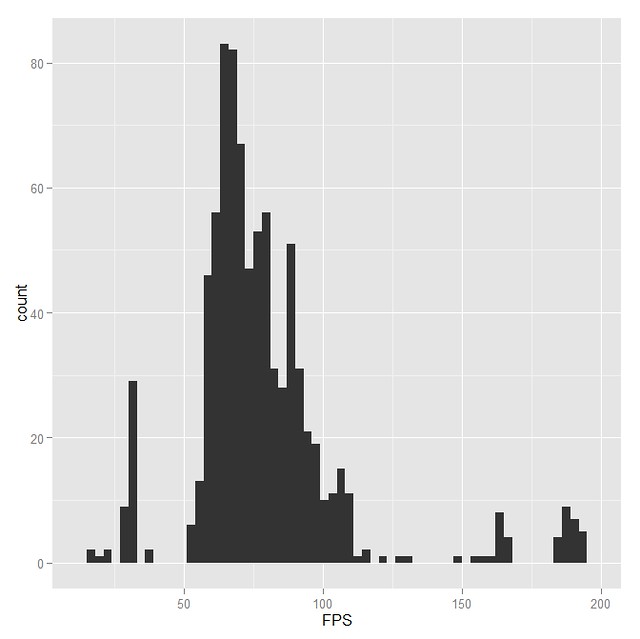
7970GE @ 1160/1500, 2600k @ 4.5, 32gb, win7sp1
a full game of 32 player domination looks like this:
1200p, all ultra settings HBAO, FXAA = medium
FPS
Min. : 15.0
1st Qu.: 64.0
Median : 73.0
Mean : 78.2
3rd Qu.: 87.0
Max. :194.0
7970GE @ 1160/1500, 2600k @ 4.5, 32gb, win7sp1
I might be pretty far off the mark here as I don't really know what's going on with mantle... But, is it partly aimed at removing load from the cpu? So will a GCN card potentially face less bottlenecking from a given cpu in mantle enabled apps than a non-GCN card?
If this game is as hard on the cpu as speculated and mantle does reduce cpu bottlenecking then might Mantle enabled cards be the only choice for high Hz monitors and bf4?
If this game is as hard on the cpu as speculated and mantle does reduce cpu bottlenecking then might Mantle enabled cards be the only choice for high Hz monitors and bf4?
I might be pretty far off the mark here as I don't really know what's going on with mantle... But, is it partly aimed at removing load from the cpu? So will a GCN card potentially face less bottlenecking from a given cpu in mantle enabled apps than a non-GCN card?
If this game is as hard on the cpu as speculated and mantle does reduce cpu bottlenecking then might Mantle enabled cards be the only choice for high Hz monitors and bf4?
No one really knows yet.
its likely to be a huge gamechanger and as noted maybe the choice for high hz gaming.
ccityinstaller
Supreme [H]ardness
- Joined
- Feb 23, 2007
- Messages
- 4,237
Thanks for the honest result. That is a legitimate result he posted. And your 1100mhz 7950 isnt faster than my 1000mhz 7970. And my 4.9ghz compared to your 4.5ghz on a new CPU is about the same in the end, not much difference (the difference in the 2 chips is only about 12-15% AT BEST). Turn on FRAPS and log and check your log. I spike up into the mid to upper 80s at times, but thats far from AVERAGE frames.
Here are my results I copied out of the other thread:
Rig in Sig:
CPU: 3770K @ 4.8Ghz
GPU is 7950 clocked @ 1.3Ghz core/1600mhz (had the wrong profile loaded so my memory wasn't running @ it's max speed of 1850mhz)..CAT 13.8 Beta Drivers...
FRAPS
2013-10-07 02:15:59 - bf4
Frames: 16487
Min: 46
Avg: 71.978
Max: 106
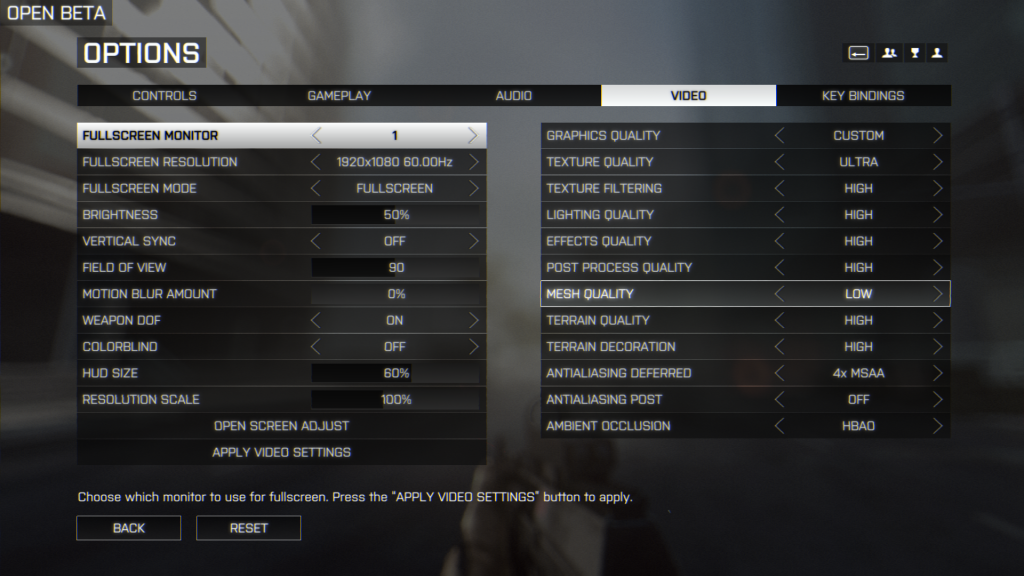
I get 55-65 on Max (Ultra+4xMSAA) settings on 1080p with mins in the 40s
2013-10-04 07:34:49 - bf4
Frames: 12213 - Time: 200000ms - Avg: 61.065 - Min: 40 - Max: 104
Sig:
| AMD FX 8350 @4.8GHz | Custom Loop |Crucial M4 128GB SSD| Seagate Barracuda 250GB |Western Digital Caviar Blue 500GB x2 |XFX R9 280X w/ Full Cover EK Block| ASUS M5A97 EVO |G.Skill Sniper 8GB (2x4GB) DDR3 2133MHz| Lite-On Blu-ray 3D burner| Corsair TX850 850W
Am I seriously the only one that caught this?!?!?
 ...Either your 7970 is having an identity crisis, or you have some explaining to do MISTER!
Metrocall
Gawd
- Joined
- Mar 4, 2008
- Messages
- 952
Am I seriously the only one that caught this?!?!?
It's probably just a typo.
What's more to do with the cpu's (with HT)? Meaning, cpu's without HT are the ones having issues?
4cores tends to load 100%.
amd game so 8 core load is possible.
I might get a 4core with HT down the line even if I cant say I feel strapped with my 4.7ghz 4670k and 5040x1050 gaming on a single 7970.
works well.
Average is 60 FPS with a low of 48. I always play with vsync on though, and my monitor is locked to 60 hz (korean IPS). Game is fully maxed out (including AA) at 2560x1440.
Specs:
i7 940 OC'd to 3.6 ghz
XFX Radeon 7990 (using the newest beta drivers)
22 gb 1333 ram
Specs:
i7 940 OC'd to 3.6 ghz
XFX Radeon 7990 (using the newest beta drivers)
22 gb 1333 ram
CCInstaller, your 7950 has quite a bit more juice than his
I saw the R290x as well, just dont know if I WANT to believe it! On that note, I do notice that the older AMD drivers are MUCH smoother (not as much stutter) whereas the new ones give you a higher FPS but stutter a bit.
Anyone else experience this?
I saw the R290x as well, just dont know if I WANT to believe it! On that note, I do notice that the older AMD drivers are MUCH smoother (not as much stutter) whereas the new ones give you a higher FPS but stutter a bit.
Anyone else experience this?
HOODedDutchman
Gawd
- Joined
- Sep 16, 2012
- Messages
- 827
Your probably just in a laggy server. Smooth as butter here with crossfire.
ccityinstaller
Supreme [H]ardness
- Joined
- Feb 23, 2007
- Messages
- 4,237
CCInstaller, your 7950 has quite a bit more juice than his
Oh I know it's a beast Doz
..I wasn't trying to call you out or anything, I was simply referencing your post so you could see what my 7950 was doing..I am one proud parent, if I must say lol...I got this puppy with a Koolance Full Cover GPU block back in March for $240-255 (can't recall the exactly number atm)..and it is a friggin BEAST! I have only been feeding it 1.23V, as measured with TRIXX/AFB/GPU-Z and a high end Fluke Multimeter...I have been slowly trying to see if I can work it down, but I really have no reason, since I have so much thermal headroom..While playing the run above, max GPU temp was only 51C, and VRMs 1/2 were 59/62C...I love WC
..I saw the R290x as well, just dont know if I WANT to believe it! On that note, I do notice that the older AMD drivers are MUCH smoother (not as much stutter) whereas the new ones give you a higher FPS but stutter a bit.
Anyone else experience this?
This is interesting, since I am still on the Cat 13.8 Beta, and while I have downloaded both CAT 13.10 1/2, I was too lazy to take update them before I played a bit...I think I might hold off now, since my setup is working and I would hate to break it lol...
What kinda Ping times are you seeing? I don't know if this is normal, since this is my first Origin game, but the Server log showed my Ping from 40-62..I was playing in a 64 player server loaded outta Chicago, and I am located on the eastern shore of MD..Like I said, it was buttery smooth, both in FPS and latency..I saw no Ping related Frame spikes...
I am very, very sensitive to wild swings in FPS games..I have to keep the FPS as high as possible, and also keep the FOV @ 90 or higher or I get severe motion sickness and then a bad migraine..It really sucks, which is why I am looking for a mate for my 7950 and am getting a 1440P O/C'able LCD for Christmas from my family.
Pings were alright, maybe it was the server not sure honestly. Since that day, I installed the newest 13.11 beta (I was on the 13.10b2 I believe) and its VERY smooth. I checked FPS and Im not seeing anymore than the old 13.8 that I was on, but its a good bit smoother. The minimum FPS is what really changed, not so much the top end. Much better FPS in larger scenes.
ccityinstaller
Supreme [H]ardness
- Joined
- Feb 23, 2007
- Messages
- 4,237
Pings were alright, maybe it was the server not sure honestly. Since that day, I installed the newest 13.11 beta (I was on the 13.10b2 I believe) and its VERY smooth. I checked FPS and Im not seeing anymore than the old 13.8 that I was on, but its a good bit smoother. The minimum FPS is what really changed, not so much the top end. Much better FPS in larger scenes.
Glad to hear it..I just grabbed them and am getting ready to the install them now..My SteelSeries MERC KB finally showed up, so I cant wait to get it a run..
Am I seriously the only one that caught this?!?!?
mine sayed that too on 3dmark, but its fixed itself.
Oh I know it's a beast Doz
I have been slowly trying to see if I can work it down, but I really have no reason, since I have so much thermal headroom..While playing the run above, max GPU temp was only 51C, and VRMs 1/2 were 59/62C...I love WC
Funny, mine will do the same 1.23v core and 1.65v memory = 1300/1850 - Sadly i'm not on water, so no gaming at these clocks.....
You got a great deal on the card I have and MSI TF3 as well with the 7970 PCB with an ASIC of 89%. If you ever want a matching card for yours make me an offer pretty sure you could break some 7950 CFX records with both!Give windows 8.1 preview a shot if you don't have a key for windows 8. I'm willing to bet its windows 7 thats causing you to lag a lot. Windows 8 has 11.1 dx which has a lot of cpu optimizations added in that are being used for BF4. That goes for everyone who wants 20-50 more fps in the game . Wont even need a cpu upgrade possibly.
. Wont even need a cpu upgrade possibly.