• Some users have recently had their accounts hijacked. It seems that the now defunct EVGA forums might have compromised your password there and seems many are using the same PW here. We would suggest you UPDATE YOUR PASSWORD and TURN ON 2FA for your account here to further secure it. None of the compromised accounts had 2FA turned on.
    Once you have enabled 2FA, your account will be updated soon to show a badge, letting other members know that you use 2FA to protect your account. This should be beneficial for everyone that uses FSFT.

So I ordered Accelero X2

Joined
Nov 19, 2003
Messages
2,276
It arrives today, my only concern is should I use the thermal paste it came preapplied with or use a rice grain in the middle of the core with arctic silver 5?
 
UPDATE: it arrived and I installed my accelero x2 with arctic silver 5 instead of the generic paste is comes with, as I said before I used a rice grain size on the gpu core and let the weight of the heatsink spread it as I gently put the heatsink on evenly from all sides and angles. The fan at 100% is super quiet compared to the stock blow drier, I am very happy with this purchase, I got it on sale for $18 from newegg free shipping too compared to the rediculosly pricey zalman alternative! The only pain in the ass part was getting on the thermal pads, they either stuck to my fingers or wouldnt peel off at all, I had to use a plastic pin just to hold em down on the ram sinks as I peeled away the protection film. Everything was cleaned with alcohol wipes, even my hands =) after I washed em. I havent put it under load yet, just got done with installation:

Idle temps according to ATT: X2-31C stock:47C
 
You'll be very happy with this purchase. I got one last week(also used AS5) and at idle I got about a 4-6 degree drop over the stock dustbuster fan at 45%, but at load with the stock HS/fan I was hitting 84c with the fan at 100%. The highest temp I've seen at load now on my X1900XT is 72c and I've only seen that in Oblivion. I'm very happy and I'm sure you will be too.
 
They are very nice. I did an evaluation of an X1950 PRO with that cooler on it recently, and it was very quiet. And it let me overclock the GPU more than I expected.
 
Have any of you seen your other temps increase due to the heat from the vid card not being vented out the back?
 
Have any of you seen your other temps increase due to the heat from the vid card not being vented out the back?

I know I've read that some people have said that, but at the AC website they say it would only be a 1 degree difference in a properly ventilated case. I have an open case environment, so I can't see a difference.
 
Cool. I've got 2 120mm intakes and 2 120mm exhausts including my PSU, so my ventilation is pretty good. I'll have to pick one up.
 
UPDATE: Played BF2 for a couple of hours, I alt tabbed b4 I exited the game to see the load temp:

X2:48C stock:88C fan is 100% at all times

Final Thoughts: I like this cooler more than I thought I would! I didnt think my temps would drop this much.
 
My 6800GT now idles at a wonderfully warm 67C. Yes, praise me, I have part of the Sun's core happily chugging away inside my computer. And you thought it was all that CO2 causing global warming, eh? Ha!

(I've been eyeing the Accelero cooler for the past couple days and I think I'm going to take the plunge next paycheck. It's good to hear so many raving reviews about it. :))
 
UPDATE: Played BF2 for a couple of hours, I alt tabbed b4 I exited the game to see the load temp:

X2:48C stock:88C fan is 100% at all times

Final Thoughts: I like this cooler more than I thought I would! I didnt think my temps would drop this much.

I'm sure your temps are running hotter than that while gaming. You should log your temps with ATT, then you'll see your true gaming temps. The temps cool down real fast once you get out of gameplay. Don't get me wrong your going to see a big difference, but I would have to think you're gaming in a freezer to get temps that low on air.
 
For my Sapphire X1950Pro, I went from around 73C on load, to about 57C on load, major difference indeed and defitantely much quieter too.
 
I just uninstalled mine, and my case temp dropped from 60c in game to 48c, it did a great job cooling my x1800xt, but did a job on my ambient temps.
 
I just uninstalled mine, and my case temp dropped from 60c in game to 48c, it did a great job cooling my x1800xt, but did a job on my ambient temps.

:eek: Do you have your case sealed up with duct tape or something?

P.S. What will you be doing with it now that you've taken it off?
 
Went to a 8800gts, SLIGHTLY louder, but much nicer to game with :). And Warcraft 3 doesn't stretch, woot! With the accelero you'd see the ambient temps jumping up as soon as gameplay started. I even had to replace my A64's HS/F, once it started pumping that hot air into the case (Thermaltake Tsunami) the fan would always spin at full tilt.

I must admit, I have horrible case temps, but I usually keep my fans (1 120, 1 92 intake, 1 PCI and 1 120 exhaust) at as low as they'll go to keep it quiet. That and I haven't cared about cleaning up my cabling in a while, too much damn work :(
 
Stick one of those Vantec dual fan card coolers and it'll pump all the heat up top. Here's my results...
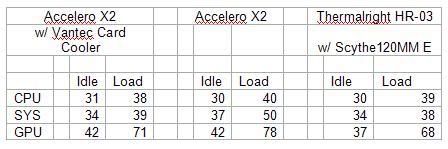
HR-03Temps.jpg


Enjoy your silence!
 
Personally, I just leave the monitoring graphs going on my secondary display (what, doesn't everyone have one?)

Or you could just leave 'em going and have a quick peek at your Max Temps (rather than avg or min) later.
 
Ok I found it and temp log shows lowest at 33C and highest at 56C. That was playing Oblivion for 55 minutes.
 
Stick one of those Vantec dual fan card coolers and it'll pump all the heat up top. Here's my results...

Thermalright&


Enjoy your silence!

Hrm. Using an HR-03 on my X1950XT in the fan-down config w/ a 92mm Panaflo M1A had me idling around 39 and loading around 68.. after flipping it over and trying the wrap-over-the-top w/ an antec tricool 92mm, it's idling around the same, but loading around 53-55 (using R6:Vegas to work the card).
edit: with the stock heatsink in the same situation @ ~40% fan, it was clearing the high 70's under load and idling around 50.

I don't get it either, but I'm happy it works properly now. :D I'm thinking of grabbing one of those PCI slot coolers or jury-rigging a quietish 80/92mm to basically blow air straight up onto the card/RAM from the bottom.
 
Ok I found it and temp log shows lowest at 33C and highest at 56C. That was playing Oblivion for 55 minutes.

Wow nice temps...I guess I need a little more airflow not that I'm not getting good temps. I'm idling around 40c now (I think the AS5 has cured, was at 43ish before) and at load averaging in the low 60s. I also use Oblivion for temp testing as it was the game causing my temps to get so high to begin with.
 
Not to resurrect a semi-old thread, but I just purchased one of these for my eVGA 6800GT. I was originally idling at 60C and load temps at 85-90C regularly with the stock HSF. Now I idle at 50C and load at 63C with the Arctic Accelero. HUGE difference.

Another thing I noticed... I never realized just how friggin' loud the stock HSF was. Now my computer is a lot quieter and a lot more bearable to have to sit next to, especially now that I've moved my computer to on top of my desk rather than it being at my feet.

Twas easy to install and works like a charm. Plus, it's only $20 + shipping at Newegg. If anyone is looking to upgrade their HSF on their video card, ATI or Nvidia, I definitely give this two thumbs up.

And for [H]ard Results, I didn't keep my OC settings, but I did try it of course. :) I was able to get my core up to 420mhz and the memory to 535mhz (1070) before it would go no further (stock = 350core and 500memory). Temps maxed out at 67C during load. This is coming from about 370core and 515memory previous with the stock HSF. I didn't keep the settings because I didn't see the point in OCing such a long in the tooth video card. I figure if I OC, I'll get about 10% more performance. If I upgrade, I'll be absolutely blown away.

 
Yea the X2 is pretty good at lowering temps but the real gain is the low sound levels. I did however have to remove the cover and fan and mod it with 2 80mm fans so that the heat would not blow directly onto my motherboard seriously heating up the PWM. Just a note to others who do not have good airflow in their case due to watercooling and such. Now with the mod I get max load temps of 66 with 675/780 core/mem. Great design on the part of AC, heatpipes work great.
 
Yes sir, just to clarify my temps on the x1900xt512, i have the accelero fan running at 100%, and havent o/c the card yet, its fast nuff for me for now, but yes i have 5 120mm case fans, 1 front intake, 1 rear intake, 1 side intake, and 2 top exhaust, so my air flow is superb in the LianLiV1000BWPLUSII. I do not game in a freezer LOL, its typical CA San Diego weather, where it gets cool at night. My case sits on top of a desk if it makes a difference, but it does collect less dust that way! It does depend on the weather conditions!

Cold Day
idle-33C
load-56
 
Back
Top