• Some users have recently had their accounts hijacked. It seems that the now defunct EVGA forums might have compromised your password there and seems many are using the same PW here. We would suggest you UPDATE YOUR PASSWORD and TURN ON 2FA for your account here to further secure it. None of the compromised accounts had 2FA turned on.
    Once you have enabled 2FA, your account will be updated soon to show a badge, letting other members know that you use 2FA to protect your account. This should be beneficial for everyone that uses FSFT.

six monitors: cant detect them

fudge2011

Limp Gawd
Joined
Jan 3, 2011
Messages
493
I have a 6950 and 6950 dcii

Im having really big problems running six monitors from them:

these are the combinations i've tried:

two dvi in the dcii and three DP-DVI-DVI with active adapters shows four screens then when I put any other cable into the other 6950 only that monitors will show up:

On startup almost everytime two screens show the asus bios screen!!

Can anyone suggest what combinations to try?

Im having real difficulty and have been trying for days:

I have three active DP-DVI adapters, one mini DP-DVI active adapter and six dvi monitors!

I have the crossfire ribbons removed at the moment. :confused:
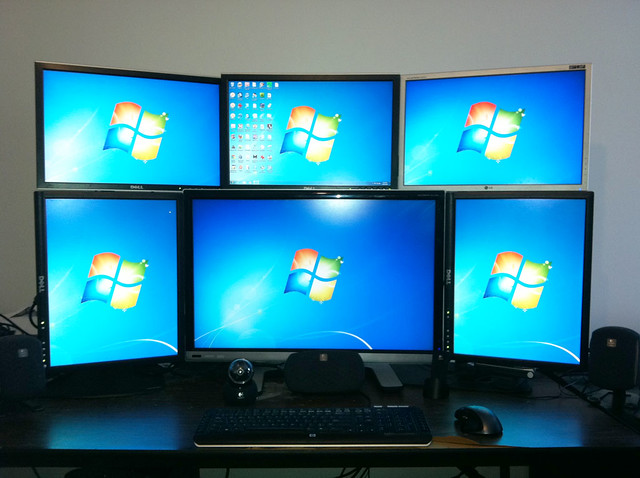
 
Take out the non-DCII card and plug in *ALL* the monitors into the DCII. Once you have all the monitors working, *THEN* plug in the second 6950. If you can't get all six monitors working, you probably have passive adapters instead of active. It will work, here's the proof:


asymetric_six_monitors by rtangwai, on Flickr

I have exactly the same setup as you, all six monitors are plugged into a HD6950 DCUII with a XFX HD6950 hooked up in CrossFire.


IMG_0178 by rtangwai, on Flickr

Get active adapters certified by AMD to be absolutely sure.
 
Get active adapters certified by AMD to be absolutely sure.
my final saphire active DP-DVI adapter arrived tody, I just took out the non dcii card,,plugged all cables into the dcii in the order top left bottom left top middle etc. starting with the two dvi connection and then left DP to the right.

Turned on my computer and only one screen is being displayed and the rest are only recognised and not showing anything under screen resolution.

I noticed that the sapphire dongles I have arent AMD approved? is this my problem?


nightmare
seems i need the third one down either wiesel startech or accel ... Would anyone like to go into details of how non approved dongles have messed me over? !!
 
Last edited:
Under "Screen Resolution", what is "Multiple displays" set to on the non-primary display?
 
Back
Top