• Some users have recently had their accounts hijacked. It seems that the now defunct EVGA forums might have compromised your password there and seems many are using the same PW here. We would suggest you UPDATE YOUR PASSWORD and TURN ON 2FA for your account here to further secure it. None of the compromised accounts had 2FA turned on.
    Once you have enabled 2FA, your account will be updated soon to show a badge, letting other members know that you use 2FA to protect your account. This should be beneficial for everyone that uses FSFT.

Sharing 5.1 speaker system between 2 computers

Other-Yoda

n00b
Joined
Sep 9, 2017
Messages
2
I have Logitech X-540 Speakers (5.1) and I was running them on my desktop for several years.
I built another PC that I want to use for gaming only. While I have G430 headphones for it, I would like to have an option to switch my speaker system between these 2 PCs. I researched many KMV switches and none of them would work. I assume that there is a 2:1 switch needed that supports 3 mini-jack
cables that run from the audio cards but I am having a terrible time finding something that will work.

Any ideas?

Thanks in advance for any leads.

O-Y
 
It's called a Mixer.

I won't claim to promote the following, just showing you an example:

https://www.amazon.com/JUST-MIXER-A...al-instruments&ie=UTF8&qid=1504985140&sr=1-17

*edit* re-read your post - this would allow 2+ sources to play through a set of speakers at the same time, and adjust the volume of each independantly at the mixing point.

If your looking for KVM style either/or selection, something like this might work:
https://www.monoprice.com/product?p_id=8231

That is designed to take one input and output it between one of two devices. You could probably run it the other way, since it's just a passive switch (one output, put your inputs on the A/B). Again, not promoting this particular product (you'd need some adapters, it's meant for straight wire/pin input), just showing an example.

If it were me, I'd just get the mixer, and you can use the volume adjust to mute a source you don't want to hear - effectively using it like a KVM switch.
 
Last edited:
As an Amazon Associate, HardForum may earn from qualifying purchases.
Well, I may not have been totally clear...
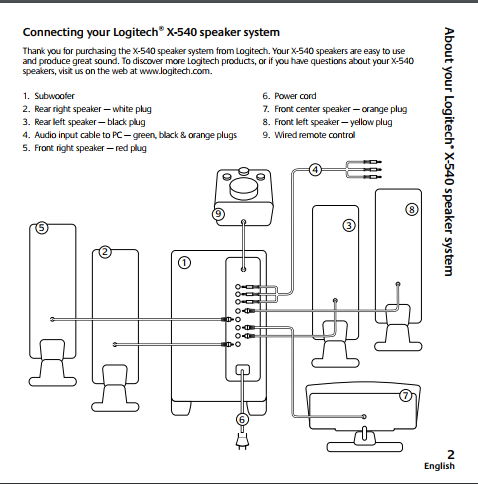
Logitech X-540 has 3 cables (with mini-jack on the end of each cable) running from audio output of the computer to back of the sub-woofer that does all channel-separation and amplification. What I am hoping to do is to have output from each computer going to some kind of switch that can let me choose which computer feeds the sound to the speaker system. I do not need to mix, I want the system to play sounds from one computer at the time. So, 2 inputs (3 cables from each source) to one output. Easily doable if switching to the speakers directly, but the fact that all amplification is done inside sub-woofer, makes things complicated. Below is wiring diagram, I want to have cable #4 being fed from 2 sources thru a switch.

upload_2017-9-9_17-5-56.png


Thanks for your interest.
 
You'd need a mixer for each of your 3 channels then (front/rear/LFE).

Might be cheaper to either get a full receiver...
 
Easily doable if switching to the speakers directly, but the fact that all amplification is done inside sub-woofer, makes things complicated.
Any box that can switch speaker-level connections will work at line level, too. But I'm not aware of a packaged source selector that handles 6+ channels, so you'll probably need to hack connectors yourself. I think you could use a few 1/8" stereo cables plus an A/B box for DB9 or VGA signals. Using Monoprice or similar would make this a $25 project.
 
Back
Top