• Some users have recently had their accounts hijacked. It seems that the now defunct EVGA forums might have compromised your password there and seems many are using the same PW here. We would suggest you UPDATE YOUR PASSWORD and TURN ON 2FA for your account here to further secure it. None of the compromised accounts had 2FA turned on.
    Once you have enabled 2FA, your account will be updated soon to show a badge, letting other members know that you use 2FA to protect your account. This should be beneficial for everyone that uses FSFT.

Second SFF Build: Need Advice

Synthetickiller

Limp Gawd
Joined
Apr 5, 2009
Messages
285
I built a SFF PC with help from you guys and I want another!

Why I'm building this PC:

I have small room in my home dedicated for powerlifting. I also have a 540w shelf stereo. I am tired of burning CDs, so I figure a PC streaming music from my file server is a better idea!

So this PC will do 2 things: Play music & run a spread sheet. The spread sheet will be running from an App Server on a Win Server 2008 R2 server.

SO here's what I'm thinking:

Mobo: dualcore intel atom (not sure if D525 is overkill), passively cooled. As long as it's fast enough, Via or anything ese
Ram: Prefer NON-SO-Dimm DDR3
Case: Needs to hold one 2.5" drive, no optical required, Smaller is better.
OS: Win 7 x64
HDD: own it
wireless: USB wifi dongle (should be fine)
Monitor: Touch screen. I have NO idea what to get. Mini-box has a few, but I don't know what's appropriate for iTunes & a spreadsheet. 7", 8" or 10".

So what should I get?
 
You've effectively rule out the Intel Atom route man: All Intel atom mobos uses DDR2 SO-DIMM RAM. Any chance of you accepting DDR2 SO-Dimm RAM?
 
hmm...

They do take DRR3, but only SO-Dimm

http://ark.intel.com/Product.aspx?id=49490

Hmm, low end DDR3 SO-Dimms are about $65, which is all I need. That is an option..

I bring up non-so-dimm since I saw DDR2 sticks being used on a LOT of atom mini-itx boards.

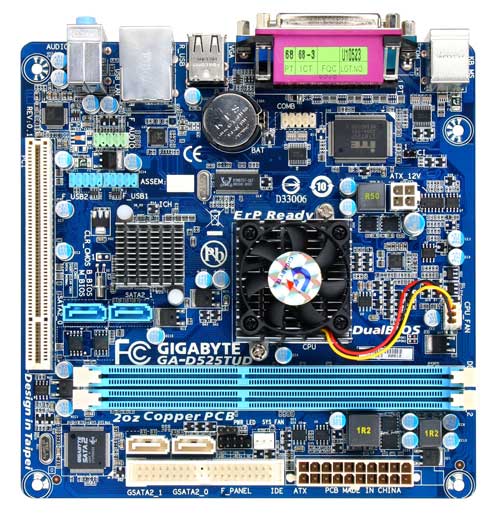
This also confuses the hell out of me:

3350.jpg

Yes, those are DDR3 Slots. If it weren't for the nosiy fan, I'd go this route. I'm STILL considering it.

http://www.newegg.com/Product/Product.aspx?Item=N82E16813128452&cm_re=d525-_-13-128-452-_-Product
 
You've effectively rule out the Intel Atom route man: All Intel atom mobos uses DDR2 SO-DIMM RAM. Any chance of you accepting DDR2 SO-Dimm RAM?
Well I stand corrected.

wow.. Yea danny thats the most left field post I have ever seen out of you.. have you been sleeping ok?

@OP If you have ram laying around that you could use then what is it? The d510 or d525 are both great options depending on what you have. Also for passive cooling look to intel branded. I had my d510 running whs & transcoding video on the fly for me so there wont be an issue with not having enough power for your use, but anything less then that just isn't worth spending the cash on.. If you dont ahve memory at all to use then go with the d525 just because its a little newer tech & the cost difference between ddr3 sodimm's & ddr2 is neglegable.
 
Danny Bui, don't worry. I had NO clue atom board supported desktop DDR3 till last night.

I'm trying to keep this build CHEAP. I'd rather not dump a lot of cash into a rig since it won't really buy me anything else. I can't use an optical audio input and I don't need built in wifi.

The gigabyte board looks very nice. I just don't want a high pitched fan, but I believe no matter what, there's a 1% chance of me hearing it. I guess I just like those pretty blue ASUS heatsinks! lol

Hypothetically, if I get that gigabyte board and 2gb of ddr3, what case & screen should I buy? I have no idea, so any recommendations would be awesome!

One other question.

When you buy a case with out a psu and purchase something like this: http://www.mini-box.com/s.nl/it.A/id.417/.f

What do you do about the 4 pin power? Most have 20/24 pin power, but nothing for the 4 pin.
 
Last edited:
Thanks.

I noticed those PSUs do infact have a 4pin power connector! Sorry for being lazy.

The ISK 100 looks really nice as it has a large 100mm fan to actively cool whatever is in the case.

So can anyone give me some hardware recommendations? Does the mobo I picked out look good for what I want, or should I get an nvidia ion solution?
 
I don't mean to troll but it seems like keeping your work out logs (I am assuming that this is what the spreadsheet is for) in some cloud based smartphone app would be more efficient. It could free you to use all sorts of simpler (and cheaper) solutions to stream your music.
 
Thanks.

I noticed those PSUs do infact have a 4pin power connector! Sorry for being lazy.

The ISK 100 looks really nice as it has a large 100mm fan to actively cool whatever is in the case.

So can anyone give me some hardware recommendations? Does the mobo I picked out look good for what I want, or should I get an nvidia ion solution?

For your odd DDR3 requirement, yes that mobo is good.
 
@ The Oatman

The issue wit a smart phone is scrolling through and editing takes a long time. A larger screen helps plug in values much easier. I also don't want to get my phone covered in chalk/dirty. If I drop it (which is possible), most things are metal and would just destroy my phone.

The music set up is so I can easily change songs. There are cheaper alternatives, but this set up would be very very simple for me to use.

I can deal w/ cleaning a touch screen surface that is dedicated for this purpose.

I also just want an excuse to have a very very small mini-itx set up w/ a touch screen. It's something I've wanted to do for a while, so I can justify the set up & cost.

@ Danny Bui

After looking, there aren't THAT many DDR3 boards.

Can you recommend me a ddr3 so-dimm board? Would it buy me anything over the gigabyte board I mentioned?

I think that it's worth going D525 as there isn't a huge cost over D510, but then again, if there isn't that much of a performance difference why spend more?

I just wonder if it's worth spending more on an ION board that would some graphical power, like Asus or Zotac?


EDIT:

Further confusing factors:

Atom 330 vs D510. The 330 wins in even cpu based benchmarks: http://www.pcmag.com/image_popup/0,1871,iid=249505,00.asp

It's an older cpu, but lower wattage. Really makes me wonder what to buy now. There's not much info on the net comparing all the intel atom processor lines.

D510 vs D525 http://www.tomshardware.com/reviews/pinetrail-atom-d525-nc98-525-lf,2716-4.html

Curious how the 330 vs 525 is honestly.
 
Last edited:
I'm trying to keep this build CHEAP.

"Cheap" and "touchscreen monitor" doesn't quite go together.

The gigabyte board looks very nice. I just don't want a high pitched fan, but I believe no matter what, there's a 1% chance of me hearing it.

Hypothetically, if I get that gigabyte board and 2gb of ddr3, what case & screen should I buy?

It is a somewhat noisy fan, but more in the pitch than loudness. Also, if you have music playing your chance of hearing the fan is close to nil, unless it is right in front of your face.

For "smaller is better" case that can hold one 2.5" drive, how about this? It is available in black or silver and holds exactly what you want. It even has space in the front to hold a USB WiFi dongle hidden behind the face. It can be had with or without the PSU, but bundled with the PSU saves you $11. The kit with the 60W adapter should easily power an Atom with one 2.5" notebook drive or SSD (probably ever needs between 30-45W), and do it at the peak of efficiency.

Atom 330 vs D510. The 330 wins in even cpu based benchmarks: http://www.pcmag.com/image_popup/0,1871,iid=249505,00.asp

It's an older cpu, but lower wattage. Really makes me wonder what to buy now. There's not much info on the net comparing all the intel atom processor lines.

A couple things... the PC Mag review isn't apples to apples exactly because the 330 was a 1st gen ION, which is better than ION2. I don't know about Cinebench, but Windows Media Encoder is a win for the D510 and AFAIK that is pure CPU. Everything else that the 330 wins at likely has GPU acceleration (PCMark/3DMark Vantage, Photoshop CS4). Alternately something changed between systems to account for the difference. This review shows the D510 beating a 330 that is not using ION.

It also wins with lower power usage (see page 11). The reason that the D510 is rated at 5W higher TDP is because the Northbridge (integrated graphics and memory controller) is now on the same die as the CPU, so 13W accounts for it all. With an Atom 330 at 8W TDP, the Intel 945GC chipset that was commonly bundled with non-ION desktop boards uses 22W on its own, so to properly compare TDP of the D510 versus the 330 as a platform would be 13W versus 30W. Neato!
 
@ Zap

AS for "cheap," it's all contextual. Touch screen's cost a LOT, but $150 isn't too bad. I was thinking this 7" would work fine.

http://www.mini-box.com/VM7000-7-touchscreen

Of course, I always appreciate advice on what to buy. I'm not sure if a 10" would help with visibility, granted, I'll be walking right up to the screen. I've never owned a touch resistive screen, so I have no idea.

I understand the CPU comparison. Ion 2 is an odd beast. I'm thinking to get that gigabyte board as it's one of the cheaper boards, 2gb of ddr3 & either one of these cases:

Antec ISK Series ISK 100
http://www.newegg.com/Product/Product.aspx?Item=N82E16811129095

Or
The case you mentioned. I guess 60w should be enough. I'll have a 5400rpm 160gb drive & that gigabyte board w/ a simple 2gb ram kit.


I like the case I found because of the 100mm fan, but I'm used to figuring out cooling solutions for OC'd cpus. That's not needed. You're right, I shouldn't be able to hear the fan over my stereo.

I do like that feature you brought up with that case.

I guess an ideal set up would be:

mobo/cpu: GIGABYTE GA-D525TUD Intel Atom D525
Ram: Whatever cheap ddr3 2gb kit I can find.
Case: M350 Enclosure WITH PICOPSU-80 and 60W ADAPTER KIT
Hdd: Hitachi 160gb 5400rpm hdd
Screen: http://www.mini-box.com/VM7000-7-touchscreen

Not sure if that's the screen I want. It's OOS too.

Anyone had a better idea?
 
Doh, internets ate my post. Here it is again (mostly).

That's a pretty good value for a small touchscreen with VGA input. I expected it to be more. As for size, perhaps you can find someone with an original Eee PC 7" to play with, to give you a size comparison?
 
I owned an Acer netbook a while back which had an 8.9" and I found that to be small.

I do agree, 7" is cheap, but larger would most likely be better.

Where are some good places to shop for resistive touch TFT screens? I know someone had a thread with a post about it, but I can't find it. 9" or 10" would be idea.

I know the site where I found the 7" had a 15" for 200, but that's pretty big. I should measure though. Maybe I should simply measure and check. 10" is ideal honestly.
 
@ Danny Bui

After looking, there aren't THAT many DDR3 boards.

Can you recommend me a ddr3 so-dimm board? Would it buy me anything over the gigabyte board I mentioned?

I think that it's worth going D525 as there isn't a huge cost over D510, but then again, if there isn't that much of a performance difference why spend more?

I just wonder if it's worth spending more on an ION board that would some graphical power, like Asus or Zotac?

I aint danny, but I know the subject fairly well.. Unless you want to overclock it I wouldn't recommend the Gigabyte at all.. Simply because of the HSF.. These things are cool enough there is no reason to have a fan on it & I hate little fans. The Intel one I linked above is going to have less tweaking features, but its passively cooled & as with pretty much all intel boards is going to be rock stable.. I had a d510 & loved it until I started using my server as a DVR with 4 HD streams & I would recommend the d5xx series for pretty much anything light duty. & When you factor memory in the d525 is within 10 bucks of the same price. I Would definitely spend the 10 bucks to get the newer & faster system. As for the possible ION system.. I wouldnt waste your money on it.. There is very little idle power savings using an Ion/Atom system over a low end Intel (i3) or amd (sempron) system. & much less power.
 
Well, it's only going to be running iTunes/Chrome w/ youtube and maybe one or two other things I find useful.

So here's what I'm thinking of getting now:

Motherboard: Intel D525MW $86.17 Shipped
http://www.amazon.com/gp/offer-list...w?ie=UTF8&qid=1289232168&sr=8-1&condition=new

Memory: Mushkin Enhanced Essentials 4GB (2 x 2GB) $65 shipped (2gb was only $20 less)
http://www.newegg.com/Product/Product.aspx?Item=N82E16820226019

Case & PSU: M350 Enclosure WITH PICOPSU-80 and 60W ADAPTER KIT $70
http://www.mini-box.com/M350-enclosure-with-picoPSU-80-and-60W-adapter

Monitor: 15" 4wire touch resistive monitor $199
http://www.mini-box.com/HF1500-15-LCD-touchscreen

Shipping for case&psu + monitor = $15, so $285 + $65 + $87 = $437 and done.

Is 4gb honestly overkill or wil that help with win 7 performance? If I could find a 2gb kit for $30, I'd go that route.
 
As an Amazon Associate, HardForum may earn from qualifying purchases.
The only thing I would change is I would swap the memory to this. There is no point in populating both slots if its cheaper to only populate 1 on these boards.
 
Alright, I know I've been dragging this thread out, but I had an epiphany....

The idle state of the D525 vs a Sempron is about even. An i5 650 actually uses less power in a mini itx format at idle.

http://www.servethehome.com/intel-core-i5-650-v-atom-n330-nvida-ion-review/

Anyways, I want to keep it cheap and came across another option:

ZOTAC GF6100-E-E AM3/AM2+/AM2 NVIDIA nForce 430 MCP Mini ITX AMD Motherboard
http://www.newegg.com/Product/Product.aspx?Item=N82E16813500045

$55 ($45 after MIR, Newegg backs up MIR, so I WILL get it fro $45)

+

Sempron 140 or 145 ($33 or $37)

That comes out to be $78 or $82. This is cheaper than an intel atom set up by a few dollars. I figure I can simply turn the system off unless I am using it, so 24/7 power consumption does not matter.

Think this'll have better performance in win 7 vs the D525?
 
Alright, I know I've been dragging this thread out, but I had an epiphany....

The idle state of the D525 vs a Sempron is about even. An i5 650 actually uses less power in a mini itx format at idle.

http://www.servethehome.com/intel-core-i5-650-v-atom-n330-nvida-ion-review/

Anyways, I want to keep it cheap and came across another option:

ZOTAC GF6100-E-E AM3/AM2+/AM2 NVIDIA nForce 430 MCP Mini ITX AMD Motherboard
http://www.newegg.com/Product/Product.aspx?Item=N82E16813500045

$55 ($45 after MIR, Newegg backs up MIR, so I WILL get it fro $45)

+

Sempron 140 or 145 ($33 or $37)

That comes out to be $78 or $82. This is cheaper than an intel atom set up by a few dollars. I figure I can simply turn the system off unless I am using it, so 24/7 power consumption does not matter.

Think this'll have better performance in win 7 vs the D525?

Personally I would still take the dual core over the extra MHZ.. Cost wise it again comes down to weather your buying ram or you already have it since DDR3 is cheaper then DDR2..
 
I made the order tonight. When I get my stuff, I'll just post pics of what I got. Some of the stuff is what I originally wanted, some is different.
 
You may want to beef the system up with a nice DAC!

I'm not an audiophile, although I do enjoy good sounding speakers.

How does using a DAC help vs analog to analog (3.5mm jack to dual RCAs)?

I have this system: JVC HX-Z30

h257HXZ30.jpeg


540w of kick ass (very clear mind you) sound!
 
Never mind, I figured you had something like a very large amplifier and a pre. :p

That JVC may sound pretty good but I don't think a DAC will give a very high boost on the sound quality. The amount of Watts don't really say anything about a system, I have a Naim Supernait that is "only" 85 Watts, but it drives Infinity's like these:


4ed67d442c190b46.jpg


:cool:

Back 2 the subject: I wonder what you are going to use as software to control iTunes on the touchscreen? I'm a huge fan of iTuns myself, but the program interface itself is not really made for touchscreen control. I think you're way better of with a tablet like the iPad.

Here's how I would do it:

Get a simple Airport Express to connect to the JVC, and use the free app called "remote" on the iPad to control iTunes. For spread sheets there will also be loods of software I guess. Buy a nice wallmount or dock for the iPad and that's it.

Cons above a mini-ITX setup:

- You can take it with you when yr done, you can use it everywhere you like.
- Better touch interface software
 
I'm going to see how itunes actually works. If it doesn't, I'll see how windows media center does.

The iPad costs more than this set up and I wouldn't want that product getting ruined. I can justify cleaning off a touch screen, but if I drop the iPad, I'm SOL.
 
If you put it on a good mount at the wall it's the same as a touchscreen. I don't see a problem on that.

Yes it costs more, but you can do more with it. Better bang for the buck!
 
I guess what about a cheap tablet laptop that can be gotten off ebay for $200 or less (lenovo x60 or something). You really don't need anything to elaborate as your just streaming music and it will be power efficient and more flexible than an iPad in terms of what you would want to install.
 
So I have the rig running. I am only missing the monitor, antennas and antenna cables. I also need to order a wall mount for my monitor.

Anyways, intel's spec for their heat sink SUCKS. Prime 95 on an open bench hit 102c before i caught the issue and stopped the process. Took about 10 minutes to get there in a 70F room. I basically need a 60mm fan in the case just to move air or it gets to about 82C+ and jumps to 92C once in a while.

I am not impressed with the quality. Thy should have put a 60mm fan in the sink and there'd be no way to have any issues. I can't hear my 60mm fan, so I think I'm ok.

Although it's a little sluggish (I'm used to an ssd & 4ghz quad), it does fine w/ windows 7, itunes and running a spreadsheet from an app server along with fan speed. I've seen ram usage drop as low as 440mb. Typically never breaks 900mb and I have a 2gb stick in the rig.

I'll get picks up soon.
 
Back
Top