SCSI question

Cerulean

[H]F Junkie
2FA
Joined
Jul 27, 2006
Messages
9,484
http://www.newegg.com/Product/Produ...name=Controllers / RAID Cards&Order=BESTMATCH

Is there a specific kind of SCSI or pin configuration I'd need in order to hook up a SCSI HDD like https://encrypted.google.com/search...=931&q=ST39173LC&aq=f&aqi=g1g-v4g-m1&aql=&oq= ?

I've noticed there are different kinds of SCSI connectors (excluding SAS) that are like, double-sided and single-sided. (Doubled-sided apparently supplies power to the drive too.)

Having a controller that supports both would be nice, but I'm not sure what to look for due to this connector confusion.

The reason I need a controller is because we need to make a clone of an old < 10GB SCSI HDD in an IBM AIX server *just incase*, but apparently there are no documentations on restoring tapes in the case of server failure. By at least having a hard, digital copy by physical clone, it could be backed up externally by tools like Acronis into archive-like files that could be stored anywhere (ie. internet). And then we can mess around with the clone under VMware and stuff like that.
 
According to that link it's an 80pin SCA drive. Logically these are the same as a 68pin SCSI drive except they provide power on the connector. AFAIK there are no 68/80pin SCSI to SAS adapters. You will likely need an SCA adapter to get a 68pin connector and molex power, then a controller and terminated ribbon cable. You say it is currently in a server, you can't just boot that and copy the data off of it?
 
I would just boot the server off a linux live USB stick and use dd to make a bit for bit copy the entire drive to another storage device or even a file.
 
According to that link it's an 80pin SCA drive. Logically these are the same as a 68pin SCSI drive except they provide power on the connector. AFAIK there are no 68/80pin SCSI to SAS adapters. You will likely need an SCA adapter to get a 68pin connector and molex power, then a controller and terminated ribbon cable. You say it is currently in a server, you can't just boot that and copy the data off of it?

Agreed. I second this..
 
No I can't just boot and copy the data off.

Remember, this an IBM AIX server from the '80s. These things require dummy terminals (yes, I really mean it). For those, like I was, who have no clue what I'm talking about, these are those old green-text monitors with keyboards built-in to them. We don't have one of those, and a normal monitor will not work.

Looks like
8953_ibm_rs-6000_power-pc_7248-120.jpg


Wiki is at https://secure.wikimedia.org/wikipedia/en/wiki/RS/6000
 
Last edited:
get an Adaptec 29320 (or a 29160), an LVD internal ribbon cable w/terminator and an SCA adapter or 7. You could probably get all of that from eBay for $50.

I recently gifted a similar setup for in-house drive scrubbing.
 
No I can't just boot and copy the data off.

Remember, this an IBM AIX server from the '80s. These things require dummy terminals (yes, I really mean it). For those, like I was, who have no clue what I'm talking about, these are those old green-text monitors with keyboards built-in to them. We don't have one of those, and a normal monitor will not work.

Looks like
http://www.bigkey.com/pic/ibm/cpu/8953_ibm_rs-6000_power-pc_7248-120.jpg

Wiki is at https://secure.wikimedia.org/wikipedia/en/wiki/RS/6000
PuTTY and a USB --> RS232 adapter? There's your terminal...any computer can be one.
 
PuTTY and a USB --> RS232 adapter? There's your terminal...any computer can be one.
You're neglecting the age of the hardware and the BIOS.

I think I will be going with a controller solution instead. Greater and broader flexibility for potential objectives other than just this machine.
 
You're neglecting the age of the hardware and the BIOS.

I think I will be going with a controller solution instead. Greater and broader flexibility for potential objectives other than just this machine.

It doesn't appear that he's neglecting it. If it's a serial port on the back you should be able to emulate vt102 through PuTTY pretty easily.

Hope you get everything copied off though.
 
It doesn't appear that he's neglecting it. If it's a serial port on the back you should be able to emulate vt102 through PuTTY pretty easily.

Hope you get everything copied off though.
Is VT102 capable of rendering anything other than text? :?
 
You're neglecting the age of the hardware and the BIOS.

I think I will be going with a controller solution instead. Greater and broader flexibility for potential objectives other than just this machine.
Age isn't a factor. RS232 has been around since the 60s. I don't see how the BIOS is relevant.
Is VT102 capable of rendering anything other than text? :?
No. VT100/102 were text only.
 
Age isn't a factor. RS232 has been around since the 60s. I don't see how the BIOS is relevant.

No. VT100/102 were text only.
BIOS is relevant.

On one note for *much* newer hardware, namely my T61 6460-66U, I could not run Linux on this laptop. I found out that was because my BIOS lacked support for certain things (which I do not know specifically or technically to be honest -- changelogs for BIOS updates don't show anything significant o_O); latest BIOS flash fixed it. Latest version was about 12 releases ahead of what this lappy had before I flashed it, when I had received it. I tried several different LiveCDs, all of which were unable to successfully boot Linux (booting off the disks were not the problem).
Another note is that on also relatively newer hardware (00s), I had a lot of problems getting pfSense installed on a server. I later found out that the reason was because of the motherboard chipset/BIOS simply not being fully compatible with FreeBSD. Solution was to use no greater than roughly ~40GB absolute max (partitions for / and /tmp/ could together be no greater). Was either a 160GB or 240GB HDD (SATA). Board had SATA ports.

It wasn't an uncommon thing back in the old days either to order BIOS chips and install them via soldering (yes, no joke -- I even found some envelopes at my workplace with new BIOS replacement chips waiting for a soldering job into their new home) to support newer hardware and just as likely software (someone would have to confirm specifically this part -- 'and just as likely software').
 
Last edited:
BIOS is relevant.

Don't need 2d graphics for BIOS, or to run dd for that matter. BIOS is just colored text.

On tons of modern server equipment today an onboard serial port is internally routed to a service processor. You can then SSH in and configure BIOS settings, PXE boot ROMs, etc.
No need for 2d graphics at all. Simple text is sufficient.
On older stuff it was routed to the first onboard db25 or db9.
 
Huh? What on earth are you on about? You're emulating a terminal here and that has absolutely nothing to do with the BIOS. Your issues with other systems have no bearing on a terminal emulator. Hell, I could use my cell phone as a terminal for that AIX system if I really wanted to.
Don't need 2d graphics for BIOS, or to run dd for that matter. BIOS is just colored text.
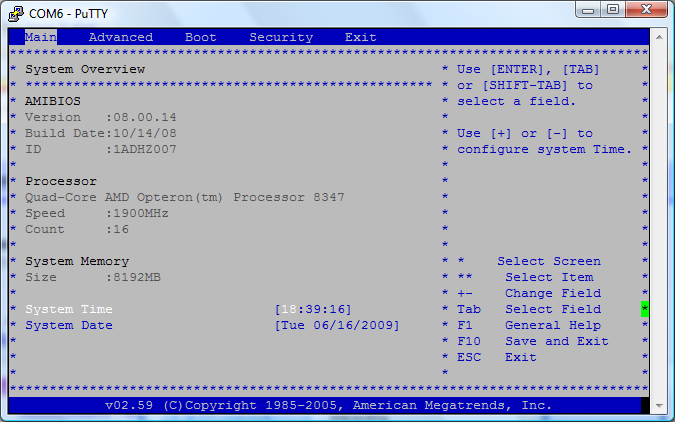
Yep, you can even do it on newer system. Here's a screenshot I took connected to my quad socket 16 core system just to prove a point:

bios.png
 
Don't need 2d graphics for BIOS, or to run dd for that matter. BIOS is just colored text.

On tons of modern server equipment today an onboard serial port is internally routed to a service processor. You can then SSH in and configure BIOS settings, PXE boot ROMs, etc.
No need for 2d graphics at all. Simple text is sufficient.
Ah well it's too old for me to do it that way. :( (EDIT: Well actually it's just that I don't see the point of using a terminal/telnet/SSH. If you guys are advising this as a replacement/substitution for a monitor, it still won't get me to UBCD, will it?)

UBCD has some very great tools in its menus for cloning and backing up HDDs to other media (including HDDs).
 
Is it really a 7248? It should have a VGA port on it and maybe even a 13W3 port, plus 2 PS2 ports.

You might be able to run a PPC Linux LiveCD on it.
 
Is it really a 7248?

You might be able to run a PPC Linux LiveCD on it
After Googling and thinking about the alternatives (terminal emulation, etc), I'm pretty sure I wouldn't be insane to say that all this could be done more properly and easily via a SCSI controller and blank SATA HDD on a modern machine.

And that's actually what my OP is. I'm just looking for information about SCSI controllers (and learn a little bit about SCSI while at it) and help in finding the right controller. There are no procedures (as far as I know thus far) for recovering from tape backups, which as of late haven't been occurring possibly due to tape drive failure. As a result, it's kind of critical to get a working copy of the HDD that for sure can be restored (because this would be a much easier thing to do anyway, guarantees results, and all you need is a program that does the transfer/sector-to-sector cloning).
 
If you want to go that route, just buy any SCSI card off eBay, get a 68 to 80 pin adapter, and then the proper cable? Pretty simple.
 
Yep, you can even do it on newer system. Here's a screenshot I took connected to my quad socket 16 core system just to prove a point:

bios.png
On a completely different note, is it possible to get non-text material rendered through a COM port? I would be interested in possibly using this for my personal workstation at home instead of having to borrow a monitor+keyboard whenever I have booting problems. I don't want to spend $300 on an IP-over-KVM. (Reason I might need non-text rendering is so that I could use Parted Magic / Windows 7 DVD repair tools / other.)
 
Yes, some motherboard will rasterize graphics as text (I've installed Windows that way actually). You won't find that on anything but server motherboards however.
 
PuTTY and a USB --> RS232 adapter? There's your terminal...any computer can be one.
I think I'm going to see what I can do with this.

We have found the server a few times lose connection to the network for unknown reasons, and not having a terminal doesn't help in diagnosing the problem. ;o
 
Huh? What on earth are you on about? You're emulating a terminal here and that has absolutely nothing to do with the BIOS. Your issues with other systems have no bearing on a terminal emulator. Hell, I could use my cell phone as a terminal for that AIX system if I really wanted to.

Yep, you can even do it on newer system. Here's a screenshot I took connected to my quad socket 16 core system just to prove a point:

x

How did you get to the BIOS from the COM port?
 
Server motherboards have serial consoles where the bios can be accessed via the com port.
 
How did you get to the BIOS from the COM port?
BIOS on the motherboard has to support it. Pretty much any server motherboard will do it. Not possible with any desktop/consumer motherboard that I'm aware of.
 
Back
Top