• Some users have recently had their accounts hijacked. It seems that the now defunct EVGA forums might have compromised your password there and seems many are using the same PW here. We would suggest you UPDATE YOUR PASSWORD and TURN ON 2FA for your account here to further secure it. None of the compromised accounts had 2FA turned on.
    Once you have enabled 2FA, your account will be updated soon to show a badge, letting other members know that you use 2FA to protect your account. This should be beneficial for everyone that uses FSFT.

Ryzen Temperature confusion

jabnyc

n00b
Joined
Mar 13, 2017
Messages
4
I am totally confused by this whole temperature offset for my 1700X chip. I took two screenshots
ORTvpS.jpg
4vypKy.jpg
The first is stock speed and the second is overclocked to 4.05 and memory to 2400 Mhz as I can't get docp to work for me. The rig is sitting idle but the temp for Package go from 55- 70 C in Ryzen master and HWmonitor. CPU temp in Asus AI and Hwmonitor show 40 C, I assume this is the same temp reported in Corsair link temp #1. But the H110i shows 27 C. The craziest thing to me is that when i boosted the clock to 4.05 and vcore to 1.40 there was virtually no change in the idle temp. Which temp do I pay attention to Package or CPU and why is there such a big difference between the H110i temp and all others?
 
Corsair link, if like mine, shows the water temp. Mine shows considerably lower than the other sensors for the CPU and MoBo. I haven't yet resurfaced my H110i GTX, but I am sure when I do it should better match the others as I am guessing that it isn't transferring the heat as well with its current grooved surface. My previous Corsair 120mm did well and it was given that mirror finish.
 
I recommend getting the latest Beta of HWiNFO64 because: #1, it has a far bigger list of temps, voltages, etc than what HWMonitor does and is even FREE whereas HWMon requires you to pay in order to get the customization features. #2, the readings so far are the same, save for one on the motherboard, but being it seems of little importance, no big deal. However, I warn you, the amount of additional readouts you'll see will be daunting at first, as there is easily 20x as much stuff in HWiNFO! Nevertheless...

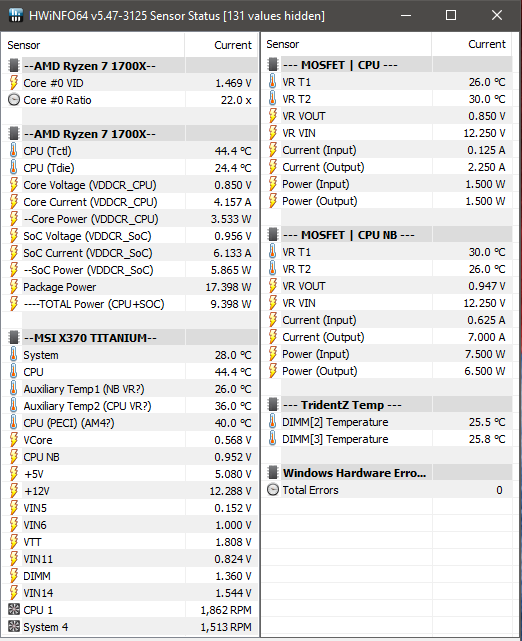
What I'm finding is that in Package in HWMon, CPU (Tctl) in HWiNFO, and Temperature in Ryzen Master are all the same (they'll show different temps at times due to their update speed, as well as decimal place differences due to being coded different), which on the 1700X and 1800X is the temp you're supposed to SUBTRACT 20C from in order to get the "Real" temp. Similarly, it's the temp that when it reaches 95C (75F Real temp) it will trigger thermal shutdown of the system.

IN COMES HWiNFO TO SIMPLIFY THINGS!

In HWiNFO's temp readings you'll find an extra one called CPU (Tdie), which is right below (Tctl) and that's when you'll notice........ it's exactly 20C difference (lower)! :D

Here is my system as an example.
HWiNFO64 Beta Ryzen.png


PLEASE NOTE: I've done heavy customization to my Sensors panel. I've expanded it to be two-panes with the blue button bottom left [not in picture], disabled the Min/Max/Avg columns, as well as making tons of naming changes and changes to positions, just for my own sanity for reading. Those three under the Titanium with question marks are my labeling, trying to determine what is what (and my AM4? is speculation as being a thermal sensor in the socket itself). The Core VID at the top perplexes me as it doesn't appear to be what anything is actually operating at (as you can note by my CPU MOSFET VR Out which is the voltage feeding the CPU, that reads 0.850V). Also confusing to me is the Package Power, since it seems to be sort of a fake reading. The one I've labeled TOTAL Power is what simply math determines to be what is being fed into the CPU. The standard formula to determine Watts is Volts x Current. Under my second listing of 1700X you'll notice Core and SoC (SoC == CPU NB), each having volts, currents and watts. Do the math and you'll notice those total the... "TOTAL" heh
BTW, the Windows Hardware Error Alerts on the right is enabled by default, but reason I left it is because it's handy to determine problems with stability. If you're overclocking CPU and they start showing up, fair bet that's why. If you're overclocking or tightening timings on memory and they show up, same thing... likely due to that. :)


Anyways I hope that helps, as I feel your pain with trying to make sense of what exactly Ryzen is doing at any given point, and most importantly, what is REAL! lol

EDIT: As a follow-up I figured I'd post an image of my system's readings after 15mins of AIDA64's stress test (which is no slouch I assure you!!). All 16GB are used, and that "Stress cache" test alone will load the CPU up really hard. The Package Power will sit around the rated 95W with the Cache test not running and just CPU, GPU and System Memory, so this adds another 7W on top, leading to these results. Currently my heatsink is a Scythe Katana 3 with a 92MM Delta Tri-Blade (it's mutant I made from a server fan and a old Dell P4 fan), which I am finding that for such a tiny heatsink and with an ambient temp of around ~23.5C, this thing does awesome! The Tri-blade is very quiet despite ripping around at 3200RPM lol Anyways....
Ryzen Stressed @ Defaults.png

Speculation: "Package Power" may perhaps be what the chip is putting out in heat and my "TOTAL" is what it's consuming electrically?
(I still don't know what the CPU PECI is. Def not a functional readout though given it's locked at 40C. I also believe I have my Aux temps backwards)
 
Last edited:
Back
Top