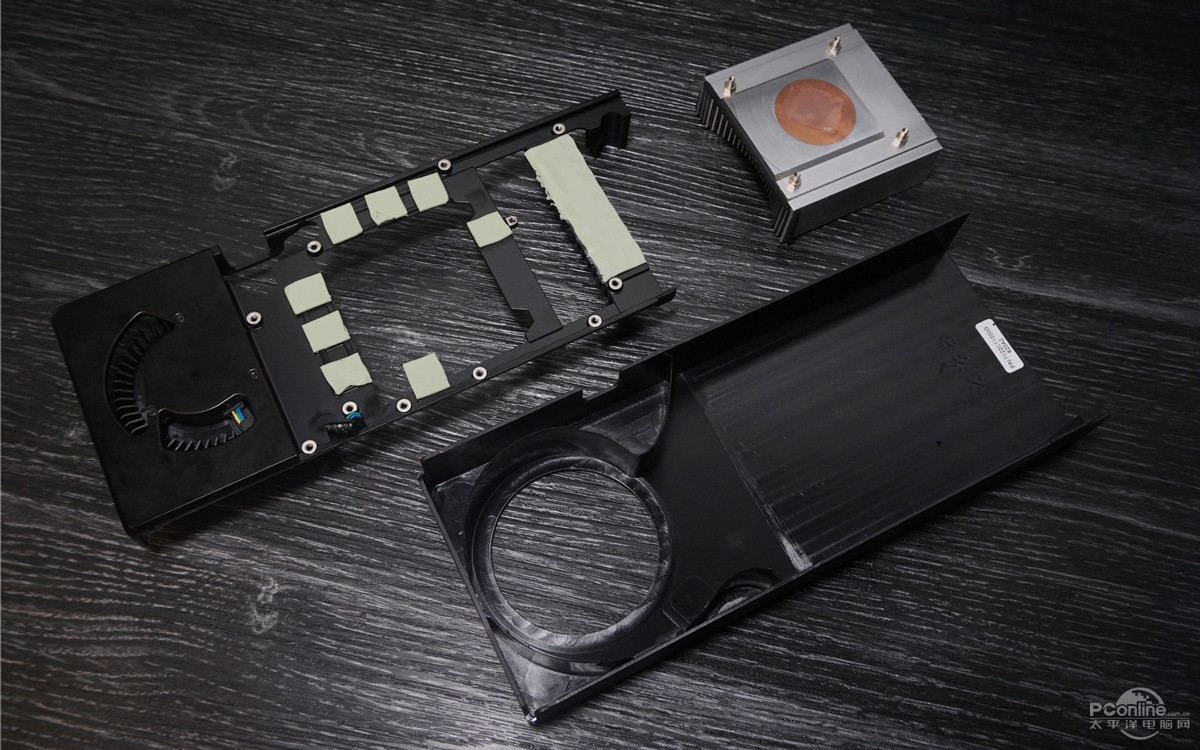
RX 480 water blocks.

Which is why they were sold w/o cooling on the vrms?
its got a flat metal plate that covers them and the ram but no real cooling. ive red-modded my card and the vrms with just that plate have never gone over 70c

edit: of course cooling will give a better life span
 
Which is why they were sold w/o cooling on the vrms?

Again I haven't seen my reference GPU cover in quite sometime so I could very well be wrong. But usually it's just some thermal pads with the second side being held onto the plastic cover? Of course it has that blower fan churning air.
 
its got a flat metal plate that covers them and the ram but no real cooling. ive red-modded my card and the vrms with just that plate have never gone over 70c

edit: of course cooling will give a better life span

The stock cooling uses the whole frame of the cooler constituting a finned portion on the vrm RIGHT IN FRONT of the squirrel fan. But yea I guess that amounts to no cooling. lol.


That said, I'd never tell ppl to not cool their vrms, especially when overclocking like the crazy guy in that video. That is just bad advice.
 
The stock cooling uses the whole frame of the cooler constituting a finned portion on the vrm RIGHT IN FRONT of the squirrel fan. But yea I guess that amounts to no cooling. lol.


That said, I'd never tell ppl to not cool their vrms, especially when overclocking like the crazy guy in that video. That is just bad advice.

I agree with you that I'd rather have them well cooled. But is it absolutely necessary if the circuitry never gets close to it's maximum operating temperature? That's the question. ;)

Here is some RX 480 pron. I'll just link one image. Check out the website for a ton more.
Sapphire Reference Radeon RX 480 Taken Apart, Pictured Some More

Lastly, taking the cooling solution apart reveals a very simplistic design. AMD is taking advantage of the 150W TDP of the "Ellesmere" silicon, and employing a simple monolithic aluminium heatsink, with a copper core. There's no complex fin-stack, no heat-pipes. The metal base-plate transports heat from the VRM and memory chips onto the main heatsink, while itself dissipating some of the heat under the lateral-blower's airflow.


153f.jpg
 
Yea, it's safe to say we agree cooling vrms is a good thing.

Heck yea! Of course! But it still makes me wonder about max operating temperatures of components. People always said that the reference R9 290 was going to die a horrible death because the card was designed to run up to 94c. Mine never had an issue with 94c; I just didn't like being in a room with a card running at 94c. ;)

So if the VRMs can run at 125c and the card OC'd to 1500 is only bringing them to 105c; then do they need extra cooling? Or we just not engineers and the man who designed it is smarter than us. :)
 
It is simple...although silicon will happily run at temps that will boil water and blister careless fingers, there's no question that its lifespan (and the lifespan of surrounding circuitry) is affected. If you replace your video card every 18 months, then maybe it's no big deal for you.

Something else no one has mentioned (and since I've not watercooled a vid card, or even a MB/CPU setup, perhaps someone who knows these things well can educate me on) is that the thermal pads are designed to work in locations where there is a significant gap (0.5mm or more) between the device and cooler. Most cooling compounds are not designed to work in such thicknesses, yet that's what gets applied to memory chips and VRM's on most of the water cooled setups I've seen. Wouldn't a replacement pad, or even something like this be a better idea?
 
As an Amazon Associate, HardForum may earn from qualifying purchases.
It is simple...although silicon will happily run at temps that will boil water and blister careless fingers, there's no question that its lifespan (and the lifespan of surrounding circuitry) is affected. If you replace your video card every 18 months, then maybe it's no big deal for you.

Something else no one has mentioned (and since I've not watercooled a vid card, or even a MB/CPU setup, perhaps someone who knows these things well can educate me on) is that the thermal pads are designed to work in locations where there is a significant gap (0.5mm or more) between the device and cooler. Most cooling compounds are not designed to work in such thicknesses, yet that's what gets applied to memory chips and VRM's on most of the water cooled setups I've seen. Wouldn't a replacement pad, or even something like this be a better idea?

Not always, for ex. Aquacomputer uses .2mm or .3mm pads which means that they are really pushing it on the tolerances. The reason you don't want to use a paste is because of manufacturing tolerances on the actual card components. The pads make up for any differences in tolerances.


Heck yea! Of course! But it still makes me wonder about max operating temperatures of components. People always said that the reference R9 290 was going to die a horrible death because the card was designed to run up to 94c. Mine never had an issue with 94c; I just didn't like being in a room with a card running at 94c. ;)

So if the VRMs can run at 125c and the card OC'd to 1500 is only bringing them to 105c; then do they need extra cooling? Or we just not engineers and the man who designed it is smarter than us. :)

Just because something is rated at X, it doesn't mean you want to actually hit that limit. All you are doing is wasting away the lifespan of the card. The lower it runs within reason, the longer it lasts. Running your vrms at 105c on a test bench for a quick video is one thing (stupid) but doing it like that 24-7 is ABUSE in my book.
 
As an Amazon Associate, HardForum may earn from qualifying purchases.
It is simple...although silicon will happily run at temps that will boil water and blister careless fingers, there's no question that its lifespan (and the lifespan of surrounding circuitry) is affected. If you replace your video card every 18 months, then maybe it's no big deal for you.

Something else no one has mentioned (and since I've not watercooled a vid card, or even a MB/CPU setup, perhaps someone who knows these things well can educate me on) is that the thermal pads are designed to work in locations where there is a significant gap (0.5mm or more) between the device and cooler. Most cooling compounds are not designed to work in such thicknesses, yet that's what gets applied to memory chips and VRM's on most of the water cooled setups I've seen. Wouldn't a replacement pad, or even something like this be a better idea?

I've never used thermal paste for memory and VRM, mainly because it would just get too messy, and as you mentioned, the gap is usually 1-1.5mm so a paste would just lose all its effectiveness.
 
As an Amazon Associate, HardForum may earn from qualifying purchases.
I got one block today from EK along with a Predator 360 AIO. Getting the waterblock on was pretty cake, unfortunately though it seems my Predator 360 was DOA, never turns on. I put a help ticket in through EK on my Predator. On Monday my 2nd block comes, but if my Predator 360 really is DOA then it's going to be another couple of days until I can start OCing/testing.
 

Attachments

  • WP_20160715_20_53_30_Raw.jpg
    WP_20160715_20_53_30_Raw.jpg
    184.1 KB · Views: 32
I got one block today from EK along with a Predator 360 AIO. Getting the waterblock on was pretty cake, unfortunately though it seems my Predator 360 was DOA, never turns on. I put a help ticket in through EK on my Predator. On Monday my 2nd block comes, but if my Predator 360 really is DOA then it's going to be another couple of days until I can start OCing/testing.
i guess you mean the pump doesnt work? bummer....the block looks good! card looks tiny as fuck.
 
Sorry to hear your AIO was DOA MotionBlur ...I have actually read several reports of those EK AIO units arriving DOA or with issues like the leaking O-rings that the first revision had..

I am done with EK, their QC has fucked me twice, once with nickel flaking issue, and then with an all copper 290X block that looked like someone took a chisel to it...

I am not a fan of the looks of the EK 480 blocks, but as long as they perform they can be ugly as hell since you wont see them even if you have your case at eye level lol...Please keep us informed..
 
i guess you mean the pump doesnt work? bummer....the block looks good! card looks tiny as fuck.

Yeah it doesn't work. There's a light on the bottom that indicates it has power, but it never comes on. It comes with a 2 pin PCIe type connector to SATA power connector that you connect to give it power, however swapping SATA power connectors on my eVGA does nothing. The funny part is I thought that I had ordered 2 480 Waterblocks in my first order, but I hadn't. So it was a blessing in disguise that the other isn't coming till Monday so I can at least rock one of my 480s until I can get a replacement Predator.

Sorry to hear your AIO was DOA MotionBlur ...I have actually read several reports of those EK AIO units arriving DOA or with issues like the leaking O-rings that the first revision had..

I am done with EK, their QC has fucked me twice, once with nickel flaking issue, and then with an all copper 290X block that looked like someone took a chisel to it...

I am not a fan of the looks of the EK 480 blocks, but as long as they perform they can be ugly as hell since you wont see them even if you have your case at eye level lol...Please keep us informed..

Thanks. I am kind of disappointed for the $600 after shipping for the 2 blocks with pre-fill and QDC and the Predator 360 I did expect pretty stellar QC on this stuff. But like I said the 480 waterblock installation was super painless so at least that went well. Hopefully Monday they'll cross ship a new Predator 360 so I can start enjoying this investment sooner than later.
 
I hope that MotionBlur gets his stuff soon. I think I'm more excited to know how his card performs with water blocks on it than him! :)
 
My 2nd one arrived today, but alas I am going back and forth with EK on my DOA Predator 360. Until that's replaced I am dead in the water literally lol
 
Back
Top