• Some users have recently had their accounts hijacked. It seems that the now defunct EVGA forums might have compromised your password there and seems many are using the same PW here. We would suggest you UPDATE YOUR PASSWORD and TURN ON 2FA for your account here to further secure it. None of the compromised accounts had 2FA turned on.
    Once you have enabled 2FA, your account will be updated soon to show a badge, letting other members know that you use 2FA to protect your account. This should be beneficial for everyone that uses FSFT.

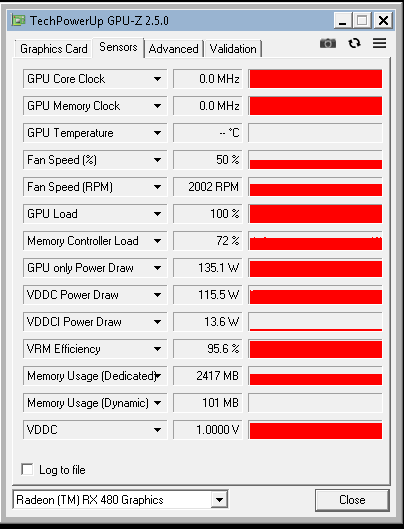
RX 480 8GB doesn't show temperature

multi-tasking_guy

Limp Gawd
Joined
Jun 16, 2017
Messages
142
for some reason my RX 480 8GB is not showing the temperature, ive tried msi afterburner, gpu-z and open hardware monitor but no success

anyone have any idea why? i have 3 other cards but they are nvidias, and the temperature works fine


is this normal for amd? do i need some special amd software?


temp.png
 
not normal that im aware of.

what drivers / OS are you running?

did you flash the card?
does MSI read the temps?
 
Ensure "Disable ULPS" is not enabled in the AB options.
 
I am running windows 7 ultimate 64-bit

i did not flash the card, but i bought it used, so im not sure if the person before me did,
Driver 23.20.15007.1005

msi does not read the temps,

i disabled ulps in the regedit but no change,

i have not had any problem with this card, but i have never played games with it, i just it for mining only
 
i forgot to mention i have 2 gpu's on my system!

gtx 970 and my rx480

i have never tried the rx480 by itself and see if the temperature works, i will have to put that on my to-do list
 
Some components of Wattman won't install properly when AB is present or running.
Uninstall afterburner till after the AMD driver. Check your temperature in Wattman,
which comes with the AMD driver. When all is good, then reinstall your afterburner.

If you aren't having to run pixel patcher to hack your driver to start, then the BIOS of
your AMD still has the original signature.
 
Last edited:
Back
Top