• Some users have recently had their accounts hijacked. It seems that the now defunct EVGA forums might have compromised your password there and seems many are using the same PW here. We would suggest you UPDATE YOUR PASSWORD and TURN ON 2FA for your account here to further secure it. None of the compromised accounts had 2FA turned on.
    Once you have enabled 2FA, your account will be updated soon to show a badge, letting other members know that you use 2FA to protect your account. This should be beneficial for everyone that uses FSFT.

RTX 5090 Undervolting (UV)

sk3tch

Supreme [H]ardness
2FA
Joined
Sep 5, 2008
Messages
4,595
Followed the instructions here:
https://www.reddit.com/r/nvidia/comments/1jaz2yq/5090fe_undervolt_guide_better_than_stock_at_450w/
(also a YouTube video - as it is more complicated than you think)

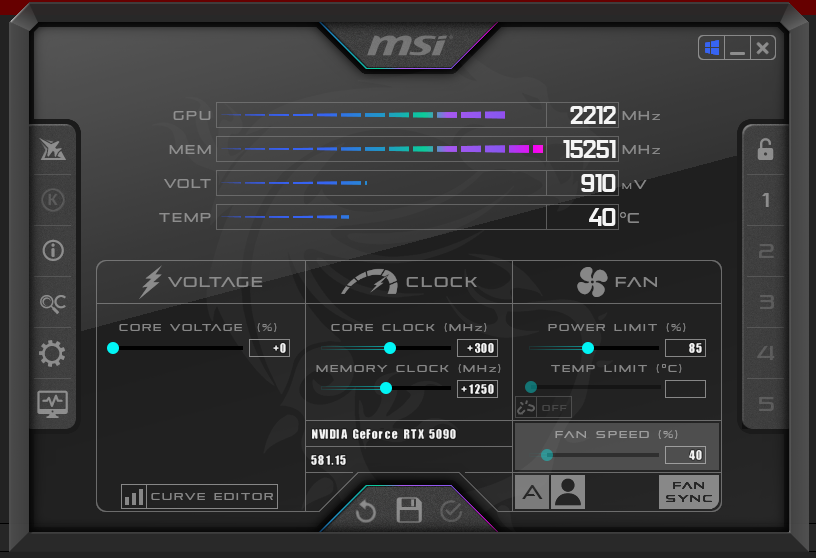
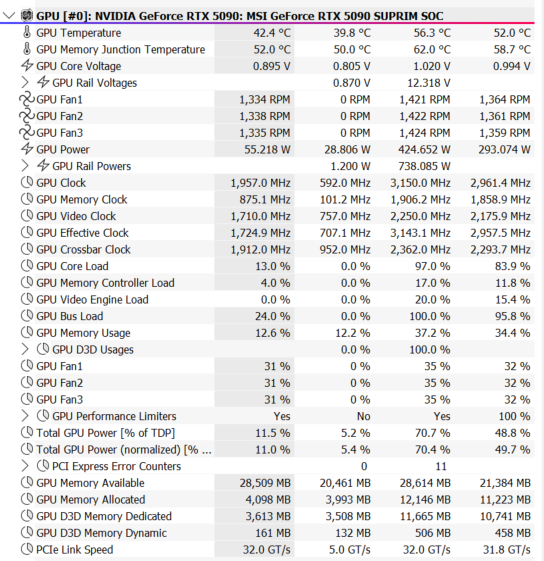
Great results...

Two nights of Fortnite MP:
5090_SUPRIM_uv.png

Pretty much zero performance loss. Maxing out at 333W!
 
UV = ultraviolet
what results? need some scores in something...
 
Those instructions are good if you are not looking for performance (like you lost 1000 pts in 3dmark).

To do a proper undervolt and overclock you need to try better settings. I suggest 975 @ 3000 MHz that will give you a decent speed boost for games where it matters (anywhere from 5-10%). Also reduces watts to about 500 max for most intense games (like using DLAA). Temps drop by about 5 C. My COD BO6 runs at 350-380W.

If Fortnite is all you play then might not be needed.

Also try other intensive games like Cyberpunk or Forza Motorsport or RDR2 to check stability. Most cards won’t be fully stable in those games with such low voltage.

Investing time in tuning the card is totally worth it this time as the gains in performance, reduction in watts and temperatures is quite meaningful.
 
Last edited:
Those instructions are good if you are not looking for performance (like you lost 1000 pts in 3dmark).

To do a proper undervolt and overclock you need to try better settings. I suggest 975 @ 3000 MHz that will give you a decent speed boost for games where it matters (anywhere from 5-10%). Also reduces watts to about 500 max for most intense games (like using DLAA). Temps drop by about 5 C. My COD BO6 runs at 350-380W.

If Fortnite is all you play then might not be needed.

Also try other intensive games like Cyberpunk or Forza Motorsport or RDR2 to check stability. Most cards won’t be fully stable in those games with such low voltage.

Investing time in tuning the card is totally worth it this time as the gains in performance, reduction in watts and temperatures is quite meaningful.
Thanks!

Only a 5.8% loss for way less power and heat I’d call that a win. Barely affects FPS - and gameplay is the same.
 
In case you want something easier - this 2 min video allowed me to hit leaderboards playing with the 5090s I have had.


View: https://www.youtube.com/watch?v=LprpVT42VMA

In case people want to try some undervolt curves. Here are mine.

.9 @ 2750 (if this does not work you can do .9 @ 2700) - should get you to 400 watts max (this is castrating the card almost and will probably perform sometimes lower than stock)
.95 @ 2900 (if this does not work you can do .95 @ 2850) - should get you to about 450 watts max (this should match or beat stock by about 3-5%)
.975 @ 3000 (if this does not work you can do .975 @ 2950) - should get you to about 500 watts max (this should beat stock by about 5-7%)
.975 @ 3130 (Suprim) - Max power - will hit 600 for Steel Nomad but clocks will stay higher (this should beat stock by 7-9%)
.975 @ 3165 (Gainward) - Max power (for leaderboards) - will hit 600 for Steel Nomad but clocks will stay higher (this should beat stock by 9-11%)

Of course you can go higher with 1V curves but then it is almost hitting 550 Watts and am not sure if it is worth it.

For gaming stability you want to try the following:

Stalker 2 - 30 mins run around the wilds
Last of Us 2 - 30-45 min play time session
Forza Motorsport - 2-3 laps on any track
Steel Nomad - 20 loop torture test -> if it passes do with Port Royal -> if it passes do with Timespy
RDR 2 - run the bench 3 times
Cyberpunk 2077 - run the bench 3 times
Superposition 8K can also highlight an unstable undervolt very fast

If all of the above works then most likely you have found a successful undervolt curve.

Hope this helps.
 
Last edited:
In case you want something easier - this 2 min video allowed me to hit leaderboards playing with the 5090s I have had.


View: https://www.youtube.com/watch?v=LprpVT42VMA

In case people want to try some undervolt curves. Here are mine.

.9 @ 2750 (if this does not work you can do .9 @ 2700) - should get you to 400 watts max (this is castrating the card almost and will probably perform sometimes lower than stock)
.95 @ 2900 (if this does not work you can do .95 @ 2850) - should get you to about 450 watts max (this should match or beat stock by about 3-5%)
.975 @ 3000 (if this does not work you can do .975 @ 2950) - should get you to about 500 watts max (this should beat stock by about 5-7%)
.975 @ 3130 (Suprim) - Max power - will hit 600 for Steel Nomad but clocks will stay higher (this should beat stock by 7-9%)
.975 @ 3165 (Gainward) - Max power (for leaderboards) - will hit 600 for Steel Nomad but clocks will stay higher (this should beat stock by 9-11%)

Of course you can go higher with 1V curves but then it is almost hitting 550 Watts and am not sure if it is worth it.

Thank you! Exactly what I was looking for. I just stumbled across that Reddit post and started messing around. I'll mess with this tonight!
 
Yeah I was wondering if Fortnite really pushes the card all that much. Try some of the games I listed if you have them both stock and undervolt and let me know if I can help you fine tune further.

sk3tch
 
My approach to power management is stacking frame limiters. I do not undervolt at all, this is my v/f curve.
1758216948968.png


What I do is I limit my FPS at a framerate around the performance my GPU can achieve at the settings I want (typically the around the minimum FPS I noticed throughout my sessions). I typically limit my FPS with RTSS unless the game has a good frame limiter built in, then I also use NVCP limiter 3 FPS higher than the RTSS limiter.

Stellar Blade Game Settings: Max Settings + GTAO, 4K DLSS 0.77 scaling
Stellar Blade with ONLY RTSS Limiter @ 120 FPS: 425W
SB-Win64-Shipping_2025_09_18_11_54_50_083.png

Stellar Blade with RTSS Limiter @ 120 FPS & NVCP Limiter @ 123 FPS: 325W
SB-Win64-Shipping_2025_09_18_12_05_41_533.png


Kingdom Come Deliverance 2 Settings: Ultra Settings, 4K, DLSS 0.72 scaling
Kingdom Come Deliverance 2 with RTSS Limiter ONLY @ 120 FPS: 479W
KingdomCome_2025_09_18_12_28_08_665.png

Kingdom Come Deliverance 2 with RTSS Limiter @ 120 FPS & NVCP Limiter @ 123 FPS: 395W
KingdomCome_2025_09_18_12_32_15_678.png


By including the NVCP limiter you're effectively telling the GPU approximately the performance it needs to output.

The reason you limit NVCP 3 FPS higher is so that it never conflicts with the RTSS limiter, yes this can be paired with undervolting (reduced effect), but I just prefer not to undervolt. No you don't have to use the RTSS limiter if there is one just as good in-game.
 
Last edited by a moderator:
My approach to power management is stacking frame limiters. I do not undervolt at all, this is my v/f curve.
View attachment 754931

What I do is I limit my FPS at a framerate around the performance my GPU can achieve at the settings I want (typically the around the minimum FPS I noticed throughout my sessions). I typically limit my FPS with RTSS unless the game has a good frame limiter built in, then I also use NVCP limiter 3 FPS higher than the RTSS limiter.

Stellar Blade Game Settings: Max Settings + GTAO, 4K DLSS 0.77 scaling
Stellar Blade with ONLY RTSS Limiter @ 120 FPS: 425W
View attachment 754932
Stellar Blade with RTSS Limiter @ 120 FPS & NVCP Limiter @ 123 FPS: 325W
View attachment 754933

Kingdom Come Deliverance 2 Settings: Ultra Settings, 4K, DLSS 0.72 scaling
Kingdom Come Deliverance 2 with RTSS Limiter ONLY @ 120 FPS: 479W
View attachment 754938
Kingdom Come Deliverance 2 with RTSS Limiter @ 120 FPS & NVCP Limiter @ 123 FPS: 395W
View attachment 754939

By including the NVCP limiter you're effectively telling the GPU approximately the performance it needs to output.

The reason you limit NVCP 3 FPS higher is so that it never conflicts with the RTSS limiter, yes this can be paired with undervolting (reduced effect), but I just prefer not to undervolt. No you don't have to use the RTSS limiter if there is one just as good in-game.
Seems like an overly complex way to achieve similar outcomes.
 
Ha. I guess compared to just setting to 85% power and forgetting it.
I noticed setting to 85% had very weird behavior. In some games I was boosting to 3000 MHz but others were only boosting to 2650 MHz. So I went back to a curve which is 30 seconds and set and forget as well. YMMV.
 
The time to undervolt (in terms of setting a cap voltage and speed flat) was simply not worth the wasted time for me for stable in all games. Plus I did not buy a 5090 to castrate it's performance for any reason. The cooler on this thing is so oversized I just yeeted full power, full voltage and saw how much of an offset I could get for max stable clocks before games would crash. If a game crashed, I'd lower by 15Mhz. Eventually, 0 games crash and I have exactly 1 profile outside stock. Still never tops 60C (and my fan curve is just default quiet still), well below the cutoff temp anyway and the card can run 600W just fine in CP2077 and Doom TDA (those two really push power usage).
 
I've been doing UV on my 5090 FE for a while. My current one is 950mV @ 2977 and it passes every single stress test for hours, gameplay etc.

Thing is, I do noticed that it NEVER actually hits that mark at all. Some synthetic benchmarks from 3DMark do vary significantly. From Port Royale, to Speed Way, Steel Nomad etc. Some use a max of 925mV and at most others use 935mV. Max clock I've seen is ~2700MHz or there abouts. It's always jumping, never stable like on previous generations.

I'm guessing this is the nature of these cards right?
 
I've been doing UV on my 5090 FE for a while. My current one is 950mV @ 2977 and it passes every single stress test for hours, gameplay etc.

Thing is, I do noticed that it NEVER actually hits that mark at all. Some synthetic benchmarks from 3DMark do vary significantly. From Port Royale, to Speed Way, Steel Nomad etc. Some use a max of 925mV and at most others use 935mV. Max clock I've seen is ~2700MHz or there abouts. It's always jumping, never stable like on previous generations.

I'm guessing this is the nature of these cards right?
Not for me... Mine always hits around 3000~3150Mhz gaming or benchmarking. You can expect some fluctuations, but you are also holding your card back by limiting the voltage. The question is "why"?
 
Are you undervolting or just overclocking?

I'm limiting the voltage because right now I have better performance than stock whilst producing less heat and power consumption.

I'm on a FE which has a pretty small heatsink unlike AIBs
 
Are you undervolting or just overclocking?

I'm limiting the voltage because right now I have better performance than stock whilst producing less heat and power consumption.

I'm on a FE which has a pretty small heatsink unlike AIBs
Technically you are under-volting if you add a positive offset like I do (+280 for me). So I get higher clocks, with less voltage per clock, up to the limits set by the vBIOS caused by temp, power and voltage. What you are doing is under-volting and CAPPING voltage, which is basically saying, less voltage per clock, but then stop at "V" voltage and go no further on clocks.
 
Back
Top