• Some users have recently had their accounts hijacked. It seems that the now defunct EVGA forums might have compromised your password there and seems many are using the same PW here. We would suggest you UPDATE YOUR PASSWORD and TURN ON 2FA for your account here to further secure it. None of the compromised accounts had 2FA turned on.
    Once you have enabled 2FA, your account will be updated soon to show a badge, letting other members know that you use 2FA to protect your account. This should be beneficial for everyone that uses FSFT.

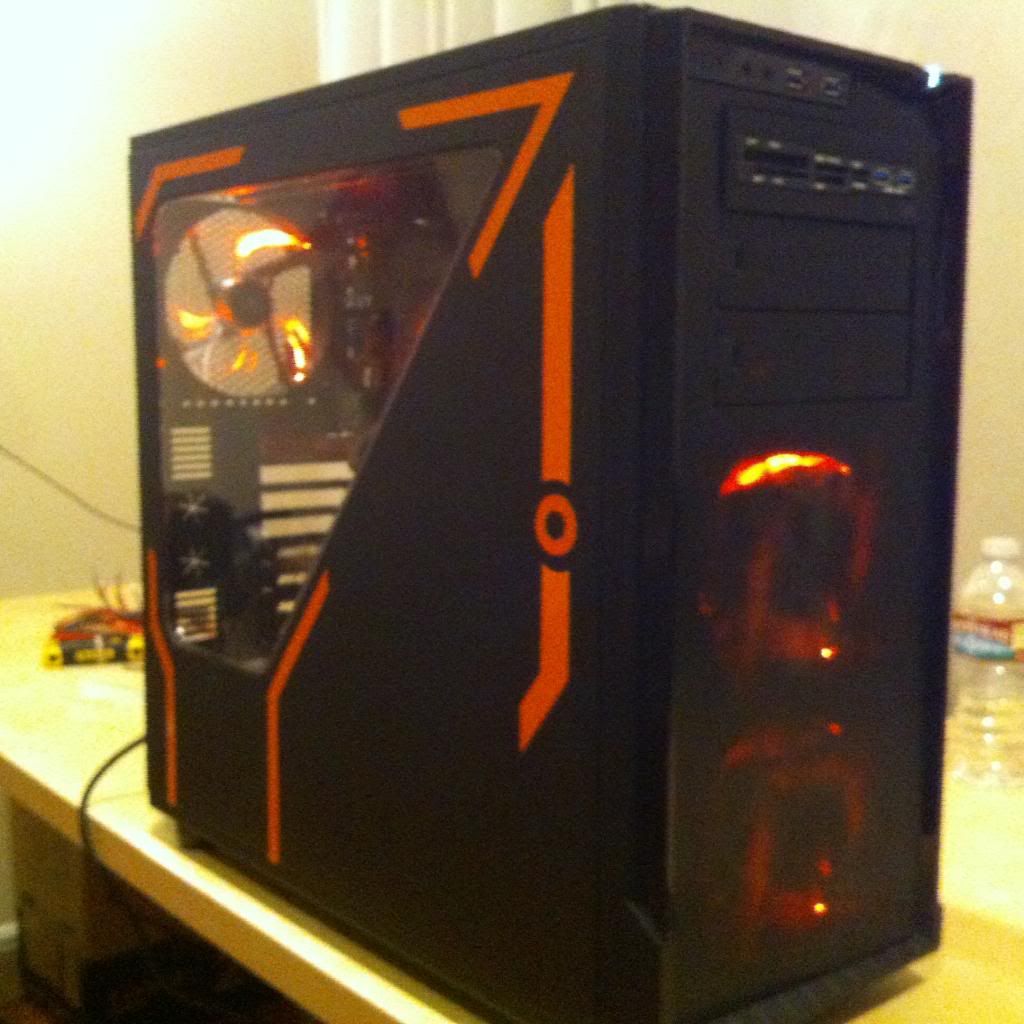
Rinzler - NZXT Source 530

Modder

Gawd
Joined
May 1, 2012
Messages
757
Hello and welcome to my worklog! Please scroll down and skip this intro if you want to get right to the good stuff.

I will be walking you through my build of the NZXT Source 530 Full Tower chassis. I hope you enjoy this build as much as I have.

Ever since Tron: Legacy released in 2010, I’ve been brainstorming ideas as to what a mod might look like if I were to do one. This is the culmination of that. 3 years of creativity, many hours of planning and a combination of the right people and the right case coming together all at the same time to make something special.

I give you: RINZLER

Tron-Legacy-Wallpaper-Rinzler.jpg


Before I go any further, I want to take a moment to thank everyone that came together to make this project a reality


There are more people involved in the project, but this is the majority of people that really went above and beyond to make this happen. The project isn’t quite complete, but it’s definitely coming along well enough to get a nice worklog going.

TABLE OF CONTENTS

1) You are here.
2) Exploring the case and features
3) Hardware
4) Mocking things up, side panel
5) cutting top panel and front. Preliminary build.
6) Motherboard shroud
7) Power supply cover (Coming soon)
8) Remember the top part I cut out? (Coming soon)
9) Final Assembly (Coming soon)
10) Completion (Coming soon)
 
Last edited:
2) Exploring the case and features

As soon as I unboxed the case, I immediately knew NZXT had been doing their homework. A full tower case that packs many features of a larger, more expensive case with just a little bit bigger footprint than a midtower under $100. Nice.

DSCN9787Medium.jpg


DSCN9789Medium.jpg


DSCN9790Medium.jpg


DSCN9793Medium.jpg


DSCN9794Medium.jpg


DSCN9797Medium.jpg


The case has lots of options. You can throw a bunch of hard drives in it or remove the HDD cages and run a custom high-end watercooling loop. The front panel is very secure and pulls off from the bottom revealing a dust filter.

DSCN9810Medium.jpg


DSCN9814Medium.jpg


This piece locks into place via tabs on the side that slide into notches on the front panel. I opted not to use this, as I have other plans.

Once you get past the front panel, You have several options for mounting fans. You can mount 2x120mm, 2x140mm or 1x200mm

DSCN9815Medium.jpg

2) Exploring the case and features


Nice little side mounted electronics. They are flush mounted so clumsy people like me don’t bang into them with a knee and break them. :)

DSCN9820Medium.jpg


Tool-less removal of 5.25 covers.

DSCN9816Medium.jpg


Walkaround of the chassis.

Just a brief set of pics going around the case. Not getting too detailed here.

DSCN98372.jpg


DSCN9838.jpg


DSCN98402.jpg


DSCN98422.jpg


DSCN9843.jpg


DSCN98502.jpg


DSCN9848.jpg
 
Last edited:
3) Hardware

Below is all of the hardware used for this build.

Lutro0 Customs goodness! Solar Orange and Charcoal Gray coreless paracord.

IMG_0278.jpg


IMG_0280.jpg


MSI Z87-G43 Socket 1150 motherboard + Intel i5 4670K

DSCN9884.jpg


NZXT Hale82 V2 550W Power Supply

DSCN9885.jpg


DSCN9895.jpg


DSCN9896.jpg


ADATA XPG SX900 256GB SSD

DSCN9883.jpg


DSCN9893.jpg


ADATA XPG DDR3-1600 4x4GB

DSCN9880.jpg


DSCN9892.jpg

3: hardware

NZXT Aperture M USB 3.0 / card reader

DSCN9882.jpg


DSCN9894.jpg


EVGA GTX 760

DSCN9871.jpg


DSCN9872.jpg


At this point, I feel it important to note that not everything sent was used. I had planned to use 2 NZXT Kraken X60s in the build: 1 for the CPU and 1 for the GPU, but I had my suspicions of fitting the second one in the front of the case without extensively modifying the upper 5.25 bays. These suspicions were confirmed and I only ended up using one.

DSCN9891.jpg


There was also an NZXT Sentry LXEthat was briefly used, but since all of the fans I am using aren’t PWM, it made the controller useless so I removed it. A small oversighton my part. For posterity, I will say it’s a very nice controller and I love the look and feel of it. The aluminum unit is very solid and looked great on my desk.

DSCN9890.jpg


Speaking of fans…

DSCN9870.jpg
 
Last edited:
4) Mocking things up / side panel

This is where the fun begins! I’ve had a vision in my head of a fully custom PC with edge lit acrylic with UV inlays and things glowing and shining all over the place just like in Tron: Legacy. Orange is my favorite color and the reason I chose to use Rinzler.I’ve seen many blue / white Tron: Legacy builds, but an orange one is hard to find. Let’s begin!

The first thing I did was take the case apart and mock up a PSU cover out of foamboard available at the craft store. This black stuff was about $6 for a large enough sheet to give me plenty to mess around with.


DSCN9863.jpg


Note the fitment isn’t quite perfect. Needed to trim some to get it to lay right.

I had to notch the backside of the PSU cover to make room for the motherboard tray that angles out slightly. Once I did that, it fit perfectly.

IMG_0241.jpg


IMG_0243.jpg


This PSU cover is going to be replaced later in the build log. Wanted to stick some pics in here of what it could potentially look like.

Rough idea of how everything looks, except the Sentry LXE which isn’t being used anymore.

DSCN9905.jpg


DSCN9903.jpg


FIRST BOOT! (Notice the fan controller is powered on. :D

DSCN9904.jpg


Moving on to the side panel….


I wanted to do something with the side panel to make the most of the angular window and stay within the Tron:Legacy theme.

Here is a candidate for the side panel design. Just kind of getting ideas out there to see what I like.

IMG_0277.jpg


While we’re at it, playing with the PSU cover as well.

IMG_0276.jpg


Back to the side panel:

Here’s what we came up with? What do you think?

C381F0AE-180B-4F96-989A-831F8A05406F-529-0000004D1DF3E007_zpsb0226382.jpg
 
Last edited:
5) Cutting the top and front. Initial build.

This part is very short, sweet and to the point. I am putting a super custom top grill in, so I had to make a cut to get rid of the mesh.

IMG_0245.jpg


Taped

IMG_0248.jpg


Cut.

IMG_0249.jpg


*I noticed my jigsaw cut a little more out of the lower end than I wanted it to, but all is well. Not bad for a freehand cut just following a line drawn with a pencil

IMG_0252.jpg


Getting down to business on the front panel.

IMG_0219.jpg


IMG_0221.jpg


Cleaned up.

IMG_0238.jpg


Let’s build this thing!

I’m taking you back to first boot. Looks kind of thrown together.

DSCN9904.jpg


Sleeved some wires and did some cable management.

PhotoOct0213006PM.jpg


PhotoOct0213733PM.jpg


Installed some fans.

1 fan on rear of HDD cage. This fan is able to be positioned to direct airflow wherever you want it to go. Note the slick looking TEK By Design chrome polished socket cap fan screw.
IMG_0385.jpg


Here is a shot of the same fan installed in the case and the proximity to the 24 pin sleeved cable coming from the back of the motherboard tray.

IMG_0399.jpg


Here’s the RBG NZXT logo on the Kraken X60 that you can adjust with the software accompanying it.

IMG_0397.jpg


Rear fan installed.

IMG_0391.jpg


Interior

IMG_0393.jpg


Exterior.

IMG_0408.jpg


IMG_0407.jpg


IMG_0406.jpg


Just cannot get the lighting right to accurately show the colors.

IMG_0401.jpg


And it works! This is how far we are right now.

Things to do:

  • PSU Cover
  • Motherboard shroud
  • top grill
  • something special planned for fans.
 
Last edited:
6) Motherboard shroud

This is where it gets really cool. We are designing the motherboard shroud so that it is clear frosted acrylic. Basically in layman’s terms, we take a clear sheet of acrylic, cut out what we need with the CNC, then stick it on the laser and etch the entire sheet. Looks super cool. Before we could do that though, we needed to know what we were cutting.

What I did was lay the motherboard flat on a non-ESD conductive surface (concrete) and take a picture from around 36” away with a camera on a tripod that had a level sitting on it so we knew it was square. From there, we did a little hocus pocus with scale and used 2 8.5x11 sheets of paper and stapled them together at the reference point. Then, carefully using an X-Acto knife, cut out all the parts we needed to be open. From there, we programmed the CNC to do some wizardry so that it would hollow the acrylic in certain sections when things were too tall just to lay it on, (Capacitors, connectors, etc.)

Here are a few pics of the process.

Pic of motherboard on concrete. Perfectly safe if you’re gentle.

DSCN98882_zps65359d3f.jpg


Original black & white raster

Z87Mobo-FadedGreyscale_zpsc1218383.jpg


First one was too small. Printer failed to properly scale it. (Left). The one on the right is the correct size.

2013-10-02113923_zpsd845e1a0.jpg


Cutting out the correct size paper draft to make sure it fits.

2013-10-01224440_zpsda47c4eb.jpg


Here’s a half.

2013-10-01220109_zpsce6ad6c7.jpg


Hocus Pocus

946013_736080389742174_469613394_n_zps2e317b2f.jpg


Rough cut.

1385742_736037266413153_699636084_n_zps08a5e0fc.jpg


Pre-frosting

1385589_736040309746182_1448301660_n_zps9790cbba.jpg


First part finished.

1378228_736048483078698_1292060941_n_zpscd195a2b.jpg


Tonight, we are going to be making the UV orange inlays and figure out how to light the thing with UV cathodes and LED’s. One design point I really am striving for is making the UV stuff react without seeing the purple glow of the cold cathodes. Tomorrow I’m picking up some of those and frosting the tubes by hand with sandpaper.
 
Back
Top