• Some users have recently had their accounts hijacked. It seems that the now defunct EVGA forums might have compromised your password there and seems many are using the same PW here. We would suggest you UPDATE YOUR PASSWORD and TURN ON 2FA for your account here to further secure it. None of the compromised accounts had 2FA turned on.
    Once you have enabled 2FA, your account will be updated soon to show a badge, letting other members know that you use 2FA to protect your account. This should be beneficial for everyone that uses FSFT.

Resolved.

Status
Not open for further replies.
I forget what my temps were exactly, it's been a while since i set it up, but i think they were similar to yours. I'm going to need to redo everything anyways since mine was originally done on the bench. I have, however been considering just dropping to 4.5-4.6 ghz. It appears that on my setup there's inflection point where temp and voltage requirements start to jump right around there. When I originally OCed it was winter too. living in texas, my room temp goes up quite a bit the summer. We'll see...

http://www.svc.com/fc444pwm-12bks.html
That's what i'm going to use to split the fans. I hear you need to cut one of the sensing wires and it should work. It's looking like I'll prob end up having to get a fan controller, but I'm just keeping my fingers crossed.

I didn't look as carefully as you at the fan speeds. I was just so happy with the temps i didn't worry with it.
If you think using the VGA Pwm wasn't worth it, I guess i'll just stick to the MB PWM. At any rate, both my cpu and vga fans were basically silent at idle and they made some noise at load, but it wasn't an annoying amount of noise.

About the soundcard fitment, it really wasn't a big deal at all. in order to plug the cables in i had to pull the DVD drive out a little bit, but then it was no problem. This is keeping in mind that the x-fi titanium has that housing too which makes it sit even closer to the DVD drives. I did use the angled connectors on the DVD drive which also seemed to help. What actually was a closer fit was all the LED/pwr swtich connectors.

Newegg is swapping out the p67. I was kind of hoping it would take longer too, but oh well.

I did have the SSD in the back there. No problems with it so far. I did just take it out to sell and am eagerly awaiting the new controllers.

the gtx570 is good enough for me, but i'm not really a hardcore gamer. I play starcraft 2 and edit video, so that's why I didn't go too crazy with the vidcards. 30" is pretty awesome though. I've had a 30" monitor for like 4 years now. about a year ago my computer/monitor got stolen and I thought I was going to go crazy without it.

For sure though, there's no way you could put two shamans in there. That would be pretty awesome though to see though.

I really wish I had more time at the moment to mess with things. You sound like you've been really thorough with the details of your build. I'll try and post more pics later after I start to get everything the way i like it. Taking pictures of it now makes me feel like i forgot to put clothes on in the morning.
 
Here's a pic of the clearance of the archon with the windowed ft02.
So what's going on is i slid the fan out until it would touch the side window slightly when i closed it. I put a ruler flat against the top of the heatpipes and then you can see a ruler that is measuring the distance from the heatpipes to the furthest point on the fan. So the distance from the top of the heatpipes to the window should be represented by the distance from the top of the heatpipes to the top of the fan.
Unfortunately I didn't get my second ruler all the way flush because i was having to balance like 3 things at once, but you get the idea. It looks like just a little bit more than 1/8" clearance from the archon to the window.

ft02shamanclearance.JPG
 
Last edited:
Here's a pic of the clearance of the archon with the windowed ft02.
So what's going on is i slid the fan out until it would touch the side window slightly when i closed it. I put a ruler flat against the top of the heatpipes and then you can see a ruler that is measuring the distance from the heatpipes to the furthest point on the fan. So the distance from the top of the heatpipes to the window should be represented by the distance from the top of the heatpipes to the top of the fan.
Unfortunately I didn't get my second ruler all the way flush because i was having to balance like 3 things at once, but you get the idea. It looks like just a little bit more than 1/8" clearance from the archon to the window.

Thanks a lot for that picture. Guess I'm gonna try out an Archon when I'm replacing my P67 mobo for B3 stepping. After reading the Z68 preview at tomshardware, I don't think it's worth waiting for.
 
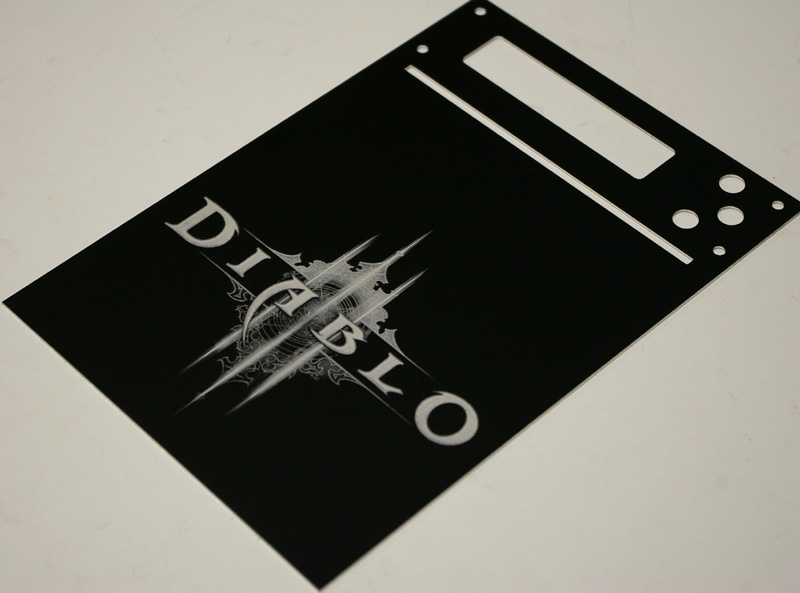
Here are some pictures of my FT02 Diablo III MOD!

The hole System is under water and this pictures i post later.

Frontpanel...

imgp4798amb9h.jpg


imgp4799aslq30o3z.jpg


This is my Sidepanel.... if someone is intrested in it you can contact me! >> PM


Black acrylsglas with an inlay and laser the Diablo III Logo... murderMod screws ;-)

r5hcJ.jpg


zQCTF.jpg


RDiLq.jpg
 
Here are some pictures of my FT02 Diablo III MOD!

The hole System is under water and this pictures i post later.

Frontpanel...

imgp4798amb9h.jpg


imgp4799aslq30o3z.jpg


This is my Sidepanel.... if someone is intrested in it you can contact me! >> PM


Black acrylsglas with an inlay and laser the Diablo III Logo... murderMod screws ;-)

r5hcJ.jpg


zQCTF.jpg


RDiLq.jpg

imgur photos are bad links
 
That Diablo panels is extremely well done, good job.

What fan controllers do you guys use?

I want one where I can have my 3 180s on 1 knob, my cpu fans on another and then 1 for the top fan and I guess 1 extra so if I go sli i can just turn up just the middle fan... or have the extra slot as a spare.
 
Glad I could be of some help and thank you very much for moving your RAM sticks to take a picture for me. I found it really hard to find information on specific coolers fitting into specific cases and onto various motherboards, which makes buying them from places with restocking fees like frozencpu.com and svc.com a bit of a crapshoot. I've actually had to eat shipping charges both ways on a Thermalright Spitfire because I thought I could fit it in the FT02. Much happier with a Shaman though, so maybe it's a good thing Spitfire didn't fit.

I just bought a spitfire on an impulse buy from the Crazy Pc sale. I take it that it doesn't fit? :( What exactly was hitting?

I had considered buying a shaman a while back but heard that it didn't work in this orientation so I bought a used HR-03. Now I see two people using it with no issue.
 
I just bought a spitfire on an impulse buy from the Crazy Pc sale. I take it that it doesn't fit? :( What exactly was hitting?

I had considered buying a shaman a while back but heard that it didn't work in this orientation so I bought a used HR-03. Now I see two people using it with no issue.

Well, there were reports that Shaman and Accelero Xtreme Plus performed sub-optimally when mounted vertically in FT02 (http://en.expreview.com/2010/11/15/90°-rotationhow-to-install-heatpipe-cooler/11843.html/5). I have tested this theory by comparing the CPU and GPU load temps in the following orientations:
1) FT02 standing upright on its feet;
2) FT02 standing upright on its front;
3) FT02 standing upright on its back;
4) FT02 lying on its left side;
5) FT02 lying on its right side.
Didn't try it upside down, sorry :)
Neither CPU nor GPU temperatures changed by more than 1-2 degrees and actually were usually lower with the case in its proper orientation. I guess my Shaman and Silver Arrow have super-duper quality wicks in their heat pipes and aren't much influenced by gravity.

You might get your Spitfire to fit, but it's going to depend on your CPU cooler and mobo. If you want to mount it with the heat sink pointing towards the CPU, you can't have a tall tower-style CPU cooler. If you want to mount it pointing the opposite way, towards the front of the case, it will probably either hit the HDD cage or the backs of your optical drives unless your PCI Express x16 is in the first position on the mobo. I have a tall CPU cooler and my video card is in the second PCI slot out of 7, so Spitfire didn't work for me.
 
Well, there were reports that Shaman and Accelero Xtreme Plus performed sub-optimally when mounted vertically in FT02 (http://en.expreview.com/2010/11/15/90°-rotationhow-to-install-heatpipe-cooler/11843.html/5). I have tested this theory by comparing the CPU and GPU load temps in the following orientations:
1) FT02 standing upright on its feet;
2) FT02 standing upright on its front;
3) FT02 standing upright on its back;
4) FT02 lying on its left side;
5) FT02 lying on its right side.
Didn't try it upside down, sorry :)
Neither CPU nor GPU temperatures changed by more than 1-2 degrees and actually were usually lower with the case in its proper orientation. I guess my Shaman and Silver Arrow have super-duper quality wicks in their heat pipes and aren't much influenced by gravity.

You might get your Spitfire to fit, but it's going to depend on your CPU cooler and mobo. If you want to mount it with the heat sink pointing towards the CPU, you can't have a tall tower-style CPU cooler. If you want to mount it pointing the opposite way, towards the front of the case, it will probably either hit the HDD cage or the backs of your optical drives unless your PCI Express x16 is in the first position on the mobo. I have a tall CPU cooler and my video card is in the second PCI slot out of 7, so Spitfire didn't work for me.

Crap, so I guess that I'm sticking with the HR-03gt unless I pick up an H50 one of these days. The only thing that concerns me about the H50 is pump noise.
 
Here's a pic of the clearance of the archon with the windowed ft02.
So what's going on is i slid the fan out until it would touch the side window slightly when i closed it. I put a ruler flat against the top of the heatpipes and then you can see a ruler that is measuring the distance from the heatpipes to the furthest point on the fan. So the distance from the top of the heatpipes to the window should be represented by the distance from the top of the heatpipes to the top of the fan.
Unfortunately I didn't get my second ruler all the way flush because i was having to balance like 3 things at once, but you get the idea. It looks like just a little bit more than 1/8" clearance from the archon to the window.

So the opinions have split. Your picture shows 1/8" clearance. Another HardOCPer with a windowed FT02 PM'ed me "It literally probably has about 1mm of clearance, no way it would fit without the window." Bob from Thermalright tech support, who also has a windowed FT02 wrote back "Your side panel will not bulge out, I’ve got at least a half inch clearance, the worst case would be for the tops of the heat pipes indent the sound dampening material."

My Silver Arrow is 163mm tall and is 1mm away from the foam, and that's with the knob on the mounting bracket tightened almost to the end position. The foam is 4mm thick, the side panel is less than 1 mm thick. How a 170mm Archon can still fit in a windowless case, who knows :) Guess I'll just have to order one to find out.
 
So the opinions have split. Your picture shows 1/8" clearance. Another HardOCPer with a windowed FT02 PM'ed me "It literally probably has about 1mm of clearance, no way it would fit without the window." Bob from Thermalright tech support, who also has a windowed FT02 wrote back "Your side panel will not bulge out, I’ve got at least a half inch clearance, the worst case would be for the tops of the heat pipes indent the sound dampening material."

My Silver Arrow is 163mm tall and is 1mm away from the foam, and that's with the knob on the mounting bracket tightened almost to the end position. The foam is 4mm thick, the side panel is less than 1 mm thick. How a 170mm Archon can still fit in a windowless case, who knows :) Guess I'll just have to order one to find out.


hmm... I'm sure you could get it to fit. There is enough clearance to account for the thickness of the side panel. The foam+side panel is probably what will put you over the edge.
What I think I might do if i were you is just install it and let it press into the foam for a few minutes. Then i'd remove the side panel and just cut little circles out of the foam where the heatpipes were pushing. Voila, no more bulge. haha.

I finally got my motherboard swapped out. I was confused earlier I have the p8p67 pro not deluxe. I guess I got it right the first time. At any rate, I could not get the speed of the fans down to what I wanted so i'm looking into fan controllers now. I really don't want anything at all to stick out of the front of the case. With fan controllers I'll prob just set the speed once and just forget it, so it seems a little overkill to me to have something poking out of the front of the case for a one time adjustment.
I was considering one of the ones that go into the PCI slot, but I can't seem to find one that will control all 3 AP 181s with enough power (supposedly 5.4W each).
I'm out of town right now so i can't look at my case, but do you think it would be possible to install a 5 1/4" fan controller backwards in the 5 1/4" bay without interfering with the ft02 faceplate mounting so i could get a one with knobs that would face into the case ?
 
Last edited:
hmm... I'm sure you could get it to fit. There is enough clearance to account for the thickness of the side panel. The foam+side panel is probably what will put you over the edge.
What I think I might do if i were you is just install it and let it press into the foam for a few minutes. Then i'd remove the side panel and just cut little circles out of the foam where the heatpipes were pushing. Voila, no more bulge. haha.

I finally got my motherboard swapped out. I was confused earlier I have the p8p67 pro not deluxe. I guess I got it right the first time. At any rate, I could not get the speed of the fans down to what I wanted so i'm looking into fan controllers now. I really don't want anything at all to stick out of the front of the case. With fan controllers I'll prob just set the speed once and just forget it, so it seems a little overkill to me to have something poking out of the front of the case for a one time adjustment.
I was considering one of the ones that go into the PCI slot, but I can't seem to find one that will control all 3 AP 181s with enough power (supposedly 5.4W each).
I'm out of town right now so i can't look at my case, but do you think it would be possible to install a 5 1/4" fan controller backwards in the 5 1/4" bay so i could get a cheap one and the knobs would face into the case?

Well, if you don't want a model with a touch screen, like Lamptron FC Touch (which is OOS everywhere anyway) or NZXT Sentry 2, you could indeed mount a fan controller in a 5.25" bay facing backwards. I wouldn't buy anything too cheap, since the more you have the controlled fans turned down, the more the controller will heat up. 4 channel controller with 10+W per channel should suffice. Lamptron FC-3, FC-4, FC-5 V2, FC-6, Scythe Kaze Master/Server and various Sunbeam Rheosmarts get decent reviews. You could probably hook up your 120mm exhaust fan to the 4th channel unless you've replaced it with a PWM fan already.

As you're slowing down the AP180s, they'll emit some clicking noise before completely stalling, so you'll have to play with the voltage to find a happy medium between clicking at lower speeds and regular fan noise at higher speeds.

Alternatively, you could probably squeeze a fan controller into the space under your PSU and above the rear AP180. It will get better air flow there and you won't have to run the wires all the way to the front of the case. Just rig it to the PSU wires with some wire ties. Then again, it might not look pretty and you do have that case window.

BTW, I just realized you can unscrew the four clamps that catch the four feet on the top cover of the case. This didn't add any extra sideways movement to the top, and now I don't have to think twice about taking it off.
 
Well, if you don't want a model with a touch screen, like Lamptron FC Touch (which is OOS everywhere anyway) or NZXT Sentry 2, you could indeed mount a fan controller in a 5.25" bay facing backwards. I wouldn't buy anything too cheap, since the more you have the controlled fans turned down, the more the controller will heat up. 4 channel controller with 10+W per channel should suffice. Lamptron FC-3, FC-4, FC-5 V2, FC-6, Scythe Kaze Master/Server and various Sunbeam Rheosmarts get decent reviews. You could probably hook up your 120mm exhaust fan to the 4th channel unless you've replaced it with a PWM fan already.

As you're slowing down the AP180s, they'll emit some clicking noise before completely stalling, so you'll have to play with the voltage to find a happy medium between clicking at lower speeds and regular fan noise at higher speeds.

Alternatively, you could probably squeeze a fan controller into the space under your PSU and above the rear AP180. It will get better air flow there and you won't have to run the wires all the way to the front of the case. Just rig it to the PSU wires with some wire ties. Then again, it might not look pretty and you do have that case window.

BTW, I just realized you can unscrew the four clamps that catch the four feet on the top cover of the case. This didn't add any extra sideways movement to the top, and now I don't have to think twice about taking it off.

sweet. I took your advice and got a good one:
http://www.newegg.com/Product/Product.aspx?Item=N82E16811995075
Now i'll be able to PWM every fan in the system, and i don't need to replace the golfball-looking top one.

Hopefully the included cables are long enough to run behind the MB. It'll be interesting to see fan control knobs pointing into the case. haha.
 
sweet. I took your advice and got a good one:
http://www.newegg.com/Product/Product.aspx?Item=N82E16811995075
Now i'll be able to PWM every fan in the system, and i don't need to replace the golfball-looking top one.

Hopefully the included cables are long enough to run behind the MB. It'll be interesting to see fan control knobs pointing into the case. haha.

Great controller, but I'm not sure that PWM'ing your AP180s is such a great idea. You'd have to use a splitter for your cpu_fan PWM header, but then your AP180s will ramp up their rpm just as the TY-140 on your Archon does. Alternatively, you can connect the fan controller to the cha-fan1 header on the motherboard, but that one doesn't let you go below 40% max rpm (at least in Fan Xpert), which might be a bit too high if you want to keep AP180s quiet. I'd stick to using your Rheosmart as a regular fan controller for the AP180s and maybe just PWM the 120mm exhaust fan by using a Y-splitter on the cpu_fan header.
 
Great controller, but I'm not sure that PWM'ing your AP180s is such a great idea. You'd have to use a splitter for your cpu_fan PWM header, but then your AP180s will ramp up their rpm just as the TY-140 on your Archon does. Alternatively, you can connect the fan controller to the cha-fan1 header on the motherboard, but that one doesn't let you go below 40% max rpm (at least in Fan Xpert), which might be a bit too high if you want to keep AP180s quiet. I'd stick to using your Rheosmart as a regular fan controller for the AP180s and maybe just PWM the 120mm exhaust fan by using a Y-splitter on the cpu_fan header.

yeah i will def have to experiment with it. The nice thing about that controller is that I can turn PWM on or off individually for each fan connected to the controller--no y-splitters required. I currently have the two ty-140s Y-ed together off the cpu header. I'll plug teh fan controller into cha-fan1 and I'll go from there.
In the end i'll prob end up rheoing everything. I was just seeing if I could have my cake and eat it too--i really don't mind a little extra noise if i'm gaming if that gives me a little reassurance that the temps will be a little cooler. However, silence at idle is a must. We'll see...
 
yeah i will def have to experiment with it. The nice thing about that controller is that I can turn PWM on or off individually for each fan connected to the controller--no y-splitters required. I currently have the two ty-140s Y-ed together off the cpu header. I'll plug teh fan controller into cha-fan1 and I'll go from there.
In the end i'll prob end up rheoing everything. I was just seeing if I could have my cake and eat it too--i really don't mind a little extra noise if i'm gaming if that gives me a little reassurance that the temps will be a little cooler. However, silence at idle is a must. We'll see...

Post the results of your experiments, I bet we're not the only two people considering putting AP181s onto a fan controller. Don't forget to keep high/low switches on top of the case set to high when the fans are driven by the controller.

Have you been able to get SpeedFan to work with your mobo? I gave up, all the temp reading were way off, so just using Asus Fan Xpert for now. If I were you, I would set the rpm vs temp ramp-up to be pretty slow and not reach 100%, AP181s at 1200 rpm are just insanely loud. I use open headphones (Sennheiser HD600), so I want noise level to be reasonable during gaming too.

Hmm, so this review says that the PWM function on your controller only works for the CPU fan header: "Although the box and manual state otherwise, using the automatic Smart Cooling System with the supplied PWM cable connected does not vary any of the fans' speed based on temperature. Instead, automatic mode runs the selected fan(s) at the maximum 12v power. This isn't a particularly huge deal since all six of the connected fans can be manually adjusted, however, it's no good if you're looking to set it and forget it. The only fan that correlates speed and temperature is the CPU cooling fan."
 
Post the results of your experiments, I bet we're not the only two people considering putting AP181s onto a fan controller. Don't forget to keep high/low switches on top of the case set to high when the fans are driven by the controller.

I have all 3 of my AP181s on a fan controller, along with the top fan too. I keep them around 600 rpm or so.
 
Post the results of your experiments, I bet we're not the only two people considering putting AP181s onto a fan controller. Don't forget to keep high/low switches on top of the case set to high when the fans are driven by the controller.

Have you been able to get SpeedFan to work with your mobo? I gave up, all the temp reading were way off, so just using Asus Fan Xpert for now. If I were you, I would set the rpm vs temp ramp-up to be pretty slow and not reach 100%, AP181s at 1200 rpm are just insanely loud. I use open headphones (Sennheiser HD600), so I want noise level to be reasonable during gaming too.

Hmm, so this review says that the PWM function on your controller only works for the CPU fan header: "Although the box and manual state otherwise, using the automatic Smart Cooling System with the supplied PWM cable connected does not vary any of the fans' speed based on temperature. Instead, automatic mode runs the selected fan(s) at the maximum 12v power. This isn't a particularly huge deal since all six of the connected fans can be manually adjusted, however, it's no good if you're looking to set it and forget it. The only fan that correlates speed and temperature is the CPU cooling fan."

You are in fact not the only two. I have been considering it for a while but medical school is keeping me a bit too busy to have time to experiment.
 
I have all 3 of my AP181s on a fan controller, along with the top fan too. I keep them around 600 rpm or so.

Care to elaborate? Which controller, did you need fan wire extensions, why not lower than 600 rpm (clicking, stalling, just not enough airflow to keep temps reasonably low?)...

I'm feeling lazy, might just get a Sunbeam PL-RS-3 Rheosmart 3 for $23 at SVC. It's a 3.5" bay controller, so I could mount it inside the case right under the PSU. I wouldn't have to rewire anything, it would basically replace the 3 3-pin fan wires to 1 Molex adapter that came with the FT02. I have an Akasa Apache 120mm PWM fan as the top case exhaust; it's hooked up to the CPU fan header along with the TY-140s on the Silver Arrow via a 3-way PWM splitter, so I only need 3 channels on my fan controller. I guess I could test if the review I linked to above is correct: hook up the Rheosmart to the cha_fan1 4 pin header on the mobo and see if the PWM input functions correctly when not connected to the cpu_fan header.
 
Post the results of your experiments, I bet we're not the only two people considering putting AP181s onto a fan controller. Don't forget to keep high/low switches on top of the case set to high when the fans are driven by the controller.

Back when I had the FT02 I put my AP181 fans on my Lamptron FC-5. I ran them at about 1000rpm. That was the threshold where I couldn't notice them over ambient noise while still maximizing airflow.

Care to elaborate? Which controller, did you need fan wire extensions, why not lower than 600 rpm (clicking, stalling, just not enough airflow to keep temps reasonably low?)...

There's no clicking/stalling at just under 600rpm. I'm going to quote the startup voltages I found while experimenting with AP181's.
The AP181 fan with the included speed controller set to "high" starts at 2.4V and spins up to 200-250rpm. When the included speed controller is set to "low" the fan starts at 8.3V and spins up to 400-450rpm.
 
Back when I had the FT02 I put my AP181 fans on my Lamptron FC-5. I ran them at about 1000rpm. That was the threshold where I couldn't notice them over ambient noise while still maximizing airflow.

There's no clicking/stalling at just under 600rpm. I'm going to quote the startup voltages I found while experimenting with AP181's.

Thanks a lot for the voltage info. 1000rpm is too high for me, since the low setting is 700 rpm and still a bit too loud for my taste. Guess I'm spoiled by the quiet TY-140s I'm using on the Silver Arrow and the Shaman.

Lamptron FC-5 v2 would be perfect for me if not for the knobs, which is why I'm still trying to hold out for a Lamptron FC Touch. I just really like the clean look of the FT02's front.
 
Not a valid excuse unless you're a 3rd year :D

In fact, I am just finished with 3rd year and studying for step 2 in a couple of weeks after I submit an article for publishing and finish a poster for a national meeting. So I guess that would be valid, right? ;)
 
In fact, I am just finished with 3rd year and studying for step 2 in a couple of weeks after I submit an article for publishing and finish a poster for a national meeting. So I guess that would be valid, right? ;)

Not unless it's in Nature and you're an MD-PhD :eek:
 
Care to elaborate? Which controller, did you need fan wire extensions, why not lower than 600 rpm (clicking, stalling, just not enough airflow to keep temps reasonably low?)...

I'm using the
Scythe KM02-BK 5.25" Bay Fan Controller

found on newegg. I never had any clicking as you report at low RPMs. I adjust mine to keep the sound as low as possible while getting cooling. The wires included with the fan controller put the long wires of the AP181 mean that I don't need any wire extensions whatsoever, at least for the first two. I'd have to check for the one furthest back, but I don't think there is any extension.
 
I'm using a Lamptron FC-4 with the three AP181 fans hooked up to the first channel, the pump on my H50 hooked up to the second channel, the fans on my H50 on the third channel, and the fan on my video card on the fourth channel. It has been working well for me. The case cools really well and is almost silent.
 
I'm using the
Scythe KM02-BK 5.25" Bay Fan Controller

found on newegg. I never had any clicking as you report at low RPMs. I adjust mine to keep the sound as low as possible while getting cooling. The wires included with the fan controller put the long wires of the AP181 mean that I don't need any wire extensions whatsoever, at least for the first two. I'd have to check for the one furthest back, but I don't think there is any extension.

Thanks for the info. Have you ever put an IR thermometer to your Kaze Master's PCB? I don't think it has any heat sinks, so I wonder how hot it gets when running AP181s at 600 rpm, so around 6V probably.

MD-PhD, I thought we were talking about people too busy to do things. ;)

Now now, this is no place for MSTP H8 :p
 
Thanks for the info. Have you ever put an IR thermometer to your Kaze Master's PCB? I don't think it has any heat sinks, so I wonder how hot it gets when running AP181s at 600 rpm, so around 6V probably.

No, I haven't tried that. In fact, I'm not using the temp probes at all. I didn't want all that wire running around inside my build. Next time I go inside I'll feel around with my hand to see if I notice any extra or unexpected heat around that area.
 
No, I haven't tried that. In fact, I'm not using the temp probes at all. I didn't want all that wire running around inside my build. Next time I go inside I'll feel around with my hand to see if I notice any extra or unexpected heat around that area.

That's why infra-red thermometer guns are so great. Not that expensive either.

I'm using a Lamptron FC-4 with the three AP181 fans hooked up to the first channel, the pump on my H50 hooked up to the second channel, the fans on my H50 on the third channel, and the fan on my video card on the fourth channel. It has been working well for me. The case cools really well and is almost silent.

Same question: does your controller get hot when you dial down the voltages? I don't think FC-4 has any heat sinks, but it's hard to tell since only the back of the PCB is exposed.
 
For those still shopping for a clean-looking fan controller, frozencpu.com seems to have finally got some Lamptrons FC Touch back in stock today. They are $75 a pop and flying fast, down to 7 from 13 this morning. I guess I'll have to do my fan wiring the proper way.
 
I'm using the
Scythe KM02-BK 5.25" Bay Fan Controller

found on newegg. I never had any clicking as you report at low RPMs. I adjust mine to keep the sound as low as possible while getting cooling. The wires included with the fan controller put the long wires of the AP181 mean that I don't need any wire extensions whatsoever, at least for the first two. I'd have to check for the one furthest back, but I don't think there is any extension.

This is the fan controller I was thinking of getting. How do you like it?

Do you have all 3 of your AP181's on the same channel?
 
For those still shopping for a clean-looking fan controller, frozencpu.com seems to have finally got some Lamptrons FC Touch back in stock today. They are $75 a pop and flying fast, down to 7 from 13 this morning. I guess I'll have to do my fan wiring the proper way.

I'm using an Akasa Jr. 3 1/4 mounted into one of the hotswap trays:
http://www.scan.co.uk/products/akas...5-speed-control-for-3-fans-and-2-usb-20-ports

Works well with case fan controller on high and the Akasa on low. Cheap and invisible.

Edit: Not a good picture, but you get the idea. :)

 
Last edited:
I'm using an Akasa Jr. 3 1/4 mounted into one of the hotswap trays:
http://www.scan.co.uk/products/akas...5-speed-control-for-3-fans-and-2-usb-20-ports

Works well with case fan controller on high and the Akasa on low. Cheap and invisible.

I guess I didn't even think about putting a 3.5" controller in the HDD trays since I have taken all of mine out. My HDD is soft-mounted horizontally on a NoiseMagic NoVibes III. Great idea though.

I've actually tried a cheap controller already, it was a Silverstone FP33, no heat sinks for the resistors, no capacitors. Wasn't happy with how hot it got, so going to try a more upscale solution now (Lamptron FC-T).
 
This is the fan controller I was thinking of getting. How do you like it?

Do you have all 3 of your AP181's on the same channel?

I like it just fine, though I am not trying to the front of my RV02 clean. I'm not using the temp probes, either. I have all four of the RV02 fans on separate channels.
 
For those still shopping for a clean-looking fan controller, frozencpu.com seems to have finally got some Lamptrons FC Touch back in stock today. They are $75 a pop and flying fast, down to 7 from 13 this morning. I guess I'll have to do my fan wiring the proper way.

performance-pcs appears to have them in stock...
 
Status
Not open for further replies.
Back
Top