• Some users have recently had their accounts hijacked. It seems that the now defunct EVGA forums might have compromised your password there and seems many are using the same PW here. We would suggest you UPDATE YOUR PASSWORD and TURN ON 2FA for your account here to further secure it. None of the compromised accounts had 2FA turned on.
    Once you have enabled 2FA, your account will be updated soon to show a badge, letting other members know that you use 2FA to protect your account. This should be beneficial for everyone that uses FSFT.

Remaking an HTML editor, need suggestions

Tygur

Weaksauce
Joined
Dec 29, 2001
Messages
123
I have an html editor that I'm remaking, and I'm at the point now where I'm trying to figure out how I want the Insert menu to behave...

In the old version, the first menu item in the Insert menu was "Plain Code", which can be checked off. If the current html file is new, and it wasn't saved yet, it's always checked. If it's checked, then clicking anything else on the Insert menu (Image, Link, etc) would just insert the basic tags that were necessary, along with any required attributes, but they would be blank, so you can fill in their values manually. If it's not checked, then an Open dialog comes up that allows you to choose the file you want inserted (html file for a link, image file for an image, etc).

I'm considering changing that for the new version. What I'm thinking is maybe the "Plain Code" item could disappear. If the current html file doesn't yet correspond to a file on the disk (needed, in order to do such things as determine relative paths), then it'll just insert the generic tags as before. Otherwise, it'll bring up a dialog that allows you to choose whether you actually want values in the various attributes, and where applicable, there can be a Browse button (or something similar) that lets you choose the necessary file.

Any suggestions on which is the better idea? Or maybe you have a third idea that might be even better? I'm interested in hearing anyone's input.

If you really did read all the way through this, then I'd like to thank you just for that. I hope you might have some comments or suggestions...
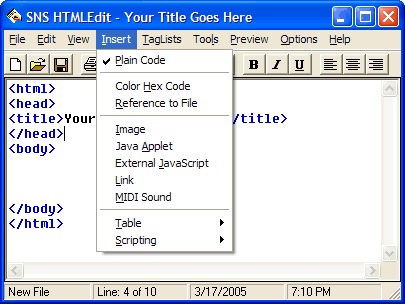
 
Well, here's a screen shot of the Insert menu on the old version:
old-htmledit-insert.gif


Let's suppose you click "Link". Since that's a new, unsaved file, Plain Code must be checked. And since it is checked, clicking "Link" just inserts this into your html file:
<a href=""></a>

If you first save that page, and then make sure "Plain Code" is not checked, then click "Link", an Open File dialog box comes up that lets you pick a file. Suppose you click on a file called "other.html" that happens to be in the same folder as the page you have opened. In that case, this is what gets inserted:
<a href="other.html"></a>

Now, under the new way, "Plain Code" is removed entirely. If you haven't saved the page yet, it'll still just insert this when you click Link:
<a href=""></a>

But if you're not dealing with a new unsaved page, a window would come up asking you to type where you want it to link to. Right next to the text field, there would be a Browse button that lets you choose a file. The difference is that you would now need to click twice if you actually want to select a file. Unfortunately, I have no screen shot because I didn't make the window yet.
 
I like the option of inserting an empty tag, or as you're calling it "plain code". Leave that as it is.

What I don't like though, is the idea of a function working differently depending on whether or not my page is saved. If I click "Link", I want it to work the same, regardless of whether or not my document is saved or not.

Just curious, you do allow for hot key combos, right? Like <ctrl> + <L> for link?
 
Well, it has to work differently if the page isn't saved, because it doesn't know where it's gonna be. If you insert a link to "c:\path\to\file.html", and the page isn't saved, it won't be able to figure out a relative path to that file. But, for example, if you save your page as "c:\path\myfile.html", the relative path would be "to/file.html". A relative path is needed, because an absolute path won't work anymore once you put your page on the web.

Hot keys are gonna be customizable. The old version let you create hot keys for various tags. Hopefully, this version will expand on that and let you attach hot keys to menu items as well.
 
Couldn't you just ask where to link the file from? What if I wanted to make a link to another website? You wouldn't care then.

What is the target audience for this program? I guess that would make sense if the program is going to be used by people who aren't familiar with linking files. But personally, I would find it to be a pain.

Not that you have to take my opinion as gold or anything, just my thoughts. Since you asked...
 
Hartlove said:
Couldn't you just ask where to link the file from? What if I wanted to make a link to another website? You wouldn't care then.
If you wanted to make a link to another website, you wouldn't be able to do it from the Open dialog box anyway, because it only loads files from your computer. If all you want to do is type a link, you can just type it right into the tag.


Hartlove said:
What is the target audience for this program? I guess that would make sense if the program is going to be used by people who aren't familiar with linking files. But personally, I would find it to be a pain.
It only matters if you start a new page without saving it. If you open an already-saved page, it'll behave normally. You really should be saving it as soon as possible anyway.


I think I'm gonna go for Option 2, the new way. Now that I'm thinking about it, being able to insert plain tags is going to be redundant once I implement the Tag Lists, because that's all those are gonna be. Lots of tags you can just insert.

Also, since you mentioned linking to other websites, the new way makes that easier, because the new window that comes up will let you type in where you want to link to, so you won't be restricted to just files on your computer.

I'm thinking I can keep the behavior mostly consistent this way, too, because I can keep the dialog window showing if your page isn't saved, and just disable the Browse button.
 
Back
Top