Random freezing on new build

ohwell26

n00b
Joined
Dec 20, 2007
Messages
11
Hi there folks, I need some help. I recently built my first computer, here is what I used:

DP35DP Intel Board
Q6600 Quad Core
EVGA 8800 GT
mushkin DDR2 800 2x2gb dual channel
600W PSU
xi-fi extreme gamer soundcard
vista 32-bit
samsung spinpoint t series 500gb hard drive

Basically, it ran fine for a few days, I have all drivers up to date, but then it started randomly freezing up! It has happened twice so far, apparently for no reason at all. I'm really clueless right now as to what might be causing it, can you guys help?

Also a secondary problem (nowhere near as important), whenever I start the thing up it takes about 2 minutes for any commands I enter/click/etc to register, but only right after I start up. After that it is fine, until it randomly freezes of course... but please help with the freezing problem first!

some more information:

processor- 44C Idle
motherboard - 41
I/O Controller Hub: 60
Memory Controller Hub: 67

I know the memory is at the correct voltage because the board only allows 1.8V, and I bought 1.8V memory because of that. I ran memtest86 overnight but when I came back, windows had loaded but there were no test results from the overnight tests..

So far it has frozen 3 times and at random times, I have no idea what could possibly be causing it. As I said, it worked fine for a couple days.

Please help! Thanks in advance.

edit: Oh, I am NOT overclocking.
edit 2: I just ran chkdsk... but when windows reloaded, just as memtest, it did not show any results! How am I supposed to see if there is a problem with them if I don't get test results?
 
If memtest runs properly, windows never loads unless you stop memtest.

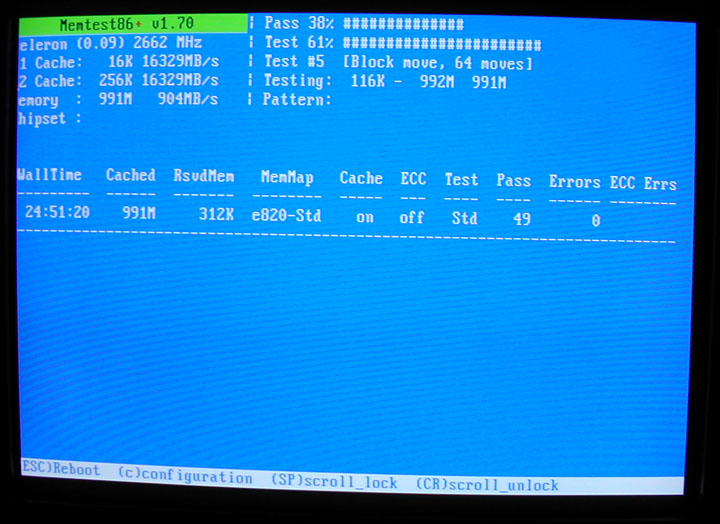
It should look like this...

memtest_example.jpg
 
Mine did not look like that, I downloaded it from the memtest86 original website and it said Windows Memory Test or something like that. It said it would run the test twice and then restart windows. Basically I burned the iso to a disk and booted using that. With this memtest86+ I don't really know how I would use that or get any info out of that.
 
How you would get any info out of it? If you read the screen, theres a column that says "Pass" and another column that says "Errors." Obviously, the RAM I was testing had no errors. If your RAM is bad, you'll most likely see some errors. I ran the memtest for over 49 passes in that particular run, which took a bit over 24 hours, according to the leftmost column.

How to use it? its simple. You DL the ISO from memtest.org and burn it to a CD. Then, boot off of the CD.
 
Okay... so if I get errors what do I do then?

What if I DON'T get errors? Either way my problem isn't fixed... I need help with this. Maybe it isn't memory related.
 
If you do get errors, you'll need to replace the RAM.

If you don't get errors, you'll need to test some other component.

What exact model PSU is that?
 
http://www.newegg.com/Product/Product.aspx?Item=N82E16817341001

Also, I just completely reformatted the HD and reinstalled Vista + all drivers + windows update... so far, the same problem of slow startup has occured, but no freezing YET. But basically its just that it takes a while for most commands to be entered for about 2 to 5 minutes, and after that everything is fine. It doesn't instantly connect to the internet through the wireless card until then either. Is this a normal Vista issue, or perhaps related to my freezing issue?

I also installed a 4th fan through the top fan hole on the top of the case, right above the memory... and it is working, but memory temperatures didn't go down even a single degree...

Also, what other tests should I run besides memtest86+?
 
I think he was running the wrong memtest or perhaps this one?
how else would you get to windows if the machine was set to boot from a disk with memtest on it???

ohwell26: you want this one
specifically the Pre-Compiled Bootable ISO (.zip)
unpack the zip, burn the ISO to a cd
you will have to set your BIOS to boot from your optical drive before HDD, if you need help with this let us know
then just (re)boot your machine with the cd in the optical drive
memtest will automatically start, but you want to run test 5
so, hit C, 1, 3, 5 [enter], 0
run that for 50 passes, it'll take about 3 hours
if you get no errors then your problem isn't your ram
 
thund3rb1rd: I tried that one a few hours ago, I got to a black screen saying "Loading..." but it stayed there for about an hour or so before I gave up.

I've been running normally almost all day now though, I had a freeze early in the day but for about 8 hours no freezes, hoping that my full reinstall worked, but not holding my breath. Do you guys think it might be heat issues? The north and south bridge seem to run at around 68 and 62 respectively which is quite warm, despite me having 4 case fans (front/side blow in, back/top blow out). 8800 GT is huge and blocks a lot of air though, and my PSU's cables are a nightmare as well. But do you think it might be causing the freezing?
 
Leave one stick of RAM in, pull the rest out, then try running memtest again. If either of your sticks are bad, it would cause freezing.

What case do you have? What are your CPU/GPU/HDD temps like?
 
Coolermaster 690. I dont know how I'd get the temperature for my GPU or HDD but the procssor runs anywhwere from 38 to 52, using stock fan, I'm not too worried about the processor for now (I'll be getting a better fan in a few months in any case).

edit: GPU temp is at 45 Celsius

edit 2: it seems my graphics card blocks off a LOT of air flow... my processor seems to be hovering at 58 C now with windows and some movies/torrents etc running, I read that up to 65 or so on a quad core isn't absolutely critical, and is actually fairly normal for a stock fan, but its pretty poor... should I worry immediately or get a new cpu fan/sink at me leisure?

Actually... that isn't the processor temperature, it is the processor thermal margin. What exactly is the processor thermal margin? Am I right in thinking that higher is actually BETTER for that? Since the intel board program shows the dial saying that 20 degrees is in the red, while 80 is green...
 
I'm having the same problems as you with the freezing, with similar specs but with XP. Other programs also tend to take a very long time to open that wouldn't have in my previous build.

I heard about RAM being a possible culprit so I ran memtest86+ and it froze 3 hours into the scan, huge waste of time there :mad: Hopefully it can be resolved somehow
 
okay, the other day I basically reformatted the HDD and reinstalled everything, and since them (over 24 hours now) not a single freeze has occured. I'm hoping it is fixed. If it is, what do you guys think the problem was in the first place, that a complete reinstall would have fixed? Driver issues?
 
Back
Top