• Some users have recently had their accounts hijacked. It seems that the now defunct EVGA forums might have compromised your password there and seems many are using the same PW here. We would suggest you UPDATE YOUR PASSWORD and TURN ON 2FA for your account here to further secure it. None of the compromised accounts had 2FA turned on.
    Once you have enabled 2FA, your account will be updated soon to show a badge, letting other members know that you use 2FA to protect your account. This should be beneficial for everyone that uses FSFT.

random frame rate drops

Kiboru

n00b
Joined
Mar 10, 2011
Messages
6
Ok so I've had this problem before. In the beginning of the year. I got completely random fps dips in any game I played. For example, I played a game of starcraft 2 and had a constant 60-70 fps. Then suddenly it dropps to 10-15 and stays there for around 10 seconds. Then it goes back to normal.
I decided to format the harddrive and install windows again. Still the problem wouldn't go away.
I removed the gpu and disassembled it to get rid of all the dust. Everything worked perfect afterwards.

Then a few days ago I decided to overclock it. The drops suddenly returned so I set the clock back to stock. It didn't go away.

I tried reinstalling the driver. Didn't help.
Removing the gpu and removing dust didn't help this time.
Any tips?

Spec
AMD Phenom II X4 920(3,4Ghz)
4 gig ram(ddr2)
Ati 4890
psu: MIST Modular 650XHE12DC 650W
Harddrive:
Western Digital 750GB S-ATA II 7200 RPM
Caviar GP 16MB cache 3,5" IntelliPower
Currently using 95,1gb of 698gb
Windows 7 64 bit

I bought the pc in 2009.
Gpu temperature never goes above 68 degrees Celsius.
I'm using the latest driver. Also tried an older one to see if there was any difference. Nothing.

I've been to several forums. Nobody seems to be able to help me. You people are my last hope :(
 
Last edited:
The frame rate dips can be from thd card's GDDR 5. GDDR 5 actually under clocks itself when it begins to have errors as supposed to artifacting right away. Try under clocking your gddr 5 ram or also try leaving it at stock and giving it a bit more voltage.

Are you monitoring your card temperatures? If the card isn't overheating then I'd suggest you look into troubleshooting the possible gddr 5 issues.
 
I dunno, got some things i'd try though iiwy, sorry if they are obvious or have already been suggested elsewhere.

Remove cpu OC.

Get some monitoring software so you can see or log your cpu and gpu clocks (and cpu temps) while gaming, maybe afterburner or gpuz for the gpu and speedfan amd thingy for the cpu. Either one may be downclocking for whatever reason. Instead of gaming, you could try to use furmark or IBT to see if you can recreate the problem.

Conversely, if I had any monitoring stuff running, like fraps or afterburner or even antivirus, i'd turn them off.

Was gunna say psu but it looks decent, maybe if its old or a freak unit it could be going off. Vid card could be dying too. This isn't that useful since unless you have redundant psus and vcards lying around its hard to test.

Assuming it's not dodgy drivers or broken OS since you've re-installed.

HTH
 
Last edited:
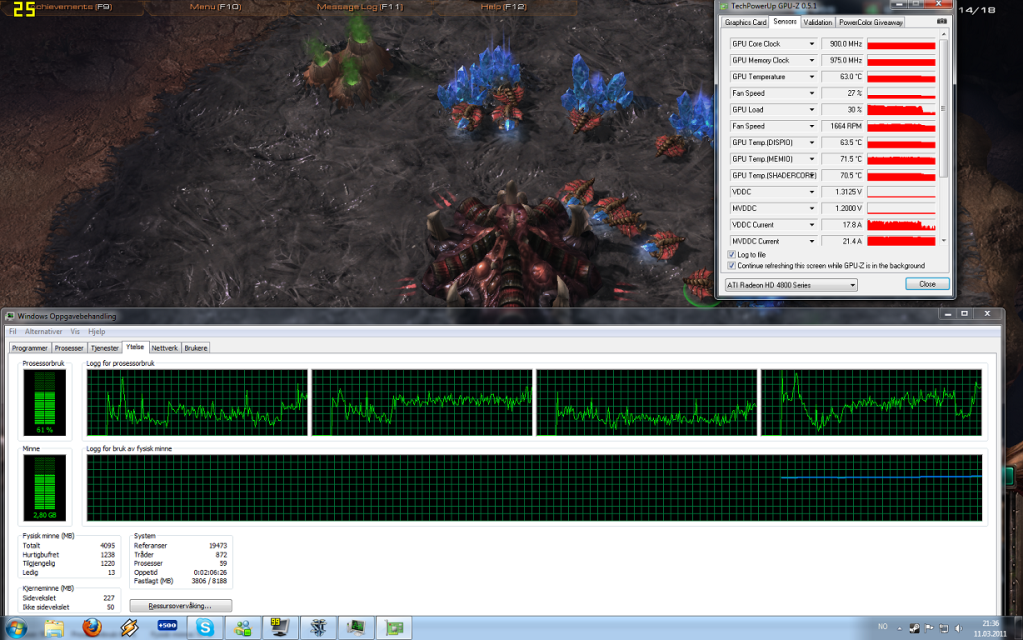
Here's a picture with info when the dip occurs.
Gpu load dropped to 30%...
orginal.png
 
Last edited:
Your temps look consistent, so it doesn't appear to be thermal throttling on the core or gddr 5 downclocking etc.. I'd say it could be driver or possibly power supply related. Have you tried testing with another power supply? Also try and think back to the oldest drivers you can remember that didn't do this on your system and reinstall those and try older games and see if it happens.
 
Do you happen to have your cursor in the upper or lower right hand corner when this happens? This is a known driver issue but I dont remember if it's suppose to effect the 4000 series Radeons
 
It affected my 4870X2s (hence me not using 10.12 on them) so yes, I assume if it still affects 5/6 series cards, it'll affect the 4 series too.
 
It affected my 4870X2s (hence me not using 10.12 on them) so yes, I assume if it still affects 5/6 series cards, it'll affect the 4 series too.

Which driver are you using? I get the dips no matter what driver I use.
I've tried 10.9, 10.10, 10.11, 11.1 and 10.5. Except with the 11.1, gpu usage dropped to 0% a couple of times...
Aren't they being uninstalled correctly or something?
 
Last edited:
I tried 10.10e. The problem didn't disappear.
I've contacted the place I bought the gpu from. I'll send it back to them on Monday and they'll take a look at it.
By the way, is it possible to still use the pc without a gpu?
I tried it once, but I didn't get a picture. Aren't all motherboards supposed to have some kind of integrated graphics solution?
 
No, not all boards have integrated graphics unless they're low-end boards designed to be run only with integrated. PCs are not usable without a graphics card except in certain rare cases where text-only commands can be input.
 
I decided to upgrade. Bought an nvidia 570.
And guess what... same exact problem. The fps issue is definitely not a gpu issue.
I think I'll format and reinstall windows, unless you people have a better idea.

Does this this mean it could be a psu problem by the way?
 
That is a possibility. Try running something like Hardware Monitor while you play, it tracks current/min/max voltages as well as temperatures. It's software monitoring, so it's not perfect, but at least it'll give you an idea.

Also, input your specs into the Antec Power Supply Calculator and see if you're close to limit. I always test to 100% CPU utilization and 100% system load to make sure that I have enough overhead, and also 20% capacitor aging to make sure that I have enough power as the PSU ages.

http://www.antec.outervision.com/
 
Oh my god...
I applied new thermal paste on the cpu and all the problems disappeared..
:D
 
Back
Top