• Some users have recently had their accounts hijacked. It seems that the now defunct EVGA forums might have compromised your password there and seems many are using the same PW here. We would suggest you UPDATE YOUR PASSWORD and TURN ON 2FA for your account here to further secure it. None of the compromised accounts had 2FA turned on.
    Once you have enabled 2FA, your account will be updated soon to show a badge, letting other members know that you use 2FA to protect your account. This should be beneficial for everyone that uses FSFT.

Question about +12VSB

TheSpook

Limp Gawd
Joined
Feb 12, 2004
Messages
379
I have an OEM Dell power supply that I'd like to replace with something stronger.

From what I can tell, the power supply has two 12V rails at 14A and 16A, which is fine. The problem is that the supply has a +12VSB at 1.67A, whereas all power supplies I can find online have +5VSBs.

Has anyone run into this before? I cannot find any power supplies with +12VSB. Can I just bump the voltage up on a +5VSB with enough amperage (like +5VSB at 4A becomes +12VSB at 1.67A) ...?
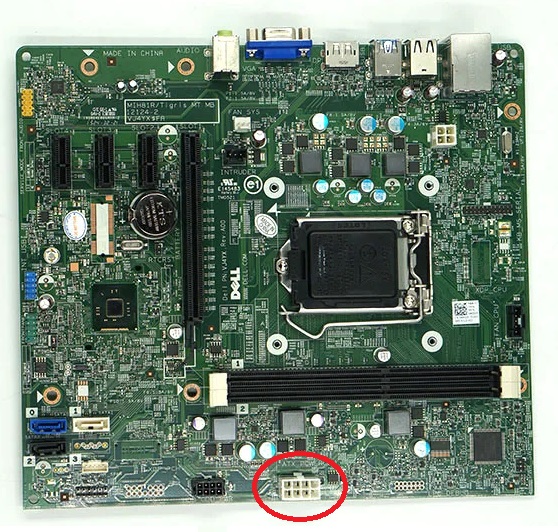
 
Is this in an Alienware? The Alienwares have a 12v Standby Rail for some of the lights.
 
This is in a Dell OptiPlex 9020 Minitower. My main worry is the +12VSB is doing something with the power to the mobo, and that I won't be able to turn on the machine without it. If it's just powering lights, I don't mind losing it.

If anyone can think of a problem with using a boost converter to move a +5VSB to a +12VSB, let me know! I don't see why that wouldn't work ...
 
Last edited:
To TheSpook :

I guess you want(ed) to supply a nice PCI-eXpress graphic card ?

Problem : Some board has proprietary power connections, as Dell's Community may reminds you.
VJ4XY.jpg


The table below shows the male plug. ( B290EM-01 ATX power supply)
8PinConn(jpg).jpg

It looks like an 4+4 PIN PCIe connector, but naturally, the pins voltage/function are not the same...
However, you may notice that a 20+4 PIN connector also makes 3 times this shape in a raw...

...just loot an old damaged AT/ATX using a hacksaw. ;)

For the pins n°1 & n°7, weld with tin to the ouput of an external HDD power supply. (for example : ZQ-AD35U , wich provides +12V / 2A)
And the mobo led will let you know that you succed.

WARNING : before saying good bye to your warranty seals, make sure that drivers are available for your devices and OS.

There where no 4-Pin CPU connector on my ACP-750LXD power supply... so I had to solder that one too.

About this experiment : an MSI N9800GTX is working fine under Windows 8.1

Hoping my english is understandable, please allow me to claim : [ PROBLEM SOLVED ! ]
 
Great on posting a potential solution to the problem, but look at the thread dates next time.

You necromanced an 8 year old thread from an author that was last online here 8 years ago.
 
Back
Top