• Some users have recently had their accounts hijacked. It seems that the now defunct EVGA forums might have compromised your password there and seems many are using the same PW here. We would suggest you UPDATE YOUR PASSWORD and TURN ON 2FA for your account here to further secure it. None of the compromised accounts had 2FA turned on.
    Once you have enabled 2FA, your account will be updated soon to show a badge, letting other members know that you use 2FA to protect your account. This should be beneficial for everyone that uses FSFT.

QUADCORE + 500 FSB

officermartinez

[H]ard|Gawd
Joined
Jan 21, 2006
Messages
2,012
Hello everyone. I am the proud owner of a recently built HTPC (Home Theater PC). I decided to build my HTPC with a few spare parts laying around as well as some new parts. My build consists of the following:

Q6600 Intel Processor
Asus P5E-VM HDMI mATX motherboard
2 gb's of Corsair PC2-8500C5D 1066mhz ram
PC Power & Cooling 750w Silencer Power Supply
Evga 8800GTS (640mb) video card
Western Digitial 640gb Hard Drive
Zalman CNPS9500 AM2 CPU Heat Sink Fan

My build took a few weeks, but I put it together and was pleased with the results. I decided to immediately give it a few quick tests when I powered it on for the first time. I ran several tests on Everest Ultimate, 3dmark06 and began downloading the normal little programs like GPU-Z, CPU-Z, Core Temp, Riva Tuner, etc..

I began playing with the front side bus for my overclocks.. (factory settings) 2.4ghz, flawless. (9x 300 FSB) 2.7ghz, flawless. (9x 333 FSB) 2.997ghz, flawless. (9x 375 FSB) 3.375ghz, flawless.

My personal goal was 3.2ghz.. So I simply dropped the multiplier to 8x and raised the FSB to 400. Presto.. 3.2ghz. All of this was pretty much accomplished on stock voltage (minus my VDIMM and FSB voltage). It made me curious, I began dropping the multiplier and increasing my FSB to see what it would do.. Low and behold, I hit a 500 FSB on a 6x multiplier! That's something that I have NEVER been able to do on previous boards.
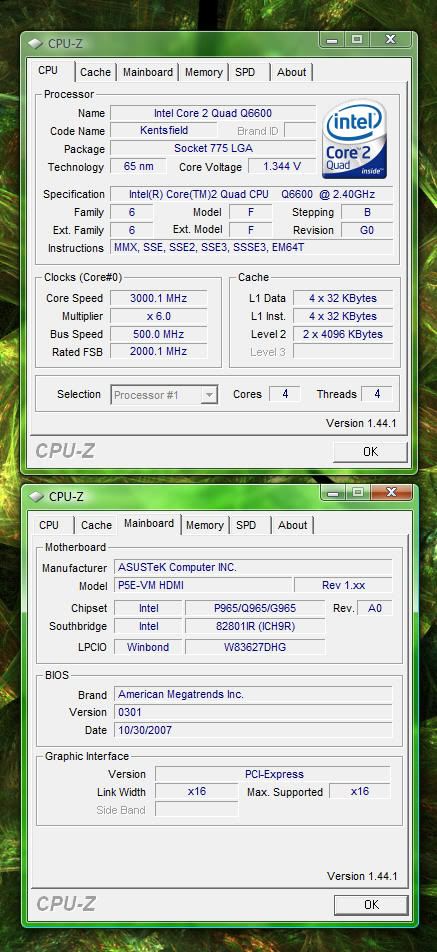
500FSB1.jpg


I began a google search for q6600 and 500 FSB but have not come up with anything. Is a quadcore + a 500 FSB a rare thing? I have since increased my multiplier to 7x and kept my 500 FSB, which allows me to run 3.5ghz! I've heard of one person who hit a 521 FSB on a dual core (65nm) processor. The 45nm processors, I am told, can hit 600 FSB (I've only been told, not seen for myself). Anyway, back to the question.. How many of you out there run at a 500 FSB or close to it?
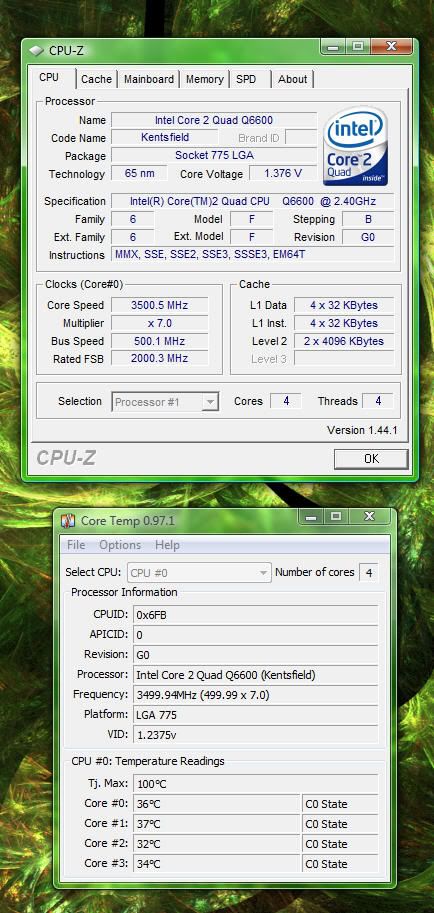
35ghztemps.jpg
 
Yes, it is a rare combination unless the OCer is using dice/phase/ln2 so consider yourself lucky.

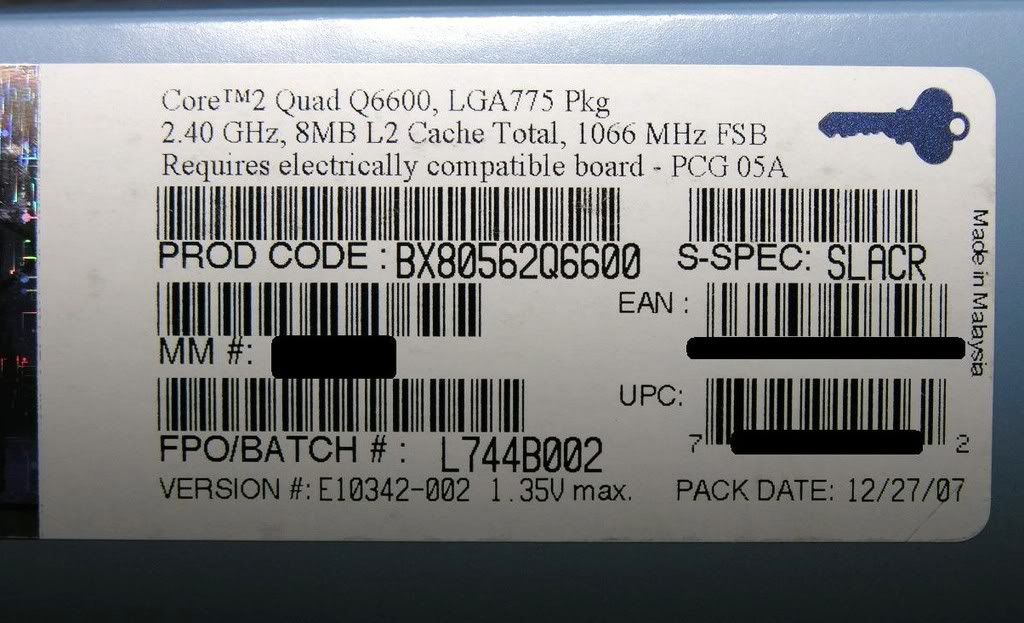
What is the batch/FPO# of that Q6600?
 
FWIW..there are many many 65nm chips that will run 500+ on air. I have owned at least 10 that would do it. My last E6750 was 551FSB with relative ease.
 
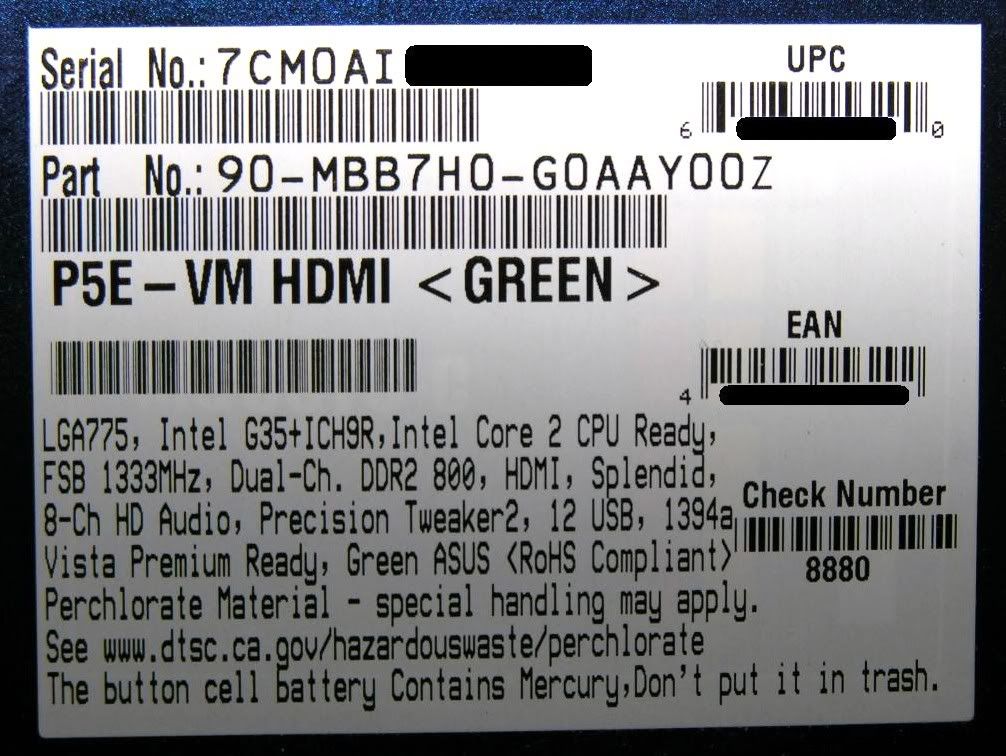
phew thank god you crossed out the universal product code. solid step in protecting your identity.
 
For a dual-core it's not incredibly remarkable, but pretty uncommon for a quad-core I think.
 
yes but those are dualcores. the highest i could get my quad to was 460.. grats OP.


also. i love your worklogs lol
 
pretty nice, but no wr. high fsb is usually dependant on the mainboard. and for an intel matx, 500mhz fsb is great probably 1 of a kind. was it hard getting the am2 hs/f on the s775? kindof overkill (and noisy) with the psu and vid for an htpc.
 
phew thank god you crossed out the universal product code. solid step in protecting your identity.

LMFAO! hahahaha, one can never be tooooooo cautious! Ooops!

For a dual-core it's not incredibly remarkable, but pretty uncommon for a quad-core I think.

Well, I've STILL be playing around with this processor.. My FSB just keeps going and going and going.. LOL..

505FSB.jpg


FWIW..there are many many 65nm chips that will run 500+ on air. I have owned at least 10 that would do it. My last E6750 was 551FSB with relative ease.

That's awesome! Any quadcore 500 + fsb processors?

yes but those are dualcores. the highest i could get my quad to was 460.. grats OP.

also. i love your worklogs lol


Thanks! Hopefully my son's stuff will come in soon and I can get on with my Centurion 5 worklog..

BTW, I was playing around with FSB and my preliminary results are in.. My combo will do a 510 FSB..

510FSB.jpg


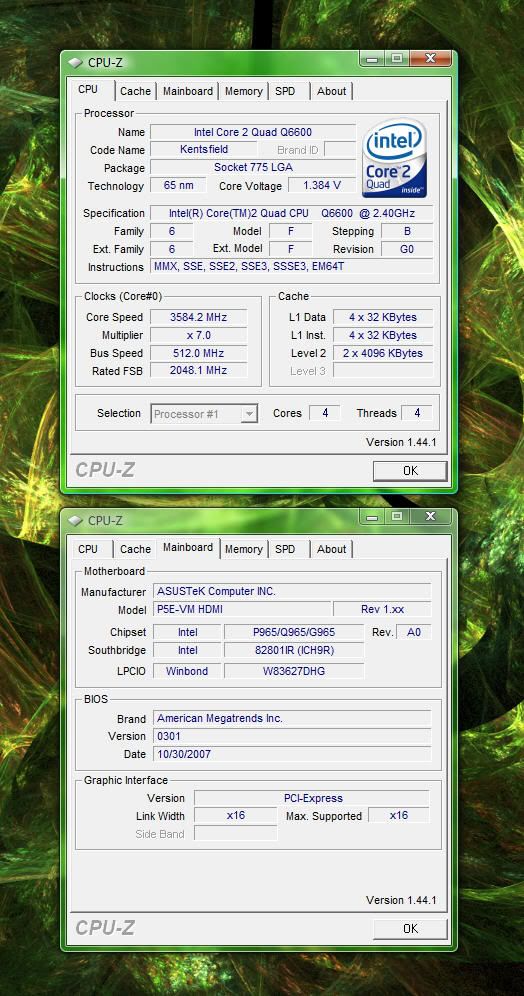
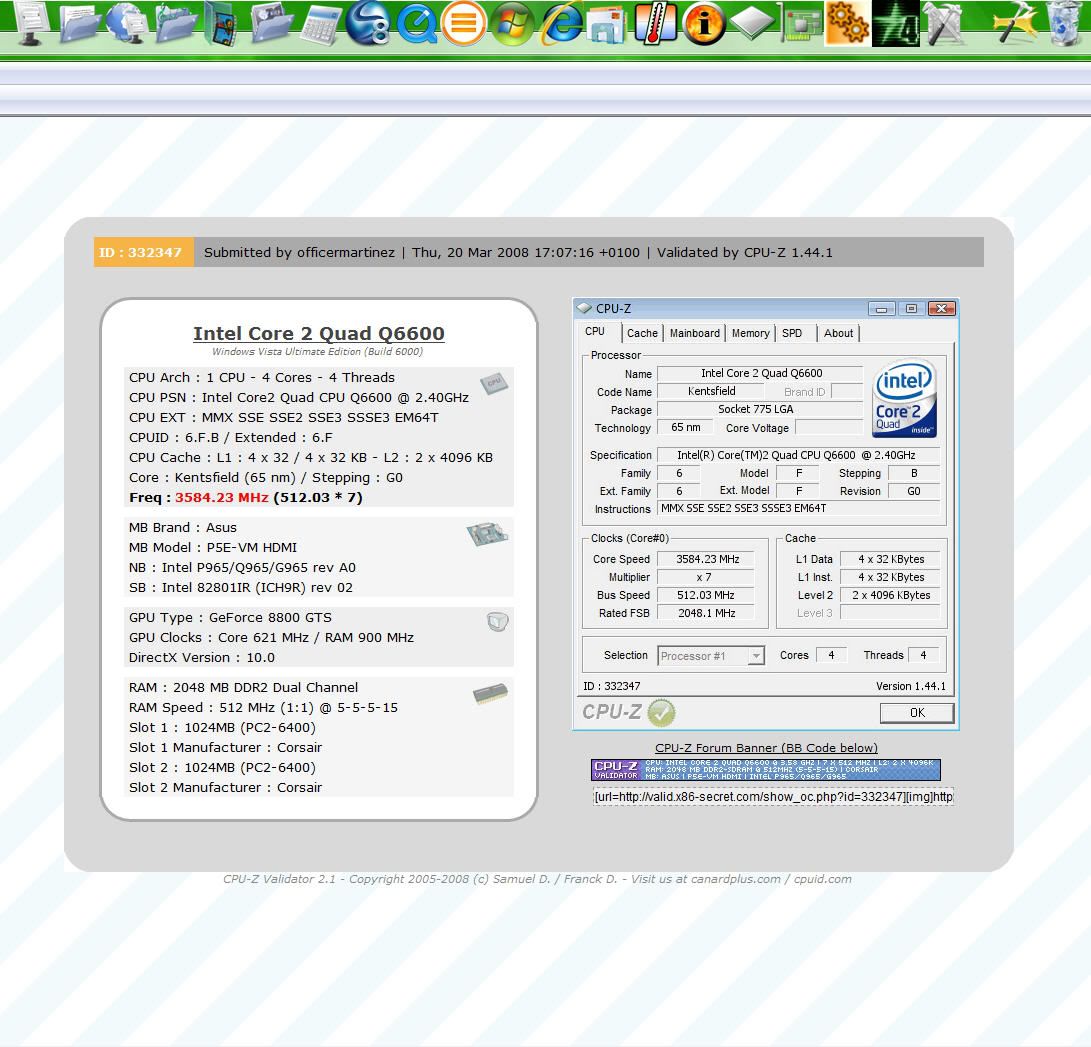
...And it will NOT do a 513 FSB.. But 512.. Ahhhhh.. 512. That's been my limit so far..

512FSB-1.jpg


512FSBValidated.jpg
 
pretty nice, but no wr. high fsb is usually dependant on the mainboard. and for an intel matx, 500mhz fsb is great probably 1 of a kind. was it hard getting the am2 hs/f on the s775? kindof overkill (and noisy) with the psu and vid for an htpc.

LOL, this is just my HTPC.. Not trying for a WR.. haha. But I am pretty darn satisfied with my build.. The PSU is a bit much on the $ but it was just laying around as a spare (back up) PSU for my 1000w Enermax Galaxy Lian Li setup. I got tired of looking at it collecting dust and I put it to use..

As for the VID on the Q6600, it was luck of the draw. I never saw the processor when I went down to Microcenter and bought one for $199. The manager on duty said they were out of stock but as soon as their truck came in, he would ship one off to me. I did ask him to ensure that I got a G0 Q6600.. He sent me an email stating he sent a SLACR stepping.. LOL.

The Zalman fan is the 92mm fan variety. I wanted the AM2 version because it lights up green and the nickel plating matches my setup better than the standard copper colored fins. I contacted Zalman and told them what I was doing and their Customer Service Team was extremely helpful and sent me a LGA775 mounting kit for free!

As for being overkill.. Although it's a HTPC, I still game on it.. COD4 is the flavor of the month right now.. I will also be doing some video editing with it. All in all, I did get some good quality componets and they really paid off in the end.. It's time to sit back and enjoy the fruits of my labor.. LOL!
 
Nice o/c OP. 2 questions. What are your core temps & did you run any stress tests.
 
Yeah.. go and get a 512fsb on your Q6600... I can only do 480 fsb stable on my setup.

I really really want 520 so I can get my RAM up to its max stable speed.
 
Nice o/c OP. 2 questions. What are your core temps & did you run any stress tests.

I stress my cpu's on Everest Ultimate.. This particular clock / FSB combo has NOT been fully stressed (yet). 3.4ghz was, for about 8 hours. I will try to stress it as soon as possible.

My core temps are usually mid to high 30's on idle and I ran this combo at 3.5ghz / 500 FSB for 15 minutes on Everest, stressing all four cours at 100% and my highest temp was 59c.. But, that was only a preliminary stress to make sure that nothing would immediately fail.


35ghztemps.jpg
 
I was playing around with the FSB speed on my system and got some strange results.

I have a Q6600 on and Asus P5K with 2 gig of Corsair XMS2 cas 4 800Mhz ram. I currently have it running at 355 X 9 at 1.4 V for 3.2 gig.

I bumped the FSB to 400, and the mult to 8 and left the voltage alone. A similar 3.2 gig to my standard settings. Everything seemed fine, Prime 95 would run for hours with no problems. Supreme Command ran just fine. But every once in a while, the machine would just reboot. It did it with Prime 95 running once. Once at idle. And another time right after I shut down Firefox on an otherwise idle machine. All 3 instances were after the system had been on at least 8 hours, and one instance was after almost an entire day of Prime running.

I have since gone back to my standard settings. My P5K or the chip just can't handle the higher bus speed.:mad:

Don
 
I was playing around with the FSB speed on my system and got some strange results.

I have a Q6600 on and Asus P5K with 2 gig of Corsair XMS2 cas 4 800Mhz ram. I currently have it running at 355 X 9 at 1.4 V for 3.2 gig.

I bumped the FSB to 400, and the mult to 8 and left the voltage alone. A similar 3.2 gig to my standard settings. Everything seemed fine, Prime 95 would run for hours with no problems. Supreme Command ran just fine. But every once in a while, the machine would just reboot. It did it with Prime 95 running once. Once at idle. And another time right after I shut down Firefox on an otherwise idle machine. All 3 instances were after the system had been on at least 8 hours, and one instance was after almost an entire day of Prime running.

I have since gone back to my standard settings. My P5K or the chip just can't handle the higher bus speed.:mad:

Don

Well I have the P5E.. it's little brother.. Your setup should be EVERY bit as capable I would think.. I've never owned a regular ATX Asus (except two + weeks while testing the striker when it first came out).
 
Run OCCT or Prime95. Most GO quads will boot up at that FSB with solid components but are not stable with some serious voltage.
 
Needs moar cooling!

(My comments are always so constructive...)

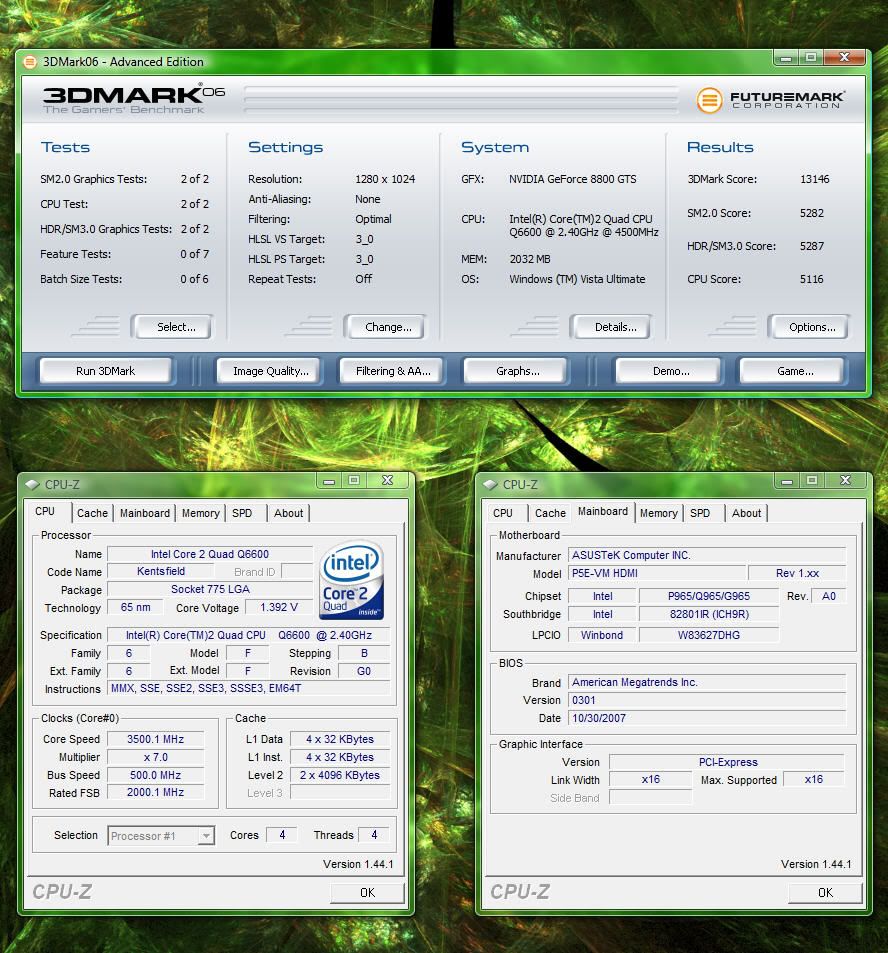
LMAO! Well whether I decide to download and install P95 or OCCT, I am perfectly fine with the Stress Testing that Everest Ultimate can give me. 3.5ghz isn't hard to get stable. Since I know my limits on this setup are close, I am perfectly fine right where I am at.. 3.5ghz.. 500 FSB.. I've been pushing the clocks on my 8800GTS. So far, I've made it to 675 / 1620 / 936.. With this processor at its' current setting and my video card at the 675 settings, I finally managed to hit over 13,000 in 3dmark06.. Not too shabby for an outdated single 8800GTS 640mb video card!

GPUtable.jpg


3dmark061.jpg
 
as long as everest runs on all four cores your probably golden. Prime 95 hits all four cores and takes each on to max -- -- It really lays on the fire! It's a very good tool to determine absolute worst case stress testing and heat build-up (non realistic probably in real world apps)...And because it's so intense if your O/C is unstable - you'll know fast... I've not had it crash my OS or anything, It simply alerts that there was an error in calculation on core 3 or whatever. I've also noticed that rarely is the first core the one that errors out first. (maybe my chip?) If your stress testing is only on one core and it can handle it, but another can't then you'll not know there's a problem until you're pushing them all....

though it is debatable if you could ever push a cpu that hard in normal everyday application use.
 
as long as everest runs on all four cores your probably golden. Prime 95 hits all four cores and takes each on to max -- -- It really lays on the fire! It's a very good tool to determine absolute worst case stress testing (non realistic probably in real world apps)...And because it's so intense if your O/C is unstable - you'll know fast... It won't crash your OS or anything, It simply alerts that there was an error in calculation on core 3 or whatever.

It'll take the OS down if your chip really screws up or the northbridge can't take it.
 
Generally if you hit the frequency limit of the chip what happens is you'll either get an error in Prime95 or in more sever situations, a lock up. However, if your memory or FSB is pushed too high, the possibility of data corruption is a lot higher and it could mess up the OS like silent-circuit pointed out.
 
Back
Top