• Some users have recently had their accounts hijacked. It seems that the now defunct EVGA forums might have compromised your password there and seems many are using the same PW here. We would suggest you UPDATE YOUR PASSWORD and TURN ON 2FA for your account here to further secure it. None of the compromised accounts had 2FA turned on.
    Once you have enabled 2FA, your account will be updated soon to show a badge, letting other members know that you use 2FA to protect your account. This should be beneficial for everyone that uses FSFT.

Q9450 58C Idle, Whats wrong ?

wolf2009

[H]ard|Gawd
Joined
Jan 23, 2008
Messages
1,767
Running Q9450 with a Zerotherm Nirvana 120mm .
Capture112.jpg


Really high idle temps . The tjmax values are set to 100 in realtemp according to Intel document .

Reseated the heatsink, 3 times with differrent application methods for MX-2 .

Used the credit card , and spreading it with finger wrapped in plastic too .

What way does the fan on Zerotherm Nirvana blow air ?

This is how everything is placed, except the antec 80mm and enermax 120mm fans are not there anymore .


Capture018307.jpg


This is reported by GIGABYTE's Easy tune utility with Winprime 1024 test running, the CPU temp is 38C

Capture114.jpg
 
I had (before my q9450 crapped out) the same cpu and cooler as you

my temps were about 48 idle on core 0, and 45 on the 1-3

Seemed sort of high to me.. making me reconsider buying a different cooler -_-
 
CoreTemp.jpg
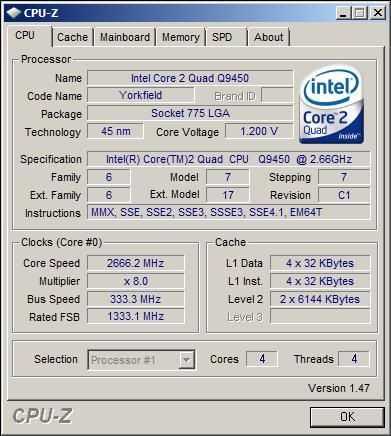
CPUZ.jpg


Same CPU, same Nirvana, no overclocking. I'm using an Antec 900, so I have a lot of fans. I don't think your fans are keeping the warm air in, so I don't know what could be causing your high temps.
 
load never goes over 65C , at this temp the heatsink just feels lukewarm . Motherboard bios shows temp as 34C .
 
Does Realtemp say the sensors are stuck? Run the test. A lot of 45nm CPUs have funky idle temp reporting.

Make sure your TJmax is set to the correct value (this was recently published by Intel) and try to stay at least 25C below that value for load. I wouldn't worry too much about idle temps.
 
Can you take your heatsink off and post a picture of the contact being made by the thermal paste? I know you've tried several methods of application, but aside from bad contact all I can think of is that something's wrong with the heatsink itself.

You should also try sticking your hand in front of where the fan blows air through the heatsink to check if it's working properly. If you've got a spare 120mm fan, you could try removing the stock fan on the Nirvana and jury-rigging the spare to blow through it to see if the stock fan is doing its job.

Make sure your TJmax is set to the correct value (this was recently published by Intel) and try to stay at least 25C below that value for load. I wouldn't worry too much about idle temps.

His Tjmax is set properly if you look at his Real Temp screenshot (100-43=57, etc.).
 
Can you take your heatsink off and post a picture of the contact being made by the thermal paste? I know you've tried several methods of application, but aside from bad contact all I can think of is that something's wrong with the heatsink itself.

You should also try sticking your hand in front of where the fan blows air through the heatsink to check if it's working properly. If you've got a spare 120mm fan, you could try removing the stock fan on the Nirvana and jury-rigging the spare to blow through it to see if the stock fan is doing its job.

Posting a picture is not possible as i dont have a camera . I have tried thinnest of methods, and with a lot too .

The fan is working properly , blowing a lot of air .
 
Yesterday I overclocked my CPU to 3.2 Ghz at night when it was raining outside and I had the window open . SO cool air was coming in . Then I ran WPrime 1024M .

The load temp topped at 67C , Idle was around 57C . I touched the heatpipes on my cooler near the bottom ( near the IHS ) . They didn't even feel warm ( maybe lukewarm ) . Then I touched NB heatsink on my motherboard, that felt warmer than the heatpipes and the fins on the Nirvana Cooler .
 
Could be a stalled heat pipe(s). Is it possible for you to lay your rig down on it’s side with the tips of the heat pipe pointing straight up. Then check your temps again.
 
Your air flow is a little messed up too. Get a new case that has real fan(s) that pull the air in the front and out the back or rig up something similar.
 
Back
Top