• Some users have recently had their accounts hijacked. It seems that the now defunct EVGA forums might have compromised your password there and seems many are using the same PW here. We would suggest you UPDATE YOUR PASSWORD and TURN ON 2FA for your account here to further secure it. None of the compromised accounts had 2FA turned on.
    Once you have enabled 2FA, your account will be updated soon to show a badge, letting other members know that you use 2FA to protect your account. This should be beneficial for everyone that uses FSFT.

Q9400 with P45 Chipset

SonDa5

Supreme [H]ardness
2FA
Joined
Aug 20, 2008
Messages
7,437
Good news.

I just let a Q9550 with C1 stepping free because it didn't have the magic E0 stepping which is officially endorsed for the P45 chipset.

I just put a Q9400 in my machine. It officially supports the P45 chipset and it has R0 stepping.

With the Q9550 I reached a stability barrier at 450FSB with a 8.5 multiplier. I saved the settings in my BIOS and ran them with the Q9400 and got a go for the boot and for the RAM settings on Memtest86x.

So here is how my machine is reacting with the Q9400! :cool:
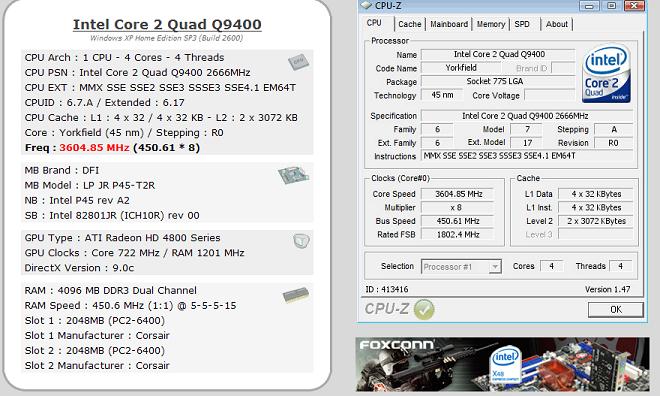
Q9400450FSBstable.JPG


http://valid.x86-secret.com/show_oc.php?id=413416

http://www.techpowerup.com/gpuz/uwx9r/

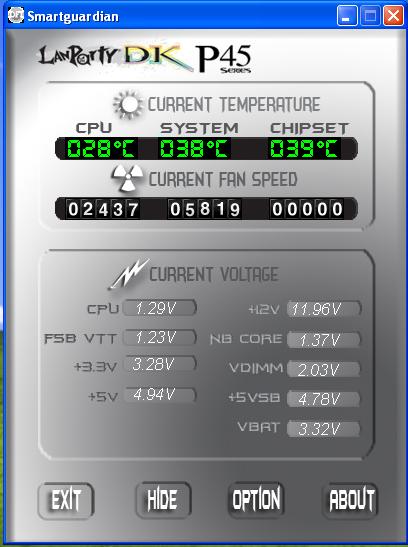
Also pay close attention to my voltages and temps!! :)
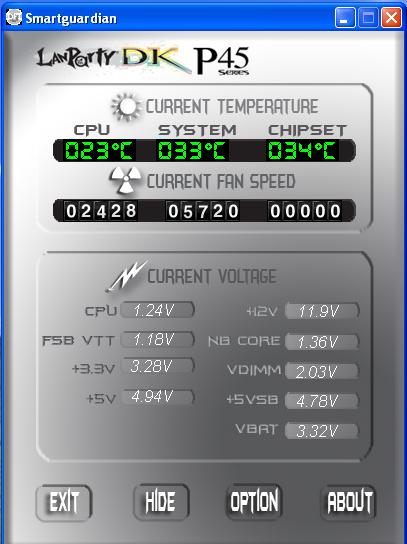
Q9400tempsat450FSB.JPG

I need to add a NB fan on the heatsink.


Q9400 transplant is a success so far. :D


Next step will be to install 3dMark06 and run a benchmark with current settings.
 
Tell me how is goes as I am thinking about a Q9400 since the Q9550 has gone up in price here in Australia as our currency has really started dropping the last two weeks vs the US dollar.

Which Motherboard do you have? The DFI P45 DK plus or just the regular version? I have heard very good things about the PLUS version of this board. I am thinking about either the DFI P45 DK plus or the Asus P45 Delxue. I can't really decide which board to get.
 
I'm running the DFI JR P45 T2RS. (mATX MB)

The 9400 was easy to do a 1GHZ OC with. My machine is in a case being cooled by air.

The voltages and temps look great@3.6 GHZ and I'm very close to doing a 500FSB@8x multiplier for 4GHZ speed on air. Again the voltages and temps are within Intel's listed specs.

I did notice my 3dMark06 score on the CPU portion is lower at 3.6GHZ on Q9400 than the Q9500 at 3.5GHZ.

That can be attributed to 12mb of cache in the Q9550 I guess.

Good thing about my Q9400 is how efficient it is operating in my MB even at OC speeds.
 
How does a processor officially support a chipset? The support comes from the chipset side, and the P45 supports all of Intel's current quad-core processors, Q9550 C1 included. It just wasn't out when the product documentation was released, so it wasn't included.
 
It looks like Intel has updated the product description to support the P45 chipset. This may be because all the Q9550's that are being produced are E0 stepping models now.

Check out this link and look at the chipsets that are supported.

http://compare.intel.com/pcc/showchart.aspx?mmID=33883,35605&familyID=1&culture=en-US

The P45 was just recently added and I am guessing that it was added because of the new
E0 stepping model.

Here is another link at Tom's Hardware from May 2008 where somebody started a thread that shows that the Q9550 didn't support the P45 chipset.

http://www.tomshardware.com/forum/249641-28-xeon-x3360-q9550-lightly-explained

Also take note on all the BIOS updates that many non P45 MB owners are having to make to fully support the newer revised E0 Intel CPUs.

I made that comment based on what was on Intel's WEB site last week but it is now changed.

Do the math. Can you see where I am am coming from?
 
It looks like Intel has updated the product description to support the P45 chipset. This may be because all the Q9550's that are being produced are E0 stepping models now.

Check out this link and look at the chipsets that are supported.

http://compare.intel.com/pcc/showchart.aspx?mmID=33883,35605&familyID=1&culture=en-US

The P45 was just recently added and I am guessing that it was added because of the new
E0 stepping model.

Here is another link at Tom's Hardware from May 2008 where somebody started a thread that shows that the Q9550 didn't support the P45 chipset.

Also take note on all the BIOS updates that many non P45 MB owners are having to make to fully support the newer revised E0 Intel CPUs.

I made that comment based on what was on Intel's WEB site last week but it is now changed.

Do the math. Can you see where I am am coming from?

No, I still can't. The chipset (in combination with the BIOS that configures the chipset) is what supports a CPU. It's just that the documentation for C1 was published before the P45 was released, so naturally it won't include it. Why would Intel produce a chipset that can't support an already existing processor?

The CPU doesn't have to support a chipset. You don't see mention of any Nvidia chipsets on there, but they'll work together just fine because Nvidia chipsets support Intel cpus.
 
Another note.

The Q9550 with C1 stepping worked great with my MB but the E0 stepping seems to be optimized for newer chipsets such as the P45.
 
Another note.

The Q9550 with C1 stepping worked great with my MB but the E0 stepping seems to be optimized for newer chipsets such as the P45.

That's because it's more optimized.. period. It'll be better on P35 as well as any other chipset that supports a 45nm quadcore. Intel is just going to push their most current chipset.
 
That's because it's more optimized.. period. It'll be better on P35 as well as any other chipset that supports a 45nm quadcore. Intel is just going to push their most current chipset.

Sure it will but my main point is that the P45 chipset optimizes the E0 stepping without any additional BIOS updates. Like it's made for it.
Also since making the E0 revised Q9550 Intel updated their WEB site to show that. This has happend in the last week.

E0 stepping looks like it has great OC potential.

Back on subject. This new Q9400 CPU with R0 stepping works great with the P45 chipset.
 
Sure it will but my main point is that the P45 chipset optimizes the E0 stepping without any additional BIOS updates. Like it's made for it.
Also since making the E0 revised Q9550 Intel updated their WEB site to show that. This has happend in the last week.

E0 stepping looks like it has great OC potential.

Back on subject. This new Q9400 CPU with R0 stepping works great with the P45 chipset.

And if it could do that with a E0, why couldn't it do the same for a C1?


The Q9400 bit is good to know since I'm buying one in the next week along with a P45 board.
 
And if it could do that with a E0, why couldn't it do the same for a C1?

Not sure why. When I got to 450FSB with the Q9550 with C1 it was like I hit a wall. No matter how I tuned the RAM and voltages I couldn't figure out how to get through the wall.
I'm sure there was a way but I opted out for a Q9400.


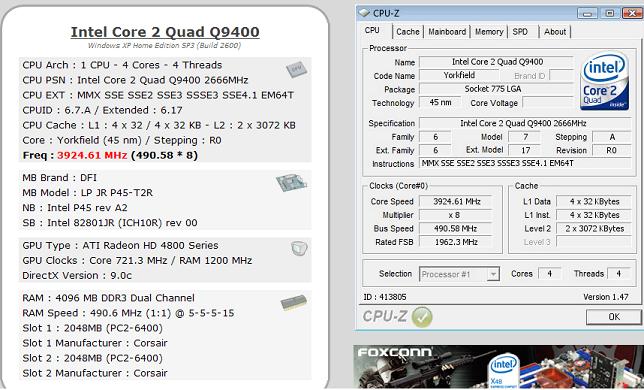
More Q9400 benchmarks. :)


With some more tweaking I could probably hit 4gHZ. This was done in my case with air cooling.


490FSBQ9400.JPG


490FSBfastQ9400.JPG


http://valid.x86-secret.com/show_oc.php?id=413805


http://www.techpowerup.com/gpuz/5d9h7/
 
Not sure why. When I got to 450FSB with the Q9550 with C1 it was like I hit a wall. No matter how I tuned the RAM and voltages I couldn't figure out how to get through the wall.
I'm sure there was a way but I opted out for a Q9400.


More Q9400 benchmarks. :)


With some more tweaking I could probably hit 4gHZ. This was done in my case with air cooling.

[]http://minidriven.com/GreenMachine/490FSBQ9400.JPG[/img]

[]http://minidriven.com/GreenMachine/490FSBfastQ9400.JPG[/img]

[]http://valid.x86-secret.com/show_oc.php?id=413805[/url]

[]http://www.techpowerup.com/gpuz/5d9h7/[/url]

Like I said before, that's just the nature of CPUs. You just hit the limit of the old CPU, whereas the newer one didn't have that limit.
 
The Q9550 with E0 stepping will probably break through the 450 FSB that I reached with the Q9550 C1 stepping technology.
 
Still too much premium in the price of q9550s now anyways.

I'm hoping they will be mid-low 200s when bloomfield is out. (I plan to build a new rig then.)
 
Good news.

I just let a Q9550 with C1 stepping free because it didn't have the magic E0 stepping which is officially endorsed for the P45 chipset.

I just put a Q9400 in my machine. It officially supports the P45 chipset and it has R0 stepping.

With the Q9550 I reached a stability barrier at 450FSB with a 8.5 multiplier. I saved the settings in my BIOS and ran them with the Q9400 and got a go for the boot and for the RAM settings on Memtest86x.

So here is how my machine is reacting with the Q9400! :cool:

Q9400450FSBstable.JPG


http://valid.x86-secret.com/show_oc.php?id=413416

http://www.techpowerup.com/gpuz/uwx9r/

Also pay close attention to my voltages and temps!! :)
Q9400tempsat450FSB.JPG

I need to add a NB fan on the heatsink.


Q9400 transplant is a success so far. :D


Next step will be to install 3dMark06 and run a benchmark with current settings.
Strange, my P5Q Deluxe (P45 chipset) supports my Q9550 C1 stepping just fine. In fact, I'm currently stable all the way up to 471 FSB. Working on going higher.
 
Strange, my P5Q Deluxe (P45 chipset) supports my Q9550 C1 stepping just fine. In fact, I'm currently stable all the way up to 471 FSB. Working on going higher.

I'm at 500 FSB with the Q9400.

I didn't have the Q9550 very long. I'm sure I could have gone higher with it.


My point that I brought up in this post is that the Q9400 was able to handle the FSB wall that I was stuck at with the Q9550 C1 stepper. Also the temps on the Q9400 are lower. So the Q9400 appears to be easier to OC and is cooler.

I still have more tweaking to do with the Q9400.
 
I'm at 340 FSB with the Q9400. I'm currently breaking it in on a Gigabyte EP45 board. According to one of the latest BIOS update (which I'm at F9 already), the memory is supposed to OC up to 1333mhz? So I have to set the DDR2 ram speed to 667mhz?
 
I'm at 340 FSB with the Q9400. I'm currently breaking it in on a Gigabyte EP45 board. According to one of the latest BIOS update (which I'm at F9 already), the memory is supposed to OC up to 1333mhz? So I have to set the DDR2 ram speed to 667mhz?


What RAM are you running? That is very fast rated OC.

I got my 500 FSB OC with Patriot PC 9200 2x1GB dual channel. It's rated for 1150mhz speed at 5-5-5-15 timings.

On my 500 FSB OC i got the RAM @4-4-4-12 timings.

I'm using 1:1 ratio with 667mhz.
 
I'm at 500 FSB with the Q9400.

I didn't have the Q9550 very long. I'm sure I could have gone higher with it.


My point that I brought up in this post is that the Q9400 was able to handle the FSB wall that I was stuck at with the Q9550 C1 stepper. Also the temps on the Q9400 are lower. So the Q9400 appears to be easier to OC and is cooler.

I still have more tweaking to do with the Q9400.

I'm up to 485 FSB now. I know 485 is stable, and 490 isn't. So the magic number is somewhere in 485 - 489.

Speaking of stability, what tests are you running for stability? Also, what temp program are you using to measure the core temps? That Lanparty software is only telling you the temperature of the CPU socket, not the CPU itself. Even if it were able to tell you the actual temp of the CPU, that still wouldn't tell you the core temps. If you haven't yet, install the latest version of Real Temp, and make sure the TJMax setting is set to 100*C. That will tell you the temperatures of the cores. Also, I have a feeling that temps you're looking at are with the PC idle, is that right?
 
arent 45nm a tjmax of 95?

No, here are the ones Intel released:

Intel®Core™2 Duo processor E8000 and E7000 series: 100°C
Intel®Core™2 Quad processor Q9000 and Q8000 series: 100°C
Intel®Core™2 Extreme processor QX9650: 95°C
Intel®Core™2 Extreme processor QX9770: 85°C
 
I'm up to 485 FSB now. I know 485 is stable, and 490 isn't. So the magic number is somewhere in 485 - 489.

Speaking of stability, what tests are you running for stability? Also, what temp program are you using to measure the core temps? That Lanparty software is only telling you the temperature of the CPU socket, not the CPU itself. Even if it were able to tell you the actual temp of the CPU, that still wouldn't tell you the core temps. If you haven't yet, install the latest version of Real Temp, and make sure the TJMax setting is set to 100*C. That will tell you the temperatures of the cores. Also, I have a feeling that temps you're looking at are with the PC idle, is that right?


I ran Prime95 benchmarks... wPrime benchmark....SuperPi....
3dMark06.

Seems stable. Nothing extreme like the many people here who run Prime95 for hours and hours... or orthos.

I still am not sure if doing that really make the machine stable.

Also I like to play UT3 for about 2 hours straight. If it handles that then I consider it stable. :D


Thanks for the info on real temp.

The temps shown were at idle.


I'll figure out how to set temp settings to see how accurate the DFI system app is.

I transfering my machine to Antec 900. Will probably finish it today.

I've been busy. If I have time over the weekend I'll do some tweaking and benchmarks.
 
I ran Prime95 benchmarks... wPrime benchmark....SuperPi....
3dMark06.

Seems stable. Nothing extreme like the many people here who run Prime95 for hours and hours... or orthos.

I still am not sure if doing that really make the machine stable.

Also I like to play UT3 for about 2 hours straight. If it handles that then I consider it stable. :D

As long as it works for what you need it for, shouldn't be a problem.

Thanks for the info on real temp.

The temps shown were at idle.


I'll figure out how to set temp settings to see how accurate the DFI system app is.

I transfering my machine to Antec 900. Will probably finish it today.

I've been busy. If I have time over the weekend I'll do some tweaking and benchmarks.

Based off the CPU temp shown in the Lanparty software, I'd guess your core temps are somwhere in the high 40's at idle, which would put them somwhere in the 60's/70's under Prime load. And about 10*C lower than that while gaming. That's high, but still within safe limits.
 
Back
Top