• Some users have recently had their accounts hijacked. It seems that the now defunct EVGA forums might have compromised your password there and seems many are using the same PW here. We would suggest you UPDATE YOUR PASSWORD and TURN ON 2FA for your account here to further secure it. None of the compromised accounts had 2FA turned on.
    Once you have enabled 2FA, your account will be updated soon to show a badge, letting other members know that you use 2FA to protect your account. This should be beneficial for everyone that uses FSFT.

Project: Nine Twenty

lkramer

n00b
Joined
Nov 12, 2008
Messages
33
Thanks for checking out this worklog.

My last PC (see the Project Skyburg worklog) was a mid-range computer housed in a Lian-Li PC-A17b case. In addition, I will be using some components from my second PC which I built 2 years ago that has older components but is housed in a Silverstone TJ09 case. So, this new PC will be using various components from each PC.

My Last PC
LastPC.jpg


Unfortunately, I did not take a picture of my second PC before I started removing components (side panels, HDDs and optical drive are removed).

The new PC will be used for gaming, programming and general use.

I bought the following components for the new computer:
  • Intel Core i7 920
  • Intel DX58SO
  • 6GB (2GBx3) Kingston DDR3-1066 Triple Channel Kit
  • EVGA GeForce 260 Core 216 FTW Edition
  • Noctua NH-U9B CPU cooler
  • Radiator Support for the Silverstone TJ09
  • 3 120mm NMB-MAT 4710KL(B10) OEM fans for the rear and top 2 exhaust fans
  • 2 120mm NMB-MAT 4710KL(B20) OEM fans for the front intake fan
  • 700W Seasonic Modular PSU
  • Various connectors and wires for the fans and adapters

I will be reusing the following components:
  • LG DVD/Blu-Ray/HD-DVD Reader and DVD Writer
  • 92mm Low Speed Panaflow fan
  • Silverstone TJ09 case
  • 2 150GB Western Digital Raptors

I bought a second Noctua NH-U9B CPU cooler and Seasonic PSU for the new PC. I replaced the Panaflow fan in my last PC with the stock Noctua fan. So, I could use the Panaflow fan in the new PC. In addition, I removed the 2 WD Raptors and the optical drive in my last PC and replaced them with the HDDs and optical drive out of my second PC.
 
I disconnected all of the cables going to the components on the motherboard tray and removed the motherboard tray from the case. I have also laid out all of the components I currently have on my work table (aka dining room table).

OldComponents.jpg


Motherboard Tray with no components but the I/O shield installed
EmptyTray.jpg


I installed most of the components onto the motherboard tray except for the memory because the memory has not arrived at the computer store yet. The connectors for the 120mm fans have not arrived yet. I wanted to make sure all of the fans worked before I install the fan connectors. So I connected each fan to an external DC power supply set to 12V (checked by a volt meter). The four 120mm fans passed the test so I can now install the connectors. The video card has not shipped from NCIX yet so I am going to use one of the 8800 GTX from the second PC until I receive the new video card.

NewComponets.jpg
 
The memory has arrived at the computer store. I going to pick it up tonight after work. The connectors and wires for the fans and adapters also arrived at my house this morning, according to the Express Mail International tracking number provided by USPS. So, I am going to create the adapters, attach the fan connectors to the fans and install the memory when I home tonight.
 
Unfortunately, last night I did not get a chance to create the adapters or attach the fan connectors to the fans because I was busy helping my cousin move. But I did create a rough diagram of the fan-to-Molex adapter for the top 2 exhaust fans.

FanMolexAdapter.png


I have decided to attach a Molex connector to the front intake fan instead of a fan connector because the front fan header is hidden by the video card. I am going to use a fan connector for the rear exhaust fan. So I can connect the rear exhaust fan to the rear fan header.
 
I apologize for the lack of updates but I have not made much progress on the new PC lately because I have decided to change a couple of components. In addition, I have decided to sleeve both the fan and adapter cables.

I am changing the rear exhaust fan from 4710KL(B20) to a 4710KL(B10). I have ordered the new fan today from DigiKey and it should arrive tomorrow. I am getting some cable sleeving and heat shrink tubing from the Active Electronics store in Mississauga on Saturday (weather permitting). I am also replacing the Raptors with 2 WD 320GB AAKS (Rev B3).

The GTX 260 Core 216 FTW Edition video card arrived today. I replaced the 8800 GTX with the new video card. Next, I placed the motherboard tray and PSU (after removing the old PSU) into the TJ09. Finally, I connected and routed all of the power cables.

New Video Card Installed and Power Cables Routed:
PowerCablesRouted.jpg


I have not installed the rear exhaust fan yet because I am going to sleeve the cable before I attach the fan connector.
 
The weather was good yesterday, so I drove to the Active Electronics store in Mississauga to get the cable sleeving and heat shrink. While I was at Active Electronics, I found a bag of cable ties with a screw hole in them and 25mm long M3 stand-offs.

I have finished making and sleeving the SATA-to-Molex adapter and fan-to-Molex Y adapter. In addition, I have sleeved the fan cables (required me to remove the front intake and top 2 exhaust fans) and attached the fan connectors to the fan cables.

Adapters:
Adapters.jpg


I rerouted the power cables by securing the main power cables using the cable ties with the screw hole. Then, I attached two 25mm stand-offs to the lower right two motherboard tray stand-off holes (meant for EATX motherboards but are unused in my system). Finally, I attached these cable ties to the stand-offs on the motherboard tray using M3 screws.

I changed my mind on replacing the Raptors with 2 WD 230GB AAKS (Rev B3) hard drives.
 
Every pic is grainy as hell.

My pictures are grainy as hell because I own a very old 2MP camera that my sister gave me when she upgraded to newer camera. Before now, I did not take that many pictures so the 2MP camera was good enough for me but I am taking more pictures now, so I think it is a good time for me to replace that camera with a newer one. I am replacing the 2MP camera with a FujiFilm FinePix J10.

I'm sure he posted these for a fucking photo quality critique. :rolleyes:

This worklog is a system build critique not a photo quality critique.
 
Keep it up! You better have an overclocking section or i swear your gonna get hate mail! :cool:

Sub'd well posting already sub'd me, but w.e
 
I installed the 4710KL(B10) rear exhaust fan. Next, I reinstalled the front intake and top 2 exhaust fans using the Radiator Support (after taking these fans out to sleeve them). Then, I connected and routed the auxiliary motherboard connector using the SATA-to-Molex adapter, cables for the case's front panel and the SATA data cables. Finally, I connected the rear exhaust fan to the motherboard directly, the top 2 exhaust fans through the fan connector to Molex adapter and the front intake fan directly to a PSU Molex connector.

The PC is completed
DSCF0096.jpg


Now onto the testing. First, I am going to run Memtest86+ to check the memory. Next, I am going to run Prime95 while I monitor the CPU temperatures using RealTemp.
 
Man my gf would have my nuts for ear rings if i did that on her dining table :D, keep up the good work

/subscribed
 
Man my gf would have my nuts for ear rings if i did that on her dining table :D, keep up the good work

/subscribed

My parents and I usually use the dining table to build and fix computers but they were not too happy about me taking over the dining table for about a month to build the PC.

The computer has now been moved up to my room.

Thanks.
 
The Memtest86+ test passed. During the Memtest86+ test, I noticed the intake and one of the top exhaust fans are making a clicking noise.

I ordered the low speed San Ace (9S1212L401) fan to replace the top 2 exhaust fans and the medium speed San Ace (9S1212M401) fan to replace the rear exhaust and front intake fans. I am switching to the San Ace fans because I cannot get the NMB-MAT 4710KL fans from my supplier as they are listed as a non-stocked item and the supplier requires a minimum order of 320 fans. The San Ace fans also have a tach sensor which the NMB-MAT 4710KL fans did not have.
 
what kind of grill are you using on the top? cause i know that's not stock.

The case originally came with two clip-based fan holders for the optional top 2 exhaust fans and a black mesh grille covering these optional fans. I removed the fan holders (secured with 4 screws each) and replaced them with the radiator support. The radiator support was originally meant to hold a 240mm radiator in a water-cooled system but I modified the radiator support by drilling bigger holes for the fan screws. Next, I attached the fans to the radiator support using the enlarged screw holes. Finally, I attached the radiator support to the top of the case using the same screw holes as the fan holders used. I reused the black mesh grille on the top of the case.
 
Really nice looking rig! Wiring job is very well done, especially while keeping everything in front of the motherboard tray. Good job!
 
The new San Ace fans arrived today from Newark (electronic components distributor). In addition, the connector samples from Tyco Electronics arrived today. I am still looking for a supplier (must be in Canada or have cheap shipping rates to Canada) to supply the 1/8" expendable nylon sleeving and pins for the 3-pin IDC headers.

San Ace fans (top 2 fans are the low-speed 9S1212L401 and bottom 2 fans are the medium speed 9S1212M401) with connectors from Tyco (AMP Mate-N-Lock and 3-pin IDC header):
DSCF0005.jpg
 
I found suppliers for the 1/8” expandable nylon sleeving and pins for the 3-pin IDC headers today.

I ordered the pins for the 3-pin IDC headers from Digi-Key (electronic components distributer) and they should arrive tomorrow. In addition, I ordered two more 3-pin IDC headers from Digi-Key, so I can use the fan connector-to-Molex adapter I made earlier. I am not going to use the AMP Mate-N-Lock connectors.

The supplier of the 1/8” expandable nylon sleeving is a local electronics store here in London, Ontario but they have to order it from their supplier, which will take seven to ten days.
 
The pins for the 3-pin IDC headers and the two additional 3-pin IDC headers arrived today.
 
Looking smooth brotha. Your post has inspired me to sleeve my cables and fix my dead 240mm.

However, you need to adjust the lighting, and focus more on color hue and saturation for these photos. You may even want to go into Photoshop and start adjusting your iris ratings, and film conflux numbers. Looking at these pictures is unbearable.

:D
 
In the past two months, I have not worked on my PC much. In March, I went to Miami for Winter Music Conference (WMC). In addition, I visited Performance PCs in Palm Bay (about a 2 hour drive north of Miami) while I visited Miami. I purchased a tube of Arctic Cooling MX-2 thermal compound from Performance PCs while I was there. In April, I stepped up my video card to a GTX 285 and ordered a new keyboard for the PC.

I have changed the following components:
  • Changed the RAM to 1600MHz to better support my overclocking goals.
  • Upgraded my video card from a GTX 260 to a GTX 285 using the Step-Up Program from EVGA.
  • Changed the CPU thermal compound to Arctic Cooling MX-2.
  • Added a serial PCIe controller card so I can communicate with my embedded development system.
  • Changed the monitors to 2 22” monitors.
  • Changed the keyboard to a Keytronics keyboard with an L Shaped Enter key.

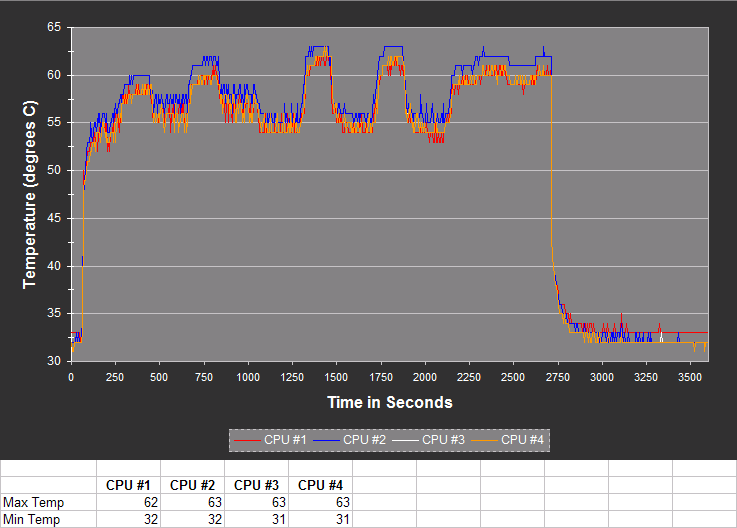
I tested the PC using Prime95 and RealTemp before and after changing the CPU thermal compound. I noticed a temperature drop as illustrated by the following graphs.

AS5 temperature graph*:
AS5TempGraph.png


Arctic Cooling MX-2 temperature graph*:
MX2TempGraph.png


*Note: These temperatures were recorded with RealTemp 2.70 which does not have Core i7 support. RealTemp 2.70 defaulted to a TjMax of 95 C which is 5 C below the actual TjMax (100 C), so add 5 C to the temperatures in the graphs for actual temperatures. The ambient temperature during both tests was 24C (+/- 1C). Temperatures were recorded at 5 second intervals in a CSV log and then the log was imported into Excel for graphing.
 
Last edited:
Back
Top