• Some users have recently had their accounts hijacked. It seems that the now defunct EVGA forums might have compromised your password there and seems many are using the same PW here. We would suggest you UPDATE YOUR PASSWORD and TURN ON 2FA for your account here to further secure it. None of the compromised accounts had 2FA turned on.
    Once you have enabled 2FA, your account will be updated soon to show a badge, letting other members know that you use 2FA to protect your account. This should be beneficial for everyone that uses FSFT.

Programming better on an A64 or P4?

ATFCharger

Weaksauce
Joined
Aug 7, 2003
Messages
73
I want to get a new laptop with at least a a gig of ram, but I'm honestly not quite sure between one with a P4 with HT (not a Centrino) or a laptop with an Athlon 64 processor in it.

Is one better for this then the other? I've been programming on Intel chips since I graduated but never really gave it much thought until now (wanting to go to a mobile developing platform from home).

I like the A64's because they seem to run much cooler, but I'm wondering if I need the raw power from a Pentium.

Any suggestions? I'm either edging towards a a Dell 9100 or an HP 5260US with an Athlon 64 3400 (I think) in it.

Thanks much, fellas!
 
For compilation, I believe the Athlon 64 is better because it has more registers. Though to be honest, unless you're gonna be compiling huge programs all the time, buying a new computer strictly for programming is a little bizarre.
 
i have a laptop with a desktop p4 in it. i hate the damn thing. it sucks juice like a fiend and outputs it as heat. and because of the heat generated, its fans constantly run and it's not quiet. when i turn it off in the living room, it feels good like when you take off really tight shoes.

i just worked on a coworker's mobile athlon emachine laptop and i was impressed.
 
Reason I'm getting a laptop for this is because I'm not home much to do work anymore and my help desk position at my company is too hectic to even try and work on stuff there. So I figure I'd use it on my lunch hour and take it with me on the weekends and such to do my stuff that way.

My only concern is everyone seems to shun the nVidia mobile processing units, and every A64 laptop I've found so far is running a GeForce chip.
 
i think you'd be fine with a mobile pentium.

they are more muscular per MHz than the p4's - plus they are good for laptops in everyway the regualr p4's aren't
 
I think you mean Pentium M, which is not the same as a Pentium mobile (like the P4-M).
 
LOL...ok, don't bash me cuz I'm not so savy on laptop hardware yet and have been a desktop jockey all my life, but what's the difference in all of these (via Dell's customization area for notebooks)
------------------------------------------------------
Intel Pentium 4 w/ HT - is this a dekstop prescott in a laptop? 800 FSB
Intel Pentium 4 w/o HT - 533 FSB
*are the above two both considered "Mobile Intel Pentium 4s"?*

Intem Pentium M - 400 FSB

Intel Celeron Processor - 400 FSB

------------------------------------------------------

What's this Centrino stuff? Is that the same as the Pentium M chip in the middle? I apologize again for making someone have to explain that (but greatly appreciate it!). I wish I followed mobile technology as well as desktop stuff.
 
Centrino is the Pentium M plus Intel's chipset and WiFi chip. There are non-Centrino Pentium M systems.

As for the others -- If it doesn't say P4-M or P4-Mobile, assume it's a high-wattage version.
 
I'm very happy with my notebook based on a mobile A64. I get about 3 hours of batterylife while doing light surfing on the net (through wlan) or almost 4 if I'm not connected. Powernow makes it pretty silent, the fan runs only when doing something intensive with it. (it's clearly audible then though)

The only downside is that it has a mobility 9700, and ati still has not released linux 3d drivers for teh videocard! :mad:

All the benchmarks I've seen considering programing (compiling actually) have the A64's kicking P4 ass bigtime. I would imagine that the pentium -m dothans do better then the P4's though, they seem to do well in the areas that the A64's dominate in.

edit: found something

3270.png
 
Wow, you guys have been awesome for assistance on this decision problem I've been having in choosing a system to run with. If it's any further help, here's what I'd be running:
-Visual Studio 6
-MS Access 2000 & 2003
-.NET
-HTML
-Paint Shop Pro for imaging
--
I also have 3d SMAX 4 that ran decently on my old P3-933 system with a GF2 GTS card (64mb). Would it run halfway decent on an A64 notebook? I don't think it's so much the problem with the processor, but maybe the RAM and the GeForce 4 Go cards that seem to be in them.

I priced out a Dell 9100 system but I think it was way overkill for what I want to do ($2100+) and I don't really plan on using this to game much, if at all. HP's A64 system from Circuit City is $1600, but I'm just having a judgement problem in deciding if it will meet my needs or if I really need something with all the excessive horsepower. (I sorta think I answered myself there) :S

Thanks again for all the input i've received back thus far. I'm really appreciative of it.
 
I've been using visual studio for many years now on several different PC's and processing power has no where near as much influence on compile time as memory and Disk IO. I compile the current code base I am working with on three different machines ranging in speed from 1.8mhz - 3.2mhz and it takes almost the same time for all.
 
dropadrop said:
I'm very happy with my notebook based on a mobile A64. I get about 3 hours of batterylife while doing light surfing on the net (through wlan) or almost 4 if I'm not connected. Powernow makes it pretty silent, the fan runs only when doing something intensive with it. (it's clearly audible then though)

The only downside is that it has a mobility 9700, and ati still has not released linux 3d drivers for teh videocard! :mad:

All the benchmarks I've seen considering programing (compiling actually) have the A64's kicking P4 ass bigtime. I would imagine that the pentium -m dothans do better then the P4's though, they seem to do well in the areas that the A64's dominate in.

edit: found something

3270.png
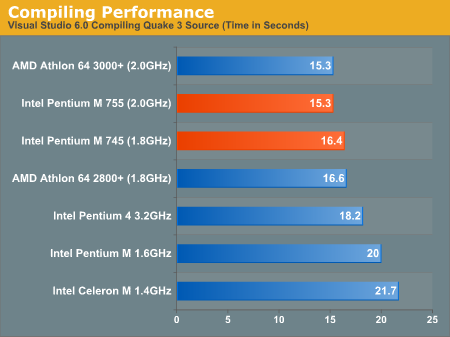
In this particular case, it's more dependent on memory access times and transfer, as you can see from the graph. The Pentium M 1.6 and Celeron both have a 400MHz bus, and 1MB and 256k cache respectively. The P4 3.2 uses DDR400, with 512k cache. The A64 has 512k, and memory controller on-die, which helps, and the P-M 745 and 755 have 2MB onboard with DDR2700.

What does this tell us? Compiling Quake III requires quick memory, not a fast CPU. For the stuff you're going to be doing, I'd suggest that anything over 2.4GHz (P4), 2800+ (A64) or 1.6GHz (P-M) will probably perform around the same. Your main problem will be memory and disk access times (from experience) - invest in a machine with plenty of RAM and a fast drive. Be careful with Centrino machines - generally, they're battery-optimised, meaning that they have a crappy 4200rpm drive. Try to get an upgrade to a 5400 (or even a 7200) - it may decrease battery life, but it'll save a lot of frustration in the long run. I personally use an HP nx7000 w/ P-M 1.4GHz, which runs like a dream except when it goes to the disk for something, at which point I may as well be using my desktop from 3 years ago. An old PIII 866 laptop with a 5400rpm drive and the same amount of memory spanks it silly when it comes to running multiple .NET and Java stuff.

One other thing - I'd suggest that you make sure that the system you get will support multiple monitors - above everything else, this will be your greatest productivity enhancement. Personally, I'd suggest getting the A64 machine and buy a 17" TFT with the spare cash you've saved on the Dell.
 
especially if its a laptop

BillLeeLee said:
For compilation, I believe the Athlon 64 is better because it has more registers. Though to be honest, unless you're gonna be compiling huge programs all the time, buying a new computer strictly for programming is a little bizarre.
 
Whatsisname said:
especially if its a laptop
Why is it so strange? If you want to demo something to a customer, just take your laptop along. Saves setting up a separate environment for that purpose.

Besides, if you tend to tweak the hell out of your main rig and swap software in and out, then it's hardly a stable, controlled platform on which to develop your software, is it?
 
Compiling is a branch-heavy and integer operation heavy workload, as such, the NetBurst arch chips (Pentium 4s) will not excel on these tasks. Similarly, SSE and SSE2 will be of no real use. Prefer to get either an Athlon64 or Pentium M notebook, of course you'll also want to look at battery life, keyboard, screen size, resolution, and price. For a programming system, you'll appreciate a good keyboard and pointer device (which are matters of personal preference) and screen (you don't want to continually scroll through your code).

You may find that a desktop system with 2 monitors (and a comfortable keyboard) is a better programming system, but portability definately has its advantages.
 
Personally, I think that usability will be the primary objective - things like a widescreen which does 1680*1050 or above, multiple monitor support, good keyboard etc will be more important than raw performance. My nx7000 has all of these things, and it wasn't particularly expensive (equivalent of about $1800). It's fast enough that there is negligible difference in developing and compiling between it and the desktop in my sig. The only noticeable difference is when I'm recompiling several large webapps using Resin while running Eclipse, MySQL etc, and even then it's less than a 15 second gap.
 
Well, I've narrowed down from the P4's (I personally didn't find the heat output all that attractive, plus the price of them) to look more solely at the Pentium-M's and the A64's.

Even according to the chart, how do the Pentium-M's fair so much more successful then, what I would consider, the P4 being the bigger brother; when shown along side with an Athlon? Have I been misinterpreting all these years that MHz vs. MHz is really no longer a fair comparison when it comes to chips for doing stuff like this?
 
ATFCharger said:
Well, I've narrowed down from the P4's (I personally didn't find the heat output all that attractive, plus the price of them) to look more solely at the Pentium-M's and the A64's.

Even according to the chart, how do the Pentium-M's fair so much more successful then, what I would consider, the P4 being the bigger brother; when shown along side with an Athlon? Have I been misinterpreting all these years that MHz vs. MHz is really no longer a fair comparison when it comes to chips for doing stuff like this?
MHz vs MHz is absolutely no longer an effective measure, in the case of CPU speed. In the case of FSB, it's more useful, and with memory bandwidth it's almost the absolute (depending on whether your CPU is more sensitive to bandwidth - P4 - or latency - AXP/A64 and P-M). For the stuff you're going to be doing, I'd say that the graph quoted above is almost irrelevant - it looks at compilation to native code. The development you're going to be doing is either in an interpreted environment (VBA in Access 2k/2k3) or a virtual machine with bytecode (.NET). These environments tend to be more dependent on the amount of memory than CPU speed. Likewise with PSP, although that will probably be limited by bandwidth and access times than the code you're writing.

As I said before, I prefer the P-M/Centrino architecture for laptops - the advantages go beyond raw speed. It's a subjective thing, but I'm too lazy to run benchmarks ;)
 
dropadrop said:
I'm very happy with my notebook based on a mobile A64. I get about 3 hours of batterylife while doing light surfing on the net (through wlan) or almost 4 if I'm not connected. Powernow makes it pretty silent, the fan runs only when doing something intensive with it. (it's clearly audible then though)

The only downside is that it has a mobility 9700, and ati still has not released linux 3d drivers for teh videocard! :mad:

All the benchmarks I've seen considering programing (compiling actually) have the A64's kicking P4 ass bigtime. I would imagine that the pentium -m dothans do better then the P4's though, they seem to do well in the areas that the A64's dominate in.

edit: found something

3270.png


A64's shorter pipeline appears to be well suited to branch-prediction laden applications such as compilation. :)
 
because the ghetto laptop keyboard and no mouse would suck balls when you are typing a shitload.

:LJ: said:
Why is it so strange? If you want to demo something to a customer, just take your laptop along. Saves setting up a separate environment for that purpose.

Besides, if you tend to tweak the hell out of your main rig and swap software in and out, then it's hardly a stable, controlled platform on which to develop your software, is it?
 
Alright, here's a spec'd whitebox system that I'm looking at for what I need. Please let me know if there's anything better I could go with that's still sub-$2000.

ASUS M6000BNe whitebox
15.4" WXGA
ATI Mobility 9700 with 64 MB
24X CDRW/DVD Combo
---
Extra's to build it from NewEgg:
1.8 Pentium M Dothan 400 MHz FSB
1 GB (2x512) Corsair Value Select 200 pin PC333
60 GB 7200 RPM Hitachi HDD
--

How does that look? I would like the 2.0 Pentium, but it breaks my $2k budget.
Also, ASUS as well as the retailer for the whitebox (1toppc) list the video color as 256K? Is that only 16-bit or something, or will it get 32-bit color? The SXGA version (M60000Ne) doesn't have the 256k number.

It won't be true Centrino because I don't plan on getting a wireless card immediately, have no use for it.

Thanks again, everyone!
 
ATFCharger said:
ASUS M6000BNe whitebox
15.4" WXGA
ATI Mobility 9700 with 64 MB
24X CDRW/DVD Combo

Bad, bad, bad. That screen only does 1280x800 - not high enough resolution for development work. You need WSXGA - 1680x1050. Sadly, I don't think ASUS do one. Alienware do one, I believe (although I couldn't find it immediately). There's also the HP NX7010, if you can find one which has the right resolution.
 
are you sure SXGA is 1280x800?

i could have sworn my laptop was SXGA and it does some weird, but nice resoltion of 1400x1040 (or something thereabouts, i forget)

hrm, mine might be SXGA+. i really wish they would get rid of the acronyms and just use the native resolution as the name...
 
Well that's about arse-backwards of what was suggested on the first page.

The only Alienware's that hit the "required" resolution you mention are $2k+ Area-51's that far exceed anything we've discussed as being needed for development purposes. I might as well build two more main rigs for that.

Even if you configure the HP, the graphics chipset is less, the hard drive speeds they offer are less (don't even have a 7200 option). Even a close spec minus the resolution of the HP compared to the ASUS is $2300 vs. $1700. C'mon...you can't purchase a laptop based solely off resolution alone.
 
"you can't purchase a laptop based solely off resolution alone."

you're damn right! i've tried! (and failed) i really wanted a fairly weak, low-power, low-heat, low-noise laptop for upstairs because all i use mine for right now is to remote into other systems in my house, but i require a high-resolution because it's for dev work, and i've been using 1600x1200 for the last 6 or more years and i just can't see going back willingly.

whenever i go for a respectable resolution (any above 1024x768), the whole laptop is suddenly a 'desktop replacement', or a 'gaming laptop'. it's like buying cars - drives me nuts.
 
Trust me, I run an nx7000, and I wouldn't trade the screen real-estate for anything. The only downside of those machines (related to programming) is that the hard drives are shitty. But then, spending an extra $100 on a hard drive when you're still within budget isn't that much of a problem, is it?

My point was that WXGA (1280x800) is totally unacceptable from the point of view of development work, although it's fine for average Joe Desktop. Given a choice between the machine above and the nx7000 I use, I'd go for mine any day of the week. Almost anything else in the system could be upgraded, but the screen's the most important part when we're talking about machines with a modern level of performance (ie all very similar), since that's what you end up staring at all day - wouldn't you agree?
 
Oh, I'm not saying it doesn't make sense. I just couldn't envision the "real estate" problem, that's all.

I did manage to find an R3790 from rjtech.com that's still Dothan based, but replaces the ASUS something like this:
15.4" WSXGA+
ATI 9700 w/ 128 MB
and the 24X CDRW/DVD included.
Barebone cost: $1,019

With the same add-in's (including the Hitachi, processer, ram, etc) I hit $1795. Now I just gotta figure out if this R3790 is any good.
 
ATFCharger said:
Oh, I'm not saying it doesn't make sense. I just couldn't envision the "real estate" problem, that's all.

I did manage to find an R3790 from rjtech.com that's still Dothan based, but replaces the ASUS something like this:
15.4" WSXGA+
ATI 9700 w/ 128 MB
and the 24X CDRW/DVD included.
Barebone cost: $1,019

With the same add-in's (including the Hitachi, processer, ram, etc) I hit $1795. Now I just gotta figure out if this R3790 is any good.

That's the spirit ;) Just one point - make sure it really is WSXGA+ (1680x1050) - some sites say WSXGA when it's really WXGA.
 
Back
Top