
Problem with PC booting from cd on start up

Akutsukun

Weaksauce
Joined
Nov 1, 2005
Messages
116
There's a problem with my PC. It's an old one that I'm going to be using for storing pictures, music, videos and what-not. No gaming heh.

It's -->

Motherboard: abit KT-7 Raid
Ram: 256 MB of Kensington PC-133 Ram
CPU: AMD Duron 850 MHz
CD-Drive: TDK 52x CD-RW

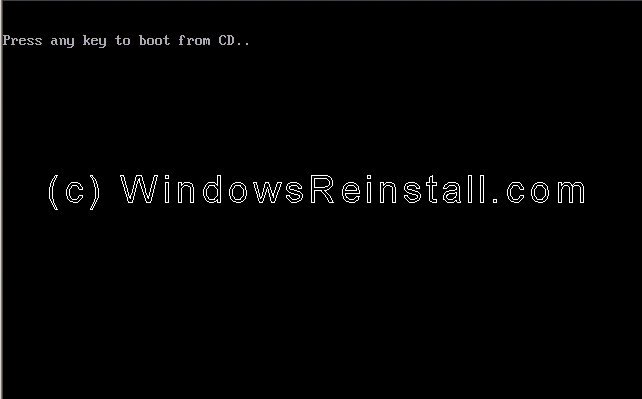
The problem is that on booting from the cd-drive it doesn't give the option to --> "press any key to boot from CD" it just boots it so I can't install Windows XP properly.
 
In the bios you can define the boot order. Find those options and move the cd drive to the first boot slot.

After you have installed windows, you can then go in and change it back to the harddrive.
 
I've set for the CD to boot up but the problem is that it doesn't show that

it just says

booting from cd... and it doesn't show the "press any key to boot from cd........"
 
You just want it to boot from the cd right? Does it matter that those words don't appear?
 
Yeah it matters because when running windows XP it goes setup configuration blah blah blah if you don't skip that booting from CD which is why I need that there.
 
ok what you are saying (correct me if im wrong) that with the windows cd in the drive, it does not boot from the cd and goes right to the windows boot?

or does it go to Windows setup where you see 'Setup in inspecting your computers hardware configuration....'

Your post 2 posts back was a bit cryptic.
 
It goes to --> Windows setup where you see 'Setup in inspecting your computers hardware configuration....'

But I want the computer to do say, "press any key to boot from cd......." :s
 
On this part (Part 3) -->

Boot will recognize that the XP CD is in the drive, DO NOT press any keys, let setup bypass the CD boot.

My motherboard or something isn't showing this:
Image15.gif


It just says, "booting from cd-rom" and it automatically boots. I want to change that (looked in the bios but can't find anything) to make my motherboard show "press any key to boot from cd-rom...."

So I can't get past this step.
 
Just because it is not saying those words does not mean that it is not working right. If you are on part 3, I assume that you were able to format the harddrive and reboot. Let it do what it wants to at this point. After the reboot, setup will continue with the installation.
 
I can't get past that part because I need the disk in the thing or my computer says "DISK BOOT ERROR... PLEASE INSERT DISK AND PRESS ENTER bla hblah blah" so I put my disk in and restart and then it automatically boots up to the "Setup in inspecting your computers hardware configuration..." blue screen.

I don't want it to boot on that second one but it automatically does :\.
 
something wrong w/ ur cd? or ur cd-rom can't read ur cd?... can't think of anything else. never encountered this problem. but if it boots from cd, will it let you install xp?
 
It automatically boots from the CD but it doesn't give the option --> "Press any key to boot from CD......"

Usually you just don't press the key after it's initially installed all the core stuff from the first step. Then you let it go without pressing any key and it goes onto installing windows stuff. But since it automatically boots from the CD I can't ignore it :\... I tried taking the disk out but it gives me that disk error thing.

But I can't get past this part. I'm not sure ;\
 
Set BIOS up to boot from CD.
Boot from CD and install Windows.
On the first reboot go into BIOS and set it to boot from hard drive first.
Boot into windows and finish installation.
At this stage if you have to put the XP CD in too boot to windows you did something wrong.
:)
There will not be a BIOS option to show the "Press any key to boot from CD". It's either dispalyed during the post or it's not, it depends on the BIOS. The BIOS gives you the option to set the boot order and or first boot device. When you set it to boot from CD_ROM it will either display that message or go directly to the CD_ROM without you having to do anything. It depends on how the BIOS was written. If you set the first boot device to CD-ROM and the second to hard drive all you have to do is take the CD out on the first reboot during the install. When it can't find a bootable CD-ROM it will skip it and try to boot from the hard drive.
 
Your motherboard is one that does not display the "Press any key to boot from CD", as long as you have a bootable CD and your boot priority is set to CD, then your computer will automatically boot from CD. You're actually on the right track, the "Setup in inspecting your computers hardware configuration...." is exactly what you want, but the reason you're blue screening after that is because you need to install RAID drivers. After the "Setup in inspecting your computers hardware configuration...." screen, you need to press F6, and then use the floppy that came with your motherboard to install the RAID controller drivers. If you don't have it anymore, go to Promise website to download them.
 
Do you have an OS installed on your hard drive already? If you don't, the Windows installer will not ask you to 'Press any key..." it will just simply boot to the installer.
 
You know, if you have a floppy drive you could just go to a friends house and make a boot floppy
 
I think I may have found the problem...

On the loadup it's only detecting 1 IDE and that's the master primary -- which is what my CD was set to.

So I had to flip the cables after the initial instillation. Swithc the CD-RW to secondary and the hard drive primary since the motherboard is only seeing the primary master on the initial bootup,

But I was curious as to why my motherboard is only detecting 1 IDE on starting up my PC on the bootup where it detects CPU speed & ram & ide drives, but pressing del and going into the CMOS/BIOS I see both drives there.

One in Master Primary and the other Master Secondary Primary trhing
 
Back
Top