When I try to install programs on my computer like Rad Studio or using torrent suddenly my hard drive hangs up and that time I can hear from the hard drive clicking and spinning sound again and again, computer hangs up until I restart. What's happened to it? Is the problem in SATA power connectors on in disk spindle?
![[H]ard|Forum](/styles/hardforum/xenforo/logo_dark.png)
Navigation
Install the app
How to install the app on iOS
Follow along with the video below to see how to install our site as a web app on your home screen.
Note: This feature may not be available in some browsers.
More options
-
Some users have recently had their accounts hijacked. It seems that the now defunct EVGA forums might have compromised your password there and seems many are using the same PW here. We would suggest you UPDATE YOUR PASSWORD and TURN ON 2FA for your account here to further secure it. None of the compromised accounts had 2FA turned on.
Once you have enabled 2FA, your account will be updated soon to show a badge, letting other members know that you use 2FA to protect your account. This should be beneficial for everyone that uses FSFT.
You are using an out of date browser. It may not display this or other websites correctly.
You should upgrade or use an alternative browser.
You should upgrade or use an alternative browser.
Problem with hard drive.
- Thread starter Anna15
- Start date
drescherjm
[H]F Junkie
- Joined
- Nov 19, 2008
- Messages
- 14,933
What's happened to it?
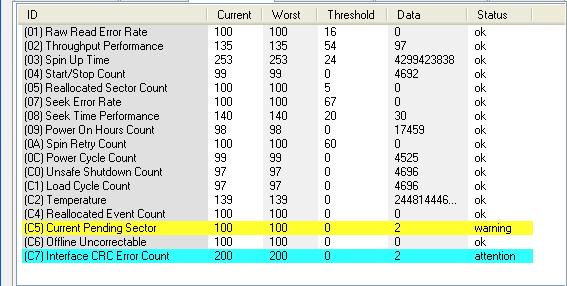
Possible bad head. What does crystaldiskinfo say?
drescherjm
[H]F Junkie
- Joined
- Nov 19, 2008
- Messages
- 14,933
Not dead yet. Make a backup ASAP.
D
Deleted member 245375
Guest
It's not so much the S.M.A.R.T. data that matters, it's the audible and probably quite noticeable noise the drive is making - S.M.A.R.T. can't really tell you when there's a true mechanical failure in a hard drive, unfortunately, so as noted back up the data as quickly and reliably as you can (and verify it's safe if possible, use checksums if necessary with something like Teracopy or whatever) and then consider that drive "dead." If it's still under warranty and after you've done the backups and verified them, run the manufacturer's diagnostic on it and see what that tells you - if a real problem is actually detected it should provide you with a code or number which you can provide to the manufacturer for an RMA (Return Merchandise Authorization).
If it's out of warranty or an OEM drive (in a prebuilt desktop or laptop) then you're basically SOL and will have to replace the drive yourself meaning get ready to spend some money.
You can, if possible, attach the drive to another computer of some kind and do a S.M.A.R.T. check as well because there is a possibility of a power issue, or perhaps even an SATA cable that's gone bad, etc. Shit happens so all you can do is do your best to handle it when it does and prepare for it ahead of time.
If it's out of warranty or an OEM drive (in a prebuilt desktop or laptop) then you're basically SOL and will have to replace the drive yourself meaning get ready to spend some money.
You can, if possible, attach the drive to another computer of some kind and do a S.M.A.R.T. check as well because there is a possibility of a power issue, or perhaps even an SATA cable that's gone bad, etc. Shit happens so all you can do is do your best to handle it when it does and prepare for it ahead of time.

- Joined
- Feb 13, 2003
- Messages
- 699
It's failing, simple as that. And no, it can't be repaired.
D
Deleted member 245375
Guest
There are times when the actuator (what moves the actual arm which has the read/write heads attached, like the arm on a record/LP player if you know what those are - these days some folks are younger and really don't so...) will get 'stuck' on some hard drives and when it can't get the full range of motion what you end up hearing is a clicking/knocking/ticking sound from the drive as it continually attempts to get the actuator into position. It's kinda sorta like a needle on an LP (again with that reference) getting stuck because of a scratch or damage to the actual groove on the LP surface (fun stupid pointless trivia fact: a record/LP album only has two grooves, one on each side). It moves along like it should, tracking the data on the platters but then it gets 'stuck' (the actuator) and can't move past a certain point (like the scratch on the LP causing the needle to literally jump back slightly and start over again at an earlier point in the groove).
Not much can be done about it, the drive technically can be refurbished but that's a rather complicated process that requires a clean room (dust-free environment that makes a hospital surgery room seem like a landfill by comparison)) and specialized hardware and technicians so, as noted above, the simplest thing to say is "It's failing, simple as that" literally. Repair is beyond the capabilities of an ordinary consumer and since we're a mass consumption society built on the idea of obsolescence, back up the data and chuck the drive.
The magnets inside are pretty powerful so, after you're ready to toss it and if you need a nice small high powered magnet or two disassemble it and take 'em out. I have like 10 magnets here stuck to the legs of my desk 'cause you just never know when you might need one. Comes in handy for magnetizing screwdrivers so the tiny screws I work with on laptops (primarily) don't get lost in the assemblies themselves.
Not much can be done about it, the drive technically can be refurbished but that's a rather complicated process that requires a clean room (dust-free environment that makes a hospital surgery room seem like a landfill by comparison)) and specialized hardware and technicians so, as noted above, the simplest thing to say is "It's failing, simple as that" literally. Repair is beyond the capabilities of an ordinary consumer and since we're a mass consumption society built on the idea of obsolescence, back up the data and chuck the drive.
The magnets inside are pretty powerful so, after you're ready to toss it and if you need a nice small high powered magnet or two disassemble it and take 'em out. I have like 10 magnets here stuck to the legs of my desk 'cause you just never know when you might need one. Comes in handy for magnetizing screwdrivers so the tiny screws I work with on laptops (primarily) don't get lost in the assemblies themselves.

dvsman
2[H]4U
- Joined
- Dec 2, 2009
- Messages
- 3,628
What everyone else said - backup all of your data pronto. As for repairing it, much like most consumer electronics nowadays, technically you "can" repair it / have it repaired, but the amount of money it will cost will be much more than simply buying a new / better one and just swapping it out.
Also keep in mind if you are a big torrenter / file-sharer, that thrashes your drive quite a bit as you receive and send out data to all of your peers. If you are DL/UL something popular (say latest movies), your drive will be getting hammered quite a bit before you may actually finish with your download or hit your target ratios.
Also keep in mind if you are a big torrenter / file-sharer, that thrashes your drive quite a bit as you receive and send out data to all of your peers. If you are DL/UL something popular (say latest movies), your drive will be getting hammered quite a bit before you may actually finish with your download or hit your target ratios.
Last edited:
westrock2000
[H]F Junkie
- Joined
- Jun 3, 2005
- Messages
- 9,616
I didnt see you mention brand, is it Seagate by chance?
No, it's Hitachi. It has been working without any noise for more than 6 years. And now it freezes my computer and has clicking sound. But now it's working good again, it happens from time to time.I didnt see you mention brand, is it Seagate by chance?
westrock2000
[H]F Junkie
- Joined
- Jun 3, 2005
- Messages
- 9,616
By the way, why did you mention Seagate?
I've only have a couple click to death in the last 15 years, and both were Seagate's. But that should not reflect on your opinion. I have several Hitachi's (5 I think) in my 10 disc ZFS array and all have been great.