Problem with Blu-Ray playback on 780g chipset?

mediafuze

n00b
Joined
Dec 2, 2008
Messages
9
After reading a few threads on here I was ready to go ahead with the 780g/4850e recommendation that seems to work for many people but then I found this article on Anandtech http://www.anandtech.com/mb/showdoc.aspx?i=3430&p=5 where it mentioned problems with 1080p Blu-Ray content because of lack of support for 24fps playback. Here's the quotes from the article:

"The AMD 780G/790GX results were very choppy at times; even when they seemed smooth we experienced audio sync problems.

The only platform that can properly handle 24 fps output is NVIDIA's GeForce 8200/8300. It just works. "

Can any of you that have this HTPC setup confirm or deny that this is an issue? The article is dated from October 14th so it's not that old, but I can't find any other mention of this specific issue with the 780g chipset anywhere else on the Internet. Perhaps a driver update fixed this problem? This is basically the one thing stopping me from proceeding with my purchase. I was either going to go with this http://www.newegg.com/Product/Produc...82E16856110096 (barebones model that uses 780g chipset) or this http://shop3.frys.com/product/5726492 (pre-packaged acer using nvidia 8200 chipset). Small form factor is a major consideration for me hence my choice between these two units.

Again, can any of you that have this HTPC setup confirm or deny the 780g chipset has an issue with stuttering 1080p/24fps playback when the camera pans? Thank you.
 
Well I have played well over a 100 blu-rays on my 780g/4050e setup and have not experienced anything like that.

Im not saying the issue does not exist, because it very well may. That said I havent seen it on my setup.

Something to take into account is they are using an ASRock A780GXE/128M, Most people i know including myself have been using one the Gigabyte 780g variants. Although these board are using the same chipsets, there is a lot of room for difference. They could have gotten the chips from different batches, maybe one manufactures implementation is better through better components, maybe the one they had for the review was just a lemon.

What I'm saying is dont base your decision on one persons results...maybe you should do some more research and see what other people here, and on AVS forum are saying and see if there are other threads with this issue.

I havent seen any on [H] but then again i might have missed some.
If i were to build a new HTPC today it would be a GIGABYTE GA-MA78GPM-DS2H and a 4850e
 
i have a 780g chipset on my pc in my classroom and it plays blu-ray content with out skipping....

i also have the gigabyte board, would be their setup, hardware not liking each other, slow or bad ram or a bad motherboard..... or temp issues.

not sure
 
As long as you have a media player that supports DXVA, 780g is all you need unless you want 7.1 DTS-MA and DolbyHD
 
Can the same be said for the Nvidia GeForce 8200 chipset? Also, does Windows Media Center support DXVA?
 
media center does not support DXVA but it also doesnt play blu-ray. you need powerdvd, there are may behind the scense powerdvd lauchers for VMC, mymovies will auto launch powerdvd with out you knowing in VMC.
 
Here's a good answer on 24fps from that article referenced earlier:

"Most movies are recorded at 24 frames per second, however most displays and graphics cards refresh the screen 60 times per second (60Hz). Enter the home theater space and you'll find a number of displays that can properly output a 24 fps signal, but with an HTPC you'll need a video card that can properly output a 24Hz signal. Support for 24 fps playback isn't necessary, but you'll find that without it wide panning shots won't be smooth as the camera moves from one point to the next. The reason is that it's impossible to evenly divide 24 frames into 60, so some frames end up being displayed more than others (the infamous 3:2 pulldown)."

Also can anyone confirm that the Nvidia 8200 chipset has flawless playback of 1080p video with no video card required?

Thanks to everyone for your answers so far.
 
Check over at avsforum. Lots of people have confirmed it. The only solutions for correct 24fps playback currently are the Nvidia 8200/8300 and the 9300 chipset (for Intel cpus)
 
Also can anyone confirm that the Nvidia 8200 chipset has flawless playback of 1080p video with no video card required?
The only Nvidia 8200 based builds I did were with the Jetway NC62K board. It does 1080p24 + LPCM 7.1 audio over HDMI as smooth as butter without a hiccup. I tested both HD DVD movies and Blu-ray movies in PowerDVD, and I also tested encodes in Vista Media Center / MyMovies, and using Media Player Classic.

Here's the thread for reference.
http://hardforum.com/showthread.php?t=1315634
 
i guess i am not aware enough to see the skipping frames.... i watched planet earth on my 780g chipset without issue and there is a lot of panning


good info though
 
Thanks for the info everyone. And cool HTPC build w1retap! I think I may go w/ the 8200 chipset for now. As long as it is adequate for what I want to do then it should be good enough.
 
media center does not support DXVA but it also doesnt play blu-ray. you need powerdvd, there are may behind the scense powerdvd lauchers for VMC, mymovies will auto launch powerdvd with out you knowing in VMC.

All you need is the standalone MPC Video Decoder and you can get DXVA in VMC
 
media center does not support DXVA but it also doesnt play blu-ray. you need powerdvd, there are may behind the scense powerdvd lauchers for VMC, mymovies will auto launch powerdvd with out you knowing in VMC.

Actually, one of the newish VMC updates (public available) added in support for DXVA; the early VMC builds didn't have it.
 
Arcsoft TMT also supports acceleration and plays back BD from within VMC.
 
Arcsoft TMT also supports acceleration and plays back BD from within VMC.

It has a script that minimizes VMC and launches TMT in fullscreen. No one can play back BR discs in VMC until MS updates it to recognise the BR file system and updates the video player to see and play the BR file structure.
 
Agreed. What I was trying to imply was that Arcsoft has a nice little plug in for VMC that handles a graceful exit and entry back to VMC.

I have not seen a PowerDVD plug in like this, but then I have not really looked for one either.
 
Agreed. What I was trying to imply was that Arcsoft has a nice little plug in for VMC that handles a graceful exit and entry back to VMC.

I have not seen a PowerDVD plug in like this, but then I have not really looked for one either.
MyMovies + Cyberlink PDVD does it rather smoothly as well.
 
Yup that works. I think that's exactly what MyMovies does in VMC, except it does all the 'hard' work for you automatically when you install it.
 
I was just about to pull the trigger on a 780g/4850e combo but now I am starting to hear how they are having problems displaying 1080p24. There are a few articles sighting bad 1080p24 playback on the 780G chipset (mainly the Anandtech one) but I am wondering if that is a real and known issue with these boards or if there have been improvements to fix this issue. So I am calling out to all you 780g owners (I know some of you have already voiced your opinions in this thread) to let me know the current state of 1080p24 playback on the 780g chipset.

I will be buying a blu-ray player for the HTPC so it is somewhat important and if it is broken on the 780g then I will be going for the 9300/9400.

Thank you for your input

Quote from Anandtech's article:
As we mentioned in our last article, proper 24Hz refresh rate support is particularly useful for playing back 24 fps content (which happens to be most movie content). Intel offers no support for 24Hz/24fps playback, AMD's implementation is a bit flaky, but NVIDIA's works flawlessly (at least with our test subjects).

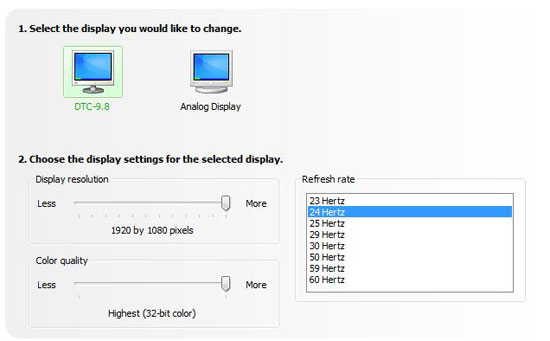
Image taken from Anandtech's article:
24hz.jpg


For post below me:
The TV should be set at 24hz as in the picture above
 
Forgot to jump in this thread, but I own the 780G and 4850e combo and have not had any problems other than when I stream movies from my desktop (which I always do) and the hard drive has to catch up. This usually happens because I pause the movie and it has to spin up the hard drive the movie is stored on.

I am not sure if I am playing these movies at 24, but they are being played at 1080P as they are .ISO files and 1:1 back ups of my blu-ray movies. If someone can tell me a way to check if the movie is playing at 1080p24 then I can verify. Also, I am using the Gigabyte 780g board.
 
I am not sure if I am playing these movies at 24, but they are being played at 1080P as they are .ISO files and 1:1 back ups of my blu-ray movies. If someone can tell me a way to check if the movie is playing at 1080p24 then I can verify. Also, I am using the Gigabyte 780g board.
You check by checking your graphics settings. If your resolution is set to 1080p @ 60hz, you're not playing them at 1080p24. You have to use 24hz, or a multiple of 24hz for the best results. 1080p24 is the native viewing specification for just about all HD DVD and Blu-ray movies. And you must have missed the picture right above your post that shows a screenshot of 1080p24 enabled. I think he edited the post after you posted.
 
Yes, those images were not there when I posted. I will check this evening on what I am playing and I would bet I am at 1080p @ 60hz and will test 24 and see what my results are. Hopefully I will not have any problems, but will report back this evening once I do some viewing.
 
Changed my display to 1080p24 and played Casino Royale, and I had no problems playing it. Sound and video were in sync and did not have any problems. Maybe the problem was from a specific manufacture of the 780g series?
 
Well I think I am still going to pull the trigger on a 780g/4850e and if I do encounter problems down the road I will just throw in a passively cooled 4550 or maybe their next generation card since I might be doing some very light gaming on it.
 
The problem with the 780g is you only get 2 channel audio over HDMI. Which completely eliminates it in my book. If you want an Nvidia board look at the 8200. Though I have seen many reports of people failing to get 7.1 out of it.

I have an Intel g45 board which works fine for me.

I don't play any discs, all my movies are stored on my server. And with the powerdvd codec I get full HA in VMC. Though I really don't need HA as my CPU is more than fast enough to process the video.
Though with full HA you don't need much of a CPU at all. I have around 10% CPU utilization when watching a blu-ray.

One thing to note when configuring a HTPC(which is the hardest part) is that just because you install a codec doesn't mean the HTPC is actually going to use it. You have to use graphedit to see what each video file will actually use when it plays. Then you use another app called radlight filter manager to change the merit or priority of each codec so Media Center will use the right codecs when playing back a file.
You'd be surprised how many people buy new parts or build a new HTPC because HD video playback is choppy and they aren't even using a codec capable of hardware acceleration.

Another thing to note about ATI cards in a HTPC. They don't work with some receivers/TV's. Most notably some Yamaha's, Denon's and Onkyo's. There is several threads on this over at avsforums.com in the HTPC section.
 
yeah I'm not too worried about sound, this set up is in my room and have no real way of setting up a nice stereo system so it will most likely be just 2.1 speaker set up.
 
I had a little problem with mine... until I end up turning off CnQ (Cool'n'Quiet)... 1080p24 no problems at all. Don't know why and how it helped, but it did.
 
Back
Top