• Some users have recently had their accounts hijacked. It seems that the now defunct EVGA forums might have compromised your password there and seems many are using the same PW here. We would suggest you UPDATE YOUR PASSWORD and TURN ON 2FA for your account here to further secure it. None of the compromised accounts had 2FA turned on.
    Once you have enabled 2FA, your account will be updated soon to show a badge, letting other members know that you use 2FA to protect your account. This should be beneficial for everyone that uses FSFT.

Power Supply??

Joined
Dec 4, 2004
Messages
846
I've been noticing some odd problems with my computer lately. It only really happens when i am playing intensive games (half life 2 and need for speed underground 2). I will be in the middle of the game and it will completely freeze, or a blank blue screen will come up and i will get the most high pitched annoying sound comming from my speakers. I have no idea what could cause this except maybe a voltage drop or something from the high number of calculations maybe? I do have a pretty crappy psu and was planning on getting a new one but I just wanted to know if this sounds like the problem before I get a new one.
 
ThirtySixBelow said:
I've been noticing some odd problems with my computer lately. It only really happens when i am playing intensive games (half life 2 and need for speed underground 2). I will be in the middle of the game and it will completely freeze, or a blank blue screen will come up and i will get the most high pitched annoying sound comming from my speakers. I have no idea what could cause this except maybe a voltage drop or something from the high number of calculations maybe? I do have a pretty crappy psu and was planning on getting a new one but I just wanted to know if this sounds like the problem before I get a new one.

3 things to check...

Power supply:
Whats the true capacity of your power supply? What I mean by that is not whats written on the side like "400W" I mean what are the amperage (A) specs for each voltage on the side of the power supply for:
3.3V = ?A
+5V =?A
+12V =?A
+5VSB =?A

These are the minimum recommended in the AMD desktop builders guide.
+3.3V = 28A
+5.0V = 30A
+12.0V = 15A-18A
+5VSB = 2A-2.5A

Temperature:

Check the following for overheating or perceived overheating:

- Is the heatsink correctly installed ?
--> Verify it is correctly installed.

- Is the heatsink filled with dust and crud ?
--> Clean with compressed air in a can.

- Is the heatsink fan operating ?
--> Replace defective fan with similar or better unit.

- Is the heatsink adequate for that application/CPU ?
--> Verify it meet the requirements for the CPU being used.
--> RETAIL heatsink? May require lapping and better TIM.

- Is thermal interface material used between heatsink and cpu ?
--> Verify it is used, and is applied according to the manufacturers guidelines.
--> Recommended PCM's, thermal pads from "AMD Thermal, Mechanical,and Chassis Cooling Design Guide #23794.PDF.
- Bergquist HF225UT Phase Change
- Chomerics T725 Phase Change
- Honeywell PCM45 Phase Change
- Power Devices Powerfilm Phase Change
- ShinEtsu PCS-TC-11T-13 Phase Change
- Thermagon T-pcm905C Phase Change
--> Recommended thermal interface material aka: grease, gel etc.
- Arctic Ceramique.
- Arctic Alumina.
- Arctic Silver, 3, 5 etc.

- Is the TIM pad cover removed from heatsink before installation, if using supplied TIM pad ?
--> Remove the cover before installation, failure to do so will insulate the cpu from the heatsink.

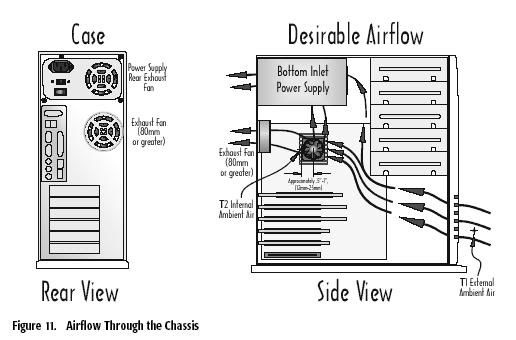
- Is there adequate airflow or case ventialation ?
--> Verify airflow, add case fans if required.

airflow.jpg


- Is the Vcore set higher than specified by the manufacturer ?
--> Verify the Vcore is set to the manufacturers specification in the mainboards bios.

- Is the temperature read via the internal temperature diode. Is the tremperature read via the socket thermistor ?
--> Temperatures read at the diode can and will be higher than an external reading.

- Is the temperature sensor properly calibrated ?
--> Several boards have this problem, check manufacturers bios revision history for calibration fix.
--> Does the heatsink feel warm or HOT, if it's warm it could be a miscalibration error.

- Outside temperature high ?
--> If the external temperature is high, then the case fans will be drawing in hot air, especially during summer months. Remeber, when it's Winter in the Northern Hemi-sphere, it's Summer in the Southern Hemi-sphere & vice-versa.

Memory:
Is it compatible with your mainboard?
Is the memory defective? Download and run memtest86.

MD
 
My temps are fine and my memory has been fine for about a year now whereas this problem has only been occuring noticably since about a month ago. I am just wondering if anything else could be the problem, like my graphics card or my processor. Are those hardware componants all or nothing as in they either work all the way or don't work at all. Or, can there be minor problems that would allow them to run unless they were pushed hard?
 
how about the fan on the video-card? My old GF3's fan got clogged with dust and stopped spinning so whenever I ran a game, it would crash instantly, or after a short period of time. If I was surfing web-pages, all was well.

I didnt even see it was clogged until I got up under the thing and noticed it wouldnt spin. A fan-cleaning later, it was great. No damage done.
 
I am having a similar problem using Windows XP SP2, Antec True 480, ASUS K8V SE Deluxe with latest BIOS, AMD 3400 Clawhammer, Crucial RAM, ATI 9800 XT, latest drivers, with a NV3 cooler with OCZ heat sinks, and WD 74GB raptor. I have run MEMtest and Prime95 with no errors or failures. I have run Spinrite on the hard drive with no errors. I am starting to suspect the new ATI drivers so I am planning to uninstall the current drivers (ATI's latest) and go back to older drivers to see if that helps. I am starting to believe this is a software issues, but at this point I am running out of ideas.
 
Try turning your AGP port down to 4x and disabling fastwrite. Basically, I was having a problem w/ my 9600XT freezing in DX9 games. It would completely lock up and only a hard restart could get things working again. The problem has stopped since I made the above changes, however.

All in all, Buying a new vid card might not be a bad idea either (that's my next upgrade as well).
 
GVX said:
Try turning your AGP port down to 4x and disabling fastwrite. Basically, I was having a problem w/ my 9600XT freezing in DX9 games. It would completely lock up and only a hard restart could get things working again. The problem has stopped since I made the above changes, however.

All in all, Buying a new vid card might not be a bad idea either (that's my next upgrade as well).

Thanks for the input. I have been considering a new video card, but I am trying to determine if ATI or Nvidia will be less problematic. Having to add aftermarket coolers to +400 cards and installing problematic drivers is extremely frustrating and should not be necessary.
 
Just out of curiosity, my POS power supply says it has 15 amps for 3.3volts. Guy above said AMD recommends 28, is this true, and if so is it a big problem.
 
The best thing to do would just be to try a new power supply. Ither get a good quality one from a friend to try out or order a new one.

If you dont want to spend alot of money then a Fortron PSU would be an excellent choice. If you want something a little more flashy and more expensive then you might consider an OCZ PowerStream or Antec NeoPower.
 
I was thinking about going with the antec neopower. My voltages are ranging from 1.63 to 1.78, which is pretty rediculous. Am i really hurting anything by the voltages being this drastic?
 
ThirtySixBelow said:
I do have a pretty crappy psu .

what make and model
some manufacturers outright lie or cook the books when rating supplies
knowing the make and model is a key component of judging the actual amp figures
and total wattage


MD_Willington said:
These are the minimum recommended in the AMD desktop builders guide.
+3.3V = 28A
+5.0V = 30A
+12.0V = 15A-18A
+5VSB = 2A-2.5A

that WAS the minimum
if its a newer AMD or if its a P4 the capacity devoted to a specifc rail has dramatically shifted
to the +12V rail


Power supplies become increasingly expensive
When I initially asked about this on a mailing list, Solaris x86 advocate Al Hopper told me I was drowning in my tea, and that it was "all very simple". I love the simplicity of Unix people.

He explained that the later P4 CPUs take their power from a 12 Volt feed and, using the onboard voltage regulators, generate the high current, low-voltages they need to operate (anywhere from ~ 1.6V to around 2.7V). So the first requirement is a PSU that has plenty of power available from the 12V supply. Since the older ATX compatible PSUs didn't supply much current from the 12V section you have to ensure that your new PS delivers enough current (or power in Watts) from the 12V section. That's why using your old P3 ATX PS is a big "no-no".

He then described the history of the post-P3 power supply mess:

The earlier Athlon motherboard manufacturers decided to solve the 12v problem by using an additional 4-pin square connector to get the extra 12V those CPUs required. However many older PSUs didn't provide the 12V 4-pin square connector.

The motherboard makers then wised up and decided that there was nothing magical about a square 4-pin connector, so they put a normal hard disk type socket on the motherboard and provided the 12v power via a standard hard disk (4-pin inline) connector. Problem solved - you may now use your older PSUs provided they supply sufficient 12V current (many did not).

Further confusion came from PSU manufacturers not specifying the capabilities of the PSU in a way that allowed the end user to verify it's 12V power output rating.

In the meantime the ATX spec was saying "use the new 6-pin" inline connector - and very few motherboard makers implemented it.

Just to be sure, some motherboard makers, implemented *both* the hard disk style 4-pin inline connector and the square 4-pin connector. They said "use either or both in any combination you like".

The spec then evolved to the 24-pin main connector. Again, most motherboard manufacturers did not wish to make their customers mad by mandating that they replace their power supplies. This might cause their customers to avoid motherboard upgrades. Some used a "special" 24-pin connector with the extra 4-pin connection blocked off, or colored so that the user could plugin a 20-pin plug into the correct end of the 24-pin socket on the motherboard. Many others simply ignored the 24-pin requirement in the specs. Again - problem solved - use your older PSU.

that is largely sorted out now
with even more amps devoted to the +12V rails for PCI-E
almost all new boards employ both a 24 pin main power connector and a 4 pin +12V auxillary

for instance an ATX12V v2.0 350 watt supply could have as high as 30A on the +12V rails

You have to run the numbers
and be very careful in the first field to select if its an AMD board with or without an auxillary 4 pin +12V mobo connector
it makes a huge difference

its very likely you need more +12V capacity if youve upgraded components recently
videocards in particular are hitting the +12V rails hard
 
Back
Top