• Some users have recently had their accounts hijacked. It seems that the now defunct EVGA forums might have compromised your password there and seems many are using the same PW here. We would suggest you UPDATE YOUR PASSWORD and TURN ON 2FA for your account here to further secure it. None of the compromised accounts had 2FA turned on.
    Once you have enabled 2FA, your account will be updated soon to show a badge, letting other members know that you use 2FA to protect your account. This should be beneficial for everyone that uses FSFT.

Post your RAMDisk speeds

El_Capitan

[H]ard|Gawd
2FA
Joined
Nov 11, 2012
Messages
1,476
I used Dataram RAMDisk, but decided to try out some others. I don't even know if they exist, anymore. You can do a 30-day trial with Primo Ramdisk, and AIM Toolkit is open source, but isn't very fast.

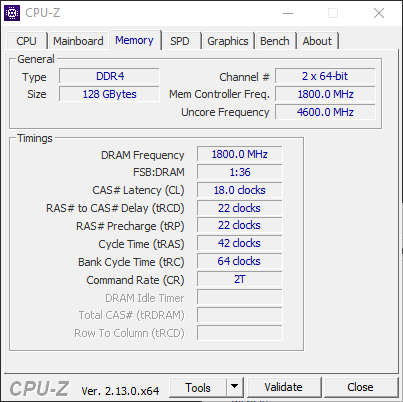
For these tests, I'm using 4x32GB DDR4 memory overclocked to 3600MHz at 18-22-22-42-2T at 1.35V's. Gear 1 and BCLK frequency at 100MHz. I set my RAM amount to ~64GB.
2026_05_14_CPU-Z_Memory.png

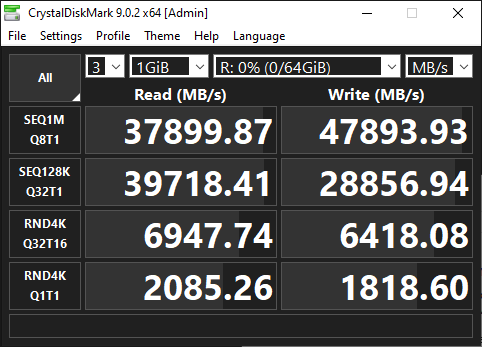
The fastest by far is Primo Ramdisk.
2026_05_14_Primo_RamDisk_CDM.png

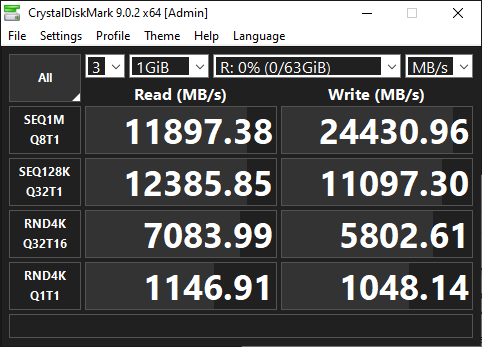
My Dataram RAMDisk is version 4.4.0.36, but it's still not bad.
2026_05_14_Dataram_RamDisk_CDM.png

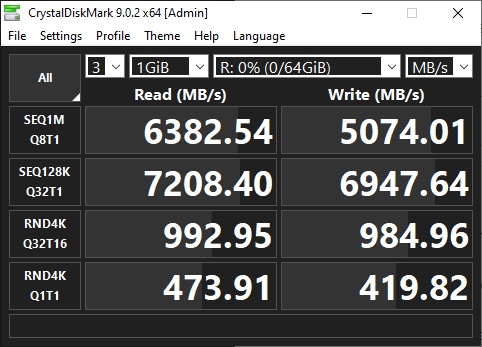
AIM Toolkit, an open source Ramdisk, was "slow"... at least compared to the others.
2026_05_14_Aim_Toolkit_CDM.png

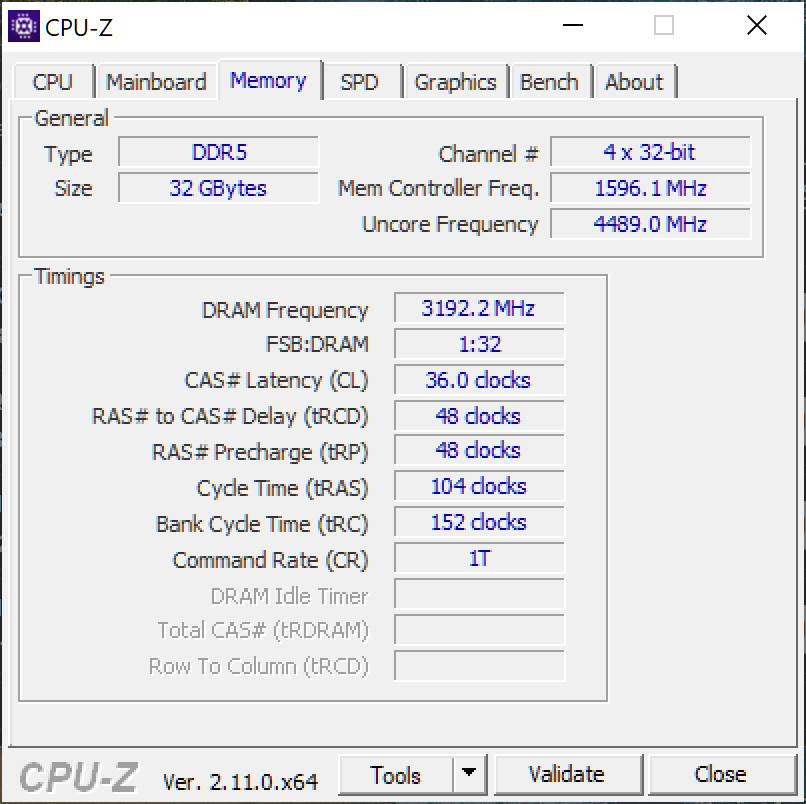
For DDR5, 2x16GB DDR5 memory overclocked to 6400MHz at 36-48-48-104-1T at 1.35V's. Gear 2 (it's a cheap pre-built MB) and BCLK frequency at 100MHz. I set my RAM amount to 16GB.
2026_05_14_CPU-Z_Memory_DDR5.png

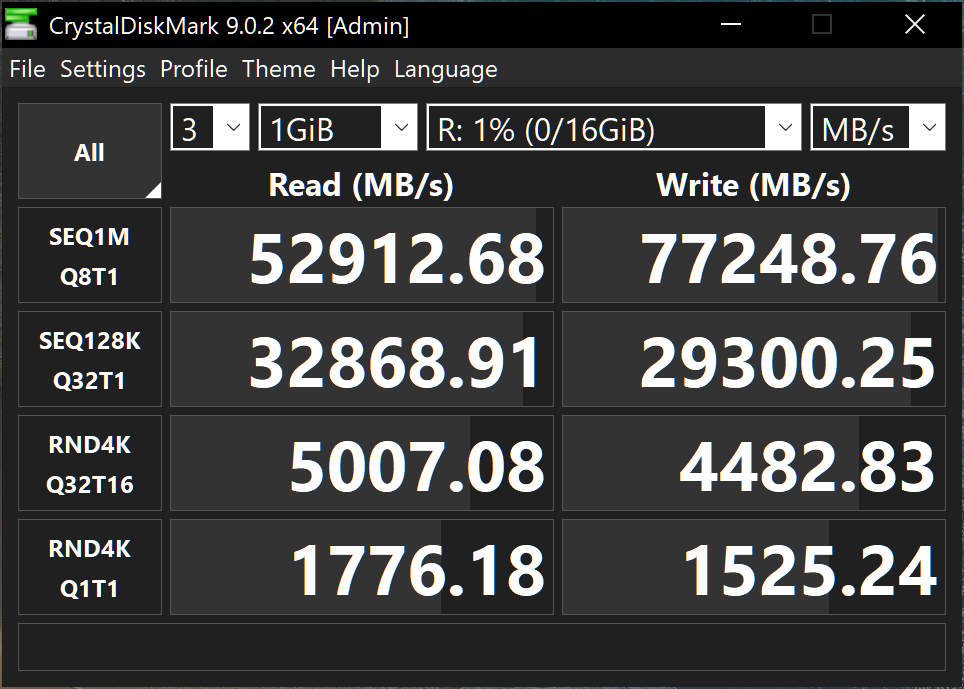
Primo Ramdisk:
2026_05_14_Primo_RamDisk_CDM_DDR5.png
 
Last edited:
I love Primo Cache. been using it for years now. I don't use the Memory aspect. I use it with SSD's and mostly for write cache, almost completely negates the downsides of HDD's. It's a must if using big HDD's and doing lots of work with media on those drives. In general, the network is the limiting factor for me. I have a Fusion-IO drive caching my HDD pool that will write at full speed until the drive fills up and that means when I transfer files over 2.5gb network it pegs 280MB/s for the entire transfer. So that's why I don't use the memory part. Not really any extra benefit for my usage.

But I 100% advocate for Primo Cache!
 
I love Primo Cache. been using it for years now. I don't use the Memory aspect. I use it with SSD's and mostly for write cache, almost completely negates the downsides of HDD's. It's a must if using big HDD's and doing lots of work with media on those drives. In general, the network is the limiting factor for me. I have a Fusion-IO drive caching my HDD pool that will write at full speed until the drive fills up and that means when I transfer files over 2.5gb network it pegs 280MB/s for the entire transfer. So that's why I don't use the memory part. Not really any extra benefit for my usage.

But I 100% advocate for Primo Cache!
Yeah, I'm thinking of getting a 3-pack and maybe selling two for cheap when the RAMpocalypse is over. Right now the Dataram license and speed is good enough. I use a RAMDisk as a work area and cache for video editing. If I'm working on 4K and high bitrate, I set it to 64GB, so I have 64GB usable RAM leftover. I'm still limited by the length of 4K videos and the amount of RAM I have, but smaller videos are a blast to work with.
 
Is there a RAM disk utility for MacOS? Would be interesting to see how fast M5 Max 128GB 64GB RAM disk could write!

EDIT: looks like it can be done right from the terminal.
 
Back
Top