• Some users have recently had their accounts hijacked. It seems that the now defunct EVGA forums might have compromised your password there and seems many are using the same PW here. We would suggest you UPDATE YOUR PASSWORD and TURN ON 2FA for your account here to further secure it. None of the compromised accounts had 2FA turned on.
    Once you have enabled 2FA, your account will be updated soon to show a badge, letting other members know that you use 2FA to protect your account. This should be beneficial for everyone that uses FSFT.

Poor Performance with 2x 4870 in Fallout3

Sinster

Gawd
2FA
Joined
Aug 2, 2002
Messages
703
Horrid... I drop way down in to the single digits.

Everything is stock..

Gigabyte - DS4 r.1
AMD 9850be
X-Fi Titanium
4870 512
4870 512
BFG PhysX card
2 x 1gb OCZ Reapers 1066.
 
Vista 32, 8.12 Cats, I was using a single 4870 but really didnt play it until I got both..
 
I run Fallout3 in 1680x1050, with 4xAA, Adaptive AA, 8xAF. The framerates are in the 'playable' zone, but regularly drop below 60fps and occasionally chunk along at 15-25 for a second or so. Also I don't know if it's the ATI, but the HDR can be a bit zany; bright-dark-BRIGHT-dark.

None of it's gamebreaking, but for all the performance the 4870x2 and 4870 in Xfire are supposed to give, it's a little disappointing.

On the subject though, it's not the only game which feels like it's underperforming a little, but I've been thinking it's my CPU bottlenecking.
 
Notwithstanding Appa's constructive reply, there's actually a sticky thread in the parent forum to this one about different cards performance with Fallout3.

Interesting note about perceived framerate drops when the frames-to-screen isn't reported as being lower. Maybe it's time to overclock :)

Quick edit: I put the resolution up to 1920x1200 and frame rates were perceivably the same. When I switched up to 8xAA though, things got a bit chunky.

Another thing to consider is the amount of VRAM your cards have - 512mb is reported as struggling with AA in high resolutions.

And a final, general note - [H] says that Fallout3 has its own Adaptive AA built in, or TR AA for the nVidia people, but I don't see it, even with everything maxed out. I definitely have to force Adaptive AA on in the control panel.
 
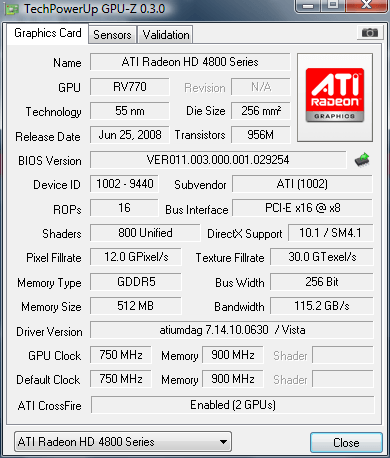
Everything reports crossfire enabled... GPU-z and Everest.

fx5.png
 
Try this:

Right-click the ATI logo in the Windows® system tray.

In the menu that appears, select the graphics card corresponding to the Display GPU for your ATI CrossFireX configuration, select CrossFireX Settings, and then do one of the following:

- Select Show CrossFireX Status Icon (Where Applicable)—The ATI CrossFireX logo appears whenever ATI CrossFireX is supported and enabled for your system. When ATI CrossFireX support is disabled, the logo does not appear.

- Clear Show CrossFireX Status Icon (Where Applicable)—The ATI CrossFireX icon is hidden at all times, even when ATI CrossFireX is enabled.

Get the Crossfire logo?
 
On my i7 rig I get nearly constant 60 fps. That's with 1920x1200, 4xaa/15xaf, everything maxed except the number of shadows and some LOD settings.

This is on the 8.11 cats. The 8.12's give me a blue screen because of my 12 gb of ram.

Maybe try going back to the 8.11's and see how well it does?
 
An old (but quite useful trick) is to (1)run CCC and enable 4xAA 16xAF, then (2)disable the AA/AF in the Fallout 3 setup screen. Works like a charm :)
 
I run Fallout3 in 1680x1050, with 4xAA, Adaptive AA, 8xAF. The framerates are in the 'playable' zone, but regularly drop below 60fps and occasionally chunk along at 15-25 for a second or so. Also I don't know if it's the ATI, but the HDR can be a bit zany; bright-dark-BRIGHT-dark.

None of it's gamebreaking, but for all the performance the 4870x2 and 4870 in Xfire are supposed to give, it's a little disappointing.

On the subject though, it's not the only game which feels like it's underperforming a little, but I've been thinking it's my CPU bottlenecking.

Pretty sure it is just an ATi thing. BTW are those your max playable settings? On my single 4870 I am pulling 1920x1200 4xAA 15xAF with pretty high fps. Over 60fps most of the time. On occasion I will get a strange little slowdown, but for the most part it is solid especially after the 8.12's.
 
Forcing AA in CCC makes the framerates drop considarably. I noticed that if the AA was on anything but "program controlled+box filter" framerates took a dive. The ingame framerate works, so its not a problem.
I'm running it on 4870x2 1920x1200@60fps all on max. (I'm using the ifsclamp at 60 + vsync).There is some occational dips all on the same places I've noticed, kinda like its loading but its not. Had a test run from Megatron to the nearby city and right before you come to the road, there is one of those dips. Same goes on the crossroad where you turn right before going down to the school (close to the car there). On every run, thats where the weird dips came. Otherwise its smooth.
 
huh..

try to switch Catalyst AI around, this stupid AI get me frustrate sometime, in Crysis I have higher frame rate in standard than advance, in some game disable works even better..
 
ensure catalyst AI is on and set to standard. :)

also in your sig u indicate you have a ds4? do u mean the p45 or p35?

*update*
my bad ur using amd cpu
 
I might try that Cookie ;)

I turned off in game AA and AF, will see what happens.

Thanks for all the input
 
Anything is better than the BSOD or blue screen of death issues with nvidia drivers a lot of
people report. This is why I went with ATI this round. As for fallout 3 not sure why your
having issues, must be some kind of compatibility problem or user error. That is the most
likely culprit 99% of the time.
 
Anything is better than the BSOD or blue screen of death issues with nvidia drivers a lot of
people report. This is why I went with ATI this round. As for fallout 3 not sure why your
having issues, must be some kind of compatibility problem or user error. That is the most
likely culprit 99% of the time.

Hey don't make fun of poor Nv4disp BSOD's :-D

Ahhh yes how I don't miss them. Instead now I get horrible driver optimization and little overclock gain.

Seriously, they both have their ups and downs and both make great cards. There is never (well ... sometimes) a clear winner. Competition at its best.
 
Ok, well I pushed the graphics up to 1920x1200, 4xAA, 16AF, (or 15 or whatever F3 thinks its doing) and it runs fine, but it doesn't feel quite like 60fps. More like 45-50.. about the same as Farcry2 on the same settings.

Indoor environments are definitely hitting the 60fps limit on my LCD screen.

A lot of this feels like lack of driver optimisation or just game engine struggling with the mobo/mem bandwidth. Other titles run flat out 60fps undaunted with similar settings and perceivable level of details.

As for the original poster's problems, I have less of a clue, but for what it's worth, I sympathise with the 'not what it ought to be' performance of these things in certain titles.
 
Hey don't make fun of poor Nv4disp BSOD's :-D

Ahhh yes how I don't miss them. Instead now I get horrible driver optimization and little overclock gain.

Seriously, they both have their ups and downs and both make great cards. There is never (well ... sometimes) a clear winner. Competition at its best.


Nv4disp BSODS? Is that what they call them?

Well at least your not getting the horrible downclocking / overheating of the gt200 series I've read about on various forums.
Of course those are probably from people who don't know how to adjust their fan speed, lol, so most complaints that people make about ati or nvidia cards, I attribute to user error
or compatibility issues.

Review sites reported excellent results with the latest 8.12 drivers, especially with fallout 3. There are instances when you get double the performance of a single GTX280 when using the same graphical settings. I would hardly
call those results poorly optimized drivers. But hey, some people just have finicky systems and bad luck. But if your theory is correct and ati drivers are poorly optimized...
then it's amazing that the 4870x2 is still able to oust the GTX280 in fallout 3. Now imagine
what will happen once the drivers get "optimized"....:p

GAME-PERF-28.JPG
 
does anyone think its because he only has 2 GB's of RAM, running at 1920 x 1200? i think that would cause a bottleneck.

and you only have 512MB's of VRAM on each card. have you treid 1920 x 1200 without any AA or AF? if you get playable framerates after doing that, then i think youre running out of VRAM. i can see Fallout3 being a culprit of that because its a very big game graphic wise.
 
Oh wow, low VRAM and low System Ram? That could be it.

i really think thats the problem.

you can't expect to game at 1920 x 1200 on 2GB's of RAM. for goodness sake, the GAME alone is going to take up 1.5 to 2GB's of RAM, so that means the OS needs to be moved to the page file, and then the VRAM is trying to work thru the hard drive with the OS. lets not forget that the CPU has to do all the swapping of files from the RAM to the Hard drive, and this is ALL while youre tryin to play fallout3.
plus BOTH your GPU's are running out of RAM, so now those graphics need to be ALSO be cached to the hard drive. now factor in the OS on the page file too.

your CPU is swamped with work, and your GPU's can't contain the data for smooth frames.


no wonder your FPS suck
 
Come to think of it, I had the same types of issues in Fallout 3 and Crysis on my old rig. It had 2 gb of ram as well. it was always loading stuff from the drive and making things stutter.
 
I played Fallout 3 for 70 hours on 2 GB memory and a single 4850 512 MB at 1920x1200.
I never saw single digit fps.

On Windows XP SP3 of course.
What kind of silly person would try gaming on Vista with 2 GB?
 
I played Fallout 3 for 70 hours on 2 GB memory and a single 4850 512 MB at 1920x1200.
I never saw single digit fps.

On Windows XP SP3 of course.
What kind of silly person would try gaming on Vista with 2 GB?

you weren't using AA and AF, i assume. correct?

yeah, thats his problem. i mean 2GB's on vista will do fine for resolutuions under 1650 x 1080. but thats about it. 1920 x 1200 is too much for 2 GB's of RAM. his problem only gets wrose because he has very little VRAM. and then factor in Vista which is taking up a GB of ram in the first place, he's practically running the game off his hard drive.
unless its a velociraptor which i doubt, he's going to get awful performance.

XP SP3 probably takes up 700-800 MB's of RAM at the absolute most.
 
I think your "memory" theory isn't the problem either.

First Join in the game.
GPU 1 Util: 35%
GPU 2 Util: 36%
Memory Util:64%

15 minutes into it at this point
ScreenShot4.jpg


GPU 1 Util: 63%
GPU 2 Util: 63%
Memory Util: 92%
I thought you were on to something with the high Memory Utilization however the game still ran smooth. Plus I did notice that if I enter a building left into the world and then came back it would increase the Memory Util.. but 92 was the highest it went.

When the game started to run like crap this is what I had
GPU1: 54%
GPU2: 54%
Memory: 80%

Also in FC2 - Max outed except for AA I set that to 4x.
Highest
GPU1: 89
GPU2: 89
Mem Util:78

Average
GPU1: 41
GPU2: 41
Mem Util:75

Lowest
GPU1: 30
GPU2: 30
Mem Util:72

Average Framerate: 53.25
Max. Framerate: 117.92 (Frame:2304, 26.47s)
Min. Framerate: 28.35 (Frame:3967, 55.67s)
 
the fact taht its hitting 92 should make you just go and buy a 4GB kit of RAM.

the problem is your system has ZERO spare ram. the reason why its showing 92 and not 100% is because the hard drive at that point is SWAPPING FILES TO THE PAGE FILE ON YOUR HARD DRIVE. more work for the CPU to do, thus you become CPU limited.
 
yea that's why I asked which OS. 2gb of system memory and 512 of vram playing at 19x12 just can't be good. I think AmongtheChosen is right. memory is so cheap, why no pick up anoth 2x1gb of the same memory you have for $25? It can't hurt, even if it's not the solution. http://www.newegg.com/Product/Product.aspx?Item=N82E16820227191

on a side note, i can't fathom why you would even spend the money on a rig with CFX vid cards, X-Fi Ti sound card, a Physix card...and skimp on system memory. It's like buying a Aston Martin and then using VW Jetta stock tires. Sure they're ok on their own, and sure they work, but are you really going to utilize your Aston Martin with them?
 
the fact taht its hitting 92 should make you just go and buy a 4GB kit of RAM.

the problem is your system has ZERO spare ram. the reason why its showing 92 and not 100% is because the hard drive at that point is SWAPPING FILES TO THE PAGE FILE ON YOUR HARD DRIVE. more work for the CPU to do, thus you become CPU limited.

It wasn't a constant 92%.. The performance hit was below that at 80%.

I didn't' skimp on memory did research and all the website I visited comparing 2gb vs. 4gb in gaming I didn't think 2%-15% was worth the extra money.

http://www.legitreviews.com/article/709/3/
http://www.bcchardware.com/index.php?option=content&task=view&id=3135&Itemid=40&limit=1&limitstart=3
http://www.bit-tech.net/hardware/2008/07/08/is-more-memory-better/5
http://www.cdrinfo.com/Sections/Reviews/Specific.aspx?ArticleId=24373&PageId=3
 
It wasn't a constant 92%.. The performance hit was below that at 80%.

I didn't' skimp on memory did research and all the website I visited comparing 2gb vs. 4gb in gaming I didn't think 2%-15% was worth the extra money.

http://www.legitreviews.com/article/709/3/
http://www.bcchardware.com/index.php?option=content&task=view&id=3135&Itemid=40&limit=1&limitstart=3
http://www.bit-tech.net/hardware/2008/07/08/is-more-memory-better/5
http://www.cdrinfo.com/Sections/Reviews/Specific.aspx?ArticleId=24373&PageId=3

you don't get me do you?

your CPU is CONSTANTLY swapping files during that entire period. you DO NOT HAVE ENOUGH FREE RAM for it to run smooth. as your playing, the VRAM starts to overflow, thus the graphical data needs to start being run into the system RAM.
next problem is that because vista is taking up over 1 GB of RAM on its own, plus the RAM that the game takes up, most of the data that STARTS in the RAM needs to be cached into the page file on the hard drive, so that the GRAPHICAL data from your VRAM can fit elsewhere.
but again, now your system RAM is filling up as well. so whatever else you weren't actively "using" now gets moved to the page file on the hard drive as well.

but, see this isn't a one time operation. its doing this the ENTIRE TIME you are playing the game. your CPU is SWAMPED with work, the VRAM can't take the data, you run out of system memory, and everything gets put on the hard drive.

did you know that the hard drive is the SLOWEST part of the computer?

Now, if you didn't get that, i don't know what to tell you. but at this point you've already been told the problem, and I've given you the reason why that problem is there, and i EVEN gave you a solution to the problem.

don't want to accept that? fine by me. enjoy your PC in all its stuttering.

oh, and PS:

4GB's of RAM versus 2GB's RAM Benchmarks DO NOT SHOW the proper difference. its simply how smooth the game runs. you can get great frame rates either way, but the experience is compeltely different.
 
I know how everything works (That's why I disagree).. I understand what you are telling me also. I just don't agree with you telling me it's because of physical ram. If you have another way to prove your point I'm open.. another game?

If a friend of mine is running 8800GTS Sli, Vista 32, Opty 165 @ 2.7Ghz, and 2Gb of ram everything on high and doesn't encounter the same problem.

Don't get the crappy performance in Oblivion either.
Also my CPU's aren't swamped while playing FO3.. I'm monitoring on my G15.. If you think 40-55% CPU is swamped then it's swamped. I also don't think 76% Memory is using all my physical memory.

Vista gives up the 1gb of ram when needed. Just as linux has done for years..
 
Thanks!!! I got it running smooth.

I added this to my Fallout3.ini
iNumHWThreads=4
 
Back
Top